

Unclaimed: Are you working at Tube Buddy?
Tube Buddy Reviews: 4.6/5 — Highly Rated

| Capabilities |
AI
|
|---|---|
| Segment |
Small Business
Mid Market
Enterprise
|
| Deployment | Cloud / SaaS / Web-Based, Desktop Chromebook, Desktop Mac, Desktop Windows, Mobile Android, Mobile iPhone |
| Support | 24/7 (Live rep), Chat, Email/Help Desk, FAQs/Forum, Knowledge Base, Phone Support |
| Training | Documentation |
| Languages | English |


Compare Tube Buddy with other popular tools in the same category.
Its helpful features. and all the great tools
nothing so far, its been a great experience.
helps me keep my channel on check.
The best part was two fold. I love how awesome the affiliate side was and it was actually my first ever paid affiliation, even though i found it way later than other offers out there. It sells itself. The offer of $5 if you do not have the qualifications for the monetization on Youtube proves they are basically guaranteeing they can get you there.
Well, I suppose with the new AI coming out so much, some better method of taking written blog work or content generation or ideation would have been nice, but they had their own method of idea generation I just didnt think it was incredibly effective.
Tubebuddy makes the ridiculously random Youtube algorithm somewhat reliable by absolutely zeroing in on keyword research and SEO optimization by analyzing difficulty and similar content.

best extension to customise your YT video and more views
YouTube is little costly and poor customer supper
Reduce the subscription cost and improve customer service
It is just like lifesaver. Even the free version solves so many problems of SEO ranking. It suggests you keyword popular as per your search , their seo ranking which helps in improving your score and better reach. It is really helpful
Just one, if i could have more features in free version. Rest everything is fine
Helpful in managing my reach and SEO ranking

The best part of this tool is Keyword research and it is completely free. Now, just this tubebuddy come with a bunch of functions which can be like designed to get proper research on the contents related to your channel and your topics.
Every so often this tool stops running. It is usually happens when you add more than one channels with this tool. While switching among different channels this extension stops working for a while.
I am a youtuber and this tool really enables to rank my videos higher or even high quality in search. Before tubebuddy it was a completely hard to understand how to rank higher in searches but after the usage of this tool I was capable to rank my videos on YouTube searches.
TubeBuddy helps to get more out of YouTube. I have already saved money thanks to the app. It helps to scale my channel ranks. I am able to see the stats of the channel very clearly and what needs to be done.
I do not know what I would dislike. If only I knew more about YouTube marketing, I would use all the data better. But it is not a matter of TubeBuddy. I need to learn more.
As I have written before, there is so much data I can use to grow my channel and make it rank better in search results. It also saves time while posting. I do not measure or follow my competitors, but it is also possible with TubeBuddy.
TubeBuddy offers advanced analytics that you just can't get elsewhere. My favorite aspect is the Keyword Analyzer feature. It helps create the best keywords for your videos based on what real people are searching for on YouTube.
The Suggested keywords feature needs work. It sometimes suggests content that is completely irrelevant. Possibly more machine learning in this area would be great.
Prior to TubeBuddy, I never had a good handle on how many subscribers I had created since last viewing my studio dashboard and what content my viewers really wanted.
How easy it us to use and how in-depth it goes as well as giving you recommendations that make a tremendous difference.
I think the tags need to be worked on much more. I know there are many that are missed and i am not sure why.
video marketing and optimization for youtube marketing.

It tells me the exact SEO to use, keywords, suggestions, categories, sharing links,
don't try to use it on a mobile, its a big screen
Better SEO, Better Views, More sharing

I love how TubeBuddy walks me through what I need to do to help my videos get found. It has suggested tags and reminds me to do simple things like add thumbnails, make a comment and pin it, etc. It is so easy to follow the instructions on the screen.
It does stay open for any video I view and I don't always need it.
Before using this tool, I was not adding subscribers and did not realize the importance of finding keywords and using end cards. TubeBuddy gives me keywords that are useful and suggests better keywords to include. I believe that I have acquired more followers on my channel by implementing what TubeBuddy suggests.

The best experience starts with the installation of this tool. It's too easy to add this extension to my browser. I started with the free plan and it has tons of features in it's a free plan. The basic plan is enough for any channel which starts at 9 USD probably. I think ubebuddy gives better insight than any other youtube tools. It helps out to optimize tags, keywords, time, thumbnail, responses, search and so on. Ranking on youtube will be so practical and trustworthy using this tool and I experienced it with my own youtube channel. It allows to view the draft from other channels. The bulk updater and the translator are so useful feature to use for Video content SEO. Again the detailed analysis and report help me to rank my channel.
I think they should consider their plans for users who have multiple channels. Their plan goes with only one channel. Again you can use it only in chrome browser which is a great lag I think.
I'm using it to rank my youtube channel and my videos. It provides me with a detailed analysis of my channel and contents so that I can understand how to improve my rank. Again all the necessary touch can be made with this tool easily. It saves a lot of time and does the exact required things for me. And there are enough resources on youtube and the web for the training of beginner users.
Ease of use and how it integrates with YouTube
Nothing really. Can always look for more items to add.
SEO issues to insure my videos are optimized
I worked in a marketing firm and our clients were influencers, especially on youtube. Tube buddy allowed us to gather data on influencers that we'd like to invite to our events
It was tricky to install/ get going at first. that might just be user error
It just made searching through Youtube pages so much easier. We wanted to gather data on our current clients and new clients and since it updates regularly, it was great to have current information for brands.
The easy of use and the fact that you have it as an extension of Safari
So far, nothing that I can think of. For what I was needing to do, it's the perfect tool.
updating the content on my video at my YouTube Channel

I mostly enjoy the Videolytics, it allows you to quickly spy on your competition. The thumbnail generator is also quite useful, when you need a decent thumbnail done quickly. It won't replace Photoshop, but it does the job.
They had to get rid of the derived statistics, which were pretty cool estimate of various metrics on other videos. Some of the greatest features, such as A/B Tests and Search Rankings are only in their top tier plans, but it's understandable.
I mostly used it to spy on my competitors, it allows you to see what kind of engagement they're getting, what tags they're using, thus allowing you to replicate and improve their process. The health report gives you a great overview of the channel, what keywords are bringing you view and a useful audience reports like demographics, regions, etc. Their member perks are a nice bonus, I love Jukedeck and AudioHero.

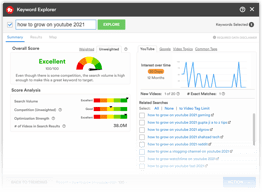
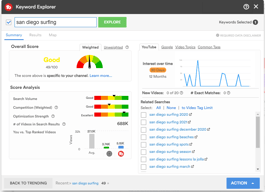
The keyword research tool is amazing, especially on paid plan as you can see weighted results
analytics used are the exact ones yu have on youtube studio
Easy optimise youtube video seo

I use tubebuddy mostly to check if the SEO of my video is appropriate or not, I'm super happy with this tool as it serves me pretty well. I will suggest it for those who have little idea about keywords but like to SEO their video.
There is nothing I don't like about this tool but I would suggest it to people who have very little idea about SEO. If you are an SEO expert, this tool may look very basic to you.
I'm doing the SEO of my videos on Youtube with tubebuddy. I'm quite satisfied with the tool. It really helps a beginner to optimize his/her video for the search engine.

Its youtube video title and tag suggestion feature help me choose the most popular keywords people use to find the related video. It also shows the keyword our video rank for and that so pretty cool. I also love its video topic planner feature that's incredibly useful when it comes to producing videos that people want to watch. BTW I love its chrome extension it's so handy while researching video topics.
To be brutally honest, I don't have anything to complain about it right now, but it does have a learning curve and it will be so helpful if we can get a full course on how to use it to grow our channel faster with youtube SEO or even video topic planner.
I use it for video keyword research and finding relevant youtube tags where my video can rank high and show as suggested videos next to related videos, and it's doing that. beautifully!

I had been maintaining a youtube channel without paying heed to improving the tags, description, and title until I discovered Tubebuddy. I realized that I could discover all the trending keywords, measure the competitive score, and rank probability score for each and every title and keyword that I target for my new as well as already uploaded videos with the help of Tubebuddy. So this tool has been an eye-opener for me. Nowadays I research in detail about every new topic that I intend to create a video about, and thanks to Tubebuddy, I can get an aerial 360-degree overview of the pros and cons of the title and associated tags that I choose, before finalizing them for my Youtube videos.
Tubebuddy's SEO scoring system can be misleading sometimes, and it has got two types of scoring - non-weighted score (for free users) and weighted score (for premium users). But if your Youtube Channel is already well-established then Tubebuddy SEO optimization can definitely help in further polishing and improving the channel standings in search results and ranking. But if your Youtube channel is in beginning stage or subscriber base is below 5k then it's very difficult and close to impossible to rank with the help of Tubebuddy's set lof tools
Tubebuddy is an indispensable tool in my arsenal when it comes to SEO optimization and overall improvisation of my Youtube channel and its contents. It works as an ever-vigilant monitoring tool to keep track of my competitor's progress and updates and latest trends, as well as providing a checklist of right steps to take for ranking and SEO optimization of specifically Youtube videos. So it is a very useful tool for any video content creator who intends to grow his/her own or client's Youtube channel
I love how this add-on gives you all kinds of stats on not only your channel and its content, but also others' and their videos.
It does clutter up the view page if I just want to casually watch someone else's content.
I really needed reliable stats on the viewership and trends of my YouTube channel and this gave me just that - I was able to present the information to my board thoroughly.

I like how quick and easy the TubeBuddy installation process was. It took me just 5 minutes to install the Chrome browser extension, link it to my youtube account, and get started. I have gained the most benefit from the SEO functionality. There was a noticeable uptick in my view counts after updating video titles and descriptions according to TubeBuddy's suggestions. When I use the keywords it suggests to me for my videos, I get more views, simple as that. I'm excited to dive deeper into this tool and see what other tips and tricks I can find to grow my channel.
The free plan is pretty limited. I only do this as a hobby, so I don't plan on purchasing the higher-tiered options, and I'm stuck with what I can get. I'm not sure how the free tool for TubeBuddy compares to others, but I wish I could do a bit more without paying.
SEO optimization; as I stated earlier, my view counts and subscriber counts have increased since using this tool. I have to use it for a little while longer to see if it keeps working. For now, the results are very positive.

TubeBuddy is the complete YouTube tool that you must have. TubeBuddy help me see in-depth statistic and have many tools that help me with keyword, statistic, thumbnail and much more stuff with the pro version that save a lot of my time in many areas.
I don't have anything to complain about what I don't dislike with this software but if they can provide more video tutorials to grow my youtube channel it'll well help me faster.
TubeBuddy help me save my time in many areas and help me make a decision what good and what not.
What I like most about tube buddy is its easy user interface. With that, it has many useful tools which help every youtuber for sure. I also like its video topic planner tools. It is so useful for a newcomer Youtuber to plan their next video topic or an experienced YouTuber who is out of content ideas.
Some time its plugin stop working during channel switching. Except that I don't have any negetive impression about tubebuddy.
It solves all my problems related to youtube SEO. This is the best tool for newcomers. Very easy to use.
I am a new YouTuber and was kinda struggling. Then I opted for Tubebuddy. I have seen an exponential growth in my YouTube mainly because now I can keep a tap on which video is performing well and which is not
I think the features in the free one are a bit less. Perhaps they could add extra things such as SEO, optimization ideas, etc. I downloaded the Tubebuddy free app and it simply sits there on my phone.
With Tubebuddy, I am being able to keep a track on my milestones..This inspires me to create new and better content. First two months I only had 11+ subscribers. After downloading Tubebuddy, I have 43 subscribers in around 2/ 3 weeks.

I really like the keyword search and how it shows you how it will do not only on your channel, but it's relevance for current searches. How it breaks down the stats of the keyword or longtail keyword you put in is easy to interpret and works! Right now, one of my most recent videos is number 6 under the keyword I found on TubeBuddy! I'm surprised and stoked that I actually made the top ten!
I have the star plan and I feel it's pretty limited. I get most of what I need to be successful, but of course, I would love to have features like retention level and competitors scorecard.
It's definitely helping my videos align with YouTube's algorithm so I show up in search even if I'm not promoting my own videos as much right now since I've been really busy. Actually, the majority of my traffic comes from YouTube search so I'm very impressed!
The milestones and milestone certificates are my favorite things about TubeBuddy.
Being unable to like/love comments on the mobile app,
I use TubeBuddy to help grow, optimize, and monitor my channel.
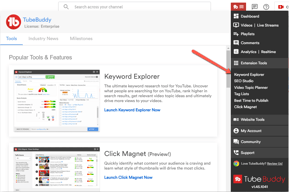
Tubebuddy is a service that lets you significantly improve the way you post videos on Youtube. This service starts by connecting to your youtube channel to gather information on the channel and its content. The significant part of the service comes with a browser add-on which is available for both firefox and chrome. It adds a dashboard screen to the youtube page that shows the live stats of the video. It's especially useful while posting videos; it helps you set the title, description, taglines, keywords etc. to improve the search engine visibility of the video. One of the primary tools in the service is the ability of the software to find relevant keyword based on the primary keyword which I find useful quite too often. the service can be used for free with limited features and if you need more insights you can upgrade to some higher plans. the service lets you use the pro features at a cheap rate if you're a new channel thus help you start off.
the email spam is absolutely irritating from them so make sure you unsubscribe. the Dashboard can be improved a lot and its not that attractive.
Tubebuddy is a Service for youtube which helps you improve the overall quality of the channel and the videos posted with the help of analysis and optimization of posted videos.
Tune Buddy is excellent if you’re wanting something simple to help with your YouTube page. Not only is it free (unless you choose to upgrade!) but it’s a great simple way to get to the tools you need without the hassle!
The option to upgrade is fantastic but not doable for some people. Wish it offered a few more tools without having to upgrade.
The ease of managing my channel! It has been fantastic!
My favorite feature of this tool is the ability it provides to analyze the top external websites that embed your videos. This helped us alert active partners when we were transitioning to a new YouTube URL. It is extremely reasonably priced, which is great if you are in the no-profit industry.
I haven't encountered a feature I do not like yet!
TubeBuddy is helping our organization transform and optimize our YouTube channel from a video repository to more of a storytelling platform!
Tubebuddy is a platform for managing your youtube channel; there are several tools in the dashboard of tubebuddy that shows your analytics and performance, also options to improve your channel. There are several checkboxes available for you to make sure you've done everything to make your youtube channel shine. Also, there are several options available when you've uploaded the video which includes selecting the best tags to get maximum visibility to your videos as well as templates for creating cards and end screens. The setup process is simple which involve connecting your youtube channel with tube buddy and you can access everything else from your tubebuddy dashboard. There is a helpful browser addon of tube buddy for chrome that helps you spy on your competition and get insights of how well the other videos are performing. You can also do keyword research with the addon.
advanced features like bulk editing aren't available on basic plans.
tubebuddy is a youtube channel management platforms that help you manage your youtube channels and help you grow them in the best way possible.