
Unclaimed: Are you working at Coinledger?
Coinledger Reviews — Pricing, Features & The Honest Take
Previously known as CryptoTrader.Tax, CoinLedger is e designed to streamline the process of completing your cryptocurrency taxes. The platform offers a free report preview, and lets users import transaction data quickly and easily from a host of crypto platforms. CoinLedger also provides access to official tax forms that you can send to your CPA. Notably, CoinLedger is also an official TurboTax partner so it ensures that it’s easy to use.

| Capabilities |
API
|
|---|---|
| Segment |
Small Business
Enterprise
|
| Deployment | Cloud / SaaS / Web-Based, Desktop Mac, Desktop Windows, Mobile Android, Mobile iPhone |
| Training | Documentation |
| Languages | English |




CoinLedger sells each tax report as a one-time purchase rather than a subscription, and you can do everything except download it for free. Import every wallet, reconcile the data, and see your capital gains without paying — you pay only when you want the file. The pricing is banded by transaction count like the rest of this category, and the band that matters most is the middle one: at 1,000 transactions CoinLedger charges $99 where ZenLedger charges $199.
- What it is: Crypto tax software producing capital gains reports and tax forms.
- Best for: Traders with 100–3,000 transactions a year.
- Pricing: Free to calculate; $49–$499 one-time to download a report. Verified August 2026.
- The honest catch: Above ~3,000 transactions, competitors get cheaper.
What Is CoinLedger?
CoinLedger — formerly CryptoTrader.Tax — imports transactions from exchanges, wallets and blockchains, calculates gains and losses, and generates the forms needed to file. It reports a 4.7 rating from 1,200+ reviews, supports 1,000+ integrations and 20,000+ cryptocurrencies, and produces reports for any tax year from 2010 to 2025.
Two structural choices set it apart from most of this category.
First, the free tier is a real product. Portfolio tracking, unlimited exchange and wallet syncs, full historical data and a capital gains overview all cost nothing. What you cannot do without paying is download the report. So you can complete the entire reconciliation, see exactly what you owe, and then decide whether the file is worth $49 — which is a far better trial than a time-limited one.
Second, each report is a one-time purchase, not an annual subscription. Buy 2025 and it stays yours: “Once you purchase a report, it’s yours - which means you can continue to edit, download, and even add transactions to it as many times as you’d like.”
Every paid tier carries the same feature set — DeFi, NFTs, margin trading, FIFO/LIFO/HIFO/Adjusted Cost, error reconciliation, unlimited revisions, IRS Form 8949, income and capital gains reports, and a full audit trail. There is no feature ladder, only transaction volume. Reports are available for the US, UK, Canada, Australia, Germany, France, Japan, Ireland, Spain, Sweden, Denmark, Austria, Switzerland, New Zealand and South Africa.
All plans include a 14-day money-back guarantee.

How CoinLedger Works
- Free to import, reconcile and see your gains.
- Pay once per tax year to download the report.
- Banded by transaction count, identical features throughout.
- Upgrade by paying only the difference.
- Reports remain editable and downloadable after purchase.
- 14-day money-back guarantee.
CoinLedger Pricing
| Plan | Price | Transactions |
|---|---|---|
| Portfolio Tracking | $0 | Unlimited tracking — no downloadable report |
| Hobbyist | $49 | Up to 100 |
| Investor | $99 | Up to 1,000 |
| Pro | $199 | Up to 3,000 |
| Unlimited | $499 | 10,000+ |
Intermediate tiers exist between Pro and Unlimited but are not published on the pricing page; CoinLedger’s help centre confirms only that “all accounts with 10,000 transactions or more fall into the Unlimited tier priced at $499.”
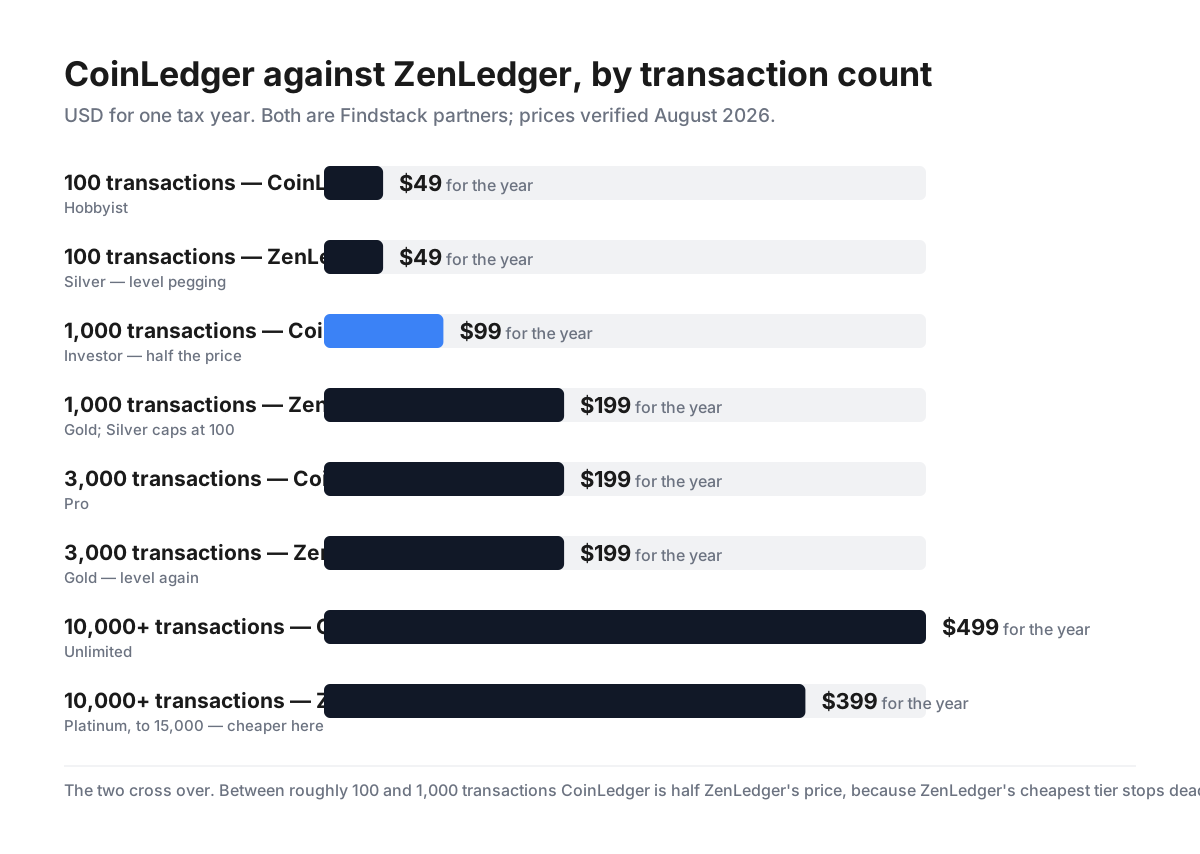
What actually decides your cost:
- The 101-to-1,000 band is where CoinLedger wins decisively. Its Investor plan is $99 for up to 1,000 transactions. ZenLedger’s cheapest tier stops dead at 100, so a trader with 400 transactions pays $199 there against $99 here — exactly half. If your annual activity sits in the hundreds, which describes a great many ordinary investors, this is the single biggest price difference in the category.
- Above roughly 3,000 transactions the advantage reverses. At 3,000 both charge $199. Beyond that CoinLedger moves toward its $499 Unlimited tier, while ZenLedger’s $399 Platinum covers up to 15,000. A high-volume trader is likely to pay less elsewhere, so run your own number against both before choosing.
- You can finish the work before paying anything. Import every wallet, fix errors, and view your capital gains overview for $0. The paywall sits only at the download. For anyone unsure whether their data will even reconcile cleanly — the genuinely hard part of crypto tax — this removes the risk of paying for a tool that then chokes on your history.
- Exceeding your tier costs only the difference. “You’ll only pay a second time if you exceed the original transaction count of the pricing plan that you purchased. In this case, you’ll be prompted to pay the difference for the next pricing tier.” So buying Hobbyist and discovering you have 900 transactions costs the $50 gap, not another $99. That removes the usual penalty for guessing low — a meaningful contrast with tiered products that make you repurchase.
- A one-time purchase genuinely means one time. The report stays editable and re-downloadable indefinitely, and you can re-run calculations without further cost. If you skip a year of trading, you pay nothing that year.
- Every feature is on the $49 tier. DeFi, NFTs, margin trading, all four cost-basis methods, error reconciliation and the full audit trail are included from the bottom. As with ZenLedger, the cheap plan is small rather than crippled — which makes comparing on transaction count the correct approach.
- The checkout price is $49.99, not $49. The pricing page shows $49; the help centre refers to “the Hobbyist plan for $49.99.” A rounding-down of one cent short of a dollar, and worth knowing only so the checkout total is not a surprise.
-
The affiliate link works and redirects from the old brand.
/go/coinledgerpoints atcryptotrader.tax, the pre-rebrand domain, which redirects cleanly tocoinledger.io/?fpr=sohomediaand sets FirstPromoter’s_fprom_codeand_fprom_trackcookies. Attribution is intact; only the stored URL is dated.
Who Should Use CoinLedger
- Investors with 100–1,000 transactions. The clearest price advantage in the category.
- Anyone unsure their data will reconcile. Do the whole job before paying.
- Occasional filers. One-time purchases mean no cost in years you do not trade.
- Non-US filers. Reports for fifteen countries.
It fits poorly for very high-volume traders, where $499 Unlimited is beaten elsewhere; for anyone wanting published pricing between 3,000 and 10,000 transactions, which is not on the site; and for people who want tax professionals bundled in, which is a separate service.
Honest Pros and Cons
Strengths
- Free to import, reconcile and view gains — pay only to download.
- $99 for 1,000 transactions, half a key competitor’s price.
- One-time purchase, not an annual subscription.
- Upgrades cost only the difference.
- Every feature on the $49 tier, including DeFi and NFTs.
- Reports for fifteen countries, editable forever.
Limitations
- $499 above 10,000 transactions, beaten by rivals.
- Tiers between 3,000 and 10,000 are unpublished.
- 14-day refund window is short.
- The listed $49 is $49.99 at checkout.
- No tax professional included at any tier.
- The stored affiliate URL still uses the old brand domain.
CoinLedger Alternatives and How It Compares
- ZenLedger is the closest comparison — dearer in the middle bands, cheaper above 3,000.
- Koinly bands similarly and is worth pricing at your own transaction count.
- CoinTracker covers the same ground with exchange-native integrations.
- A crypto-experienced accountant becomes competitive once you are in the $499 range.
The Verdict
CoinLedger gets two structural decisions right that make it easy to recommend for most ordinary investors.
The first is that you can do the entire job before paying. Import every exchange and wallet, reconcile errors, and see your capital gains overview at no cost — the paywall applies only to downloading the report. Crypto tax software fails on messy data far more often than on features, and this lets you discover that for free rather than after a purchase. It is the most honest trial structure in the category.
The second is one-time pricing. Each tax year’s report is bought once and stays yours to edit and re-download indefinitely, and exceeding your tier costs only the difference rather than a fresh purchase. Guessing low is therefore cheap, which is the opposite of how banded pricing usually punishes you.
On price, the decisive band is the middle. CoinLedger’s Investor tier is $99 for up to 1,000 transactions, while ZenLedger’s cheapest plan stops at 100 and its next is $199. For a trader with a few hundred transactions — most people, in practice — that is half the price for identical scope. Both include every feature at every tier, so the comparison really is that simple.
The honest counterweight is what happens at scale. At 3,000 transactions the two are level at $199, and above that CoinLedger heads toward $499 Unlimited while ZenLedger’s $399 covers 15,000. If you are a high-frequency trader, CoinLedger is likely the more expensive choice, and the tiers between 3,000 and 10,000 are not published anywhere on the pricing page — you have to reach the help centre to learn even the $499 figure. Count your transactions and compare directly.
Two minor notes. The 14-day refund window is on the short side for a product whose value only becomes clear once your data is loaded — though since loading data is free, the practical risk is small. And the page’s $49 is $49.99 at checkout.
For anyone in the hundreds-of-transactions range, this is the better-priced of the two major options in this catalogue, and the free reconciliation means finding out costs nothing.
FAQ
How much does CoinLedger cost?
Nothing to import data, reconcile it and view your capital gains — portfolio tracking is free and unlimited. Downloading a tax report is a one-time purchase per tax year: $49 for up to 100 transactions (Hobbyist), $99 for up to 1,000 (Investor), $199 for up to 3,000 (Pro), and $499 for 10,000 or more (Unlimited). All tiers include the same features, and a 14-day money-back guarantee applies.
Is CoinLedger really free?
The calculation is; the report is not. You can connect unlimited exchanges and wallets, import your full history, run error reconciliation and see your total capital gains across all platforms without paying. What requires payment is downloading the tax report — the file you actually file with. That makes it a genuinely useful free tier for confirming your data reconciles before you commit.
Is CoinLedger cheaper than ZenLedger?
It depends entirely on transaction count, and they cross over. At 100 transactions both are $49. At 1,000, CoinLedger is $99 against ZenLedger’s $199 — half, because ZenLedger’s cheapest tier caps at 100. At 3,000 both are $199. Above that ZenLedger becomes cheaper: its $399 tier covers up to 15,000 where CoinLedger charges $499 beyond 10,000. Count your transactions and compare at your own number.
What happens if I exceed my CoinLedger transaction limit?
You pay only the difference. CoinLedger states that if you exceed the threshold of the plan you bought, “you’ll simply be prompted to upgrade to the next tier by paying the difference.” So starting on the $49 Hobbyist plan and finding you have 800 transactions costs a further $50, not a new $99 purchase. This makes buying the cheaper tier first a low-risk approach.
Do I have to pay CoinLedger again every year?
Only for years you need a report. Each report is a one-time purchase rather than a subscription, and once bought it remains yours — CoinLedger says you can “continue to edit, download, and even add transactions to it as many times as you’d like.” Reports are available for any tax year from 2010 to 2025, so you can also buy a past year without an ongoing commitment.

Compare Coinledger with other popular tools in the same category.

CryptoTrader.tax makes it extremely easy for me to import all of my exchange and crypto trading platform data, including for DeFi, to give me my tax forms for the tax year. It is also great for finding my total capital gains both short term and long term, cost basis, and to generate all my corresponding tax forms pre filled to just attach to my tax return or integrate with my tax software ike Turbotax.
Nothing to dislike. Perfectly easy to use this software. Everything works properly and there is not much left to be desired in this product. Even reporting for DeFi is eas by just entering the MetaMask network address.
CryptoTrader Tax is helping me solve the cumbersome problem of crypto tax reporting that takes a lot of time to sort and review. It makes this very easy and efficient, and generates the forms for me upon tax reporting time.
Honestly this app completely saved me. I traded in and out of multiple different cryptocurrencies over the course of the past three years. Just recently, I found out that I needed to be filing taxes on these transactions. Like most people, I freaked out. I called many different "crypto accountants" who wanted THOUSANDS of dollars to help me file Form 8949 from my past few years. Enter CryptoTrader.Tax. The platform saved me. Entered my trade history and it immediately spit out my required tax forms for ALL years I needed them for a fraction of the price the accountants wanted. Awesome tech.
No downsides. This app saved me. No problems.
Saved me a ton of money and allowed me to automatically create my needed crypto tax reports. I created them for all years I needed them. Easy.
I am completely new to trading cryptocurrency and digital assets and was nervous about being able to get my taxes done this year. CryptoTrader.Tax was extremely helpful, clear and easy to follow while going through the whole process. Their support team was able to help me out when I had troubles uploading my trade history. Highly recommend!
Taxes are still not very enjoyable in general.
Calculating gains/losses from trading digital assets for my tax return.
Ability to do many and many things with all other platforms which are linked, and big quantity of features provided
It's often too hard to know exactly how to perform easy task. At beginning, I was lost into all ways app allow us to do
I can now, thanks I making some settings on account, see all accounts from all exchange on same page, and I can also make trade with all of them, as there would be on same exchange platform