Unclaimed: Are you working at Evernote?
Evernote Reviews: 4.4/5 — Solid Choice
Evernote is a top note-taking platform that is used to create and organize notes and lists. With Evernote, it’s easier to take note of ideas and access it through different devices. The platform also offers features that help facilitate a better and more efficient note-taking experience. Tools such as web clipping and easy integration with other applications are well-known features.

| Capabilities |
API
|
|---|---|
| Segment |
Small Business
Mid Market
Enterprise
|
| Deployment | Cloud / SaaS / Web-Based, Desktop Mac, Desktop Windows, Mobile Android, Mobile iPad, Mobile iPhone |
| Training | Documentation |
| Languages | English |


Who hasn't used a notebook at work? More than 90% of the people who occupy jobs in large, medium or small companies use the passbook resource to register different types of events, ideas, information or work indications that will allow them, in the end, to fulfill their obligations. Faced with new technological and competitive demands today, Evernote stands as the number one digital notebook in the market, and the reasons are obvious, Evernote is a digital notebook that allows you to record notes of what you need in your work, in my case, use Evernote to take notes of the various products that we have in our companies and their components. Evernote also has the option to synchronize each of these notes and not lose the information you recorded in case you uninstall the software. Another great feature that Evernote offers is that you can attach photos, documents, and information because it supports many formats, so it is ideal to attach all the information you need. This software is compatible with several platforms, so you can use it at will from your phone, computer, or mac.
This software has certain limitations associated with the use of the Internet. Evernote relies heavily on your internet connection for full use. If your Internet connection is unstable or non-existent, the digital notebook will not function at its maximum capacity, limiting its functions.
Thanks to Evernote I was able to definitively abandon the obsolete physical agendas, which became a nuisance for me since I had to take them everywhere and sometimes I had the bad luck that I lost them and with her all the information that I record of my work. Evernote has allowed me to update, and now I use my digital diary from the comfort of my phone and its performance is the best of all.
Multiplatform support, every OS is supported Consistent user interface between operating systems Easy to create, modify and delete notes with good, fast Syncing after note edition.
Default keyboard shortcuts are the same as the ones in other programs but can be configured easily
Taking notes, sharing notes, exporting notes to PDF
Is an application that allows personal organization through note files. It is applicable for both PCs and cell phones.All notes, photos, audio files and web pages can be saved and shared with the work or study team. This simple application can be used both at work and academically. in the workplace, the files can be shared. The information can also remain in private mode. From a smartphone the application can also be used to access the saved files and make comments
One disadvantage is that it has no applicability or compatibility with linux and in some cases with android.
With the use of this tool I have been able to maintain the order and control of my daily activities, not only at a professional level in my place of work, I have also achieved it in my academic activities, adding reminder notes and important details of the university classes. It is a widely recommended tool because it is super simple to use, friendly and intuitive, it is not necessary to prepare the staff for its use.
It helps me organize different aspects of my workday, from planning out experiments to making a weekly schedule.
I wish that you could control more features, like having multiple tables or controlling the placement of tables.
I generally use Evernote to simplify my experimental procedure into an easy-to-follow protocol complete with tables, checklists, and instructions. This helps me combine together several different steps into one protocol.
Evernote serves as both note taker and as well a to do list. The best advantage is that it works on all existing operating systems, windows, android, OS. My own favourite of all its advantages is that it syncs accross multiple devices. This means, when at home, you can use your evernote account on your PC, and when on the move, you can use it on your smartphones. That is really great. Evernote can be used for free, likewise, a premium version is available with extra features.
The only downside I see is the monthly bandwith limit. Makes me feel uncormfortable believing I can run out of bandwith in a month
I use evernote both as a note taker and also as to write down my to do list. Great

EverNote is my personal assistant, in this software I organize all my notes both text and voice, linked to my work and my personal life, I like it to be very easy to use, have ample storage capacity and allow me to organize all the information that I add in it in different folders in an organized way.
So far EverNote has worked very well, I have no complaints about this software.
EverNote allows me to have my information up to date and fully organized, which helps me access it in a quick and easy way whenever I need it.
It's there at the click of a button, syncing is great. It does not matter if I take a note on my Mac or my iPhone it's available everywhere. I can attach a photo or screenshot to any note and I'm happy because I don't need any cable to see a thing in another device. As a project manager, I need to take a lot of notes and photos so syncing is essential to have an optimal work flow.
Nothing at all. I don't need any other feature so I'm really happy.
Taking notes in my PC or taking a photo on my phone and syncing it to my PC.

I like being able to attach PDF's and photos to notes.
The cells of a grid are difficult to edit, and some of the writing/editing capabilities (setting fonts, sizing, colors, highlights, etc) are sometimes frustrating to work with.
Project Management & Content Scheduling. Being able to use Evernote to create social media content calendars with photos, copy, and approval checkboxes have been very useful.

I love that no matter where I am, I'm able to quickly save my ideas.It's helped so much in keeping my business and life organized,
I don't have any complaints about the software.
I'm better organized and less frustrated that I lost a random idea.
Evernote is a wonderful software and very necessary in my daily work practice. With this software I can enjoy many benefits in the use of a digital notebook which I put and use in my current job, as it serves me to take notes of my meetings, instructions from my bosses, general ideas emanating from meetings with my co-workers and personal ideas that I then use for the construction of work reports. I also use this software to add reminders of important dates, activities to develop, schedule of business meetings and other events that I need to record to fulfill my job duties. Evernote is incredible because not only can I work it on my work PC but I can use it on my smartphone, this allows me to use it wherever I want.
This agenda does not have details, each one of its tools I use adequately for the fulfillment of my work activities, allowing me to have products and reports of very good quality, in addition that it allows me to organize my time of work and its relation with activities.
Evernote has inserted me into the world of technology. Thanks to the use of this digital diary I have been able to improve and experiment with its functions and how I can incorporate them into my work, making it considerably improve my performance and performance in my work.
Evernote is an incredible tool with many resources which I use daily in my work. Graciasa Evernote I can register different types of notes or important ideas that I need to make my reports. As a cultural and patrimonial promoter, I need a digital notebook that allows me to have my work organized, and thus efficiently fulfill my tasks at work, and Evernote is the software that helps me accomplish this, since I also have to record reminders, store photographs, ideas to present work proposals and many other things. I can use all these tools comfortably since this software is quite easy to use.
After using this software to its full capacity, making the most of each of its tools and applying them in my work settings, I can conclude that this software has no defects, is very useful, functional and adjusts efficiently to my work development.
Evernote is a software that complements very well with my daily work, at such a level, that to fully comply with my work objectives I need to use this software. Their tools make me a more dedicated and skilled worker to serve my company.
The portability and sync-ability is awesome. It is the best productivity tool available today. you can take photos and save to all devices.
Really everything about the app is cool.
Staying organized

Evernote is software you should never miss when you're working. With this software I stopped using notebooks and now I use this excellent digital diary that has multiple uses in my work. The main use I give Evernote in my work is to record the notes of the various meetings I have with members of my team or with the directors of the television channel where I work, with Evernote I can record what I want and I can use it later to make my reports or press releases. With Evernote I can also record my instructions or activities to perform and thus bring order in my work obligations. These benefits merge into one easy-to-use digital diary with one of the most complete and detailed user interfaces I have ever used. Evernote is fascinating and very useful to fulfill my work obligations.
Of this software I do not have a complaint at all, both its tools and the functions they perform and how they allow me to complete my work activities as quickly as possible, makes this software is essential for the fulfillment of my work.
With this software I have managed to materialize one of the most important objectives in my work, and this is to maintain a systematized order of each of my activities. Thanks to the fact that I can make notes in Evernote and record work activities, I can have an orderly work method that allows me to be an efficient worker. With Evernote I have achieved work excellence and that makes me very happy.
I like the fact that there is built-in formatting that is conducive to taking notes
I don't have any complaints, the app satisfies my needs
Moving away from pen & paper notes to keeping a digitally stored version of important ideas
There is an Evernote web clipper add-on for later reading in the application of articles found while browsing through the internet. Tags may be added to notes for better organization. Notes may also be shared through email or simply copying the share URL.
Evernote does not support code syntax formatting.
It is the best app for saving information and keeping track of things.

Evernote is an excellent note organizing platform which allows you access information wherever you are. It is user friendly thanks to its various features of text formatting, searches and folder organizing. The sync across devices is fast and works very well. It gives you an option for secure content sharing via email or password which is crucial for privacy. Additionally, the notes can be classified in notebooks which makes it easy to sort them in categories.
Evernote basically covers all of my immediate requirement. The only annoying part is the formatting option for a table. I personally find it a bit difficult when I need to add additional rows/columns to them.
Note creation and distribution.
Evernote is great for both work and personal endeavors. I don't know where I'd be today and how disorganized I'd be without evernote.
Wish there were more computer syncs available with the free version.
Able to tackle work and out of work problems seamlessly without having to jump focus all the time.

It has never been so easy to take my daily tasks prioritized and organized in quality software, and this is what makes evernote attractive with a clean and intuitive interface. Easy to synchronize and very practical.
10/10 I really like this software is one of my favorites, I would not change anything, as this works great.
I organize my work and my personal life, increase my pace and with it my performance.

Me gusta mucho las herramientas que ofrece para organizar las notas a traves de libretas y etiquetas. Tiene un excelente buscador que sirve incluso con palabras que contenga la nota. Me encanta poder agregar fotos y cualquier medio gráfico a mis notas, ya que así las enriquece y mejora la experiencia. La app es muy buena, me gusta mucho usarla ya que es el dispositivo que llevo conmigo y siempre hay algo que anotar. Se sincroniza automaticamente tanto en mi PC como en mis dispositivos mobiles.
La verdad es que Evernote me encanta y no la cambio por nada.
Evernote me trae muchos beneficios como profesora y asesora universitaria, ya que con este software puedo compartir y llevar anotaciones de las clases que doy o de las asesorías que hago. Realmente la uso para pequeñas anotaciones que conlleven alguna imagen de alguna actividad que haya realizado o de la pizarra de alguna clase vista, en pocas palabras, la uso para llevar notas con imágenes ya que me resulta el software más adecuado para eso. Es la gran ventaja que tiene, ademas de que es muy facil de usar y con una interfaz muy limpia y fácil de entender.
Many have been stumbling that I have given myself the start of independent consultant, but as a good critic, I stopped to analyze my weaknesses being one of them the disorder of my daily activities, that's how I got this fantastic service. Evernote has allowed me to correct in a short time how disorganized it used to be. The one of organizing my tasks without so much effort and establishing times have achieved a positive change in my work mainly.
Its free version is limited, one of them being unable to download the notes in Word and other formats.
Improvement of the sky to the land of my productivity, attend all the daily activities, organize them and have control of my time.
This tool is great, besides easy to use its interface is truly intuitive l that facilitates its customization or configuration, additionally is multiplatform, ie, is based on the cloud, you can also get it installed compatible with Mac or Windows, in our case we have it in the cloud so we can enter from the smartphone , tablet , laptop , pc , ie any mobile or fixed device with Internet access, automatically synchronized on all your devices, which facilitates the capture, navigation, search and editing of your notes anywhere you have installed Evernote. On the other hand it allows me to establish a better organization of my daily activities, as well as to host files and photos by sending the content in an email to the service. Another outstanding aspect is that it offers the possibility of creating simple links with the information that you will see later. You can save the most important part of the web or create a table of contents in a note.
It is a good tool however there are occasions in which I have presented inconvenience to synchronize the account in several devices, generating an unexpected closing of the program and indicating error, in addition to that they should improve the cipher because it only allows to cipher texts but not figures.
We mainly use it as a manager of activities or tasks, which has allowed us to establish a better organization of our agendas, we are synchronized as a work team, ie the administration of the clinical center where I work, my secretary and myself, for the planning of appointments of my patient, plus the fact of having the ability to link the email to Evernote has greatly reduced our dependence on email. So this tool has become our information center, giving us full access when and where we need it.
Ideal to store and organize all kinds of notes or tasks, the best thing is that you can add labels. It is flexible since it has a desktop version in various operating systems to other than its web version. All our ideas can be documented through this tool easily.
There are tasks that are not available but we are connected, it seems strange to me that there is no failure or restrictions of the application as such.
As an executive assistant, I not only have many tasks to do within my work habits, but I must also remind my boss of his. With evernote I have the areas classified and clearly defined what an optimal professional organization offers me.
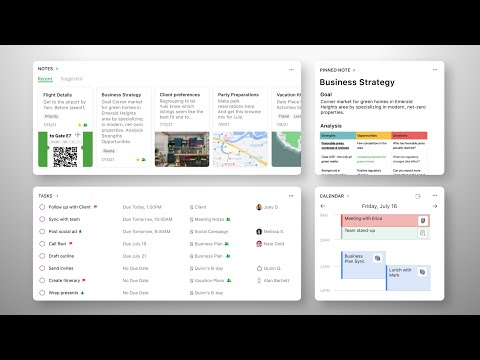
I have started using it since last few months and I have become so reliable on this application for all the emergency situations for taking quick notes, reminders, schedules and much more things. It's widgets are so great and they work absolutely great on my device.
I haven't noticed or come across any issue so far.
I have been adding my business schedules in it. And it works very fast and it works great. It even reminds me of upcoming events and meetings that I need to attend. I completely rely on this application.

Evernote offers a comprehensive, intuitive solution for notes and memos. The service isn't just about notes though, memos in all forms can be created and saved. The word processing capability of the service is good enough that one could ditch a separate word processor all together and just use Evernote. Evernote allows access to your data from a variety of platforms including mobile and web with native well built applications. The service is extremely inexpensive and due to Evernote's presence in the industry for such a long time integration with other services and applications is very wide spread.
I have been using Evernote for years and it has never let me down. The service is consistent and the apps are well built and frequently updated. I have and have had not complaints with Evernote.
Evernote has made storing, creating and accessing memos across multiple platforms simple and efficient for me. The service's many integrations make the whole process a lot less time consuming.
Best part about this application is the smart camera. The smart camera lets you scan your documents anywhere, anytime and gets you going with your work. It correctly scans your documents and crops it in the right shape and saves it in your notes. you can also scribble your words if you're in a situation where you cant type. You can also add voice notes, attachments and reminders.
There's nothing much actually that I dislike in the application because it's such wonderful application without any drawbacks. But yes, they can try adding different languages in the application for better use and variety in options of languages could be provided.
I've been organizing all the daily events that should be done in our company. I personally use this application to discretize our daily work and schedule it up with proper planning. Evernote has being helping us to properly plan things and get things done and get the job running.
Evernote is a finished App of notes that enables you to leave recorded as a hard copy any thought or idea that rings a bell. With Evernote you can make a thorough administration of the notes that you are taking, including writings, pictures, sounds, and so forth. What's more, it permits a total association through organizers and marks. Evernote isn't only an application intended for cell phones, they likewise have a work area application (Windows and Mac) and a web design (open through the program). Thusly, whatever your method for working Evernote will turn into your best partner, since every one of the notes are naturally synchronized. I truly like how you can have various types of notes. I use voice notes for when I'm driving or have a speedy thought, I utilized content notes more often than not, and transferring reports to the applicable notes (PDFs, Word, things like that) keeps reference material close by so I don't need to search all over for it.
I couldn't make reference to a solitary objection about this product, as it came into my life to encourage my capacities and work, I never again must compose anything on sheets or scratch pad, yet I use Evernote on my advanced mobile phone and record every one of the day by day changes in my work, is a computerized journal that significantly encourages my work.
Taking a few sorted out records and include notes by classification put updates so I remember anything. In my work is fundamental the utilization of my Evernote motivation, because of the way that I have this product has made it a lot simpler for me to record every one of the perceptions I am taking in the gatherings. This plan enables me to record every single one of the subtleties important to set up my reports. A product that has enabled me to fortify my characteristics as an expert.
This is by far the best and the most functional software to make notes of any kind, keep necessary information and synchronize it across any type and any number of platforms: I use it simultaneously on Macbook, two Windows computers and iPhone and it always synchs smoothly. We can keep itineraries, scanned travel documents, confirmations, notes, so we will have them easily accessible whenever we need them. Notes can be accessed offline. Web clipping, Note Sharing are best features
Premium subscription is expensive and restricted. Offline access is only for premium members
Easy note taking software. Solves the problem of platform dependent notes. cloud-based notes can be synchronized across devices: Evernote clients are available for Windows, Mac, Android, and iOS. Notes can be accessed offline.
It is an application for both PC and cell phones so I can get to my data from anyplace and whenever I need it, I likewise like that EverNote permits synergistic work and along these lines my partners Jobs contribute their thoughts when we plan together through EverNote. I like the straightforwardness the best! I likewise utilize their Search work a ton, since I take TONS of notes! Utilizing the Search work gets me to where I should be rapidly. What's more, that is vital when I'm attempting to write something down before I overlook it. The interface is so straightforward, yet lovely. It's not confused or overpowering. They offer indistinguishable content capacities from some other report interface arranging alternatives, visual cues or number records, connecting, and so on.. Clients can transfer PDFs or different reports to their notes, just as associate Evernote to Google Drive for connecting applicable tasks.
Not a lot to disdain yet when the web is poor, notes are not spared rapidly, so the procedure turns out to be moderate.
I have to store notes always particularly clients and passwords in each new venture, notwithstanding other data identified with the undertaking, already I pointed this in content records yet with Evernote I can point it in your web application and afterward send it or offer it utilizing my cell phone Everything is substantially more agreeable along these lines since beforehand you needed to send the reports via mail. It is extremely helpful for me to record the gatherings and make the quarterly arranging, making task records utilizing the check boxes and the numbered records to monitor the exercises and push ahead in the work. I can likewise impart the data to the accomplices and directors and include updates which is imperative to dependably be exceptional in the workplace.

In order to effectively fulfill my labor obligations, I require several software that facilitate the fulfillment of my functions; one of the software that I use the most is Evernote, which is a digital notebook with very interesting functions and characteristics that allow me to fulfill my goals at work. Among the most outstanding functions and that more use of Evernote we have the record of notes related to my work dynamics, thanks to this function I can attach ideas, instructions from my bosses, upcoming activities, reminders, photographs and many more things. This software has a very elegant and clear interface that allows you to use each one of its options and take advantage of the maximum potential that Evernote offers. Being one of the most used digital notebooks in the world, always has good updates tailored to the needs and demands of the people who use it. Evernote is my ideal companion at work because it allows me to meet my work objectives in a more effective way.
The more I use this software I convince myself that it has no defect, on the contrary, thanks to this software I have been able to enhance my performance in the company where I work, since the use of a notebook for the fulfillment of my work objectives is extremely important.
When I think of how Evernote has contributed to my work, I feel very satisfied. It is thanks to this digital notebook that I have been able to improve my skills on the job because Evernote offers me many interesting features that I use every day in my work to improve. A software that brings many positive features to my work environment.

Evernote just works. The newer players are fancier, but I always come back to Evernote. It seems that my life is in this app. I use it every day, because it always does the job.
I have always disliked Evernote's pricing, but I have come accept that if we expect it to be there for us, we have to support it.
I do most of my draft writing in Evernote. Pretty much everything I prepare passes through Evernote first. I capture my research links in the note and also any images or other files that I refer to to support the work. It is all in one place.