
Unclaimed: Are you working at Autodesk Fusion 360?
Autodesk Fusion 360 Reviews: 4.3/5 — Solid Choice
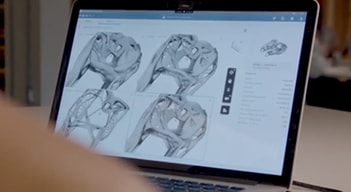
Fusion 360 is a professional cloud-based 3D CAD program that lets users design and manufacture products using CAD, CAM, and PCB software. The feature-rich 3D printing software offers tools that include simulation, assemblies, 3D printing, generative design, tools sculpting, and CAM. That platform is known for having numerous product design options and cross-cloud capabilities, making it perfect for remote team collaboration, especially for large-scale projects.

| Capabilities |
AI
API
|
|---|---|
| Segment |
Small Business
Mid Market
Enterprise
|
| Deployment | Cloud / SaaS / Web-Based, Desktop Mac, Desktop Windows |
| Support | 24/7 (Live rep), Chat, Email/Help Desk, FAQs/Forum, Knowledge Base, Phone Support |
| Training | Documentation |
| Languages | English |


Mobile access, Product portfolio management, Multi-CAD data management, Change management, Dashboards and KPIs, Centralised data and processes, Open API are good features compared to its competitors
Change management, Bill of materials these 2 featured can be improved further. Since Fusion 360 is still evolving from upchain point of view, user requirements will take time for incorporation,
The most amusing feature of Fusion 360 manage with upchain is Multi CAD data management and helping a lot for my problems. New product information feature need to be improved further.

Smooth workflow and good data management.
Some more plugins / compatibility with other CAD files.
The API, PLM apps and the workflow changes. These have made the processes very smooth and adapting. Supplier collaboration, Bill of Materials, Design change adaption, etc have improved the overall quality and experience.

It gives a separate dimension to our imagination and analyse the creation that how it will act under different conditions and also allow us to improve simultaneously when required.
Add-in has limited sources that prevents us to increase our designing speed
I faced minimal problem with autodesk fusion 360, it is very collaborative with upchain

Everything was best and all the functions are at their best. It is a well structured solution which solves the common problems which we were seeing in a fast paced product development space.
There is nothing that I don't like. It's a great experience
Forced revision control on check-in helps ensure that the correct revisions are being selected by the manufacturing team
Autodesk Fusion 360 Manage PLM accompanies the entire process chain around a product. From planning and development to production preparation, manufacturing, assembly, sales and beyond. The complete life cycle is mapped. An essential aspect of PLM is access to product data that is always up-to-date for everyone involved in the process chain. This ensures maximum efficiency in all phases of the product lifecycle. This process is supported by central data management, in which all product data and information are bundled. Well structured, PLM can be an excellent basis for agile, interdisciplinary processes around products. In addition to the technical requirements, the most important thing is to involve the employees. Teamwork is another central starting point for PLM.
The very fast software improvements, thanks to the Cloud Platform. Otherwise, the system is very stable and has no problems.
We are solving BOM and Change Management Problems. We have connected the hole business engineering CAD / PDM / PLM / CRM / ERP.
The ability to view CAD models without opening the parts in SolidWorks
There are some features that are yet to be included in the product, such as the ability to view who has yet to sign off a workflow
They prevention of multiple versions of the same part being worked on by different people and not knowing which one is right.

It enables CAD and document revision and lifecycle control, accessible through an intuitive web browser or plug in. The cloud based functionality allows me to review and check data when on the move. It is a well structured solution which solves the common problems which we were seeing in a fast paced product development space. On top of this the UPchain team are professional, quick to respond and seem willing to implement new ideas and functionality.
There was more detail in set up than initially anticipated. It would be great to have a hands on demo before purchase rather than a video introduction. This would have allowed us to dive deeper into what we were purchasing and ensure that this was the correct product for our needs and problems. There have been a couple of bugs but the team have been fantastic in responding to these.
We are eliminating multiple versions and duplicated files which was a common problem with multiple users and teams working on the same projects. Forced revision control on check in helps ensure that the correct revisions are being selected by the manufacturing team. Viewer licenses with mark up is an invaluable tool for the assembly line. It will streamline our processes and reduce waste in the form of time and scrap.

The best aspect to Upchain is its cohesive platform. As a full PDM and PLM solution, it provides and all-in-one approach. As a Solidworks user, the plug-in is crucial for it's PDM functions and the ability to control full life cycle management within the same platform is seamless. Additionally, the direct to consumer communication has proved to be far superiors to having to go through a authorized reseller other platforms require. If there is a question, or improvement suggestion, direct communication to the Upchain team is easy. The response time and feedback has been phenomenal. Platform updates are pushed every 30-60 days, so improvements are continual.
As a relatively new platform there have been a few bugs, but the development team have been extremely quick to implement fixes. Overall, I am very satisfied with very little dislikes.
The most substantial problem that Upchain solves for us is that it is an all-inclusive platform. It's PDM and PLM tools function within one seamless platform. There is not manual transmission of data or a third party software link needed to make all of your system work together properly. This has greatly increased our productivity due to a lessened amount of time fighting software.

It's hard to pick what I like best. There are so many useful features that are equally important in different ways. The document control features and being able to modify approval processes is a big one for me though.
There's not anything that I "dislike" although I do look forward to a bit more flexibility on the project management gantt chart. I would like to more easily change timelines and tasks around as project attributes change but that could be just me being lazy ;).
There are a number of gaps we are solving for with Upchain. 1) Document Control (ECR's and CAD mainly) 2) Project Management and an effective way to assign tasks across the company 3) More visibility to specifications and how often they are revised within a department 4) How we treat BOM data and sub-assembly changes 5) How we control our approval processes and streamline resources across multiple projects and products
Upchain is a breeze to set up. It's possible to implement without having a full-time person dedicated to administration. Through their "Connect the Chain" program, current and new users have access to detailed live training sessions every month. Throughout the process, Upchain's support team is very present and willing to help.
Some of our assemblies have suppressed parts that need to be unsuppressed in order to be uploaded which is an inconvenience. I communicated this to the Upchain team and they are already working on it.
We are a startup that needs a single source of truth on design details in order to execute efficiently and with proper ECO approvals. Upchain provides us with a scalable, cloud-based solution with easy setup, great user interface, and competitive pricing. Upchain has many additional features such as project management that will be useful as our design team grows.
Upchain is clearly focused on simplifying complex PLM processes. Recently, we conducting a review of several major PLM platforms, and Upchain was the only one that our users were excited about. They were able to pick up on the platform with very little training, and felt like it would allow them to do their day-to-day job better. The Solidworks integration for Upchain is a differentiator. They've done a really good job bringing the major capabilities of the system into the plugin, and it does a really good job blurring the lines between "PLM Data" to "CAD Data". From an IT perspective, their Cloud approach makes it much easier to quickly get started with the platform. Their "Partner Enablement" team (Upchain terms for sales & support) has also been helpful in getting us on-boarded and trained.
Upchain does not have all of the functionality of a traditional, major PLM. This has been changing pretty rapidly, and they've been very receptive to our feedback in terms of priority.
We're primarily using Upchain for its Design Collaboration features, including CAD Management, Bill of Materials Management, and Change Control (ECO) . We're also using some of the document management and requirements management tools. As we, and the platform, mature, we intent to use it to manage the service & maintenance of our products.

Plug in for Solidworks is well integrated and simple enough to pick up and use for day to day tasks The development/support team are good to work with, very responsive and helpful. The majority of issues and feature requests we come across are already in the pipeline to be fixed in upcoming releases. Updates happen frequently and are quick and simple to carry out. Online Upchain academy is good for getting an overview of all parts of the system. I liked the format of the the live "Connect the Chain" video training, with each short session dedicated to a single topic.
Some extra features would be useful to aid day to day useability, things like a collapse all option for the tree or clearer visualisation of the different levels of the BOM Migration process seemed to be very manual with the potential to miss files that are not in the top level assemblies. Some significant issues were encountered with the hybrid vault solution (Upchain interface with the data on a local server), but due to be fixed in upcoming releases.
As any PDM system, Upchain has allowed better control of files and revision management. The benefits of Upchain in particular is its strong plugin integration into multiple CAD packages and easy access to the software anywhere with the internet.
Cross platform compatibility. Not limited to using one software within an organisation. Easy to share and view CAD data without the need to have a CAD package installed on your machine. Good customer support, and very quick response times on issues.
Its not easy to understand until training is complete. Some naming and layouts are not logical and take some getting used to. The integration process requires a lot of time and planning. Metadata importing from existing sources could be made more user friendly. Mapping metadata from a database proved more difficult than expected (very specific data formatting required for Upchain's plugin to read the data properly. Part numbering rules limited in term of the format and delimiter types. On some new releases the layout changes and throws the user off.
Upchain is used as a PLM & PDM system in our organisation. It has helped loads in the current situation in the world with allowing us to seamlessly transition into working from home and not have project or design downtime.
We found the Software very valuable when it came to streamlining our engineers and production teams. Before Upchain our teams were constantly using old cad files or misplacing new files. This software has helped minimize and abolish any of these human errors.
We enjoy the new features and functionality constantly being given, however that requires our users to redo the Upchain academy courses, to best utilize the platform.
Upchain is helping solve a variety of problems, ranging from human error to our other software bugs. We have begun to cut costs and mistakes by removing some variables and making sure all of our teams are up to date on the latest drawings.
This software helped bring all aspects of the business together to collaborate on projects. It is great for assigning certain tasks to individuals. We also love the low monthly costs. For a small business, keeping costs low is important for us.
I would like to see more controls in place that protect documents and also some improvements on integrating the software.
Our business is constantly changing to adapt to our customers needs and this platform is great for managing that change.
Upchain provides a central location for all our product specifications, allowing great collaboration for CAD (Solidworks), and online CAD viewer! The user interface is very slick and web-enabled which is a must these days. Communications of changes is very well done also through emails ahead of time. The visualization tool for changes, and just in general CAD viewing is great as not everyone in our company has solid works or a viewer, so this makes things much easier. There are lots of columns that can be customized, and the multiple preset views allows for quick changes to the data displayed, which we do all the time.
We know it's in the pipeline, but documentation management would be great to allow us to have a full suite of design inputs (all the documentation) along with the design outputs (all the data), to round-out the development tracking side of things. Can't wait to see what the team releases! The BOM tool could be a little better as you navigate up/down the chain.
data management, collaboration with CAD users, central repo for viewing changes, BOM management
Simple, minimalist looking graphical user interface in the solid works add in environment, aesthetically it is very pleasing and easy to use.
The learning curve/ number of training sessions required, both in the form of online classes and teleconferenced sessions.
We require a more robust PLM system, our current system is PDM only, the native solid works add in, and is very buggy, slow, and crash prone.
User friendly software that helps engineers with keeping track of design changes. The version updates allow other users to be aware of changes. Integration with Solidworks program works relatively well in comparison to the native PDM software Solidworks provides.
Checking in parts can be confusing for those who have not used a PDM software before. I suggest getting familiar though usage before giving an overall impression.
No problems yet, very similar to Solidworks PDM
Previously our company had many rogue engineering processes such as engineering change requests, engineering change notice, non conformance reviews, engineering deviations, and many more. Managing all these processes got messy very quickly but Upchain has helped formalize these processes and brought them all under the same roof. With the Upchain features it is very simple to review the engineering documents and kick off a process or assign work.
I wish there was a better feature to track productivity. Such as, the total number of ECR's completed in the past month sorted by the departments that did the work. A feature for tracking these statistics would help provide managers with a high level of what is going on and equip them with the information they would like to see from a brief glance. Another feature that took some time to work with is the way Upchain segments by project. If your company does not already split work out by project it takes a little bit to get used to. The project approach also makes it difficult to manage sustaining efforts.
Upchain is helping to reduce many uncertainties within the company related to parts and the latest revisions. In some instances the files associated with a particular part number is not always clear. Without any organizational logic in the drawing/schematic directories it becomes very difficult for purchasing, manufacturing, or other department to distinguish which revision is actively being used. between the different revisions. Upchain helps eliminate that uncertainty while allowing for red lines and comments to be applied and tracked directly within Upchain.

Compared to major Relational Database Management Systems requiring major infrastructure resources, Upchain is a web-based application that remotely provides an equivalent yet let burdensome Product Lifecycle Management (PLM) platform. The administrative tools are straightforward to use, and workflow development and tailoring are a breeze. The visibility of project activity and the history of every project artifacts are provided in the primary levels of the application rather than requiring skilled expertise in tunneling down into a project. Users can easily collaborate on a product, and in an organized fashion within the corporate-designed constraints of the PLM system.
I have not been able to find a way to assess the maturity of an Engineering Change Request (ECR) and it's present state within the ECR workflow. It would be good to know where it has been and where it's going next in order to periodically report ECR status to stakeholders in the release of the pending change.
We are challenged with a legacy engineering culture focused on prototype development that has long needed but overlooked the necessity of controlling a product baseline, regardless of a product's deemed suitability for manufacturing. With the PLM tools afforded in Upchain, traceability of the product performance to its design requirements will be established and officially available for validation and verification. Lessons learned in preliminary development will be available as a permanent record and repeatable best practices can be achieved. The intricate and accurate assembly and sub-level details captured and controlled within the Upchain tool provides a basis for positive control of product artifacts in a Product Data Management (PDM) regime, supporting the shift from a prototype to a mature, manufacturing culture.
Upchain provides a great service for BOM and change management. The online viewer for browsing 3D models imported from our Solidworks developers is great for non-Solidworks users (quality team, management team, electrical/software developers, etc.), and even for Solidworks developers that aren't on their CAD computers. The price point for Upchain is also really great and hard to beat for small teams. The customization of workflows is really nice as it allows our company to start making different paths for different products/stages of the design.
User interface could be tweaked for repetitive tasks, like making changes to a part in the expanded BOM, but then the BOM collapses after the change takes effect you must re-expand all levels. Also, document management that matches part management would be excellent. The ECR/ECO/ECN process could be tailored more closely to ECO processes like ISO 13485, especially with the ECN aspect which doesn't really match the typical "notification" stage that we are working with in the medical space. The ability to customize the part's metadata further, and remove fields that aren't used even if they are defaults in the system. This would be nice to make it cleaner and less cumbersome when reviewing.
We were managing BOMs and parts using Excel, and now using Upchain which is great for that. We were also doing our own "vault" for solid works parts, which is now being done by Upchain and helps with collaboration.
Easy to use and understand without help. Very useful for managing CAD models and drawings. Very easy to perform engineering change along with tracing the changes completed previously.
Not able to create new part number for small change (design shared with other assembly with small change) in current assembly and need to restart from zero.
Managing CAD models and drawings. Creating bill of material for manufacturing drawings for vendors, Bill of Materials for purchase and assembly team. Mostly importantly easily able to create Bill of materials for different products.
I like that it combines all the documents needed in one place. It is easy to view everything at a one stop location. I also like that it is Cloud based and can be accessed by multiple users at the same time. This is really beneficial especially that we have couple team members in different remote locations, and can't have access to the local server. I also like the user friendliness of the file. It is not too complicated, not so many buttons are present that could mess things up.
It can include more things and more capabilities. I think some points to improve is having the ability to manage more documents such as FMEA & APQP as well as work instructions documents. This would be super beneficial! One thing I dislike, is the duplication of some documents. I wish there is a feature to lock things and control them better. This would be super beneficial from a document control perspective. We wouldn't want two documents to be copied twice and worked on twice. I also suggest having approvals of parts or drawings so it can be controled more.
We are trying to have all our files in one system in relation to a part number. Upchain have helped managing them and grouping them in one place. It is easier to use this tool as a one-stop for everything related to a certain part.
What I like most about Upchain is how it keeps the guesswork out of knowing where we are with a product launch. We've set up workflows so that our entire team can be on the same page as to where we are in the launch cycle.
So far, there is nothing I've come to dislike about Upchain. It's easy to use, I've been properly trained, and our organization is beginning to implement the usage across multi levels of our business.
By using Upchain, I know longer question if I am looking at the most current revision of a BOM or material. Before we were always left wondering because the information wasn't kept in a central place.

It is one of the only cloud based PDM/PLM solutions available at a reasonable cost. Other software only offers PLM, no CAD storage and a significant set-up fee.
Need some more BOM functions such as being able to re-arrange the position of a part within the BOM. We also need to figure out how to integrate with our apparel design team who uses a lot of 2D and Adobe software.
We are improving communication with our supplier development, purchasing, engineering and quality teams. We have seen tremendous improvements in change management and maintaining project design freeze. We have reduced confusion about product specifications be being able to directly link documents and drawings to the part. Product cost is also finally becoming transparent across the organization.

-It keeps work flow very smoothly. This tool has the ability to allow multiple users to work together on the same project. As Engineers we are able to work together as a team through Upchain. -It also has a wonderful features for management of projects. -It integrate with other apps like Microsoft Office, etc. -They also have a very reliable customer support team to help their clients. -Tracking and monitoring of projects progress. -Very customization tool to fit any business styles. -Files and documents storage, whereby the user can access the stored file in a very easy way.
Upchain works everything out well and its a very useful tool in many businesses. Only that the its updates happens in re-installation process.
-Managements of our Engineering files and other documents. -Enabling of team work flow. -Time saving and others.
Cloud based, very powerful, plug-ins for Solidworks, Office, and Visio are great. Assistance from customer support is excellent.
With a lot of power comes complexity, but once you work through the steps it make sense.
Document / version control, CAD model storage.
Advanced plugins for NX, Creo, Catia, Inventor, Solid Edge, and SolidWorks. This allowed our engineers to integrate with our systems for a streamlined process.
Learning curve is average for this type of product.
Provide CAD Reading tool for our engineers.
I love how automated I am able to make simple jobs and even complicated ones.
There are a few bugs that make it sometimes difficult to work with.
Tracking of Engineering changes.

The ability to customize the software to our workflow that we need to fit our company path. The fact that we can create a similar look for completely different workflows is a blessing as well for smother transition from task to task.
If we do not tweak the layout often, sometimes it takes a bit of working with it to get the groove back. Like riding a bike, but a little longer re-learning curve.
We are using it for Internal process tracking, things like software updating, miles traveled reporting and other Internal tracking needs, expanding uses to include as many workflows as we can.