

Unclaimed: Are you working at BuzzStream?
BuzzStream Reviews: 4.1/5 — Solid Choice
BuzzStream is a link-building and digital PR software that lets users manage media relationships. BuzzStream facilitates better relationships with influencers and publications through tools such as email outreach, link-building tracking, and media list management—all of which help grow high-quality links to improve a business’s online visibility.

| Capabilities |
API
|
|---|---|
| Segment |
Small Business
Mid Market
Enterprise
|
| Deployment | Cloud / SaaS / Web-Based |
| Training | Documentation |
| Languages | English |

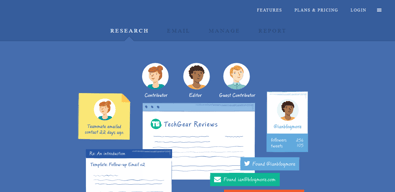
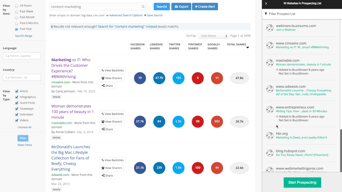
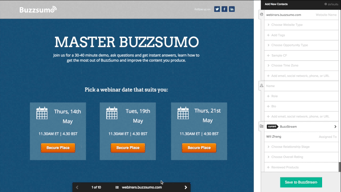
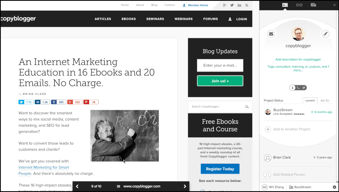
The ability to easily read, manage, create and compile data from campaigns has never been easier! Additionally, finding social media influencers is now enjoyable and fun!
The price is simply too much, perhaps discounts for non-profits or military institutions.
Being able to build a social media program by finding influencers.
I love the fact that you can customize email templates. You can use this for link and outreach building and it works perfectly. With the customized email template, you can save it and use it later when doing a quick email. It is a very fast and easy program and I wouldn’t use anything else!
The only real problem I have incurred is that the company is very slow at responding to my emails when I have a question or problem. If they were to fix that then it would be an A+ company.
As stated above, it’s very quick and easy, especially with the templates that you can save. They have a Google Chrome extension that just makes it even faster! Super intuitive.
I love that buzzstream allows me to keep my contact list up to date and growing so easily! The email templates are spot on and I love tracking my clients’ reactions to our news!
I like that I can track projects and contacts, but I wish I could set more automatic response situations
I am able to track client history and progress, as well as keep track of clients as our schedules change throughout the year

BuzzStream works for anyone that is working in the SEO field! It has literally saved me hours of time and is my go-to tool for all link building needs. The speed that I'm able to research a site, save the key information and launch a pre-crafted email is head spinning (In a good way)! This is one of the SEO tools that I can't live without--it makes link building and link tracking a whole lot easier. BuzzStream likely wouldn't be a good fit for anyone that isn't particularly working in the SEO field. I can't imagine this would replace a dedicated email tracking system or be used to send email drips.
Not much of anything. I’ve enjoyed the platform for the better part of 2 years
PR & Marketing
It's easy to navigate and figure out for any level of tech user, the customer service is always responsive and supportive,
I dont like the way the features are set up and options are hard to find
Streamlining marketing techniques, really good for reaching new adueinces
I used this software to promote our products and evolve our sales base, this software made it easier to make connections with other brands and find customers
expensive software, wish I could take this home with me!
we were having a hard time getting started as a small company, this software took all the guess work out of advertising and helped our product take over
he usado buzzstream por un par de años para amplificar mi contenido y me ha estado tratando bien. Las herramientas son fáciles de aprender y la gente entiende cómo funcionan rápidamente cuando tengo que capacitar a nuevos especialistas en marketing. Las analíticas van bien cuando se trata de aperturas ... no es perfecto pero cumple su función. Me gusta poder usar las plantillas cuando hago muchas campañas, eso funciona bien. Integraciones en el futuro?
Buzzstream - ¡POR FAVOR OBTENGA MEJORES DATOS! Muchos de los correos electrónicos que envié no son leídos ni respondidos. A menudo están robando una dirección de correo electrónico general. Me encantaría que ustedes rasparan la página individual y no solo el dominio. Esto me permitiría ser mucho más específico con mis mensajes. ¿Me estoy perdiendo algo cuando trato de hacer eso? Por último, me doy cuenta de que todos los correos electrónicos se envían directamente a través de mi dominio / IP. ¿Ofrecen algo que me permite redirigirlos a través de un alias diferente o algo así? Si hago suficiente alcance, me arriesgas a ser incluido en la lista negra por enviar spam a personas
he usado buzzstream por un par de años para amplificar mi contenido, hago muchas campaña, crear y usar plantillas de correo electrónico y personalizarlas...
Makes it easy for links and communication.
There are quite a few processes to follow, but I don’t hate it.
easier communication between people on websites.
I like how simple BuzzStream is.and how I can easily do my P.R work.
I dont really dislike anything about the way it performs.
I can track how I do my work

Send outreach emails, create templates, schedule follow ups, document results, get regular reports all in one place. This tool makes your SEO outreach more organized and easier.
Customer support can take some time to respond to queries.
Having one centralized tool for reaching out to prospect sites.

Overall the best quality about buzzstream is the chrome extension. You can quickly pop that open to record a website in the Buzzstream database, and from there you can quickly send an email with a pre-saved template. This makes outreach ridiculously fast.
I don't think Buzzstream accurately records backlinks from websites and who is opening your emails. I have had multiple instances of people responding to my emails even when Buzzstream says they were never opened. I also want a way to sort emails by people who have viewed the email and by people who haven't.
I am able to quickly send email outreach to build backlinks for our company's website. I love the fact that all of my outreach is stored in one place and I continually get reminded to follow up after I send emails.
It has everything you would need to monitor contacts and people you've reached out to.
Though it is very easy to personalize, you cannot send bulk emails at once.
Simplifies and streamlines the outreach process of content marketing.
Manage contacts and websites across teams to build and manage relationships. BuzzStream is essentially a CRM with SEO/PR focus that will tracking links. Link tracking is an amazing feature. I worked at an agency and in-house and this feature was critical for both roles. Link tracking would enable to monitor when a link is live or lost. Links can be attributed to projects for easy reporting. Support is great. Paul and his team are very responsive and they roll out updates and new features on a regular cadence.
Buzzmarker, which is a Chrome plugin, can be slow at times. The Buzzmarker tool is how BuzzStream knows what specific URL to monitor for links. Honestly this is me nitpicking as, because the rest of the tool is great. I also wasn't a fan of sending form emails through the tool, this enables correspondence through the tool with prewritten emails and lets users track emails more closely. I prefer to send more personal emails myself.
Scaling linkbuilding, PR, and promotions at an agency and in-house. Preventing overlap from people reaching out to the same website and/or person. Track links and mention with showing ROI.
The Outreach feature is probably my favorite thing about Buzzstream. It allows you to add contacts to a project and seamlessly email each person with a template and/or personalized message. We all hate spam, and our team loves that Buzzstream allows us to efficiently pitch to the media in one window while still giving room to keep things personal with our contacts. Plus, Buzzstream keeps track of how many times your email was opened and notifies you of any responses. It's a seriously great way to keep track of who is talking to who and make sure team members aren't stepping on each other's toes.
My main qualm is with the reporting system. I send link reports to clients regularly and wish there was a way that my custom export could be saved so I don't have to deal with 18 fields of info my clients couldn't care less about, and so I don't have to click the same few boxes each time. Also, their ranking system is a bit outdated. As of right now, you can sort links by Page Rank (which is basically useless for my client's needs) but Moz Domain Authority is unavailable. I've talked to the Buzzstream team about adding the feature multiple times, but they say they're busy with adding other features and will address later. Not sure when "later" is, but I would love to see that addressed sooner.
Before we switched to Buzzstream, we were working on a super outdated spreadsheet system that made it hard to keep track of our outreach efforts. Buzzstream has allowed us to at least triple our outreach efforts because of the ease of finding old contacts through their tagging system and adding new ones through the Buzzmarker and prospecting tools.
The user-friendly design of Buzzstream helps us scale to new users with little training. Our team is able to manage large projects in little-to-no time. Also, installing click scripts enables us to utilize a large database of contacts without constant supervision.
There are a limited number of custom fields that we can use when issuing variables. It limits how robust our contact information can truly be. Also, I share our contact list with colleagues and it's easy to lose information. I'm not sure how the loss occurs, but we're looking into it.
We are using Buzzstream to create new Marketing relationships and manage existing ones. This is huge for us, as our business does not currently have a CRM system in place that our marketing team can adopt.

I came to BuzzStream after searching for an ideal influencer marketing tool to use for my platform. In short, we're searching for influencers to create content for targeted distribution as an agency. The beta version of the Discovery Tool is nothing short of incredible. You can target writers by any keyword, and each writer's publication history, social media activity, follower interaction rate, and influencer reach is listed. I've been using it for a few weeks and have already seen a 40% jump in our CTR on sponsored content.
So far, there's not much to dislike. You can use a lot of the tools for free, which is obviously incredibly convenient for a small business. I'm eager to try out the paid platform with my extended marketing budget in 2016.
BuzzStream has solved a huge problem area for us. Rather than searching manually for writers, BuzzStream Discovery brings these writers to me. HUGE help.
There few things that I like: - great search filters - detailed database of performed searches (meaning I can tag saved results the way I want, make notes, share with others) - easy to use outreach feature, which keeps track of the whole communication cycle - reporting
Sometimes too many results to go through
We wanted to promote our content as much as we could to help people find our product, which we believe would be extremely beneficial for them. By connecting with others we realized how many of our contacts were happy to hear from us, and how our content is much better by supporting each other.
I like the ability to track contacts and sites across multiple projects. I can have one parent project with several other initiatives going (brand mention monitoring, link monitoring, outreach progress, etc.)
Sometimes it fails to show updates when someone emails back. I often have to login to my email account (outside of Buzzstream) to make sure that I am responding to the current email. Also, logging back into Buzzstream can be a hassle.
Having Buzzstream has made outreach and monitoring a lot more efficient for us. It is a easy tool to help consolidate so many projects into one platform.
BuzzStream does a great job at tracking your history of communication with contacts and makes it easier for PR professionals to keep track of relationships they've built. If you have a large team working on outreach, the history feature is key to avoiding stepping on each other's toes. Being able to see a contact's social media footprints is an added bonus! The BuzzStream team is an absolute pleasure to work with and have been extremely receptive to our company's needs. If you're looking for the best outreach tool out there, this is it!
Like with any systems, there is always room for improvement. It can take a little while to get the hang of BuzzStream, and you need to spend the time to master it, but once you do, there's no turning back.
We are trying to build our own comprehensive database of contacts for outreach and BuzzStream is helping us streamline this process quickly and effortlessly.
BuzzStream helps us stay organized and maintain transparency between our growing team. We love using BuzzStream to simplify the data collection process in the list building phase of our work. The BuzzBar automatically pulls contact information, and social pages to minimize time spent on pre-outreach research. Depending on the complexity of of our current campaign, we may reach out to hundreds of community members, which can be burdensome with typical email systems. BuzzStream's relationship field helps us stay organized in tracking each outreach round, submission and link-back statuses within each project.
The BuzzStream system has few issues, but when we find them, the the support team responds quickly and promptly. They are incredibly responsive and in many instances they have taken our feedback to help make the product even better. I appreciate that they are not perfect, but are always striving to improve the user experience.
BuzzStream is an essential part of our every-day workflow and has enabled us to scale our efforts efficiently over the years. BuzzStream allows our content and outreach teams to work independently and collaboratively to research topics, build relationships within relevant verticals, develop content and perform effective outreach. By being able to manage multiple lists, view the current relationship with people in a particular list, and listen in on various conversations via our project lists, we can better serve our partners in helping them reach a wider audience via creative content and innovative placement.
Though the Buzzstream team is quite small, they are consistently pleasant, responsive to feedback and curious about our company's needs. I trust that if we ask for a feature to help us do our jobs better, they'll be receptive to it. We train all of our staff members on this product because it plays such an integral role in our outreach process.
I wish certain fields that require more frequent updating -- contact email address, for example -- were easier to update without opening the entire edit tab.
We're trying to transition from transactional linkbuilding to long-term relationship building. Some of Buzzstream's newer products and features, which should help us assess the value/context of certain thought leaders, will help us ease that process.
BuzzStream is probably the only dedicated search, prospecting, and CRM tool available for link building outreach and partnerships. I love the way they have focused on the smallest details in the overall link building process of various organisations and attempted to solve thise problems in a very practical and pragmatic manner. We have taken 4 seats on the tool and I really like how multiple people can manage their own leads or assign it to someone else to avoid confusion and contacting the same people over and over again. I also like how it seamlessly syncs with our email accounts to show all the previous conversations to everyone in the team and keep them updated about the leads. The inbuilt bulk outreach system is amazing and works pretty well. Overall, I like using BuzzStream as an end to end tool for outreach and link building activities.
Even tho its packed with a bunch of useful features and integrations with other tools like Hunter, BuzzStream can sometimes feel buggy and complicated. Even the most simple task can take a while to complete and that can be a turn off.
We are using BuzzStream for our outreach and link building activities
Setting up templates is nice and simple and the dynamic fields are very useful. Once a template is set up, it is very quick to start outreaching, and the feedback on email opens and clickthroughs is almost instant. Adding contact details from websites with the Buzzstream Buzzmarker is very useful and easy to do. I like how you can share templates with team members and how easy it is to move prospects between lists and users.
As a relatively new starter to outreach, I find the interface quite hard to navigate in terms of remembering how to get to different parts of the tool, but that may get better with time.
Buzzstream is great for allowing me to contact large volumes of prospects quickly. The instant feedback on open and clickthrough rates enables me to tweak my template and gauge reception and interest. Showing outgoing mail and incoming replies from within the software is a fantastic way of keeping correspondence clear and organized.
It’s simple to create lists of sites, blogs and influencers to contact. It makes it easy to manage outreach projects whilst working with other members of the team. Templates, tagging and automation make it easy to speed up email contact whilst maintaining a personal approach.
Sometimes it can be tricky to keep track of which specific contacts you want to use for bigger sites on any given project. If there are multiple contacts for a website, details about who’s who isn’t always obvious and it can take time to seek out the most relevant contact.
It benefits a busy outreach team by giving visibility on all projects across the team. It helps improve our approach by providing analytics and template testing.
The organisation setting are very good and make your workload way easier to find and analys.
The influencer platform needs to be implemented as for certain country is not working properly
I'm using it for organise , plan and analyse all my campaigns
With Buzzstream, it's easier to reach influencers where you can market your product. It is also easier to outreach websites to get links if you are into offline SEO. All you need to do is open the chrome extension and mark your potential website to be added on the Buzzstream database, then all you have to do is send out your template. Easy right!
Twitter is the only available option for the Discover Section which is quite frustrating. And also, more detailed steps/tutorials should have been added so I would not have messed up some things when I am already sending out those outreach emails.
Finding potential websites for link building is quite faster and finding appropriate influencers to promote our products is no longer troublesome.
The fact that it not only tracks your day to day emails and such but it also helps keep track of your twitter interactions.
There isn’t much that I dislike about the company I mean the plans are affordable and easy to use so what more can you ask for.
The problems we have had are that we can’t get to everything at once because we either don’t see a notification or just don’t have time, buzz stream has brought those notifications to the front so we are able to get to everything in a timely manner.

The ability to keep track of who my team has reached out to and keep notes on our history with various sites. And to create collective outreach lists for content distribution.
I don't enjoy the email feature, it doesn't flow well with my individual Gmail account.
Content distribution - helps us distribute more efficiently and not double up on work.
I like the ease of BuzzStream and the personalized relationship-building approach that it has.
I do not like how not as many people know about BuzzStream
I have realized the ease of BuzzStream is a very good approach on making sure everyone is in line with marketing management
This is great for placing your specific preferences in and then organizing your social media into categories that are unique to you.
As like with all of these, they can use faulty algorithms to assess your preferences and this leads to weird stuff showing up on your feed, but this is rare and not a big deal.
Organization and preference based social media streamlining