

Unclaimed: Are you working at Contractor Foreman?
Contractor Foreman Reviews: 4.5/5 — Highly Rated
Contractor Foreman is a cloud-based construction management and estimating suite for contractors. It combines project management, estimating, financials, field workflows (timecards, daily logs, inspections), document/photo management, permits, client/subcontractor portals, resource and equipment tracking, and reporting—targeted primarily at small and mid-sized contracting businesses.
| Company | Contractor Foreman |
|---|---|
| Year founded | 2017 |
| Company size | 51-200 employees |
| Headquarters | Forest City, North Carolina, USA |

| Capabilities |
API
|
|---|---|
| Segment |
Small Business
Mid Market
|
| Deployment | Cloud / SaaS / Web-Based, Mobile Android, Mobile iPhone |
| Support | Chat, Email/Help Desk, Knowledge Base |
| Training | Documentation, Live Online, Videos, Webinars |
| Languages | English |
Contractor Foreman Pros and Cons
- Broad feature set covering estimating, field and office workflows at competitive price points.
- Transparent pricing with annual price-lock and 30-day free trial.
- Extensive customization (templates, numbering, custom fields, roles).
- Integrations with common tools (QuickBooks Online, calendars, Zapier) and field-focused features.
- No full offline mode—requires online connectivity for most field work.
- QuickBooks Desktop integration support ended Jan 1, 2026.
- Can be overwhelming for very small operations due to breadth of features.
- Some reports of slow load times, bugs, and limited reporting customization depending on plan.
Contractor Foreman’s Basic plan is $49 a month for exactly one user, and the next plan up is $105. So adding your second person costs $56 more a month for one extra seat — a 114% increase — and your effective rate per user goes up, from $49.00 to $52.50. It only starts falling once you fill the band: three users on Standard is $35 each, and fifteen on Pro is $14.73. The volume curve above that point is genuinely good, one of the better ones in construction software. The step from one user to two is the most expensive move on the whole ladder.
- What it is: All-in-one construction management — projects, financials, scheduling, daily logs, CRM.
- Best for: Small and mid-size general and trade contractors, especially at 8–15 users.
- Pricing: $49–$332 a month on annual billing, banded by user count. Verified August 2026.
- The honest catch: You pay for the seat band, not the seats, and Basic is annual-only.
What Is Contractor Foreman?
Contractor Foreman is construction management software for contractors who are not Procore-sized. It covers a genuinely wide surface — projects, opportunities and bidding, scheduling, punchlists, work orders, permits, daily logs, inspections, service tickets, a client portal, CRM and to-dos on the project side, plus financials, people and document management.
The pitch is breadth at a small-business price, and its own customer quote makes the point better than its marketing does: “This software packs more punch than you would expect at its meager price point.”
It serves general contractors, subcontractors, trade contractors and service contractors, and the Findstack listing carries 204 user reviews at 4.5 out of 5 — a solid sample and a respectable score for a category where implementation frustration usually drags ratings down.
How Contractor Foreman Works
There is one meter: how many users you have. Every plan carries the same core product; what changes is the seat cap and a short list of service inclusions.
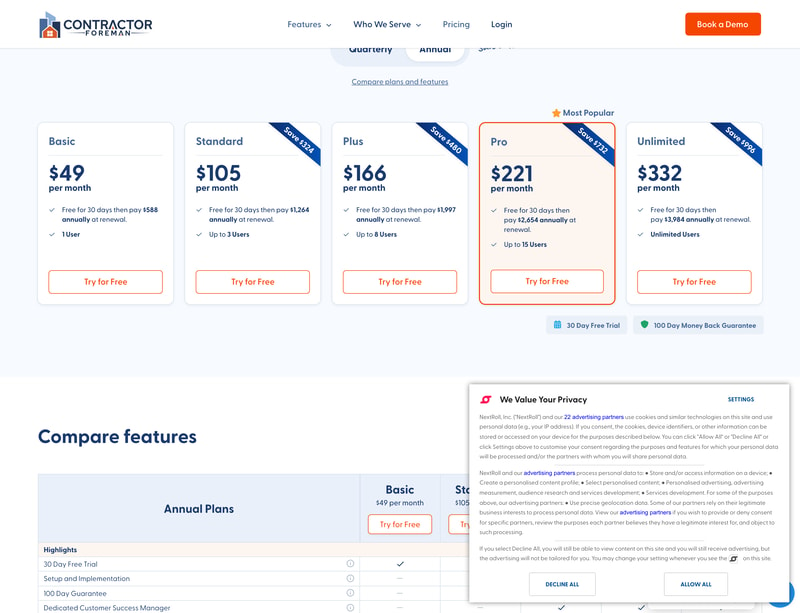
| Plan | Annual/mo | Billed annually | Users | Quarterly/mo |
|---|---|---|---|---|
| Basic | $49 | $588 | 1 | not available |
| Standard | $105 | $1,264 | up to 3 | $132 |
| Plus | $166 | $1,997 | up to 8 | $206 |
| Pro | $221 | $2,654 | up to 15 | $282 |
| Unlimited | $332 | $3,984 | Unlimited | $415 |
Every plan gets a 30-day free trial. The service inclusions ladder separately:
- Free private training sessions: none on Basic, 2 on Standard, 3 on Plus, 4 on Pro, unlimited on Unlimited.
- Setup and implementation: not offered on Basic or Standard, available (as a paid service) on Plus, and free on Pro and Unlimited.
Contractor Foreman Pricing
You pay for the band, and the first step is the worst

Because seats are banded rather than metered, your real rate depends on how full your band is:
- 1 user on Basic — $49.00 each
- 2 users on Standard — $52.50 each (worse than being solo)
- 3 users on Standard — $35.00 each
- 4 users on Plus — $41.50 each
- 8 users on Plus — $20.75 each
- 9 users on Pro — $24.56 each
- 15 users on Pro — $14.73 each
- 16 users on Unlimited — $20.75 each
Two things follow.
The 1-to-2 user step is uniquely punishing. Everywhere else on the ladder, crossing a band boundary still leaves you better off per user than you were at the previous band’s ceiling. Crossing from Basic to Standard does not: you go from $49.00 a user to $52.50 for the privilege of adding one person. Every subsequent boundary — 4th user, 9th user, 16th — lands you cheaper per head than the plan you left.
Filling your band is worth real money. At 8 users, Plus works out to $20.75 each; at 4 users it is $41.50 — exactly double. If you are sitting at 4, 9 or 16 users, you are paying for a band you are not using, and the sensible move is either to add the people or to check whether you genuinely need those seats.
At full capacity, the curve is excellent: $49.00 down to $14.73 is a 3.3× improvement, and $14.73 per user per month for full construction management software is competitive with anything in the category.
Basic is annual-only, and it is missing the guarantee
Contractor Foreman displays two badges under its plan cards: “30 Day Free Trial” and “100 Day Money Back Guarantee.” The second one is a genuinely strong commitment — a 100-day refund window is longer than most software offers and far longer than a quarter.
But the comparison table further down the page tells a different story per plan. In the Basic column, the 100 Day Guarantee row shows a dash, as do Setup and Implementation and Dedicated Customer Success Manager. Only the 30-day trial carries a tick.
That matters because Basic is also the one plan with no quarterly option. Standard, Plus, Pro and Unlimited can all be paid quarterly; Basic is annual or nothing. So the solo contractor — the customer least able to absorb a mistake — is the one asked to commit $588 up front with only a 30-day trial as protection, while the larger customers get both a quarterly option and the 100-day guarantee.
The badges under the cards do not distinguish. If you are buying Basic, confirm the refund terms in writing before you pay for the year.
The annual savings are real and correctly stated
Comparing the annual monthly rate against the quarterly one:
- Standard $132 → $105 is 20.5% · Plus $206 → $166 is 19.4%
- Pro $282 → $221 is 21.6% · Unlimited $415 → $332 is 20.0%
Contractor Foreman prints a dollar saving on each card rather than a percentage — $324, $480, $732 and $996 — and every one of those checks out against the quarterly rate to within a few dollars of rounding. Stating the saving in dollars is also more useful than a percentage for a contractor budgeting a year, and it removes the “up to X%” ambiguity that most vendors trade on.
What actually decides your cost
- Your headcount against the band boundaries — 1, 3, 8, 15 — which is the only real variable.
- How full your band is, since a half-empty band doubles your effective per-user rate.
- Billing cadence, worth about 20%, and unavailable on Basic.
- Whether you need setup and implementation, which is a paid service on Plus and free only on Pro and above.
- How much training you want, at 0, 2, 3 or 4 free private sessions depending on plan.
- Not features. The functional product is the same across the ladder; the plans gate seats and services.
Who Should Use Contractor Foreman
Contractor Foreman fits a small-to-mid general or trade contractor with somewhere between three and fifteen people who wants one system instead of a whiteboard, a spreadsheet and a shared inbox. The feature list is genuinely broad for the money — daily logs, punchlists, permits, inspections, service tickets and a client portal are all things that usually cost extra elsewhere — and at 8 or 15 users the per-head cost is very hard to argue with.
It fits badly for a two-person operation, where the band structure delivers its single worst rate. If you are a solo operator planning to hire, be aware that your software cost more than doubles on the day you do. And it fits badly for large or complex commercial builders, where Procore and Autodesk exist for reasons that become apparent above a certain project size.
Honest Pros and Cons
What works well:
- Very broad feature set for the price — project management, financials, CRM, daily logs, permits and inspections all included.
- The per-user curve at full bands is excellent: $49 down to $14.73, a 3.3× improvement.
- Annual savings are stated in dollars and are accurate — $324 to $996, all checkable against the quarterly rate.
- A 30-day free trial on every plan, with no charge during it.
- A 100-day money-back guarantee on the paid plans above Basic — unusually long.
- Free private training sessions included on every plan except Basic, scaling from 2 to unlimited.
- Free setup and implementation on Pro and Unlimited.
- 204 Findstack reviews at 4.5/5, a real sample for a category this specialised.
- Same product across the ladder — you are not paying more for features, only for seats and service.
What to watch:
- Going from 1 to 2 users costs +$56 a month and raises your per-user rate from $49.00 to $52.50.
- You pay for the band, not the seats — 4 users on Plus costs double per head what 8 users costs.
- Basic has no quarterly option, so a solo contractor commits $588 up front.
- The comparison table shows a dash for Basic on the 100 Day Guarantee, on setup, and on a dedicated CSM — despite the badge appearing under all the cards.
- Setup and implementation is a paid service on Plus and free only from Pro upward.
- No free tier — the trial is the only way in.
- Findstack has no construction management category, so this review sits under project management for want of a better home.
Contractor Foreman Alternatives and How It Compares
- Buildertrend and CoConstruct are the closest comparisons for residential builders and remodellers, generally at a higher price with stronger client-facing tools.
- Procore is the commercial-construction standard and an entirely different budget — the right answer above a certain project scale and overkill below it.
- JobTread competes hardest on estimating and job costing for small builders.
- Jobber and Housecall Pro are better fits if your work is service calls rather than projects.
- monday.com and ClickUp are the generic alternatives — cheaper per seat, far more flexible, and missing every construction-specific module (permits, punchlists, daily logs) you would then have to build yourself.
The honest comparison: Contractor Foreman competes on breadth per dollar, and it wins that comparison against most of the construction-specific field. Where it loses is polish and depth — the reason Buildertrend and Procore cost more is not that they do more things, but that they do the important things more thoroughly. Take the 30-day trial and test your actual estimating and change-order workflow, because that is where cheap construction software usually falls down.
The Verdict
Contractor Foreman does what it says: a lot of construction software for not much money, with an unusually honest pricing page — dollar savings rather than percentages, a 30-day trial, and a 100-day guarantee on most plans.
The structure is where you can lose money without noticing. Seats are banded, so your real cost is the plan price divided by the people you actually have, and the two worst positions on the ladder are being a two-person shop and being one user over any boundary. At 8 users on Plus you pay $20.75 a head; at 4 users on the same plan you pay $41.50.
Count your headcount and count it honestly, including anyone you will hire this year. If you are at 2 or 3, Standard is the plan and you should aim to fill it. If you are at 6 or 7, Plus is already good value and better still at 8. If you are anywhere near 12, Pro at $14.73 a user is the best rate in the lineup and worth stretching to.
And if you are a solo operator, read Basic’s fine print before you pay. It is the only plan with no quarterly option, and the comparison table shows it does not carry the 100-day guarantee that the badge under the cards implies. A $588 annual commitment with a 30-day trial is a reasonable deal — but it is a different deal from the one the badges suggest, and you should know which one you are signing.
FAQ
How much does Contractor Foreman cost?
Five plans, priced by seat band on annual billing: Basic $49 (1 user, $588 a year), Standard $105 (up to 3, $1,264), Plus $166 (up to 8, $1,997), Pro $221 (up to 15, $2,654) and Unlimited $332 (unlimited users, $3,984). Quarterly billing is available on every plan except Basic, at $132, $206, $282 and $415 a month respectively — roughly 20% more than annual. All plans include a 30-day free trial.
Which Contractor Foreman plan should I choose?
By headcount, and aim to fill the band, because you pay for the band rather than the seats. At full capacity the rates are $49.00 per user on Basic, $35.00 on Standard, $20.75 on Plus and $14.73 on Pro — but a half-empty band doubles that. Four users on Plus costs $41.50 each; eight costs $20.75. The one step to plan for is going from one user to two: that moves you from Basic to Standard, adds $56 a month, and briefly raises your per-user cost from $49.00 to $52.50.
Does Contractor Foreman have a free trial or money-back guarantee?
Both, with a caveat. Every plan includes a 30-day free trial with no charge during it. Contractor Foreman also advertises a 100 Day Money Back Guarantee on a badge below the plan cards — but its own comparison table shows a dash in the Basic column for that row, alongside dashes for setup and implementation and a dedicated customer success manager. Since Basic is also the only plan with no quarterly option, a solo contractor is committing $588 up front; confirm the refund terms in writing first.
Is Contractor Foreman cheaper than Buildertrend or Procore?
Substantially, yes. At 15 users on Pro, Contractor Foreman works out to $14.73 per user per month for a feature set covering projects, financials, scheduling, daily logs, permits, punchlists, inspections, service tickets, CRM and a client portal. Buildertrend and CoConstruct generally cost more and are more polished for residential builders; Procore is a different category of spend aimed at commercial construction. The honest trade is breadth per dollar against depth and refinement — test your estimating and change-order workflow during the trial, since that is where the price difference usually shows.
What do Contractor Foreman’s plans include beyond user seats?
The functional software is the same across the ladder — the plans gate seats and services rather than features. What differs: free private training sessions run none on Basic, 2 on Standard, 3 on Plus, 4 on Pro and unlimited on Unlimited. Setup and implementation is not offered on Basic or Standard, is available as a paid service on Plus, and is free on Pro and Unlimited. So the higher plans are buying onboarding help and headcount, not extra modules.

Its a very well thought out tool and easy to navigate and bulit for the trades in mined. Its tons of trading videos which make getting your team up to speed easy no matter the side as well as the chat tool to help with everything else.
No much to dislike to be honest, I wish I started instend of try "cheaper" options that pretty much wasted a lot of my time.
I used smartsheets a past comapny and when I started my mine company I knew I wouldn't make that mistake but needed up make news to save cost but it was a big mistake. We started with monday.com and thats usefull but i'm not sure for whom and recently whiched from using the Project fitures in QB which worked out but I thought it was always missing key features.
I cannot speak highly enough about the customer service I have received while setting up Contractor Foreman. Even before we decided to purchase, our sales person was phenomenal. He took time to answer my questions and spoke with me several times via phone and email all per my request. The Live Chat tool is invaluable as well as the private training sessions which allow me to save my list of questions and have them all answered at once. The reps are kind, share their ideas, the most patient people. I'm truly blown away at well they have taken care of me and helped me make this system work for my company.
So far, so good. There's not a single thing I would complain about other than having not found it sooner.
It's saving an incredible amount of our time. The flow from lead to estimate to project is seamless. They thought of everything.
The ease of use and the support from customer service.
The initial setup was a little cumbersome at first but with customer support, it was explained and resolved quickly.
Quicker more accurate estimation process.
The thing I like best about Contractor Foreman is the ease of learning and use. Along with the the responsiveness of the help team to assist you in anything you may need either through love chat or one-on-one trainings and group trainings.
I don't dislike anything about Contractor Foreman.
It's keep my projects organized and allowing me to manage my business better.
It checks many boxes needed for a construction company from Estimating/Preconstruction to an active project. It has many other management items like time card that syncs with daily reports and into your project costs. I tested about 10 softwares and this was not only the best for our company it was by far the best value. Their customer support is just that - very supportive.
Finding that sometimes it may be slow, and you may have a bug - they address it quickly but it is not perfect.
Fixing bugs as they are found and helping me understand the system better as well.
It is hard to choose one thing that I like the most so far. Each feature is so easy to learn and implement. Using the leads feature is not something I anticipated being a big win. BUT I was wrong. It has provided me with a quick and easy place to oragnize everythign BID related.
I wish that we could send and recieve signed waivers from our subcontractors.
Our former system was cubersome. CF is simple, quick and easily understood across our teams.
Contractor Foreman has all the bells and whistles you would want to successfully run your business.
I have yet to find a problem with the software that I did not like.
Contractor Foreman allows me to track a project from initial estimating to completion.
There are several, the flow process is simplified, tracking is simplified, keeping records of money out vs money in on a specific project, I could go on but you get it. this program offers everything you need in one package! I have been looking for something that will fit our small mom and pop business which is a specialty market and couldnt find anything that would either : A. fit our needs or B. Fit our Budget... After about 6 months of searching I just happen to run across the name and searched them out..... during those 6 months I was quoted by another company $13,000.00 per year for use of their program.... with CF, I get everything I need (same as the other) for 3k..... NO brainer And the "Trainers" are very helpful and take you step by step!!!
for the first few times it can seem a bit overwhelming BUT once you learn how to navigate it, its very easy
Record Keeping, Project tracking, data storage (photos/files) budgets..... the list goes on...
We have checked out a lot of software and spent a year trying and demoing software. Contractor Foreman is absolutely the best value. It is straightforward to use, it took very little setup time, and offers the flexibility and features we needed to run our construction projects that other software didn't have. The customer support is Amazing! Integration is easy. It is the only software we use to manage our projects from lead-in to managing and finalizing a project.
It does lack a few features that could make it smoother to use, but they are always updating the software. For example you can save all of your docs and pics, but it doesn't automatically save it to the master customer file. You also have to refresh the pages when you add new data.
Contractor foreman solved keeping track of out process. keeping track of documentation. CRM, project planning, bidding, estimation, safety meetings and documentation. We were able to get rid of 5 software when we signed up for CF.
Contractor Foreman is very affordable. This program has been easy to learn. If at any time I needed help support was always available to help.
Truthfully no dislikes. I started using this program in place of paper and pencil so it is a huge upgrade.
Project organization

So far it has been super easy to navigate and start-up quickly!
Nothing yet, just started using but will come back and add if anyting.
Timesheets, Paper, Work Orders and Job Costing

We use CF on a daily basis, we originally purchase it for time cards witch is a great feature it tracks locations, can easily switch employees between projects and tracks injuries as well. We used only this feature for the first year and when we decided to transition to fully use CF for our company it was extremely easy to implement. CF is always adding new features to help your business run smooth. But my favorite and best feature is how adaptable it is to your own business. All modules can be set to your companies preference.
The integrations with other applications are still a work in progress, but they seem to be improving very quickly. Customer support is very easy to contact and they help you navigate thru the issues with ease or at least with very quick response of what you can and can not do or the reason for the issue happening.
If it weren't for CF we would still be managing time cards by written or verbal confirmation from our PM. We have been able to track all expenses from Payroll to COGS and now with the ease of comunicating with our accounting software we don't have to input information twice.
I like that everything is in one platform. I can start with estimating and guide the project all the way to final inspection. Support has also been amazing. Access to live chat is priceless
It's a bit buggy and laggy at times. Thankfully the majority of the time it works, but I do like the feature where I can report bugs or ask customer service a live chat question.
Before Contractor Foreman I was using several programs, including Excel, for estimating and bidding. Everything is now in one place. I can keep all signed contracts within the platform and send bids directly to subcontractors. Since I can send proposals to cliens as well, I LOVE the feature where you can choose how much (or little) information to send on a bid.
Ease of use is astounding---the user interface is very intuitive
There are no downsides of Contractor Foreman---as I have tried several other systems
This software is grat for managing daily tasks
There are so many great things about this software. You can set up a client portal on your website so that your customers can view their project (and you can upload all the pictures to there so you're not trying to shuffle them through email) You can customize your logos, generate estimates & invoices, it integrates with quickbooks (which I haven't gotten to yet but hope to soon) I very much like how responsive everyone is- There's a live chat button, or you can schedule a 1 on 1 if you need help with anything- I've seen some of the other contractor software my partner used to use, and this is way better, and much more reasonably priced.
I haven't found fault with the software at all. If I have an issue I just ask for live help, and if it's something more complicated they will video call you to get you what you need. I do find the scheduling confusing but I think that's just because I need to watch more videos and play with it more.
-Provides an easy way to share pictures between multiple people -Good way to make lists and keep track of customers
I like everything; you can manage all your projects. I love how it shows how much you make on a project, how much you lose, track your receipts, etc. It's also remarkable how when you job code or put anything in Contractor Foreman, and it sinks with our Quickbooks.
Sometimes it is slow to navigate, and I don't like how when you save something, you have to refresh or go back to where you started. I wouldn't say I like there is no contact number. You have to do everything online to answer any question.
I love how they can answer any questions you have; it's great they have one on one training or the question box, or if you want to get experience learning the software, there are training classes
Simplicity and ease of use. Very intuative and not overly complicated to get started. The price is also very affordable. Most comparable platforms are overpriced.
some of the menus can be repetative and hard to follow but once you get familar with the program and start using it, it becomes natural and easy. The speed of the menus can also be slightly improved, but overall its very good.
Managing day to day activities of my construction business. uploading quotes, estimates, invoices. It all stays in one place and organized. Customer budgets.
I have only been using contractor foreman for just over a week, I have had one training session and I have already logged my materials and done my first quote!
So far I haven't found anything that has caught me out
Quotient with a paper trail! No more paper it's all on here
I've used many other project mangement software programs but nothing seems to compare to the customization and overall processes in place at Contractor Foreman.
I am only in the early stages of working with Contractor Foreman but every time I think about a process I need for my business, CF has it. The difficult part is setting everything up to suit the business, luckily CF has many options for support and I havent run into any issues yet.
Contractor Foreman is helping me as a new business owner, with oraganization and fluidity on all systems. CF is like an assisant that I dont have to hire! Saving time and money along the way.
It is very easy to use and learn. Estimates and billing are simple.
The phone app could be improved and be more useful. I think that will get updated at some point.
Managing estimate, billing, subcontractor paperwork, and document storage.
Contractor Foreman is a fantastic tool for Project Management. A comprehensive software with built in workflow helps orgnazations like ours get up and running quickly. Highlights include unlimited document storage and integrated chat tools. Bravo CF
No real downsides, but an integrated email client would be a welcome addition. Currently we can only SEND email with related document attachments from within a project, which is good. Being able to receive email related to the same would be awesome.
Correlating and gathering every aspect of a Project is essental. Ensures eveyone has access to the information the require and with the Customer Portal access, customers can login and see what the need.
I needed a program that would allow me to keep track of payment sent to Subcontractors, withouth having to be integrated with our accounting software. This program does that and so much more. I don't know why anyone would choose anything else.
The only thing I've found so far, that is a down side- Is the limited amount of templates that can be used. There is a fix for this though- You can use the document writer to generate the forms needed. So it all comes out in the wash.
Contactor Foreman gives you one place to house all aspects of Construction management. I don't have to go anywhere else to find anything needed. Bills, Invoices, letters and emails are all there at my fingertips.
Contractor Foreman has so many customizable options that allow for flexibility in how you you want to manage your projects. The price point is incredibly afforable for businesses of any size. I have reviewed multiple similar systems over the past 18 months to find something that works well for our business and this product checks all the boxes.
The thing that I like least about this product is also one of it's greatest strengths. When you open up Contractor Foreman there are so many options for modules to look into and use. It can be overwhelming but there is always someone to help and once you know how to navigate it becomes very user friendly.
Our business has mainly been very paper oriented. As anyone knows, losing a piece of paper is so easy. This product will replace a good chunk of the paperwork that myself and the field technicians do on a daily basis which will allow for a more effective work flow and less loss of paperwork, which overall is going to save us money.
The best part is the very, very quick customer service and willingness to help!
I really don't dislike anything about it however, I'm not using it for estimating and feel it's been pushed a bit.
Keeping everything in one plaace!

Ease of Use. Easy to set up. Lots of unique features.
There is no ability to send off invoices etc for electronic signatures
It allows our company to stay profitable by properly estimating projects and tracking spend
Contractor Foreman integrates all the best features we need to manage our projects efficiently! We used four separate stand-alone applications to perform the tasks that Contractor Foreman now does. We have saved countless hours of administrative time, not to mention higher productivity through accurate job costing and scheduling.
There needs to be more customization options for Estimate and Invoice templates.
Using Cost Codes has been a game changer for our business. The ability to estimate, track, and invoice our jobs correctly has added clarity to a previously murky picture of key project metrics. From the initial estimate to the final invoice, we have a clear picture of where our resources and money are going, as well as where there are coming from!
Contractor Foreman surpasses BuilderTrend as the ultimate software for construction management. With its user-friendly interface, comprehensive project management capabilities, exceptional mobile app, collaborative communication features, and efficient reporting system, Contractor Foreman has established itself as the undisputed leader in the industry. If you're seeking to streamline your construction management workflow and elevate your business to new heights, I wholeheartedly endorse Contractor Foreman. It has transformed my business and is sure to do the same for yours. The software offers remarkable flexibility and an array of built-in features that make it incredibly user-friendly. After experiencing frustrations with SalesForce and Buildertrend, discovering Contractor Foreman was a game-changer for us. It effectively solved numerous challenges we faced, and the cherry on top is its affordable price. Contractor Foreman encompasses all the necessary features and functionalities tailored to our business requirements. Switching over was an obvious choice, and we couldn't be happier with the decision.
The initial setup process can be time-consuming and requires a significant amount of trial and error to ensure proper configuration. Unfortunately, there is a lack of comprehensive support or established best practices for seamlessly integrating the different modules. Additionally, the available support options from Contractor Foreman (CF) are limited and often slow in their response. While they do offer weekly training sessions for both basic and advanced users, as well as a limited number of one-on-one training sessions, chat, and email support, it appears that users are primarily responsible for setting up the system effectively on their own. On a positive note, the integration with QuickBooks Online is exceptional. However, the third-party setup company, Smart Business Solutions, could benefit from more extensive experience in their field. Their approach mainly revolves around trial and error, rather than demonstrating expertise in addressing the specific challenges users may encounter. Support primarily relies on email communication without the option for screen sharing, and the weekly training calls often focus on generic topics rather than delving into individual issues. While there are excellent instructional videos available, they may not address the specific intricacies of your business practices.
We are immensely satisfied with Contractor Foreman, as it has met the majority of our expectations. While there are a few minor quirks and room for improvement, particularly concerning purchase orders and their alignment with corresponding sections in the estimate, our overall experience has been overwhelmingly positive. We are genuinely delighted with the platform's performance. Zapier has proven to be a user-friendly tool, and one significant benefit for us was seamlessly integrating the website lead form with Contractor Foreman through Zapier. This was a game-changer as it allowed us to utilize our customized form and capture additional information from potential leads. We eagerly anticipate further advancements in this area to explore enhanced marketing opportunities. However, it's worth noting that the existing range of fields available for data synchronization is somewhat limited, and we hope for expanded options in the future.
Vast features cover pretty much anything you can think of when running a contractor business
The Only downside is with anything as vast as this it does come with a learning curve but well worth it.
Keeping track of projects and estimates.
Customization and customer service. CF allows you to customize almost every model to cater to your business, regardless of size. The team at CF is more responsive than any other software we have used. You can have a live chat with a real person in seconds if you are having a difficult time figuring something else.
Its slightly buggy, but not a big deal. Occasionally I will run into a problem where the software is giving me inaccurate information. I report the bug and it is fixed. It's never a major problem. For example I wanted all of our dates to be formatted as month/date/year, but the software was publishing dates as date/month/year. I reported it and it was fixed in less than 24 hours. Haven't had a problem since.
In the past we used multiple programs to run accounting, project management, scheduling, Gantt charting, etc. Now we use just CF and it does this all for us. I looked into some of the industry leading software but that was on average $6k-$12k per year. This is a fraction of the cost and works great for us.
The support is second to none. Helpful videos in easy to get to places, classes, chat and more.
Not able to change type size of menus, etc. within the app.
We wanted an interface for our team to connect, along with a portal for our clients. This provided both, and far more.