

Unclaimed: Are you working at Float?
Float Reviews: 4.2/5 — Solid Choice
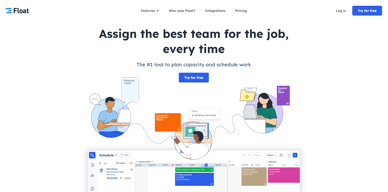
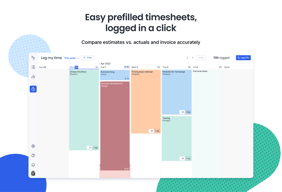
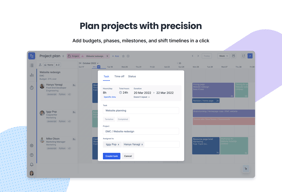
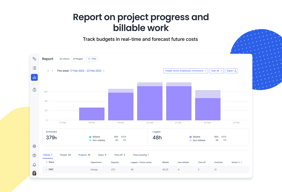
Float is one of the best resource management tools for robust scheduling and time tracking, trusted by companies like BuzzFeed and Deloitte. Project scheduling is easy with its click-and-create and drag-and-drop interfaces and users can set tasks easily and assign them to the relevant people/teams. Float’s scheduling tool also is simple and visual, giving you a clear picture of your team’s workload, as well as project progress all from a single dashboard. With Float, you can easily plan, manage and monitor projects and teams. Time tracking is simple, task management is streamlined, and the platform provides accurate forecasting based on gathered data.

| Capabilities |
API
|
|---|---|
| Segment |
Small Business
Mid Market
Enterprise
|
| Deployment | Cloud / SaaS / Web-Based, Mobile Android, Mobile iPad, Mobile iPhone |
| Support | 24/7 (Live rep), Chat, Email/Help Desk, FAQs/Forum, Knowledge Base, Phone Support |
| Training | Documentation |
| Languages | English |

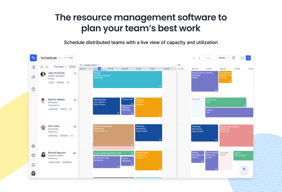
Very nice and thought-through interface. Great functional. Allows tracking and managing work load and capacity of a team like my design unit. There is integration with Outlook calendar.
I wish there was a bucket view like: Backlog-inProgress-inReview-Done/Approved. Also, I think Float functions would benefit from having some project naming automation based on mask: Number_Client_ProjectName.
Before Float it was impossible to plan my team's time especially long-term. With Float I know who's doing what, blocked capacity for scheduled projects, current capacity when a new project comes in, milestones, deadlines etc at a glance.
Ease of access. User Friendly. Dynamic updates. Team/Org View helps a lot with reporting the capacity and utilization of the team members
Mobile app needs to be faster, and bug fixes, as sometimes it crashes or stops responding
It helps big teams to control demand management, and capacity planning

It's incredibly easy to pick up and start using, for both team members and managers.
I would love to see the software grow into a stage where it can manage more aspects of projects.
Float is how I see my daily schedule and know what projects I'm assigned to.
Float is one of the best tools in the market to handle project budgets and workforce. It also has a very intuitive UI.
Sometimes it is very slow for few minutes.
I use Float to schedule budgets and workforce, with Float I can have everything under control
It was so easy to implement and use. No more using Excel and entering in multiple cells all the time. Additionally, the people who wouldn't use Excel to see their schedule use Float! We also love that it tracks dollars and resources by project. It's giving us visibility in to our work we haven't had before. To see that you are on budget based on team hours is amazing. We also love that we can see how booked our team is at any given time. It helps us allocate resources and shift projects as needed when things get busy. The fact that so many people in our company immediately jumped on board says a lot about the software. We searched and tried a lot of different products before finding and implementing Float. We would highly recommended trying it for your team. It's really affordable and can be started up very quickly.
I wish the program could automatically build schedules using an end date like Microsoft Project but the information is really easy to enter into Float. We do wish Float would come out with a project management software that's as easy to use as their scheduling software!
Float is helping our company adjust pricing on projects. We're learning a lot about how much time is being spent on projects, something we haven't been able to easily track until now.
Integration with Asana Drop and Drag functionality Capacity plan reporting Simplicity of use eg: Filtering and search
I'd love it to automatically map the dates from Asana directly on the board so that you don't have to work with them dual screen. But its not a deal breaker.
Visibility and the ability to capacity plan across all of our Asana boards and workflows. Incredibly powerful for our business at the rate that we're scaling.
Simplicity of the UI. It handles the important thing which perfection. Also it's very easy for a beginner to get used to the UI of it,
At this point I dont dislike anything in particular and its been over a year.
In my company it helps manage everyone's working hours.
Organizing the project structure by using a hierarchy based on phases and tasks has created a consistent workflow between legacy projects documented in MS Projects and FLOAT
Time off management should offer the option of handling vacation flex and so on from the Person Card
Scheduling projects and monitoring logged time against completed efforts - has increased data collection efficiency
The main screen is dedicated to delivering the most important information. The filtering, sorting and view modes are natural and easy to use. We leverage external integrations with our HR systems to synchronize time off and availability, ensuring the Float information is always up to date. Both the Schedule and Project Plan view allow easy focus on possible issues and opportunities. The customization tagging combined with rich filtering really makes it accessible to all our team. Reporting is also nice with very flexible timeline options (I especially like the per month/per week/per day option in the bar chart capacity reports).
Truly, it is a great platform, nothing major is an issue. Some interesting enhancements could be adding the possibility to easily simulate scenarios when planning for long-term projects.
Float is allowing us to quickly assign and ensure all our projects are fully staffed with the required personnel at a glance. It also gives us valuable medium and long-term insight on capacity planning.

I love being able to rearrange my schedule with "drag & drop" when adjustments need to be made. It's simple & effective.
Overall Float is great. The "Project Plan" screen is sometimes a little hard to read. It'd be nice if some projects could be "collapsed" or there was an abbreviated summary first!
I do creative work and often have multiple overlapping projects to manage. Float helps me plan my workweek, and is so simple to make adjustments when needed (which is common with creative work). Thank you!
Easy to learn how to use. Great filters.
No built-in feature to remind the scheduler to confirm the project.
It displays the project and easy to see the projects other teammates are doing.
Best - The overview of the workload, we always know who is available for more work! The interface is really amazing, easy to use and easy to understand.
Nothing so far, everything makes sense but excited to see what features they add.
Employee workload, our project managers now have a clear overview of the projects the employees are working on and how loaded they are, our performance increased greately.
Easy to use, non-intrusive and efficient
The interface can be better, switching from scheduled to log time to see how the team is performing
Helping us better log time and help report where efforts are being spent
Able to plan your day and view others' planning and availability
no comment on this as I am extremely satisfied
Able to plan my day and confirm all tasks are completed
I would like of course the best of this.
Nothing, every thing it is ok, and it will be cool
Scheduling, Time Manager, Tasks Manager, and Epointment
Float helps you organise your tasks for the day, and you can link JIRA tickets directly with your Float entries. If you have many tickets in JIRA, Float can help you schedule which ones to tackle first!
What I would like to see is if your Float ticket is associated with a JIRA ticket, maybe have the functionality to see the whole JIRA ticket in the Float entry. The title, description, reporter, and comments from the ticket. That would be super helpful!
Scheduling! Definitely scheduling! Before using Float, I would look at what JIRA tickets I was assigned and, unless told otherwise, pick one and go with it. Float lets me know what my PM wants me to work on for the day and I can see what I am scheduled for the foreseeable future so I can plan ahead.
The user interface is very well optimised for browsers and looks pleasant to the eye.
Not very much. A night mode would be useful.
Tracking time within client budgets.
Easy to navigate the interface. Many custom options are available for project management. Easy to keep track of hours used on a projects.
No good way to block out specific hours. You can only log hours in general.
I can see very quickly what I'm scheduled for and how many hours I'm expected to work.

The reports provided and being able to export in xls.
I'd like to be able to export the graphs and tables as PDFs. Exporting as Xls is good but adds more work in excel afterwards.
Making the team plan their day and having data to present to my directors.
The ability to see what projects all members of the team are working on.
The lack of ability to amend a project timeline without administrators' approval.
The organisation is more organised and there is clarity on what everyone is doing.

What I like most about the Float is to get a high level of view of all your project and also it can set budgets and target the milstones and reallocate resources before it's too late.
Float is one platform where you can add your projects in just a second where you can plan your projects based upon your team's real capacity as well you can set project budgets using total hours or fees and accurately forecast the resources you will need so don't think that there is something which I dislike, everything is amazing.
Float is solved the problem related to working hours, who is working on this particular project as well how many hours he/she spends over there and also what kind of task he/she going to perform.
Working with float in conjunction with my managers has made keeping track of my projects and my time sheets so easy. It really has been a huge help. Instead of going through emails or memos I can login to Float and see my entire work history for the month.
I haven't had anything to dislike. It really has made one part of my job that I dislike much easier.
Less time doing timesheets, more consistency with my hours and my manager's records. Less back and forth wasting time over discrepancies in the schedule.
It is very intuitive and allows me to see other employee's availability for optimised working experience. I do currently do not use any other tools for this. Compared to SAP, this is much more user-friendly.
I hated how initially I had to scour through the interface to find the search button only to find that it is buried under the Filter function. I would suggest that the search function is separated from the filter for easier and a more intuitive access.
Allows me to see my future schedule; hence, allows me to mentally prepare for my next job. This allows me to be more productive as I know what to expect for my coming weeks.
Scheduling time across different teams, and getting an overveiw of everyone in the company to book people.
Not much, the only thing is that some times when you assign a lot of people to the same task, and one person moves/reschedules that task, it moves all of them.
Saving a lot of time, briefing7meetings etc.
As a producer, the upside of Float is the ease of scheduling my team's many projects. Float's interface helps our team access and view each other's calendars so we know which resources are available. It's also a very nice interface that is pleasant to look at.
The only thing I dislike about Float is when I try to drag projects and their timelines, the dates end up getting messed up. The drag feature skews the dates sometimes.
Float solves our issues of inter-company schedule access. Instead of wondering what projects our editors are working on, everyone can access Float and see who is busy on what projects. It has made our lives so much easier.
The colors and the way it's organized and helpful.
nothing actually , i love my float it's really easy to understand.
it's organizing my tasks in a very good way that it's easy for me to see my schedule everyday
It's easy to see who is on leave in a single view
I don't like how there's no integrations yet with out software we use e.g. Toggl etc
Team scheduling on different projects
Easy to read. Can see time off. Breaks the day down into time slots, so you know what to tackle first.
Nothing I can think of. Enjoyed using it so far.
Helps with time management.
Everything about it is super useful -- extending tasks to span other days, splitting tasks, colour-coding by client, easily dragging tasks around, adding notes to each task, etc.
I wish they had a membership for single-person use.
My work follows a 2-week sprint and I use float to organize my day-to-day to keep me on track for the 2 weeks. I can also easily move tasks around if they spill over to the next sprint.
watching others' schedules and the simplicity of UI
Where is my dark theme? I can't use some VPNs to connect.
it provides an overview of colleagues' schedules and PM can manage them easily.