

Unclaimed: Are you working at Imagify?
Imagify Reviews: 4.3/5 — Solid Choice
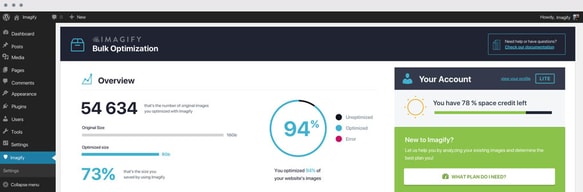
Imagify allows companies to optimize website images to improve website load times and speed. The software offers numerous compression levels of automatic optimization that help enhance user experience, SEO, and loading speed.

| Capabilities |
API
|
|---|---|
| Segment |
Small Business
Enterprise
|
| Deployment | Cloud / SaaS / Web-Based, Desktop Mac, Desktop Windows |
| Training | Documentation |
| Languages | English |


Compare Imagify with other popular tools in the same category.
The image compression from Imagify is a must for all of our WordPress websites. These days having a fast-loading site is an important metric, and Imagify helps us achieve that goal and keep websites optimized properly.
The only thing that I dislike is when an image file size doesn't get compressed as low as I would like. That tends to be the result of having image dimensions that are way too big and not entirely the fault of Imagify though.
Imagify helps us ensure that client websites meet the Google core web vitals standard. When Google rolled that out we needed a solution to help ensure that page performance was optimal and Imagify helped us achieve that. Having a WordPress plugin is a huge benefit for ease of use and makes our job a lot easier.
It will speed up our websites, and images will speed user experience and even in the marketing stuff. It will save the time to stop fine-tuning our pictures, and they now automatically can be optimized. In a single click, we can optimize our images.
I don't see any dislikes. Everything is l good as of now. Everything will work properly without any issues. This product will be better in terms of quality improvements
Easily we can optimize the images and resize the photos speedily. We can restore our media in their original variations when we need those. Our business performance also increased.

The Wordpress integration plugin is great, you can optimize bigger sites very simple.
Sometimes is slow to process every image, the good thing is that the process can be automatic.
Reduce the size of the sites to improve the speed and the user experience of the site.
I like how easy it is to compress images and make my website run at faster speeds.
It's an outstanding tool and I do not see any cons associated with it.
I used to have the problem of images slowing my website down. But with Imagify, my website speeds have significantly increased.

Automatically Resize Your WordPress Images’ Dimensions. All you need to do is set up Imagify and it runs in the background, compressing and resizing your images and speeding up your site.
Nothing much that one can complain about this tool.
Imagify is one of the best ways to shrink your images’ sizes.

Thanks to imagify my websites load faster. It compresses correctly images that I use in my in all my websites. I particularly like it ability to convert images quickly in different format And resize images without losing the original image quality.
There is not more to dislike because just with the free plan you can do little stuff like compressing up to 20 MB for free per month. It is enough for small websites.
Problems I solve with this tool are big images compression, image resizing, and image conversion. These tools make it easy to convert images in many different formats And help my websites load even faster.

Because it has helped me to compress correctly the images that I use in my web site, as well as it helps me to show the images in webp format without any problem.
Nothing, actually I have worked very well with this tool for the optimization of my images and I like it very much because it is very easy to understand.
We have improved the optimization of our images and therefore we have improved our score in page speed insights metrics, as well as we have been able to integrate the option to serve images in WebP format in the compatible browsers.
How simple it is to integrate with our WordPress site.
Nothing. It does exactly what I want it to do.
Imagify makes it so I don't have to worry about the whole team uploading images. I know that they won't be too large and slow our page load times. I don't have to be the image file size police.
It has free features that allow for a limited amount of images optimized but there's also an API and a paid subscription. I like that it's not limited by the number of websites. I also like that it integrates fully with WP-Rocket.
I don't see any drawbacks to it. It's always worked well and is pretty full-featured. There are free options on the market and this one does provide some free compressions.
With it integrating with WP Rocket and that it doesn't have a limit to the number of sites it can be used on - only the amount of images in a month, I can use it on all the websites that we build.
That it integrates easily into WordPress and that it's an automated process.
Nothing really. It meets our needs for exactly what we want to do which is to make images smaller for the web.
Images need to be small so the website loads fast. Imagify allows us to automate the sizing of the image so that it looks good on screen while being as small as possible.
Saves space and makes your website load faster
I like everything about it. No problems
It has improved my pagespeed loading time on my website
Imagify is VERY user friendly! I love that it optimizes the photos in one click. It is also nice that I can easily restore images back to the orginal version...Some other apps don't allow you to do that.
The one thing I didn't like was that images were only stored for 24 hours with the free version but I switched accounts so now I can store them longer.
I am solving faster and easier ways to edit my images and compress them. Imagify has saved me alot of time when it comes to this.
Very easy to use software and there is a free option.
I have not found anything to disklike yet.
I have been using the software to help with image optimization and page optimization as well.

The most thing that I like in this product is that it is a very lightweight application that can help me to edit photos and reduce their size without decreasing the quality of the photo
The most thing I dislike about this product is that it doesn't support the Arabic language
I used this product to help me in reducing the size of the photos while working on a WordPress project. Imagify has a plunging for WordPress and it increases the user experience and makes the website more user-friendly.
An excellent powerful tool for squeezing the images at a professional level. It increases the WordPress website loading speed at an incredible pace. No brainer plugin
There is nothing to dislike; it's best available amongst all other plugins available for image optimization in the market.
It increases the WordPress website speed at an incredible pace. A must try no brainer Wordpress Plugin
Easy to use for a non-coder who uses WordPress plugin
UIUX of WordPress plugin can be improved
Easy bulk compression and individual image compression
I develop websites and have tried some other image optimizer, but iMagify is so far the best. It's simple to use and it integrates perfectly with WordPress and works silently but efficiently optimizing every image on my websites.
I love it's integration with WordPress. Makes me set and forget about image optimization.
IMagify helps our team solve the problem when we forget to manually optimize an image. It's pretty easy to forget when you manage multiple websites and have to make constant changes. IMagify takes care of that for us.

I love the simplicity of use and the way it integrates with WP Rocket. I've used it for years now and have saved quite a bit of money on their unlimited plan. I never have to worry about running into my size limits.
I dislike the lack of image cropping when resizing images, but this isn't an advertised feature. I also find it's a bit confusing knowing how many sizes I should be doing for each image.
I am compressing images on my client websites in order to save space and improve load speed performance. It does an excellent job and I have the ability to adjust as needed.
I like the ease of use. It saves time without sacrificing quality.
I had to create several different accounts to implement on several other websites.
I'm solving the issue of heavy images causing slow load times. I see faster websites that maintain hi-res photos.
I really love how friendly the interface is, and the optimization results summary is also a nice touch, I believe you can now (as of 2023) leave the optimization running in the background (an awesome addition)
Not a big issue, but deleting the API key when you're transferring to another license code is a hit or miss. Might be good to have another look and generate a dedicated tab for that.
Really helps enhance my site's speed without losing image quality, helps my site load lightning fast, if you're someone who has an e-comm website, their automatic optimization setting is a good feature for when you're adding new images.

Imagify is a helpful tool to compress your images without reducing the image quality. The tool is very easy to use.
Nothing to dislike it is a very helpful tool.
We are using imagify plugin to optimize our website speed by compressing the images present on the page.
Compressing images regularly is one of the tasks that took maximum of my time. But Imagify made this easy and quick by offering a solution to compress different types of image formats. Not only this, but it also offers to resize images. I can use this directly on my WordPress & Shopify websites which is very convenient to manage the image sizes.
Uploading image size limit for a free trial is just 2 MB.
I can compress the images quickly. I can resize the images without using any editing tool. The best part is that I do not have to use multiple platforms to compress for my website images as they allow to use the integration in CMS websites.
Easily to configure and practical for performance
Nothing, I used to get a better performance in my website and works perfectly
Slow WordPress website, because big images in website.

Imagify is really easy to use and includes a lot of features, from re-sizing to compressing images to optimizing the images. They also accept lots of different image formats, even GIFs.
There are really no downsides to using Imagify, I recommend it to all of my friends in the industry. Of course, there are free options out there that do similar things, but I haven't found any as useful as this one.
I use a lot of images on landing pages, but they're often the wrong size - too large to load quickly on the screen. I use Imagify to upload and compress multiple images all at once.

Drag and drop option and compression level I like the most.
Need to be one-time purchase app, not in subscription method.
Compress images without losing quality and use on websites.

the most feature i like its to compressing the complete images of a particukar web page and even i can also select the mode of compression. Apart from that it allows me to resize images and combine all files into one zip and download easily. It saved my time to upload multiple images at a time for a complete web page and also I can just share a link of webpage - and the system if imagify automatically compress all images on this page - i like it very much.
If there are any images that I don't want to compress, I can't make it stop; either i have to download the image with all images or not share that page URL. I didn't find the history option is useful.
Imagify solving my problem related to image optimizing for my websites and I must say it saves my time 90% (for uploading the file from drive). Also, Imagify has an option to convert image file type from one to another like PNG to JPG, so it also add some extra features for the files I compress as needed.
I love that it is a very intuitive and effective image optimization tool. It helped us to trim down on the loading speed of our website.
Th only negative I see is the fact that they limit you to 250 free optimizations per month while other products offer more.
This tool helps us to optimize our website loading time, therefore heling us with our SEO.
Its extremely easy to get started and, most importantly, very affordable.
I honestly can't think of a disadvantage to this product, assuming you're using WordPress.
Big ol' images getting uploaded by people who don't know the ramifications of doing so.
Imagify makes it super easy to optimizes images for the Wordpress websites we build for our clients. We just make sure images are the right dimensions, upload to Wordpress and let Imagify do its thing.
The aggressive optimization can often lead to big loss in quality, and we very rarely use it. Even though site speed is always a major concern, and aggressive gives us super small images, the quality just isn't usable.
Our sites load so much faster because of Imagify. In fact, when we do site speed optimization on a client site, Imagify is often one of the first steps to improve site load time.
Imagify is great for integrating with WordPress based websites. It's settings let you fine tune your image optimization so that you can still get the image quality you desire.
It can be a little pricey especially if you have to go back through years of images, but once you're on a steady cadence, it works out nicely moving forward.
Image optimization, site speed and user-friendliness of our site has improved greatly since using imagify.