

Unclaimed: Are are working at Jira ?
Jira Reviews & Product Details
Jira is a project management software for team planning, tracking, and project management. The platform allows for better project transparency and collaboration through tools and integrations that are designed to boost team and project efficiency.

| Capabilities |
|
|---|---|
| Segment |
|
| Deployment | Cloud / SaaS / Web-Based, Desktop Mac, Desktop Windows, Mobile Android, Mobile iPad, Mobile iPhone, On-Premise Linux, On-Premise Windows |
| Training | Documentation |
| Languages | English |


Compare Jira with other popular tools in the same category.

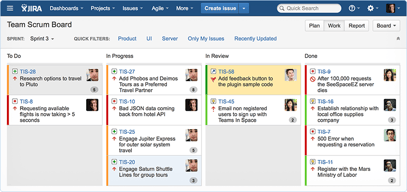
Kanban boards, scrum and workflow's sprint planning and backlog management
The learning curve for beginners is incredible, the initial setup and configuration process with Jira's advanced features
The product Mapping tool from Jira software is revolutionary for software engineering teams. Any s/w project needs it because of its user-friendly design seamless integration with Jira, customizable views extensive planning and forecasts capabilities and collaboration tools. I fully endorse Jira software's Product Road Mapping tool to s/w engineering teams looking for a potent and effective road map solution because I have personally experienced its beneficial effects.
We've used Jira for years...many years. We were on server version for the longest time before we made the switch to cloud. This is by far the most conrehensive and flexible platform covering several departments.
Maintaining and administering can get very complex very fast, but as long as we take the time to learn the platform in details things get easier over time. Jira requires quite a bit of training to get started.
Several departments in our org rely on jira. From our creative studios using this to keep track of their progress to the developer team that uses jira is many ways like development and bug tracking.
Integration with multiple tools like git and jenkins
UI looks complex but i guess its because of multiple features.
1. Ticket management. 2. Integration with github for pull request merged details on jira dashboard. 3. Integration with jenkins to automate our pipelines
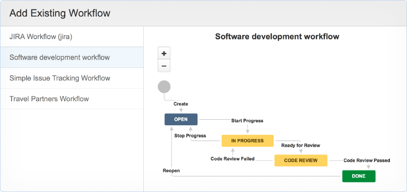
As an active user of Jira, I wanted to share my thoughts on this project management tool. In a nutshell, Jira has been a game-changer for our team's workflow. The first thing that struck me was its versatility. From managing tasks to tracking complex projects, Jira seems to handle it all with ease. The ability to customize workflows, fields, and issue types tailored to our team's needs has been a real boon.
Learning Curve and Complexity... Admittedly, Jira can be a bit overwhelming at first, especially for new users. The myriad of features might take some time to fully explore and grasp. But once you get the hang of it, it's a powerful tool at your fingertips.
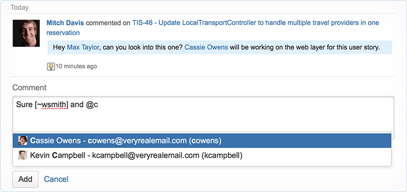
Collaboration has been a breeze with Jira. The transparency it offers through shared boards, real-time updates, and commenting keeps everyone on the same page. The Kanban and Scrum boards have become our go-to visual aids for project progress. What's particularly impressive is the integration ecosystem. Jira plays well with other tools we use, be it for development, communication, or design. This seamless connectivity has significantly reduced manual work and data duplication.

Simple and Sleek user interface. Easy to integrate third party tools. Licensing cost is affordable. Help portal found helpful to learn about jira features and faqs.
Nothing i come across. Overall the jira product team values customers in terms of resolving queries and bringing up new features.
Managing security incidents and tracking the status of issues is painful when you are working in product company. Jira solves this problems to track and bugs and set SLA and assign the ticket to responsible stakeholder to mitigate the issue before due date.
Jira truly tranform managining project and task from most diffcult to easy going process. User Interface and User Experience of jira is so easy to use and understand. Rather than tracking tasks jira gives amazing feature of customisable dashbaord where it gives you lot of charts so that you can see you contribution and can also track others work. jira give power to make your own status to move tickets , you can make as per your flow. it have a very good drag and drop user interface to move tickets and have feature to put deadline , actual time you take so that managers have track of time.
JIra doesn't provide much graphs to personal dashboard free access , it means which don't require any person's permission. i think jira can provides more easy access of graphs and good graphs.
Jira benefits me with putting timeline of task i am doing so any other person know bandwidth i am haiving and how much i did. apart from it gives me dashboard which is personal , whom to give access is my choice so there i can track how much tash are pending , untouched or to move status.

The simplicity & cross-platforming potential, an ability to be combined with the other tools and platforms (e.g. Zoom, MS Teams, Atlassian Confluence, Slack etc.). This is a multi-feature tool, which could substitute several other tools, applications and platforms, so it is much easier to cooperate and no need to work with the full bunch of them. In combination with Confluence, that leads to the improvement of functional efficiency & protects all the information within the project from segmentation.
Some functions are available only on subscription plans, but it is a common practice. This tool is extremely addictive :).
With help of this tool, we were able to improve the efficiency of our team by means of time management, collaboration, proactivity and transparency and the goal understanding within my team and between the other teams.
- implement agile methodology in planning, implementation and delivery - track progress, hours, priority - shuffle task between teams as needed - collaboration between teams - integration with other products like bitbucket and confluence
- no internal comments but that comes with good transparency
We need a project planning and tracking software

Ease of Use is the best that I like about JIRA. It is so easy to customize for a specific organization as well Ease of maintenance, on-premise or Cloud deployment.
Too many fields that hardly make any difference to an end-user Too little documentation for programmers who would want to automate the ticket creation through their ReST APIs
JIRA helps me maintain my product's backlog and also helps me track the statuses of each of these during the Sprints, Releases etc. JIRA helps me identify critical enhancements based on the trackers that it provides out of the box JIRA helps in the product maintenance, product roadmap, dashboards, change management, incident management and a lot of things.

Jira helps similes our reporting and time tracking of project we can easily create ticket, task and we can also do team team collbaration if anyone want put notes in it they easily put it. It also integrate almost lot of third part tool which make our like easier such as slack, outllok and lot more. It also help out team in porduct traking and timeline mapping od the product.
I don't find much dislike about jira but one thing if we are new it take time to get familer with tool and filter, it has lot of metrics and filter to put down data and monitor and have some advanced feature which take time to get familer with tools.
Jira helps us to similife our daily and tacking the team process and helps us to be on te same page. If anyone has any issue they put in the ticket or create new ticket for help. We can easily review all the project at same place.