

Unclaimed: Are you working at MeisterTask?
MeisterTask Reviews: 4.5/5 — Highly Rated
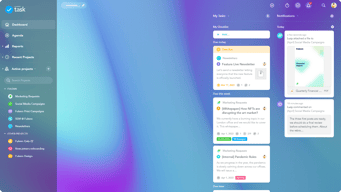
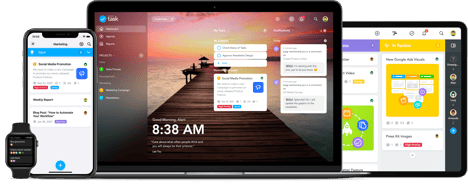
MeisterTask is a web-based task and project management tool built for agile project management. It features an exceptionally designed user interface, with intuitive functionality and seamless integrations with other tools. The platform is customizable, with the option to view projects following Kanban-style project boards, and other key features that help streamline the work process.

| Capabilities |
API
|
|---|---|
| Segment |
Small Business
Mid Market
Enterprise
|
| Deployment | Cloud / SaaS / Web-Based, Desktop Mac, Desktop Windows, Mobile Android, Mobile iPad, Mobile iPhone |
| Support | 24/7 (Live rep), Chat, Email/Help Desk, FAQs/Forum, Knowledge Base, Phone Support |
| Training | Documentation |
| Languages | English |

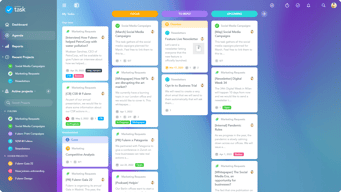
I like that I can see all of my projects, tasks, and the status of my requests in one shot. I also like that I can place notes within a task that is printable so that I can provide all the steps I've taken to complete a task when requested. I find its integration with Outlook to be very helpful, and the customizable sections allow me to create the project base that works best for me. I use it for my personal use and my department of 1 person. I am sure this would be an excellent tool for teams of 2 or more. I am also a huge fan of emails sent from Meistertask about projects due. It helps me in the morning to know what I need to focus on that day.
Not so much downsides, but I wish Meistertask had more views. I would like to see a calendar view. I also wish Meistertask allowed subtasks. These might be features in an upgraded plan.
It is helping me focus on my Department goals and projects and track how much time is spent on each project through the HArvest integration.

Intuitive handling, good integration with mobile, web and desktop computer. You can really start up your business with it even with a larger team.
offline capability on the phone has some flows
Sales funnel, team management, tasks, personal items… I run my life in meister taks more or less

If you're a list person, then you're going to love Miester Task! It has so much functionality, and helps you keep your projects organised in a beautifully visual way. Its super easy to use and very user intuitive. I would, and already have recommended this tool to my colleagues and clients alike! There are various ways in which you can setup Miester Task to deal with your day to day tasks, or you can sync together with others to make a project. There is also a lot of different ways in which you make it your own, such as adding your own icons to projects, adding columns specifically related to tasks and much more. The mobile app is also very slick, enabling you to track your tasks on the go, and updating if needs be. I would highly recommend using it with the app as it makes you look really efficient if you know what tasks you've got to do on the go! Another great feature is that it can be accessed from anywhere, so if you've got to pull up some information it is always readily available for you to find more information. It's eye-catching, easy to use and packs a ton of features, which makes it my only tool of choice for project management.
Some more icons to be implemented making it easier to check things at a glance. Improvements to the hours spent to pull a report or something similar Very minor issues as its AWESOME!
Keeping track of all my tasks, making sure that projects are completed on time and more!
My colleague and I both work from home. We are in different time zones and not all of our hours overlap. MeisterTask allows us to keep tabs on the status of not just every project, but every task of the project. It is so easy to assign things back and forth and keep track of notes and due dates.
There are some features we'd love to see, like sorting the checklists.
We used to have so many different ways of tracking - spreadsheets on Dropbox, Evernote, emails. MeisterTask keeps everything in one place.

Meistertask has been crucial for my clients projects to move forward. It's so easy to use and many of my clients favor it over Jira, Trello, and Ansira. Seriously, you won't find anything easier to use. And it's cost effective!
I wasn't a huge fan of not having a way to see a calendar/timeline but with the new scheduling feature, this has solved that problem!
MeisterTask holds me and my clients accountable for our deliverables. It helps us have full visibility into milestones, deadlines, and progress being made. I can't imagine not using it. I also have the mobile app on my phone and I use it as a checklist of personal projects outside of work.
Makes it easy to keep track of tasks and assign to others. Can have multiple projects being tracked, others can contribute and comment. Notifications help serve as reminders of what needs to be done.
It would be nice to be able to have multiple projects up at the same time, either in different tabs or windows.
Client intake and qualifying process, assigning tasks to employees, keeping track of employees' work and progress, being able to have multiple people contribute to a project.

I'm really picky about the UX and visual design of products I use day-to-day. Most task management apps just aren't that well-designed. Meistertask is! It's fun, colorful, yet easy to read and use, even with large numbers of tasks. Design makes the difference.
Occasional performance issues or forced reloads - but these are rare.
Helps me manage my GTD system of projects/tasks on a kanban board, and focus on one task at a time. The visual layout is much easier to focus on than a linear checklist of tasks.
I like that the entire staff is able to keep track of what needs to get done for the day. We are also able to see the tasks that may have been missed to ensure we get 100% of the tasks done.
Sometimes when logging in, instead of showing the most updated task sheet, the site takes me back to a sheet that is a few weeks old.
Like that we can all use the task sheet.
The look and feel and the integration with different tools. I really like how you can start with an idea in mindmeister and create the tasks from it.
Nothing I can really think of right now.
managing my tasks backlog: work and personal
I use MeisterTask for EVERYTHING! I have a few different jobs, and it allows me to keep track of what I have to do every day.
The free version is a bit limited, so I have to duplicate recurring tasks every time.
I achieve so much more in my day! It’s integrated into my Calendar, so I can see what to do next straight from my watch.

Meistertask is extremely intuitive and easy to use. It has all the necessary features needed to run my business.
Haven't found anything that I dislike about Meistertask
business operations and task management. I prefer tracking projects and tasks through meistertask rather than clogging up email.

I like the fact that it shows a variety of options when it comes to customizing boards and processes in the best suitable way for your business.
To be able to get the full features you need to pay and having a large team might be costly.
We have implemented it as an ordersystem where we handle our production setup with our manufacturer.

The interface is user friendly and dynamic, with the ability to customize and shape your projects easily. I like being able to click and drag areas of work to order based on priority and timing.
Depending on the browser, it can be tricky to scroll left or right.
I'm coordinating with consultants and managing my time better.
I love the fact it keeps everyone Organized and I know what’s on everyone’s to do list
I wish I could export tasks from my outlook at taskmeister. I wish the timing function would have promts to only work on task for x mins , also assignment of tasks integrate with google calendar
Keeping everyone on track and accountable
Continuous improvements, UX designs, wireframe....
Somethings are needed to be tailor made based on the business.
task management with the team
Es lassen sich mit Meistertask und Mindmeister nicht nur einfach Ideen und Projekte entwickeln, sondern du kannst auch gleich die Abarbeitung planen. Wer macht was bis wann? Mit Meistertask ist die Planung absolut einfach und übersichtlich zu gestalten.
Warum ist die Zeitleiste nicht in der Pro Version enthalten?
Kampagnenplanung im Marketing ist damit super.

MeisterTask is a software that not only gives me complete control over my projects, but also finds a way to make them more entertaining and stress-free. Its interface is what I would define as cute, and it has a very aesthetic visual to it that makes it possible for me to complete all my assignments in time. Because it’s cloud-hosted, it’s useful for all my coworkers that need to access information regarding a project and not have to ask someone else since we all can share the same files automatically. Regarding the communication levels, MeisterTask provides me a way to keep communicated at all times with my team to be able to discuss everything, from tasks and projects to deadlines and ideas. One of the things I find very useful from this program are the Kanban boards, which can be customized and displayed in individual and organizational levels. It’s a smart way to view all the tasks that are completed and the ones that need to be done, and get daily reports to see how the organization is doing in general terms.
I can’t remember anything right now. MeisterTask is a software that is very helpful and I don’t think I’ve experienced any inconveniences with it.
I’m really happy that I use this software because it’s just a product that I can easily log into, see all my due tasks and get them done fastly. It’s easily available anywhere because of the mobile app, which also works perfectly and has a cool structure that’s similar to the web app. I have noticed that when I use MeisterTask, my workflow is 100 times better than when I don’t, and I can contact everyone in my team if I need help with something right away. It’s extremely flexible, with tools that are made to prioritize teamwork and individual work.
I love the greeting and the daily quote underneath it.
For premium features you have to pay for it!
Surprisingly I haven't had any issues with MeisterTask. I find myself following through with my tasks and that this is available on my IOS and OS devices!

Visibilidade das tarefas, são bem claras e o processo fica mais transparente
Adorei tudo, não tem nada que desabone o programa.
O fluxo de trabalho fica mais transparente e integrado.
easy to use, intuitive UI, easily connects with multiple people.
attachments should be drag n drop. also an audio should go off when completing a task.
MeisterTasks has helped us organize tasks across multiple categories.
The system is very easy to use and integrates well with other business systems - I use it every day for keeping on top of project development. The system also informs other departments when key points in the schedule have been reached.
I've not figured out how to share tasks between projects - but that could be my issue and not the systems.
Simply very good at task management ... keeping track of project development is super easy and it is a great help to be able to save list presets.

The practicality of being notified on the smartphone and tablet when something changes in tasks that you're part of! Love that I receive everything that is happening right on time! Makes the workflow very enjoyable.
File size limit, not being able to build presentations for evaluation of product directly with clients, we implemented the platform called iClips, for the presentations and evaluation with the client, but it doesn't even get close to MeisterTask Usability
Organising tasks and dividing parts between all the team, with ease and practicity.

I really like the flow and ease of use. I enjoy the tracking system so I could see exactly how much time it takes to complete a task.
The inability to pause time tracking on a task. Maybe I still need to learn some aspects of the program.
I have definitely become more organized and productive using it. I can see how it can implement different areas of my life. We use it at home for the house tasks and I also now use it at work for my own personal productivity.
Powerful and flexible task management for teams. Integrates well with Mind Meister for planning.
MeisterTask is very powerful but expensive for small teams
Personal and Team Project / Task Planning. Great for Time Management.
I like the team organized and using Meistertask help us to be synchronize, you can use the app from your cellphone, so all the team use it including the one who work in the street.
is nothing that I dislike from Meistertask.
the mayor problem that we are solving is the miss communication, anytime that we sing in we know the status of the task

Possibilità di inserire in ogni task il team di riferimento, allegare file e impostare date di scadenza
Piccole pecche recenti, le notifiche non arrivano in maniera istantanea, su chrome ha dei difetti di visualizzazione
Il mio datore di lavoro da esattamente su cosa sto lavorando in quel preciso momento to
I like the simple breakdown of daily tasks and the feature that allows you to track how much time has been spent on each task.
I wish there were more options for the listing feature and more ways to customize your experience.
We have solved many communication problems and each person now knows exactly what they are to be doing each day,

MeisterTask is available in iOS, Andriod, Windows, and Macs. I enjoy using kanban features as well and the ability to work with others. Also, it can integrate with many other apps including Freshdesk, Gmail, Dropbox, etc.
Only the thing I dislike about it is some of our users love to use Linux machines and MeisterTask doesn't have a Linux application.
MeisterTask allows us to work on projects using Kanban. It also allows us to integrate with FreshDesk to convert tickets into a task in MeisterTask.
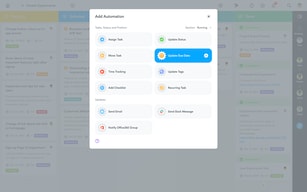
MeisterTask is not so big like Jira, Monday.com or AHA! and also not so small like Trello or To-Do. It supports perfectly your processes, no matter if it is for a services desk, a marketing campaign, a product launch, a sales funnel or creating a new website - with MeisterTask you have all task and their current status under control. Start your Monday morning with a smile and with motivation! MeisterTask is one of these rare applications you really enjoy working with every day and on all devices, including your mobile phone. With MeisterTask, your entire team is communicating directly on the tasks. It is collaboration in its most beautiful form. If you were ever dreaming of an intuitive project and task management with a feature set that fulfils all your dreams - in MeisterTask you will find it! The feature set serves already in the free version many of the needs of smaller teams and groups. But feel free to ask for more, as you will get it all: Custom fields; Automations; Repeating Tasks; Roles & Permissions; Statistics and Reports about the tasks: Open, Completed, Overdue, Upcoming, Long-running; You can connect with all your existing tools such as Gmail, TEAMS, Slack, Zendesk, Freshdesk, Office365, Confluence, Jira, Github and more than 1000+ applications via Zapier. Combine Task Management with Mind Mapping and choose MeisterTask together with MindMeister. It leaves only one question open: How can anybody work efficiently without these two fantastic applications??
There is nothing not to like about MeisterTask. And by looking at the roadmap and the coming feature, it is getting just better and better with large steps.
Task management, team management, collaboration also with externals, control, planning, organisation, keeping the overview at any moment and on any device anywhere;
The design is simple, functional and modern. Makes task management both visual and fun.
If you are used to using Trello, MeisterTask is a great alternative but you will pay for teams / additional features.This isn't a bad thing, however as the only way they'll continue to improve is if they're generating revenue.
Client project tracking and personal organization.