

Unclaimed: Are you working at MeisterTask?
MeisterTask Reviews: 4.5/5 — Highly Rated
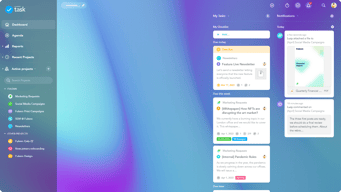
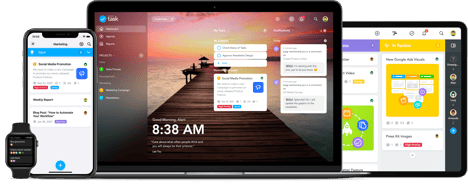
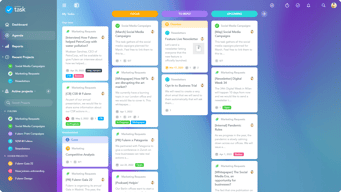
MeisterTask is a web-based task and project management tool built for agile project management. It features an exceptionally designed user interface, with intuitive functionality and seamless integrations with other tools. The platform is customizable, with the option to view projects following Kanban-style project boards, and other key features that help streamline the work process.

| Capabilities |
API
|
|---|---|
| Segment |
Small Business
Mid Market
Enterprise
|
| Deployment | Cloud / SaaS / Web-Based, Desktop Mac, Desktop Windows, Mobile Android, Mobile iPad, Mobile iPhone |
| Support | 24/7 (Live rep), Chat, Email/Help Desk, FAQs/Forum, Knowledge Base, Phone Support |
| Training | Documentation |
| Languages | English |

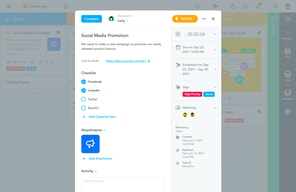

It is an excellent tool for managing content and essential ideas, it allows us to tag our team in our tasks and assign various projects to specific people, see their performance and keep track of each project from start to finish.
It has provided us with good functions to improve our creation and management of projects, it gives us options to share files, create a Kanban board, analyze expenses, work hours and more; honestly, we have not had any inconvenience.
We have created a more flexible workflow, and we can share the projects with our marketing and human resources team and create work without interruptions to be in constant growth and reduce problems and tedious tasks.
The colorful kanban type interface, the multiple projects list you can have, colorful tags, integration from mindmeister, easy integration from other websites to spawn tasks. I use it on my phone, tablet, my ipad. Great looking dashboard too! I can use it as an engineer, or use it as a sales pipeline, manage work and play tasks...I use it as a notes database in my favorites, great search function, can assign tasks to my wife and others si she can execute things on my behalf
This is an awesome tool in my opinion. I cannot fault the features I use. Its available on my phone, ipad and windows 10 so my tasks are always available. I probably take on too much work because the tool makes it look easy to accomplish. :)
I pop a lot of websites, share articles into my reading list, I manage pipelines, client reviews, any list of "projects", workflows and anything I want quick reference access to, like my producer codes, critical data etc. Its made task management fun. You can add pictures, URLs, Notes, other projects to your tasks. I like being able to access my tasks across android, windows and apple seamlessly.
Gives allerts, timely management of projects, colorful interface, best to manage activities of the project, task assign properties are very amazing along with deadlines.
In my opinion this is an great tool. No flaws are there. This is the tool that helps you to manage your activities so well. And to do list platform is all you need at one place to manage the project.
Problems like delay in activities of the projects, not exceeding deadlines as it give remainders, helps in remembering all the activities that are urgent for the concerned project.

MeisterTask is really easy to just pick up and use. I love the colorful kanban style boards and the fact that I can have all of my most essential tasks placed on my main dashboard. It's also the prettiest task manager I've ever used. :)
There is nothing I have disliked so far.
I'm a freelancer, and MeisterTask has made it simple for me to track all the to-do's I have for each client.
Kanban task management style, very flexible, good for teams/collaboration, fantastic mobile apps. I was looking for a Trello alternative when I found this tool a year ago.
I like their Grant chart feature, but it's on the expensive membership tier. Would be nice if they had local pricing for other country users. Sometimes I type Task Meister instead of Meister Task and go to another website :P
Task management for my projects A fantastic tool to organize all my ideas Blogging calendar
MeisterTask is so easy to use, and the visuals are great.
The most significant change I would like to see is a requirement of a follow-up or due date. It can be easy to miss putting that in if you are rushing. Also, I wouldn't be upset if you could add comments to individual checklist items in the task, as opposed to the whole task. But that's a tiny thing.
As a small healthcare office, it is imperative that we keep track of partially or fully denied claims and follow up on them promptly because we usually have only 90 days to do so. Our electronic medical records software doesn't do the best job, so we had to find another way to track these. I looked for software that was easy to use, not too heavy (we didn't need actual project-management software, after all), where multiple users could have insight and hands on the project. MeisterTask has given us a collaborative space to work on these denied claims, make sure we follow up in time, allows us to prioritize, and sends reminders of almost-due and due tasks.

The best of MeisterTask is that it is simple with a beautiful interface that allows me to get the most out of my work and tasks. From being able to add as many members as I want to managing a workflow that is flexible and adjusts to everyone’s schedule, I think MeisterTask comes with functional and capable features that make things easier. When it comes to communicating with other team members, it comes with an intuitive and modern platform in which everyone can communicate, share tasks, files, and discuss things that are in relation to the project we’re working on.
I have not found any dislikes in this app yet and it continues to work perfectly.
From being unorganized to being extremely synchronized and delivering all of our deadlines in time, MeisterTask has succeeded in making us a very powerful team and helped us in improving the areas we were lacking in. The Kanban Boards have been of great help and its easy to identify all these projects with said boards located in a nice way in the app. We’re not a big team and still using MeisterTask has improved all our workflow methods and we are able to track tasks faster and finish things earlier.

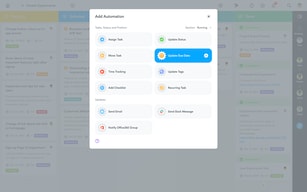
Powerful automations and repeatable checklists
No templates for tasks that come out of the box
Managing a lot of projects across a variety of topics
Meisterstak is a software designed to meet the needs of agile project teams as it adapts to all types of workflows such as simple kanban boards, software sprints and more. It is an intuitive tool with an excellent price and with integrations with Slack, GitHud and Zendesk this has allowed us to create a workflow without interruptions, while the intelligent automations guarantee a consistent and efficient work the chronological Gantt views are excellent and the truth is very easy to adapt to the methodology of this software if you know how to search the functions
Meisterstak presents some notable weaknesses that should perhaps be improved with a new update among it I can mention that some functions are difficult to find and are weakened by default, without limits of work in progress or lanes the interface can see loaded and messy this makes the certain measure the learning curve of a little high and hinders the adoption of the application by users finally I would like them to add a visually appealing calendar when the task is completed.
Currently my entire organization uses Meisterstak as a project management software because it helps us to keep everyone responsible for their tasks and track deadlines this software is very useful to collect workflows based on everything that must be done during the day, week, month and even throughout the year everything that this software collects can be managed in a single board depending on the task where it can be managed in a safe and organized.

The simple customization and ease of use.
The limitation on the number of projects on the free accounts. It used to be unlimited, but since has changed to only allow 3 projects.
Keeping organized is the biggest thing. Helping many people stay focused on what is important and seeing a task complete through from beginning to end and nothing gets missed along the way.

I like the simplicity of the user interface yet rich in features! Everything is on the tips of your fingers and I can have a good understanding of the big picture at a glance when reviewing the whole board. Also the dashboard is really helpful when you need to focus on specific tasks between multiple projects.
I would have liked the free version to supprot multiple checlist on one card but I guess this is a just tradeoff.
Organizing long and multitask projects collaborating with other peers.
The UI is intuitive and easy to use. Setting up boards for project management is straightforward. I have used Trello and find MeisterTask to be easily as good.
There isn't anything I dislike. It is a clean interface and does what I need.
Planning complicated projects by separating into subject boards with tasks. It provides a good way to break big subjects into manageable pieces and gives a clear over view of progress.

MeisterTask is very intuitive, the flow just feels right. I love that it syncs between the browser app and my phone app. I can be sitting on the thrown and have a task idea, write it down, and when I get back to my desk its waiting to be implemented. Using this app has breathed new life into my game development production flow.
No complaints! Really its great. I Highly recommend it.
MeisterTask helps me juggle all the ideas I have for my production. I used to get distracted with new ideas, and bounce back in forth trying to implement everything at once, but never really finishing anything completely. Now I can focus on one task at a time. And as new ideas pop into my head, I jump into MeisterTask, write them down, and then get back to focus on the task at hand.
Setting due date for all ongoing projects. Helps organize to do lists at home and work. MeisterTask alerts me of due dates.
I want to be able to ingrate with outlook Calendar to pull work schedules or Time conflicts
All my tasks are in one place. I used to write on post it's and place them all over my desk. They get lost. No reminders to let me know automatically when they are due

The to do-list on the front page helps me get an overview of what I have left that day, and what is to do tomorrow. It is easy to change along the way, and the feeling of ticking the "complete"-box when a job is done, is delightful. And the beautiful pictures and layout makes me enjoying making projects and I always have it in view on my screen.
I would like the completed tasks to jump below the not completed tasks, or jump to a "completed"-bar.
To have control over the tasks that are due in the days to come. It is my memory so I don't have to remember it all.

I like that it lets you customize your dashboard on the site and see your progress right from the main screen before you go into the project directly. I have convinced other people to use meistertask just by working with them and showing them how easily I could track the projects I was working on.
The price is a little bit higher than I like sometimes but its affordable for what it provides. I have noticed a couple of times that if someone moved a task from a project I did have access to, to one I did not, it would show a weird error message.
I am working as a consultant and tech for multiple companies that use meistertask. I also use it myself and it has allowed me to connect up projects to give me an overview to make sure I focus on the right tasks at the right time.

Keeps me on point to get stuff done. Plus great way to organize thoughts and ideas for projects.
I can't say there is much I dislike about Meister Task. There is a little learning curve to be able to take advantage of all the features.
We buy and sell homes and use it to keep up us on task for all the things involved. Also, like it for To-Do items and setting and achieving goals.

MeisterTask helps organize multiple tasks both within your remit and across teams. It’s so easy to add, assign and share jobs.
Sometimes the platform will not let you reorganize tasks to make the most important ones appear first.
Sharing multiple jobs across different team Members, group communication and project management. It helps me and our team stay on target without confusion, and has been especially valuable during covid-19.
Just managing between the tasks..love it!
The scrolling in project, and unabel to make more than one checklist in task
Weekly and daily planners and projects that I work on in teams

design and usability and have no user limit
not able to integrate with github and gitlab
I can't delete columns and as I am from the beginning I can lose the automation
I like the ease of use and new features.
Wish there was a way to add screenshots in a timeline type of way rather than just as attachments. I also wish formatting of text was easier.
I manage my tasks with customers using MeisterTask. It has helped me stay organized and is WAY better than using a spreadsheet.

Kanban-style task management is great. As my day-to-day priorities change and shift, so can my tasks. I have always loved writing down tasks and checking them off, but utilizing Meistertask is a much more productive use of my time.
My only request is that I'd love to be able to set recurring tasks, similar to Wunderlist. When I complete the task, I check it off, and it gets shifted to another list or due date. You can also title each section whatever you'd like. I'd like it to be more intuitive. I typically title them by date or priority. I'm sure other people do the same, so it would be cool if it could recognize some often used titles.
I save a lot more time by utilizing MeisterTask rather than hardcopy checklists. It also helps to avoid allowing things to slip through the cracks.
i like everything in meistertask but mostly like time tracking and task allocation
nothing to talk about dislike sections in meistertask
manage the project with team members under the every project add tasks allocate every task for any team members etc

The simple, esay-to-navigate UI and ease-of-use of the app is a huge plus. The native desktop versions mean I don't always need a web browser open and it's super-quick to learn and start boosting productivity. Drag and drop to new columns is great and being able to set due dates and assign tasks is invaluable. Colour palette is kept to a minimum making navigating and working with tasks a more pleasant experience. There is little clutter in the app; nice icon set and the app design is consistent throughout. Being able to keep comments within the app is good, it means that email threads are cut down to a minimum and all communication can be kept in one place. Instant notifications are great as you can know straight away of a change to a task or if a task has been assigned to you. Being able to tap your avatar and only your tasks appear on the Kanban board is a nice touch, again getting rid of the clutter and helping you focus.
That timeline isn't available on the free version. Would be nice to have even a stripped-down version of this!
As a designer, Meistertask helps massively. Clients can post requests into a project, I get notified and get started all with a few clicks/taps. This means a smoother workflow, higher productivity and quicker turnaround for clients.

This tool has made it so easy to get organized. It is very easy to learn and use. I have been able to customize all of my workflows to correspond with how the work is actually happening. I also keep a personal "To-Do" workflow that I customize and just have fun with. Having everything I need in one place has eased my stress level considerably.
The only option I think is missing from MeisterTask is the ability to shrink a Kanban board to fit the screen. Having to scroll across to see all of the columns can make things more challenging.
I have become much more organized. I can respond more quickly when there are questions related to a project and I can show others how the project is progressing. The visual aspect of MeisterTask makes it easier to communicate with others who are affiliated with a project. It is also so easy to assign work to others as well as to know when work is completed or a task is needed from me. I especially love that every step is tracked and time stamped. Overall, I am able to complete project more efficiently and with significantly less stress.

I love the posibility of having shared projects with colleagues were anyone can input information. The layout and themes are also something nice. The user experience is friendly, since the learning curve is not that steep. Customization is also a nice factor to the app. I mostly use is in the desktop, so I cannot give much feedback on how it runs on the mobile phone.
The relations on projects is not working for me, when I block certain tasks that are dependant on others being completed first, I can still modify them. Also the time tracking tool I quite don't find it useful, I use a third app for that since is more practical in the input of every task. Would also love the possibility of having one task being related to same task in other project, so that by completing it in one, would automatically be completed in a second related project.
Keep track of everyones task and also being able to organize yourself in all the duties and deadlines you need to feel. If well implemented in a company, could help immensesly in the efficiency of the team and deparment managers. Specially in communication so that not to loose time in trying to find out who is doing what. That comes very in hand for entrepreneurs since is common not to have all processes very well stablished.

The ease of use, the GUI and the functionality it provides. The app provides so much functionality that is unavailable on comparable software also I've found that the free version is incredibly generous with the functionality provided. I love how you can customise the columns, it feels like a nice place to work out of.
Some times it can be a little slow when you're dealing with a board with thousands of cards. Other than that it's incredibly user friendly and helpful as a productivity tool, there are so few negatives.
We're able to keep track of prospects for our business in a super detailed and organised fashion, it has solved a huge problem of keeping track of our business and sales process. We use the cards to track each prospect and use the columns Kanban style to move them through each stage of our sales process. We're also able to add due dates on to each one, write important notes and add checklists for each prospect also. Incredibly useful for managing prospects and tracking your sales funnels.

Being able to assign tasks to individuals in my house hold and separate by progress and due date has made all the difference in the world. Being able to drag and drop tasks is great
I would like to run administrator reports to see projects due under each individual but on the same page
I use a lot of software, trellis, process st and Asana but task MeisterTask is amazing. And visually the easiest.

A like it's simplicity and availability on any platform. I run a lot of projects simultaneously and Meistertask makes it realy simple to have an overview on all of them. Inside each projects I set a lot of tasks and use Kanban to see the progress of each task, I track time for each task and I use time tracking for reports to my customers.
There si not much to dislike. Maybe the pricing for the Timeline (new Gannt chart like) feature. It looks awesome but I am not sure it is worth 12.5 € more per month. I am considering to upgrade to see if this is something that really helps to have a clear and better overview on our projects.
I use it mostly for Project management. I am co-owner of digital marketing agency. As a web developer I use it for projects, tasks and due dates. A also like to use time tracking for myself. In the future we plan to use it for task assignment with all my colleagues. For a project like building a online store I use tasks and Kanban and track all of the tasks to see if I am in the timeframe as planned. Inside tasks I use checklists to have all tasks structured as good as possible.
The layout of tasks is the best part. Very easily organized and nice to use. I also love how it updates over the phone and the Mac app. Makes it very easy to do submit things to get done.
More features in the free tear please. Paying is fine, just can't always make co-works pay for it. I would also like to see some features to tie in third party services. It would be nice to have that
None to speak of at this point. It has been working great for me. I use it as a true task list to keep me on top of projects and do what I need to do in a timely manner