

Unclaimed: Are you working at OneStream?
OneStream Reviews: 4.7/5 — Highly Rated
OneStream is a content creator’s essential streaming tool thanks to its easy-to-use software that lets users record and stream videos at the touch of a button. You can also easily distribute your streams across 40 social media platforms, multi-cast your video to various in real-time, and schedule pre-recorded videos to appear on social media up to 60 days in advance. Live streams can be embedded into your website, where you can add captions and subtitles for clarity, and even experiment with cloud storage integrations.

| Capabilities |
AI
API
|
|---|---|
| Segment |
Small Business
Mid Market
Enterprise
|
| Deployment | Cloud / SaaS / Web-Based, Desktop Windows, Mobile Android, Mobile iPhone, On-Premise Linux, On-Premise Windows |
| Support | 24/7 (Live rep), Chat, Email/Help Desk, FAQs/Forum, Knowledge Base, Phone Support |
| Training | Documentation |
| Languages | English |
OneStream Pros and Cons
- Excellent live chat and team management engagement
- No software installations required, and a range of upload options
- Captions and subtitles for playlist clarity
- Custom RTMP and embed options
- Integrations with over 40 social media channels
- Can take some getting used to for beginners
- Can get expensive depending on how much you stream


Compare OneStream with other popular tools in the same category.
Single integrated platform for FP&A, Consolidations, and Finance.
As a high growth company there are places where the documentation hasn't kept up with the innovation in the product.
OneStream minimizes the need to load the same data to multiple products or modules. It creates simplicity for users by allowing administrators to be technical.
What I love most about OneStream is its infinite adaptability and customization. Being mostly open allows architects like myself to adapt it to the specific needs of any industry or accounting needs. You can do all reporting levels, from consolidations to budget & planning to HR, and so much more, without needing multiple CPM tools. OneStream can do it all!
Honestly, there's not a lot I don't like about OneStream, and the few complaints I have, OneStream provides the ability to request enhancements and corrections for. They are very responsive to customer requests.
OneStream is streamlining and simplifying every finance function in one tool. This reduces license fees and data storage costs, allowing companies to run "in real time" without aggregating data elsewhere from multiple tools and worrying about multiple chart of account mappings.

One tool and one license for all apps and program
It is a little bit thecnical. You need it inhouse in order to deploy and maintain
Easy to transfer data from other systems and consume it Helps to provide one source of truth
Advanced Automation Capabilities: The software provides advanced automation capabilities, such as automated data loading and transformation, automated consolidation, and data validation, which helps to streamline the financial planning and analysis process.
It has limited integrations with other third-party software, which may restrict the functionality and customization of the software.
One stop solution for the all the close related activities, the best things is task manager feature in onestream we can have multiple tasks and can tack the same for the other users and have a streamined period close process.
OneStream is a very powerful Financial Consolidatio and Planning platofrm. I like that it is very flexible in terms of creating reports/dashboards in task automation, report books, Account recs that save the need for an external tool.It also provides external tools like Microsoft products to connect and pull data providing users with a self serve capability
To get the most out of the tool some level of VB coding is needed like most other EPM tools in this space.
We are able to load all our TB's from various sources into one application, it allows us to automate that load process, we also utilise the account recs module as well as using the analytic blend which provides very granular details to the FP&A team. This saves them from having to log into multiple source systems to interrogate data. They can do that via dashboard report, very cool functionality!
Easy for end users to understand and begin loading and reporting data. Also relatively easy for administrators to understand.
Transfer from on-premise to cloud SaaS is slightly complex due to the unique nature of the business. OneStream support are helpful and prompt to reply however.
Better reporting for end users including standardisation of reports to ensure everyone is looking at the same picture.
OneStream was the best solution to replace our aging Hyperion Enterprise consolidation and reporting system. From an implementation perspective, the design and build of this platform proved to be extensible, secure, and scalable. With over 20K members in one dimension, we've pushed some limits, but OneStream continually accommodates our growing business needs. Also, considering the application's expandability through Marketplace solutions, you have a platform with unlimited potential. OneStream for the win!
Would suggest some efficiencies to metadata management, such as the ability to sort members within the member dimension library without using an external macro for metadata building.
Consolidations, Expanded Financial Reporting, Account Reconciliations (RCM), and OneStream XF (QuickView, CubeView and XFGetCell) were implemented and are now utilized to replace legacy reporting tools. One platform, one reporting tool, one source of truth.

All-in-one platform for consolidation and reporting purposes. The customer excelence team is fantastic, they ensure that all users are 100% satisfied with the software and they do not make any compromises!
Since OneStream is still relatively new, there are (as expected) some aspects of the software still in development. However, they are working extremely hard to catch up!
OneStream is helping clients to improve their monthly processes by not only automizing the process, but also improving the way of working, workflows, and data quality.

The workflow aspect of bringing in data.
Would like to be able to open the application in a new window.
Rolling forecasts.
OneStream is a great platform for all kinds of Finance and non-Finance challenges. User friendly, very fast and easy to maintain.
The tool is so broad, that you easily get lost in the possibilities.
OneStream is very flexible in setup. So it helps us with consolidation, cashflow planning and even ESG reporting.
OneStreams unified platform is simple and easy to navigate, and their customer support is superior. automation of my monthly consolidations has been a life changer
Onestream is a ten year old company, and still learning and expanding. the one issue they have is that they do not have a journal entry module. although this was an internal issue, Onestream has said they are building that module for their account recs process
OneStream is helping automated and streamline my planning, budgeting and forecasting processes with a click of a button. Theyre also automating my month and year end consolidations. The task manager from the marketplace is the best on the market
User interface is intuitive and local administration is very user friendly
This software shouldn't require a consultant to implement. OneStream could provide better training or in-house implementation included in the cost of the licenses.
Better reporting around Account Reconciliation compliance and adherence to the policies. Good approval workflow and audit logs
The tool is extremely easy to use and has incredible extensibility to automate processes and drive efficiencies. Their focus on customer success is also a key differentiator.
The only challenge is not with t(e tool itself but with historical data challenges.
Improving planning and forecasting cycle time, automation of processes and extensibility for profitability reporting.
One application that handles consolidation, planning, forecasting, reporting, tel, etc.
Would like to see a better excel add in with ad hoc capability.
All of our consolidation, planning, and reporting needs. We were able to reduce month close by 10 days.

One of the key strengths of OneStream is that it was built as a single product from the ground up. All of the code and artefacts are reusable throughout the application. Also the product is identical whether it is on-prem or in the cloud which makes it very easy to migrate from one to the other.
There is no keyboard navigation defined in OneStream. everything is mouse based which makes interaction with the product much slower and cumbersome than it needs to be.
OneStream is giving us reporting agility and speed that we could not dream of with Excel.
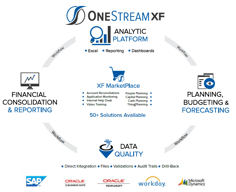
So Why OneStream? OneStream XF is a platform not a product. So, what does that mean? From a business perspective, it means the end to spending time determining which product and technology to use as OneStream was developed to support Consolidations, FP&A, Management Reporting, Account Reconciliations, Strategic Finance, Governed Analytics, etc. providing a consistent technology platform. From an implementation perspective, the limitations and compromises of Hyperion / Oracle are eliminated due to a platform that is extensible, scalable, modern and secure. From an IT perspective you are in the driver’s seat, deploying a modern architecture that is operating in either your company’s data center or in the cloud.
Would suggest improvements to Metadata management and synchronization of metadata between environments.
Consolidations, Planning, Forecasting, Account Reconciliations, People Planning, Sales Reporting, Dashboarding, Zero-Based Budgeting, custom drill through, and OneStream XF was utilized to replace Hyperion Strategic Finance to support Cash Planning.

The XF platform is the real deal. Customers love it, and developers love to build on the platform. Anyone with a curiosity to learn will find value in using OneStream.
It is relatively new (10 years), and best practices are still being refined and developed, and communicated. There also is a lot to know to become an expert, so pace yourself.
Planning, consolidation, and defining repeatable processes that can be automated. A developer can automate any manual mouse click event on the platform using Data Management Sequences and Steps. It is very powerful.
OneStream is by far the best consolidation tool that I have ever worked on. The reporting, upgrades, ease of use, and automation are fantastic.
Sometimes the excel function can be tricky to learn but once you get familiar with it the tool is great!
The ability to load from our ERP into OneStream has been very benenificial. The users pick up the tool very easily. And the ability to add more dashboards like Account Recs has been great!

Extensibility Dimensionality allows information to be analyzed at different levels
I think the main improvement may be the use on mobile devices, having an integration with different devices such as ipad or smartphone
Mainly being able to have a single and integrated platform with the different financial modules such as consolidation and planning.
Hands down, my favorite part of OneStream is the flexibility of the software. There continues to be new ways to utilize the software on almost a weekly basis.
While not a complete dislike, there are certain challenges with report formatting that I've been working through for quite some time. The formatting could be a little more user friendly that would then compare to the user friendliness of the rest of the software.
The idea of creating "One Source of the Truth" is probably one of our biggest benefits. We can utilize the same software for both internal and external reporting as well as allowing multiple disciplines to utilize the same solution.
We really appreciate the reduced reliance on IT infrastructure due to (a) having the database supported by Azure and OneStream. Tied for best, we also love how flexible the planning capabilities have been to capture our evolving complex needs
It is newer than other legacy platforms out there and as such there are less people available to help... less "experts", if you will. We've just taken on learning as much as we can on our own.
We struggled with forecasting a business that can change dramatically quickly and with mobile assets. OS afforded us the flexibility within the hierarchy to do just that. We are also multi-national, multi-currency and it has allowed all locations to be involved without any latency or performance issues.
Adaptability of the product through configuration. Development of reports, dashboards, etc., can be accomplished without the need to hire a programmer to write custom code. The launching of the Academy to allow for self-instruction has been a huge benefit to our team, allowing us to expand usage of the product through development of dashboards.
Performance can be an issue with large entity and account structures. Having a fairly complex entity structure, it takes the system over 2 hours to run a full consolidation. There is a point where no matter how many processors or memory is given to it, the system simply cannot process records any faster.
The entire financial close process has improved since implementing OneStream. Workflow guides the users through the steps they need to take to complete the close process. Validation checks ensure data quality. Integration with ERP systems is great! We knocked a day off the monthly financial close and have improved data quality immensely.

One version of the truth, all your data in one place makes reporting easier and performing tasks more standardized. We don't spend our time having to reconcile data between multiple systems or training people on multiple products.
The OneSream solution is a little Microsoft oriented. As long as your organization okay with that as a platform it's fine - most companies have some sort of Microsoft anyway..
Consolidations, Reporting, and Analytics all in one place. It's been a huge time saver.
Multidimensional analysis through the different ERPs that conform our Group
BI still needs development and should be easier to use
We use it for Consolidation, Planning and Reporting. BI under development right now

Efficiency. I first got my hands on OneStream as a Senior Consolidations and Financial Reporting Analyst. I saw the legacy excel workbooks that were used for Consolidations and was so thankful that the organization had recently implemented OneStream. Trying to refresh the legacy workbooks was a nightmare... it would lock up my excel, constantly "break" with #VALUE!s all over the place, etc. I loved OneStream XF so much that I decided to change my career and work on Implementation. I now work for an official OneStream partner and have loved learning about all of the exciting OneStream solutions out there!
I would say that OneStream is still a relatively new software. As such, you can't "google" your way to solutions. There are, however, various tools available such as OneStream Academy, OneStream Knowledge Base and OneStream Community that help you "google" your way to solutions.
So many problems! Number one benefit was not having to switch between multiple applications to arrive at the same (or sometimes a lesser) result. Why jump into multiple ERPs, multiple excel books, etc when you can find it all in one place?
OneStream gives the entire package for one price. Close and Planning as well as everything else is on one place for one price.
It can be complicated to learn. The theory is the same as the other EPM software, but the layout allows for more specialization.
Data movement is much easier with OneStream. There is no disconnect between Close and Planning.
Software functionality is absolutely state of the art. A modern architecture (e.g. updates only take two hours) combined with a professional cloud offering. OneStream support is absolute top, any ticket we open (even non urgent ones) are usually looked at within two minutes. Furthermore, OneStream is very much interested in bringing customers up to speed. They teach us how to use and maintain the product without trying to sell us a lot of consulting hours.
We don't say this lightly, but we have really no issues at all.
We run a very complicated consolidation through OneStream. We have realised a lot of efficiencies by automating processes. The tool is extremely stable and a big improvement for our end users in terms of workflow management and speed.
Meets all the organization's financial reporting and analytical needs. Very personalizable. Very personalizable.
When you work with support teams / consultants, you must learn OneStream "lingo" to effectively manage the software and to resolve problems. It's easy to learn but easy to use.
Excellent customer service and pleased constantly with system usability and capabilities. There are endless ways to configure and combine both news and research aspects.
I like the intent my organization has with Onestream. We plan to use this 1 portal for financial, statutory, legal, business and management. The software is easy to use. Like any other reporting software, the underlying data needs to be accurate.
I dont dislike anything about the software.
1 portal for financial, statutory, legal, business and management. Accountants will have more time to analyze the data than laying out data in a readable format.