

Unclaimed: Are you working at OneStream?
OneStream Reviews: 4.7/5 — Highly Rated
OneStream is a content creator’s essential streaming tool thanks to its easy-to-use software that lets users record and stream videos at the touch of a button. You can also easily distribute your streams across 40 social media platforms, multi-cast your video to various in real-time, and schedule pre-recorded videos to appear on social media up to 60 days in advance. Live streams can be embedded into your website, where you can add captions and subtitles for clarity, and even experiment with cloud storage integrations.

| Capabilities |
AI
API
|
|---|---|
| Segment |
Small Business
Mid Market
Enterprise
|
| Deployment | Cloud / SaaS / Web-Based, Desktop Windows, Mobile Android, Mobile iPhone, On-Premise Linux, On-Premise Windows |
| Support | 24/7 (Live rep), Chat, Email/Help Desk, FAQs/Forum, Knowledge Base, Phone Support |
| Training | Documentation |
| Languages | English |
OneStream Pros and Cons
- Excellent live chat and team management engagement
- No software installations required, and a range of upload options
- Captions and subtitles for playlist clarity
- Custom RTMP and embed options
- Integrations with over 40 social media channels
- Can take some getting used to for beginners
- Can get expensive depending on how much you stream



OneStream Live sells 24/7 streaming as a €30-per-stream add-on — and its €83 Enterprise plan includes three of them. Add three to the €39 Professional plan and you pay €129 a month for a package that Enterprise delivers for €83, while also giving you more destinations, seats, storage and bandwidth. The cheaper-looking plan is the more expensive one, and nothing on the pricing page points this out.
- What it is: A multistreaming platform that pushes one broadcast to up to 50 destinations.
- Best for: Creators and agencies streaming to many social platforms at once.
- Pricing: Free, then €12 to €83 a month billed annually. Verified August 2026.
- The honest catch: Four separate add-on meters sit on top of every plan price.
What Is OneStream Live?
OneStream Live is a multistreaming and live-production platform. You broadcast once and it distributes to multiple social destinations simultaneously, with three related capabilities alongside: Live Studio (browser-based production with remote guests, teleprompter and multiple cameras), pre-recorded streaming (upload a file and stream it as though live), and 24/7 streaming (a playlist running continuously).
It connects to external encoders — OBS, vMix and others — on every plan including the free one, and provides an embed player and custom webpages on paid tiers.
A necessary note before the pricing. This Findstack listing describes two different companies. Its name, website URL and category point at OneStream Software (onestreamsoftware.com), an enterprise financial-consolidation vendor filed under Corporate Performance Management. Its description and its affiliate link point at OneStream Live (onestream.live), the multistreaming product reviewed here. They are unrelated businesses that share a name. This review covers the product the link actually sells; the listing’s category and URL are wrong and have been reported.

How OneStream Live Works
- Five tiers: Free, Basic, Standard, Professional, Enterprise.
- Metered on four axes: destinations, seats, storage, CDN bandwidth.
- Each is upgradeable in-card as a paid add-on.
- 24/7 streaming is Enterprise-only or a €30/stream add-on.
- Free plan needs no credit card.
- Connects OBS and vMix on every tier.
OneStream Live Pricing
Captured from onestream.live/pricing/ in August 2026. Euros as served to our location; all paid cards state “Billed annually”.
| Plan | Price | Destinations | Quality | Seats | Storage | CDN |
|---|---|---|---|---|---|---|
| Free | €0 forever | 2 | 720p | 1 | 1 GB | — |
| Basic | €12/mo | 5 | 720p | 1 | 5 GB | 0.5 TB |
| Standard (popular) | €32/mo | 10 | 1080p | 4 | 20 GB | 1.5 TB |
| Professional | €39/mo | 30 | 1080p | 6 | 50 GB | 2.5 TB |
| Enterprise | €83/mo | 50 | 1080p | 10 | 150 GB | 5 TB |
| Studio and pre-recorded limits | Free | Basic | Standard | Professional | Enterprise |
|---|---|---|---|---|---|
| Studio session length | 1 hr | 2 hr | 6 hr | 10 hr | 20 hr |
| Studio guests | 4 | 6 | 10 | 12 | 16 |
| Pre-recorded stream length | 15 min | 1 hr | 3 hr | 8 hr | 20 hr |
| 24/7 streaming | ✗ | ✗ | ✗ | ✗ | 3 concurrent |
| Add-on prices (published in-card) | ||
|---|---|---|
| 24/7 streams | 1 / 2 / 3 concurrent | €30 / €60 / €90 per month |
| Social destinations | 5 / 15 / 25 / 50 / 100 / 200 | €10 / €17 / €20 / €25 / €50 / €99 |
| Team seats | 2 / 4 / 6 / 10 | €10 / €15 / €20 / €25 |
| Storage | 10 / 50 / 100 / 250 / 500 GB | €10 / €25 / €50 / €100 / €150 |
| CDN bandwidth | 1 / 2 / 5 / 10 / 50 / 100 / 250 TB | €10 / €20 / €50 / €100 / €500 / €1,000 / €2,500 |
| The comparison the page does not make | |
|---|---|
| Professional | €39 |
| + 3 concurrent 24/7 streams | +€90 |
| Total | €129/month |
| Enterprise, which includes all three | €83/month |
| Enterprise is cheaper by | €46/month — and includes more of everything |

What actually decides your cost:
- Buying 24/7 streaming on Professional costs more than Enterprise. The add-on is €30 per concurrent stream — €30, €60, €90 for one, two and three. Enterprise at €83 includes three concurrent 24/7 streams outright. So Professional (€39) plus the three-stream add-on (€90) is €129, against €83 for Enterprise — which also gives you 50 destinations instead of 30, 10 seats instead of 6, 150 GB instead of 50, and 5 TB of CDN instead of 2.5. Anyone who needs continuous streaming should go straight to Enterprise; the page never draws the comparison.
- The ladder has one nearly-free step and one very expensive one. Basic to Standard is €12 to €32 — a 167% increase. Standard to Professional is €32 to €39 — just 21.9% — and that €7 buys three times the destinations (10 → 30), 1.5× the seats, 2.5× the storage, an extra terabyte of CDN, four more studio hours, plus RTMP source, playlist streaming and password protection. Standard is the plan to avoid. If you were going to pay €32, pay €39.
- CDN bandwidth is a flat €10 per terabyte at every volume. 1 TB for €10, 5 TB for €50, 10 TB for €100, 100 TB for €1,000, 250 TB for €2,500 — no volume discount whatsoever, exactly the pattern found on HostHavoc elsewhere in this series. Bandwidth-heavy broadcasters get no reward for scale, so model your egress before committing.
- The other three add-ons do taper. Destinations fall from €2.00 each (5 for €10) to €0.50 (50 for €25) and flatten there. Seats fall from €5.00 (2 for €10) to €2.50 (10 for €25). Storage falls from €1.00/GB (10 GB for €10) to €0.30/GB (500 GB for €150). Only bandwidth stays linear.
- The free plan is a real product, not a demo. 2 destinations, 720p, 1 seat, 1 GB storage, 3 scheduled events, a 1-hour studio session with 4 guests, 15-minute pre-recorded streams, and OBS/vMix connectivity — with no credit card required. For someone testing whether multistreaming suits their workflow at all, that is enough to find out.
- 1080p starts at Standard, which is €32. Basic at €12 and Free are both 720p only. For anyone streaming to YouTube or Twitch where 1080p is the expectation, the entry price is not €12 but €32 — or €39 given the Standard-versus-Professional arithmetic above.
- We could not verify the “Save up to 20%” annual claim. The toggle reads “Monthly / Yearly Save up to 20%” and every card is labelled “Billed annually”, but repeated attempts to flip the control left all five prices unchanged, so the monthly rates were not obtainable. Treat the 20% as unverified; if you intend to pay monthly, confirm the figure before assuming a saving.
- Studio and pre-recorded limits scale hard, and they may matter more than destinations. Studio sessions run 1 → 2 → 6 → 10 → 20 hours and pre-recorded streams 15 min → 1 → 3 → 8 → 20 hours across the range. A church or conference streaming a three-hour service cannot do it on Basic at any destination count — that needs Standard at minimum.
-
The affiliate link resolves cleanly.
/go/onestreamreturns 200, lands ononestream.live/?deal=findstack, and sets FirstPromoter’s_fprom_codeand_fprom_trackcookies, so attribution is intact.
Who Should Use OneStream Live
- Creators broadcasting to many platforms. Up to 50 destinations from one stream.
- Agencies managing client channels. 10 seats and 10 custom webpages on Enterprise.
- Anyone running continuous streams. But take Enterprise, not Professional plus add-ons.
- Teams testing multistreaming. The free tier connects OBS and vMix with no card.
It fits poorly for anyone needing 1080p on the cheapest paid plan, since Basic is 720p; for bandwidth-heavy broadcasters, since CDN never gets cheaper per terabyte; and for buyers who want a single flat price, since four separate meters sit on top of every plan.
Honest Pros and Cons
Strengths
- Add-on prices are published in-card rather than hidden behind sales.
- A genuinely usable free tier with OBS and vMix connectivity.
- Professional costs only 22% more than Standard for far more capability.
- Enterprise includes three 24/7 streams worth €90 as add-ons.
- Destinations, seats and storage all taper as you buy more.
- Up to 50 destinations from a single broadcast.
Limitations
- Professional plus 24/7 add-ons costs €46/month more than Enterprise.
- CDN bandwidth is a flat €10/TB with no volume discount.
- 1080p requires Standard, at €32.
- Four separate add-on meters on top of the plan price.
- The “Save up to 20%” annual claim could not be verified.
- The Findstack listing names and categorises a different company.
OneStream Live Alternatives and How It Compares
- Vimeo Livestream targets professional broadcast, reviewed elsewhere in this series.
- XSplit Broadcaster is desktop production software rather than a distribution platform.
- Restream is the closest direct multistreaming competitor.
- Switcher Studio focuses on multi-camera iOS production.
- StreamYard and Castr compete on browser studio and 24/7 streaming respectively.
The Verdict
OneStream Live does one thing clearly — take a single broadcast and push it to up to 50 destinations — and wraps a browser studio, pre-recorded streaming and 24/7 playlists around it. The pricing page is unusually forthcoming: every add-on carries a published price inside the plan card, which is more than most platforms in this series manage. What it does not do is help you spot when the arithmetic points somewhere other than the plan you were choosing.
The clearest example is 24/7 streaming. It is sold at €30 per concurrent stream — €30, €60, €90 for one, two and three — and Enterprise at €83 includes three of them. So Professional at €39 plus three streams is €129 a month, while Enterprise is €83 and simultaneously offers 50 destinations rather than 30, ten seats rather than six, 150 GB rather than 50, and 5 TB of CDN rather than 2.5. If continuous streaming is why you are here, Enterprise is both cheaper and larger, and nothing on the page tells you so.
The second thing worth knowing is that Standard is the weak plan. Basic to Standard costs +167% (€12 to €32); Standard to Professional costs +21.9% (€32 to €39) and delivers three times the destinations, more seats, 2.5× the storage, an extra terabyte of bandwidth, four more studio hours, plus RTMP source, playlist streaming and password protection. Seven euros is a rounding error against what it buys. Anyone drawn to the “Popular” badge on Standard should look one card to the right.
Two smaller cautions. CDN bandwidth costs a flat €10 per terabyte at every level — from 1 TB to 250 TB, no volume discount at all — so a high-egress broadcaster should price that separately rather than assuming scale helps. And 1080p begins at Standard, meaning the practical entry point for anyone streaming to YouTube or Twitch is not the €12 Basic plan but €32, or realistically €39. The free tier, though, is genuinely useful for deciding whether any of this suits you: two destinations, a one-hour studio session with four guests, OBS and vMix connectivity, and no card required.
FAQ
How much does OneStream Live cost?
In euros as served to our location in August 2026, all billed annually. Free is €0 forever. Basic is €12 a month, Standard €32, Professional €39 and Enterprise €83. On top of those, four add-ons carry their own published prices: extra social destinations from €10, team seats from €10, storage from €10 and CDN bandwidth at €10 per terabyte. 24/7 streaming costs €30 per concurrent stream.
Which OneStream Live plan should I choose?
Not Standard. Going from Standard (€32) to Professional (€39) costs only 21.9% more and triples your destinations from 10 to 30, adds two seats, 30 GB of storage, a terabyte of bandwidth, four studio hours, RTMP source, playlist streaming and password protection. And if you need 24/7 streaming, skip straight to Enterprise at €83 — it includes three concurrent streams that would cost €90 as an add-on, making Professional-plus-add-ons €129.
Does OneStream Live support 24/7 streaming?
Yes, but only on Enterprise as standard. Enterprise (€83) includes 3 concurrent 24/7 streams; every lower tier shows “No 24/7 Stream” by default. It can be added to lower plans at €30 per concurrent stream (€30, €60, €90 for one, two and three) — though as above, buying three on Professional costs more in total than simply taking Enterprise.
Is OneStream Live’s free plan any good?
For evaluation, yes. It offers 2 social destinations, 720p streaming, 1 team seat, 1 GB of storage, 3 scheduled events, a 1-hour Live Studio session with 4 guests, 15-minute pre-recorded streams, and connectivity to OBS, vMix and similar encoders — with no credit card required. The main limits are 720p quality and the two-destination cap.
Is this the same OneStream as the financial software company?
No, and the Findstack listing conflates them. This review covers OneStream Live (onestream.live), a multistreaming platform — which is what the listing’s description and affiliate link both point to. The listing’s name, website URL and category instead refer to OneStream Software (onestreamsoftware.com), an unrelated enterprise financial-consolidation vendor. The two companies simply share a name.

Compare OneStream with other popular tools in the same category.
The tools and functionality available on this platform make it simple to access key data, build dashboards, and automate operations. It connects with Microsoft applications, making it possible for users to connect and extract data for quicker decision-making.
OneStream is a cutting-edge platform that is ideal for businesses with a variety of use cases. the value for money might not be as substantial if you only use a tiny percentage of its features. Its adaptability is one of its main advantages, although this can also be problematic. To ensure you maximise the potential of the platform, it is crucial to obtain advice from an experienced OneStream consultant or user.
For simplified financial planning and analysis, OneStream is an all-in-one solution. Businesses can save money on licence costs and data storage by using OneStream for a variety of tasks instead of needing several solutions. It provides an integrated method of financial management, allowing for real-time operations without the hassles of dealing with numerous chart of accounts or mapping problems. OneStream is a state-of-the-art platform for reporting and consolidation that enables companies to provide accurate, dependable, and fast financial reporting.
One of the most highly valued features of Onestream is its seamless integration with Microsoft Excel. This integration allows users to continue working with their familiar spreadsheets while also gaining access to powerful cloud-based functionality such as databases, catalogs, budgets, reconciliations, and legacy systems. The comprehensive suite of capabilities that Onestream offers makes it the ideal solution for finance teams seeking a seamless and integrated approach to financial management, which is why it is widely regarded as the to-go tool for finance professionals.
Perhaps the performance during month-end close is something to consider since Onestream can become a bit slow when there is heavy usage across the organization.
Onestream is utilized for the accounts reconciliation process at month-end. Before implementing Onestream, the organization relied on multiple, disconnected Excel files and email communication, which made the process slower and more tedious.
Onestream is platform EPM solution which allows for customization and a wide range of business use.
There are training available some just scratches the surface of the possibilities. Would like to see more extended or in depth traning classes.
Onestream increases our productivity through automization of many processes and data integration.
OneStream offers a unified platform for financial planning, consolidation, reporting, and analysis, eliminating the need for multiple tools. Its user-friendly interface and drag-and-drop functionality make it easy for non-technical users to operate. OneStream's powerful workflow engine and robust security features ensure data accuracy and integrity. The platform provides real-time financial intelligence, enabling organizations to make informed decisions quickly.
OneStream's implementation and customization can be complex, requiring technical expertise and extensive training. The platform may not be cost-effective for small businesses or those with simpler financial needs.
Utilizing OneStream for multiple functions, rather than relying on individual tools for each task, can minimize the need to transfer data between various applications, oversee metadata, and verify data consistency across different tools.
Platform, integrating all functionalities and modules within one integrated platform. Ensuring a better integration and data collection process.
Could be to overwhelming for starters, also for smaller use-cases the platform could be "too much"
Flexibel to to able to find a solution to (almost) all client challenges.

Being a consultant (previously Oracle/ Hyperion) i really like that OneStream is a real platform where you don't need to move your data around. Consolidation, planning, data integration but also operational reporting using BI is included in the platform.
Since OneStream is so advanced it really fits companies with more then 1 usecase. If you only use a small part of it the value for money might not be that good. A great feature is that everyting is possible but that is also a challenge. make sure you are advised by an experienced OneStream consultant/ user.
Using OneStream for multiple purposes instead of a separate tool for all reduces the effort in moving data around, managing metadata and validating that the data is equal over the different applications/ tools.
Tea or Coffee?... Why chose if you can have both?... That is where OneStream is strong as you always have a choice. It starts on day 1 where you need to choose if you want OneStream on premises or in the cloud.... With OneStream you own the solution and you keep your freedom. I also really like the Marketplace with all the solutions. Not only for the end users but also for the admin. It is really helpful to have tools like the metadata builder to kick start a project. I also really appreciate their fast and good support team. You usually get an answer within the hour - And i do not mean something like "Thanks for contacting us" :-) The videos are also a really nice way to help or discover a part of the tool. Unfortunately it takes time to watch those videos and I do not take advantage of it enough!
Anything is possible in OneStream... The early stage of the implementation is key to meet the long term requirements! And this is challenging to foresee...
With OneStream it is possible to do consolidation, forecast... but also more specialized reporting like IFRS16!

Transformation Rules Flexibility with Application Extensible Dimensions for business reporting One Solution multiple Products Easy implementation of a new product from Market Place Customize the application according to business needs
Dashboarding Capabilities Ease of creating dashboards There is no keyboard navigation defined in OneStream, everything is mouse-based.
We have started using OneStream for Account Reconciliation. Instead of just migrating the account reconciliations to a digital platform, we have now achieved the below benefits from OS tool. Consolidation of additional attributes like Aging, Categories from lowest to top entity hierarchy Calculation of Risk indicators associated with Sub Ledgers of AP, AR & Inventory Drill Back from summary level to Transactional level at a click of a button

Building specific solutions, processes, end user dashboards to support the financial department in the business. When OneStream is implemented there is time to really analyze data instead of creating data. The vendor strives a 100% customer satisfaction, this is visible in multiple ways, like their own support and expecting the maximum of their implementation partners.
You need a certain basis of knowledge to get the best out of OneStream. I would always advice to follow the basic training.
Complex Planning Solutions Consolidation IFRS16 Tax Treasury Creating a streamlined process out of complex Excel sheets
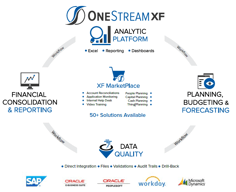
OneStream XF is a platform, meaning it has multiple solutions in it. We implemented Consolidation and IFRS16 (which is a marketplace solution, like an app). But also data integration, reporting and planning is included.
The learning curve is pretty steep since it is such a big platform. Since everything seems possible it is a challenge to balance a world-class application versus project timelines and budget.
Consolidation and IFRS16 is now in one system with the same user experience. It is all maintained in one central place.
Reconcilation which made easy and scenario based analysis helpful for managment decisions
Required some more automation connection like excel VBA enabled.
Onestream helping management to do anlaysis of business decisions.
Easy to use and consolidate many entities replicating similar data. Quick to update and review previous periods, Easy to calculate financials in particular Fx rate
Adding accounts to the report is not straightforward, cannot delete cells once you add one by mistake. Account codes are not self-explanatory easy to make mistakes. Will not bother giving you consolidation unless you create your own
Budget process and periodical reporting. Fast consolidated sub-divisions give flexibility and speed to the month-end reporting process. Can utilize excel capabilities and link source systems thru other link softwares.

I like that the window in excel with the onestream add-on updates in real time.
You have to use internet explorer to initially launch onestream XF. It also takes some time to query, even slower than other Saas products.
Exporting and importing reports.
The interface is simple to understand. I have tried 50 users so far and they quickly understand how to use it and feel comfortable to explore additional features.
It was unable to import the subledger detail to allow us to reconcile the control accounts. We must still manually run the subledger report and attach it manually to each reconcilation. Other than that, it seems to achieve our requirements.
We have achieved better compliance and corporate visibility to our account reconciliations. We can timely meet auditor requests and evidence the support for balance sheet accounts.
XF has financial intelligence that makes consolidation a breeze.
You can call OS a tool that tries to do it all in one platform. There are some areas that need improvement when it comes to planning and reporting. (it is not a Tableau or a true Planning system)
It is flexible to the point that you can do pretty much anything with it (given the time, money, and the expertise to maintain the system once it is done.)
I like Onestream for our organization because we can service people that are looking at business reporting, financial reporting, management reporting, statutory reporting etc. We have 1 platform to run the reports and have standard reports for all segments
The way our organization is implementing it, it appears to be very HFM based. Its not my favorite.
We are using Onestream to report our entire business from 1 platform.
-Community is very helpful -Extremely fast support -Extremely fast compiling and processing of data -Very flexible reporting -Once setup correctly, very easy to maintain -Fast and impactful additions to the features in updates
-Hard to learn the advanced usage of the software (administrating/reporting) -Not a widespread phenomenon yet, so there is not a lot of use cases found on the internet
We currently use Onestream for our consolidation and reporting. It is very easy to put in a widespread of values, while maintaining the integrity of the information.
Our organization is still in the process of implementing Onestream and we have been trained on the software and it seems quite easy to use. It appears to be much like a pivot.
I don't like how HFM based this program is, or how HFM based it appears to be within our organization.
This will give us the capability where each user can analyze the data on their own regardless of function- financial reporting, business reporting and management reporting.