( 136 )
Unclaimed: Are you working at Termius?
Termius Reviews: 4.7/5 — Highly Rated
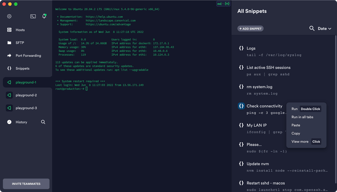
Termius is a cross-platform SSH client that provides secure remote access to Unix and Linux servers for software developers and system administrators. It offers a user-friendly interface with features like SFTP, Mosh, and port forwarding, enhancing productivity and efficiency in managing servers. Termius is available on various platforms including Windows, macOS, Linux, iOS, and Android, making it a versatile tool for remote server management.
| Company | Termius |
|---|---|
| Year founded | 2019 |
| Company size | 11-50 employees |
| Headquarters | San Francisco, California |

| Capabilities |
CLI
|
|---|---|
| Segment |
Small Business
Enterprise
|
| Deployment | Cloud / SaaS / Web-Based, Desktop Linux, Desktop Mac, Desktop Windows, Mobile Android, Mobile iPad, Mobile iPhone |
| Training | Documentation |
| Languages | English |

I can have several servers at my fingertips and differentiate them by colors... so simple, so friendly
Right now, I haven't found something I dislike
I have access to all my Linux servers in one only place. This is so useful because we are only three persons in my department

Easy to use, well laid out, vaulted access to targets, very good product
No dislikes, Easy to use, well laid out, vaulted access to targets, very good product
Easy to use, well laid out, vaulted access to targets, very good product, used for access to services

It works in different operative systems, and you can share the sessions among the different systems
Color themes are very limited, and creating a new one takes time
Sharing session across different systems
I reaaaaaaally love that I have the control of my PM2, EC2, etc., from my smartphone, that means that I can easily go out for a walk not worrying about a server that's down because I can spin up the instance from my phone Lol
So far so good to be honest, I'm doing great with it
I can easily handle all my instances in AWS, other servers and so on.
The best thing I liked about Termius is that it allows me to keep all of my Virtual Machines at one place. I can log into multiple remote VMs at the same time using SSH and can also start local session to do basic work in shell. I can also store my session keys, so I don't have to worry about it.
The thing that disappoint me is their customer support. Due to Hardware issue in my smartphone, I lost MFA access, and wanted to reset MFA. Hence, i contacted their customer support, and they responded after the 2 months. I lost hope that I will never be able to recover my account, but in the end they helped me. But still, I really hate their customer service.
Termis is helping people use Remote Machines without worrying about session security and re-entering credentials everytime you use them. It allows me to store my keys and credentials along with Remote VMs address, so I can connect to my machines with just one click!
1. Ability to organize all connections 2. Auto connection on network reset, reliability 3. Screen area utilization, connection colors 4. Ability to duplicate connections in tabs, windows Overall feels so inituative .
No dislike for me as of by now. Hope it will remain so in future.
SSH and ftp management.
1. Don't need to remember the host name and password/paraphrase. 2. Command autocomplete and option to create snippets 3. SFTP
The autocomplete feature at times creates trouble in completing command through tab.
Overall management of multiple remote hosts
Having the SFTP and SSH under one roof that's why I love Termius. Oh and she aint bad to look at either. 😍😜
Encrypted password can be tricky. Make sure you write it down cuz if you forget that one, it forgets you back!
Managing my Discord bots that I have running on Virtual Machine screens on the Google Cloud

Ubiquity, ease of use, sync, team features, just the best terminal for the past 5 years.
lack of sync on SFTP between local and remote. But that's a dropt in a bucket compared to what termius actually has helped our team.
Automating Scripting, Cloud/On-premises support, tunneling
Termius is installed on my iPhone and my Windows PC. It saves the server access information, and CLI commands I use often. My customers use Linux Ubuntu, Suse, RedHat, Amazon AWS, Microsoft Azure and FreeBSD. I get woken up at 3 AM and don't have to fumble around to get access to a server. Once I have the customer's name, I fix and resolve the issue within minutes.
When I find something to dislike about Termius, I will share it.
Server security and maintaining applications running on the server. Such as Apache, Email, MySQL and DNS. Instant access is most important, as well as the encryption of passwords
Simple sync between devices. Now, the AI tool creation is quickly becoming helpful for when I know what I need to do but don't remember the syntax. Beautiful design. Well organized. Snippets. Love the snippets. The prediction is great. The mobile experience is unprecedented.
Slight bug right now, if I set a custom start directory for the Local Terminal, it stops functioning, immediately terminates. I'm sure that will be fixed soon though.
Quick mobile access, staying in the same workspace across devices

Great UI/UX, tabs, snippets, horizontal tabs, bulk actions on all servers
It might cost you a rather big amount if you purchase it without the app store
I am able to connect and manage more than 25 servers at a time. The UI is great, the recent change of horizontal tabs is great.

Can't really say ONE thing. But easy connetions is my fav.
I think it's chromium behind!? Some times weird thing happen. Sharing was hard when I tried months ago.
Easy server connetions on my personal computers and some laggy chromius-like things. BUT I LOVE IT.
Precise, consistency and always online...
Nothing, keeping going to your jobs , because you are helping people...
Multi-connection ssh in one place!
The code snippets and the SSH stored to easily enter into within the possibility to see logs without the need to be connected.
The price for a personal use. For an enterprise it's a good price but for a personal need, it would depend on the country, I suppose
Gain speed
Termius available on my desktop Mac and my iPad makes me feeling very comfortable when doing quick tasks underway. Normaly I have to change the way I work when using an iPad. This is no longer nesscessary.
Hosts and groups do not sync between Mac and iPad. There is no solution for me asigning the "esc" Key to "^" on the iPad. So I was allway struggling within "vi".
Beeing able to rect fast on certain problems when underway. Accessing hosts in customer-environments and beeing able to support from andy place in the world (when using my iPad.

** I like the way Terminus let us save multiple servers' login info in an encrypted way and I can log into them parallelly very fast just by clicking. ** It's very user-friendly, easy to learn & navigate. Ui seems clean too ** It runs as a freemium model, so I can use the basic features for free but I have to pay for premium features, which totally suits me.
** Sometimes crashes without any trace, especially when the data showing rate is high. ** No saved sessions, so even a simple internet disconnection causes a lost session. Saved session could have been a really nice feature.
It mainly solves the login problem for multiple servers parallelly which was costing me so much time, now I can do it just with some simple clicks
One of the standout features of Termius is its seamless and efficient remote UAT server access capabilities. With Termius, managing and accessing remote servers becomes a breeze. The software offers a user-friendly interface that is both intuitive and visually appealing. Navigating through different servers and executing commands is a smooth and hassle-free experience. Termius excels in providing secure and encrypted connections, ensuring the safety of sensitive data during remote server access. The software supports many protocols, including SSH, Mosh, and Telnet, allowing users to connect to various types of servers easily. Additionally, the ability to save and organise server configurations simplifies managing multiple connections. One of the standout features of Termius is its synchronisation across different devices. Whether you're accessing your remote servers from a desktop, laptop, or mobile device, Termius keeps your configurations and preferences consistent. This feature adds excellent convenience, allowing users to seamlessly switch between devices without requiring manual setup or reconfiguration. Termius also offers a robust set of tools to enhance productivity. The built-in terminal emulator provides rich functionalities, including tabbed sessions, customisable keybindings, and support for various colour schemes. It also supports SSH tunnels, making it easy to establish secure connections to services running on remote servers. Furthermore, Termius provides additional features such as SSH key management, two-factor authentication, and SFTP file transfers. These features add an extra layer of security and versatility to the software, making it a comprehensive solution for remote server access. Termius is a reliable and user-friendly software for accessing remote UAT servers. Its seamless interface, robust security measures, synchronisation across devices, and productivity-enhancing tools make it an excellent choice for individual users and businesses needing efficient and secure server management.
While Termius offers numerous advantages, there are a few aspects that some users might find less favourable. One potential downside is that some advanced features and functionalities in Termius are only available in the premium or paid version. While the accessible version of the software provides essential remote server access capabilities, users who require more advanced features, such as team collaboration tools or SSH tunnelling options, may need to upgrade to a paid subscription. Another aspect that some users may find lacking is the limited customisation options in the interface. While the interface is generally user-friendly and visually appealing, there may be limited options for customisation in terms of themes, layouts, or font sizes. This can be a drawback for users who prefer a highly personalised working environment. Additionally, some users have reported occasional stability issues with Termius. While these issues are not widespread, connection disruptions or crashes can be frustrating, especially during critical server management tasks. It is worth noting, however, that the Termius team regularly releases updates to address such issues and improve overall stability. Lastly, the learning curve for new users, especially those unfamiliar with terminal-based interfaces or remote server management, can be steep. While the software offers a user-friendly interface, the intricacies of remote server access and the various protocols involved may require some time and effort to understand fully. However, Termius provides documentation and resources to help users get up to speed with the software. Despite these drawbacks, Termius remains a robust and reliable tool for remote UAT server access. While the limitations in customisation, advanced features, and occasional stability issues may be present, they are outweighed by the software's overall functionality, security, and convenience.
Termius solves several key problems related to remote UAT server access, benefiting users in various ways. Firstly, Termius streamlines the process of managing and accessing remote servers. It eliminates the need for multiple separate tools or manual configurations by providing a unified platform for server management. This saves users valuable time and effort, as they can easily navigate their servers, execute commands, and handle configurations from a single interface. Termius also addresses security concerns related to remote server access. By offering encrypted connections and supporting various protocols like SSH, Mosh, and Telnet, Termius ensures that sensitive data transmitted between the user and the remote server remains secure. This heightened security is crucial for businesses dealing with confidential information or working in regulated industries. Another problem Termius solves is the synchronization of server configurations across multiple devices. Users can seamlessly switch between desktops, laptops, and mobile devices while retaining their server settings, preferences, and saved configurations. This feature adds convenience and flexibility, allowing users to access their remote servers from different devices without the need for manual setup or replication of configurations. Termius also improves productivity by providing a range of useful tools and features. The built-in terminal emulator with tabbed sessions, customizable keybindings, and support for color schemes enhances the efficiency of executing commands and managing multiple sessions simultaneously. Features like SSH key management, two-factor authentication, and SFTP file transfers contribute to a more secure and streamlined workflow. Overall, Termius benefits users by simplifying remote server access, enhancing security, ensuring synchronization across devices, and providing productivity-boosting tools. It saves time, improves data protection, and offers a convenient and efficient solution for individuals and businesses managing remote UAT servers.
That I don't have to worry about my .key files because they all are stored in the cloud and I just upload the ones I need and it works AUTOMAGICALLY.
I don't think I actually dislike anything about termius. The thing I would like to learn is how to use snippets, I didn't actually really check anything on the internet, maybe there is some but some tutorials on demand would be nice.
Managing keys for me.
Ability to easily manage all my VMs from a single place, single click ssh and great UI that allows me to bring multiple screens in the same window.
Some shortcuts used in editors perform some other functions in termius, some can be replaced but some are not mentioned in the settings (like Ctrl+_)
Easily manage and duplicate or stack multiple ssh terminals

I'm an expert in Linux with more than 20 years using Linux desktops. Actually, I'm using Windows. I did not know anything about Termius, but I discovered it in some searches. So I decided to do some tests with Termius and it was an amazing experience and a surprise to me because it works like a Linux terminal on Windows. Congrats to everyone involved in the Termius project. And if you are a Windows user and need an excellent terminal, try Termius.
By now nothing is a reason to dislike Termius.
It's working fine and solve my experience using SSH clients for Windows. I liked the interface, the usability, and the font colors.
I like the design, speed, SFTP support and how I can switch between the terminal and SFTP.
I actually do not have something to say here. I love everything about Termius!
Server management (When I am setting up the server I am configuring port 22 so I can connect with Termius into it).
Perfect for use with multiple sessions and cloud instances
Nothing - everything has worked perfect thus far.
Connecting with my servers and working with the command line.
I love the fact i can run termius on any platform and have all my keys, sites and setup ready to go.
To be honest, nothing. Its a great example of getting the tool just right
Access to my home lans multiple ssh based servers from Android, Chromebook to Mac M1
That it is free for students like me, i use it daily and will continue to use it for my job. I like that it's all synchronized and sorted on all devices i use daily.
I don't really remember but i think without pro / premium you cannot sync your hosts across devices. Also the Autocompletions are very often quite not useful / not working commands in the end. Prefer the autocompletions from ubuntu / linux itself.
Termius makes it possible to work from outside and to be very flexible at all. Really good user experience.
The ease with which we can add multiple Servers with PEM keys to access them all from a very neat and clean UI. Extremely helpful for me and my team who need to access multiple servers on a daily basis.
Nothing to dislike at this stage. Great work, Termius team!
The main problem we were facing was when we used the default Mac OS or Windows terminal to SSH into different servers. We had to move into the directory where the PEM keys are stored and then SSH into each server accordingly. But with Termius, it's all in one place with an amazing UI to do it all with a single click on the Server Name.
Port forwarding, identities and search devices
the autocomplete is a good idea but turn very slow write on the terminal There are not groups on port forwading
- Save port forwading and double click to connect without ssh terminal open. - search devices - Create identities and reuse it

Gives possibility to use trial several times to work more with the features Very convinient interface Easy to control several connections Also it allows to store previous session Great hints that show previous commands. With long commands that have small changes it's very convinient just to ensure you are entering whole command properly
Ability to select hint command but not to execute it immideately Run command/snippet on connection(e.g. I need to run . .bashrc each time I'm connecting to a server) P.S. At least I haven't found these features
Allows to have serveral hosts Snippets(haven't used them a lot, but I hope to learn more in the future) Clear hints(of possible commands) that simplify work process File manager (command line became the Finder...again) Generally it is like perfect version of zsh
The sync feature across all clients allows me to work seamlessly from any device, including mobile, where the interface is straightforward. I haven't found any other tool as useful.
Sometimes when I connect to multiple servers it's difficult to distinguish each connection. Personalized icons would be helpful.
Easy way to keep all servers info synced across all my devices, including mobile, so I can focus on solving the problem and not worrying about connection issues.

The UI of Termius is special and the features this app has are wonderful and helps in my day to day work
The price is high, I want to get the premium but the price is high
Termius is solving a problem in all the SSH connections I have on all servers