


What It Actually Costs to Switch Web Hosts




Almost every host now advertises free migration, and they mean it. Someone at the new host will move your files and database, usually within a day or two, at no charge.
That’s genuinely the smallest line item in switching. The expensive part is on the other side of the transaction — the term you already paid for and are about to abandon.
The cost nobody prices: your unused term
Here’s the number that decides whether switching hurts.
Cheap hosting is sold as a long prepayment. Hostinger’s Premium plan at $2.99/mo is a 48-month term costing $143.52 upfront — its own pricing page states that all plans are paid upfront and the monthly rate is simply the total divided by the term.
So what happens to the unused months if you leave?
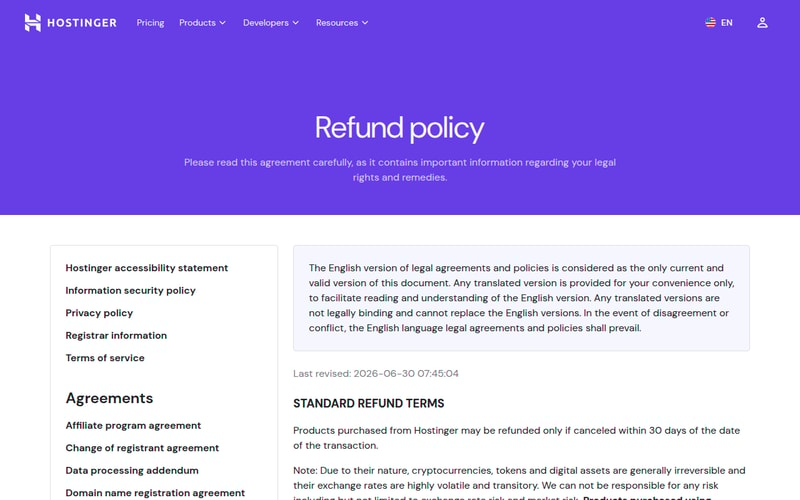
Hostinger’s refund policy is 30 days, and it isn’t prorated. Under “Standard refund terms,” the policy — last revised 30 June 2026 — states that products “may be refunded only if canceled within 30 days of the date of the transaction.” There’s no clause offering a partial refund for the remainder of a term after that.
Its non-refundable list is long, too: domain registrations and renewals, privacy protection, SEO tools, Google Workspace, VPS upgrades, and all paid support services.
Which produces this:
| You leave at | Months unused | Forfeited |
|---|---|---|
| Month 6 | 42 | $125.58 |
| Month 14 | 34 | $101.66 |
| Month 24 | 24 | $71.76 |
| Month 36 | 12 | $35.88 |
Fourteen months into a four-year plan, walking away costs you $101.66 of hosting you’ve already bought. That’s the real switching cost, and no “free migration” banner touches it.
This is not a criticism unique to Hostinger — it’s how most of the budget end of the market works, and Hostinger at least states its terms clearly. But it’s the number to look up before you get excited about a competitor’s offer.
Money-back windows differ by 3×
Your exposure depends enormously on when you’re reading this, and the windows are not standard.
| Host | Money-back window |
|---|---|
| InMotion Hosting | 90 days (shared and WordPress plans) |
| Hostinger | 30 days |
| Hosting.com (formerly A2) | 30 days |
| SiteGround | 30 days |
| GreenGeeks | 30 days |
| Cloudways | billed monthly — nothing to strand |
InMotion’s 90 days is three times the industry norm and is the single most switching-friendly term in this article. Its own guarantee page states that “All Shared Hosting and Hosting for WordPress plans come with a full 90-day money-back guarantee,” and that the same applies to “6-month or longer subscription terms for VPS Hosting, UltraStack One for WordPress, and Reseller Hosting plans.”
Month-to-month VPS, reseller and dedicated plans get 30 days instead, “prior to your first renewal” — and the page lists a shorter tier below that, so check which bracket your specific plan falls into rather than assuming the headline number.

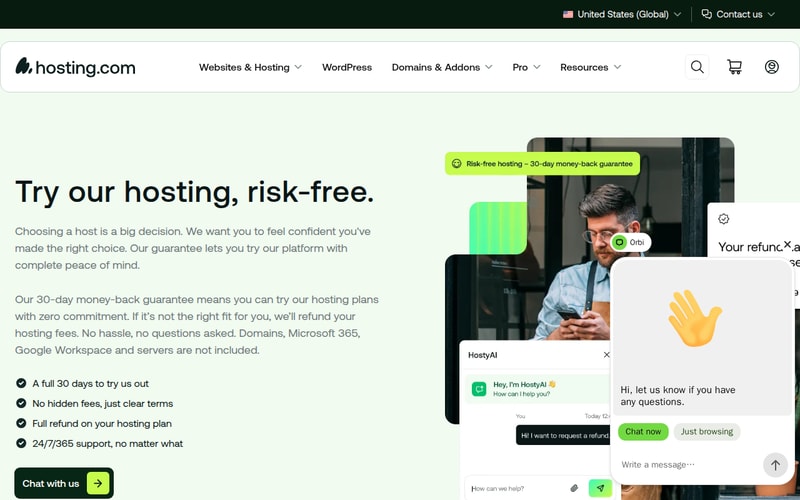
Hosting.com — the brand formerly known as A2 Hosting — offers 30 days on shared, WordPress, email and reseller plans, and excludes domains, VPS and dedicated servers, SSL certificates, third-party services and renewal fees.
Cloudways sidesteps the whole problem by billing monthly. There is no prepaid term to forfeit, which is worth something real that never appears in a price comparison.
The practical rule: if you’re inside a money-back window, switch now rather than later. The difference between day 29 and day 31 at most of these hosts is your entire annual fee.
What “free migration” actually covers
It varies more than the marketing implies.
| Host | Free migrations |
|---|---|
| Hostinger | Unlimited |
| SiteGround | Free, via its migrator plugin for WordPress |
| GreenGeeks | 1 on shared; up to 30 on VPS/reseller |
GreenGeeks is the one to read carefully: shared hosting includes a single free migration, and additional sites are $15 each. On VPS and reseller plans it’s $5 per cPanel account or $15 for a manual transfer. If you’re moving five sites off a shared plan, that’s $60 the comparison page didn’t mention.
Hostinger’s unlimited policy is the most generous here, and for anyone moving a portfolio it’s worth real money.
The costs the migration doesn’t cover
Four more, in rough order of how often they surprise people.
The overlap month. You keep the old host running while you verify the new one. That’s one month of double billing — unavoidable and correct. Anyone who cancels before verifying deserves what happens next.
Email. This is the genuine trap. (Migrating WordPress specifically covers it in full, along with the SSL and rankings failures that follow a switch.) Website migration tools move files and databases; mailboxes usually aren’t included. If your email is at the same host, you’re exporting and re-importing mail, recreating accounts and updating MX records — and mail delivered during the cutover can land in the old mailbox. Budget real time here, or move email to a dedicated provider first and never face it again.
DNS propagation. Your domain points at the old server until the change propagates, governed by your record’s TTL. Lower the TTL a day or two before you switch and the cutover is quick; leave it at a day and you’ll be in split-brain for a day, with some visitors on the old server and some on the new. There’s no charge for this, but there is downtime risk if you skip the TTL step.
Your hours. Verification is the part people underestimate — checking forms submit, payments process, redirects work, and cron jobs still fire. Two to four hours for a simple site, considerably more for anything with commerce.
The all-in number, and the payback
Take a realistic case. You’re paying a renewal rate of about $13.19/mo — that’s HostGator’s Hatchling on annual renewal, a fair example of the post-promo rate people drift into — and you move to Hostinger’s Premium at $2.99/mo effective.
| Line | Cost |
|---|---|
| Migration | $0 |
| Overlap month | $13.19 |
| Email move | your time |
| Verification | 2–4 hours |
| Monthly saving after | $10.20 |
Payback on the overlap month: 1.3 months. Twelve-month net saving: $109.21.
That’s the argument, and it’s decisive — switching from a drifted renewal rate pays for itself in about six weeks.
Unless you’re mid-prepay. Forfeit 34 months of a Hostinger term ($101.66) and the same $10.20/mo saving takes ten months to break even. Still worth it if you’re unhappy, but it’s a different decision, and it argues for timing the move to your renewal date rather than doing it in a temper.
When not to switch
Three cases where the arithmetic says stay.
You’re more than halfway through a prepaid term and content. Ride it out and switch at renewal. The forfeited months are pure loss.
Your saving is under about $3/month. At that delta, payback runs past a year once you count your own hours, and hosting migrations have a non-zero chance of breaking something.
You have complex email at the same host. Not never — but do the email move as its own project first, then the website. Combining them is how weekends disappear.
The hosts
Hostinger has the most generous migration policy here — unlimited free transfers — and the cheapest effective rate, which is why it’s the usual destination. Go in knowing the term is paid upfront and the refund window is 30 days with no proration, and time your purchase accordingly. Its renewal pricing works differently from most hosts: the long term genuinely is cheapest, because the renewal rate barely moves.
SiteGround offers free WordPress migration through its own migrator plugin, which makes the move largely self-service and quick if your site is standard.
Hosting.com, formerly A2 Hosting, gives 30 days on shared, WordPress, email and reseller plans, with domains, SSL, VPS and renewals excluded.
InMotion Hosting has the strongest position in this article on exit terms specifically — 90 days on shared and WordPress plans, which is three times what everyone else offers and materially reduces the risk of getting this wrong.
GreenGeeks includes one free migration on shared hosting and charges $15 per additional site, so price the full move if you’re bringing a portfolio.
Cloudways bills monthly with no prepaid term, which removes the forfeiture problem entirely — the cost of leaving is one month.
Nexcess and Rocket.net sit at the managed end; Rocket.net’s plans are month-to-month at $30 and up, which carries the same no-forfeiture advantage as Cloudways.
Before you move, it’s worth checking what your checkout is actually adding — several of the add-ons that inflate a hosting bill have free equivalents, and switching host is a good moment to drop them.
How we checked this
Hostinger’s refund terms — 30 days from the date of transaction, with domains, privacy protection, SEO tools, Google Workspace, VPS upgrades and paid support services listed as non-refundable — are from its own refund policy, read in August 2026. Its 48-month Premium term of $143.52 and the “all plans are paid upfront” wording are from its pricing page, checked for our renewal-pricing article.
Hosting.com’s 30-day guarantee, its covered plans and its exclusions are from its own money-back guarantee page, which also confirms the brand was formerly A2 Hosting.
InMotion’s 90-day and 30-day guarantee wording is quoted from its own guarantee page, which we captured in a browser after it refused our first request.
What we could not read at source. GreenGeeks’ and SiteGround’s migration terms are from secondary documentation, as both sites blocked our requests. Verify the migration allowance in writing before relying on it, particularly GreenGeeks’ one-free-site limit and its $15 per additional site.
On the forfeiture table. Hostinger’s policy states a 30-day window and is silent on prorated refunds thereafter. We have read that silence as “no proration,” which matches how the budget hosting market generally operates, but it is an inference from an absence rather than a quoted refusal. If you’re mid-term and considering leaving, ask support directly and get the answer in writing — the worst case is that we’re right.
What we did not do: we have not run a migration on any of these hosts, timed one, or tested a refund request. The hours estimates are conventional rather than measured, and the payback arithmetic assumes the saving is real and durable — if you’re switching onto a promotional rate, calculate the payback against its renewal price, not its headline.
The hosting links above are affiliate links, and this article recommends switching, which is the outcome we’re paid for. The arithmetic is shown in full so you can check it — including the section arguing you shouldn’t switch.
FAQ
Is web hosting migration free?
Usually yes for the transfer itself — Hostinger offers unlimited free migrations, SiteGround provides a migrator plugin, GreenGeeks includes one on shared plans. The costs that aren’t free are the prepaid term you abandon, an overlap month, and moving email.
Do hosts refund the unused part of a prepaid plan?
Generally not after the money-back window. Hostinger’s policy is 30 days with no proration stated, so leaving 34 months into a 48-month term forfeits about $101.66. Ask your host in writing before assuming otherwise.
Which host has the longest money-back guarantee?
InMotion Hosting, at 90 days on shared and WordPress plans — three times the 30 days offered by Hostinger, SiteGround, GreenGeeks and Hosting.com.
How long does switching hosts take?
The file and database transfer is usually a day or two. Add DNS propagation, which depends on your record’s TTL, and 2–4 hours of your own verification for a simple site. Lower your TTL a day before cutover to shorten it.
Will my site go down when I switch hosts?
It shouldn’t, if you keep the old host running until the new one is verified and lower your DNS TTL beforehand. The risk isn’t downtime so much as a split period where some visitors reach each server.
Does migration include my email?
Usually not. Website migration moves files and databases; mailboxes normally need exporting and re-importing separately, and mail arriving mid-cutover can land at the old host. It’s the most underestimated part of switching.
Is switching hosts worth it?
At typical renewal deltas, yes and quickly — moving from a $13.19/mo renewal to an effective $2.99/mo pays back the overlap month in about six weeks. If you’re mid-prepay it takes closer to ten months, so time the move to your renewal date.
