

Unclaimed: Are you working at Adobe Connect?
Adobe Connect Reviews: 4.0/5 — Solid Choice
Adobe Connect is a web conferencing platform that lets companies conduct online meetings, webinars, and training sessions. It’s a reliable solution that lets users share presentations and other multimedia right from your desktop—delivering multimedia rich experiences to hundreds of participants. It’s designed to recreate the learning environment of physical classrooms to define a more engaging and collaborative communication experience. The solution offers immersive virtual experiences with useful storyboarding tools and design features where you can plan, host, and track all your events.
Adobe Connect is a web conferencing platform that lets companies conduct online meetings, webinars, and training sessions. It’s a reliable solution that lets users share presentations and other multimedia right from your desktop—delivering multimedia rich experiences to hundreds of participants. It’s designed to recreate the learning environment of physical classrooms to define a more engaging and collaborative communication experience. The solution offers immersive virtual experiences with useful storyboarding tools and design features where you can plan, host, and track all your events.

| Capabilities |
API
|
|---|---|
| Segment |
Small Business
Mid Market
Enterprise
|
| Deployment | Cloud / SaaS / Web-Based, Desktop Mac, Desktop Windows, Mobile Android, Mobile iPad, Mobile iPhone, On-Premise Linux |
| Support | 24/7 (Live rep), Chat, Email/Help Desk, FAQs/Forum, Knowledge Base, Phone Support |
| Training | Documentation |
| Languages | English |
Adobe Connect Pros and Cons
- Easily inegrates with popular CRM software such as Salesforce and Eloqua
- Option to create unique registration pages
- Provides extensive template options that are customizable for virtual environments
- Bad recording quality and audio and video issues espeically when used on mobile
- Requires extensive support to resolve issues




I am Teacher and I found the Adobe Connect very useful meeting program in my class , I can control all students voices, sharing , video, ...etc
1- I don't found a disadvantage in it yet
giving my online lectures as I am in a real class
Adobe Connect allows me to create my pods
What I dislike about Adobe Connect is low bandwidth
The problem I am solving with Adobe Connect is to not allow my class camera to be on
The ease of use with the platform. I went through a two day virtual event using Connect and it worked perfectly.
When I used Connect for my two day event, the only issue was with the audio. Sometimes when using audio from the software, the speakers voice would be glitchy.
I was able to work alongside my instructor with Connect.

The Abilitiy To Connect With No Issues Plus I Love The Features
The Wait Time To Get Inside A Meeting Could Be Shorter But Overrall Love It
The Seperate Calling To Co-Workers Or Emails. In Connect Not Only Can We Meet But We Can Have Verbal Discussions
Adobe Connect has presentation features like transitions and animations, which are important in communications. Furthermore, Adobe Connect supports virtual events in the classroom, where training is done and knowledge acquired, it’s very easy to use and logon no issues with mainframe.It is possible to stream a presentation online. There is also the choice of video conferencing. There is no need to download something.On this platform, webinars are also very simple, and you can share your laptop in moments. It also has a chat feature and the ability to record calls.
Their closed caption pod has to be connected to an external service Users joining via the web are less successful using all of the features. Requires planning and design to have the best experience. (Bad for events on the fly) The text is tiny. This is on the title of the share pods, and chat and attendee list. I imagine those with visual impairments might struggle. Difficult to record meetings.
Ability to customize the layout of webinar rooms to tailor to my audience. Ability to add polls and Q&A.,Ability to have more than one host at any given time. Other capabilities instead of just audio and video is present too, but they haven't been fully explored or leveraged
That you can customize every meeting you create
I have experienced multiple connectivity issues. As well that there's not an easy option to share screen and audio at the same time
It has helped me to boost the experience
Connectivity and breakout sessions, engagement meter and cam
Audi issues at times, also the old version is better than the new one
Online learning and school. helps with students
It's is very helpful in training classes. Screen shares polls and engagement are really amazing.
Sometimes I run into connection issues. Usually this is my isp though. I do wish they would support more file types for upload.
Training effectively while showing others how to learn the campaigns we support.

The ability to record and share- and store recordings for future use- the ability to interact with students- the ability to post polls to check for understanding- the ability to post files for users to download without having to email or file share them out- the ability to share my screen and teach- then pull it back to the connect screen to focus learners
The only thing I would change is the ability to embed and play videos- the sound is not great when sharing a video
The ability to teach and share virtually
I like how you can customize each classroom based upon the unique needs and make-up of your class.
Larger class sizes can slow down the system's efficiency, especially with multiple people on video during screen sharing.
Adobe Connect is extremely useful in holding learners accountable during training and is built with great opportunities to keep the class engaged.
Easy to navigate and quickly switch to different rooms.
Old chat and documents are still in the new meeting rooms and you have to remember to delete that information before your next meeting.
Meeting clients remotely and providing documents securely to clients.
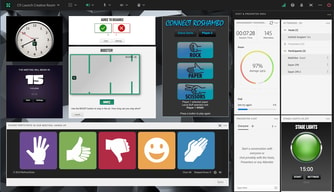
I like how we can interact with our students. The fun ways to have the students do when we ask a student either hand wave, thumps up, the face. Also, how students can send private messages when they do not want other students to know why they are late or anything.
Not really it was learning progress this year for me.
There are not any problems.
The very many functionalities that I can all use throughout my workday. I am on the adobe room for my entire workday and use it to monitor our teams in the morning. This is where I do my team huddles and one on one coaching. I am also a part of multiple rooms that I can get to simultaneously.
I would have wanted the ability to respond directly to another person's response or query in the chat pods, but it is not too much of a bother considering that I can always use my microphone to address the team, which I always do anyway. Another capability I would like to explore is the "sending file" function which I know is there but I have not fully figured out how to use.
Adobe connect is great for virtual huddles and individual coaching sessions. I love that you have all the basics of a virtual environment plus additional benefits like creating breakout sessions. It is also easy to organize my day and enables me to multi-task, seamlessly moving from one task while still working on another. The notification sounds are very helpful when I need to be in another screen. I am also able to join multiple adobe rooms without much issues.

The share screen feature is great. Also, i love how you are able to share documents and whiteboards, as well as links and documents. I use the chat feature for all of my classes and find it very helpful. I think that it is easy for my end users to connect into the classroom using the links. I post the link when i create the class in my LMS. I love the file share feature and I love that i can also share a web link. I like that i am able to have multiple chat and polling windows open at the same time. I find this program easy to use and i think my end users also find it easy to use. Easy to connect to as well.
i wish it were more interactive. Where people can raise their hands, give thumbs up etc. The other issue i have is with the audio. it is not very easy or user friendly to connect the audio through the classroom. I instead have to have the users call a number. I am hoping this gets fixed.
I need a place where i am able to present in a classroom type of environment and i am able to do this with Adobe Connect. I love it. Skype is the other screen share program and it just doesn't work well if you have a lot of people attending. Adobe connect helps with this. I use it daily for my classes that i teach.

Generating reports (questions, tests, participation etc.) is just perfect. Working together in group projects with other teachers and students is easy and quick. "Engagement Dashboard" is the best tool a teacher could've; from with it I can track class' engament easily.
Some times video stream have same issues like stutter and mini-freezes. Resizing of a windows and working areas are sometimes bugged or stuck on click. In general they are not real problems but again some minor technical bugs and glitches occur.
Adobe connect has really good tools that can be applied various scenarios in teaching: Video sharing, Q&A, Test, Screen sharing, participation tracking.
I like all of the features Adobe Connect offers.
It takes some practice to use, but the Adobe Connect instructions make it easy.
I can control how many students participate at one time.
I live that I can have all of my content loaded in for 15 days of learning. Each day having its own window.
Sometimes audio cuts in and out but I've found that's because of the learner's data connection.
Overall better learning experience for our learner's compared to other platforms.
The persistent layout system. We can set up any virtual workshop structure in advance and modify it over time. The flexibility it offers for instructional designers is way above any other solution I know.
The connectivity instability. We often have users kicked out of the system or not hearing audio and having to try the other options (web client, different browsers, some even end up joining with the app because they can't make it work on their computer). Some of our trainers have decided not to use Adobe Connect anymore because of these.
We are virtualizing our classrooms. It was already the case before, but the covid situation has accelerated the process. Most of our synchronous training goes through Adobe Connect these days.
The icons that help to navigate for my use
Seems to take bandwidth and disconnects sometimes
None as I use it for training
Flexible set up can change for each class and in class
It throwing me out and at times student sound quality Should require attendees to provide specific email or name to access so register is easier
Teaching technical material remotely
Adobe Connect provides a great platform for live or recorded classes and trainings. It has many features that other platforms can't do. The app is straightforward and easy to use. Connect also interfaces with our learning management system which makes it easy for students to go to live class or watch recordings.
We are trying to find alternatives to some of the Flash-based pods that we use. Also, the experience between the web version and the app version isn't 100% identical. This can cause an issue when trying to troubleshoot problems.
We use Connect for all of our live classes. Since students also have the option of watching recordings, it works perfectly for eceryone.
The functionality, customize layout, in one meeting I can log in multiple times, chatbox, document sharing. keep my content separate on Adobe cloud.
The Blackboard is not working with my writing pad. In the chatbox, sometimes messages appear as from the Host instead attendee's name.
Blackboard issues using the writing pad for the excellent learning experience for the students. Right now, I am sharing my desktop to use external blackboard options. Benefits are: students' logs can be downloaded and poll results as well (if it opens). Another benefit is to create webinars and share the link with the students to view them.
Individual classroom setting, up to 20 classrooms
If more than 10-20 people attend same time system crashes and slow
We have large group, so utilize 2nd adobe (annex) and split them was very helpful
All together is good. There are somethings I do not like but that has nothing with Adobe but with my coleagues
The window with participants camera is sometime not enough big. Even with scrolling not all of them will be shown
Saving the time with uploading presentations. When internet connection is OK everything goes smooth.
Dynamic. Easy access. Personalization. Have been using this platform for almost twenty years.
Bugs with screen sharing and hot keys across browsers and platforms.
Education for foreign languages.
Now with the use of the app, easy to access. Love the ability to use breakout rooms.
Can be very glitchy. Needs heavy bandwidth to be effective.
Can accommodate a lot of people
Breakout room and screen sharing is great for me
As for now, I am ok with everything with me
Using breakout make students connect with each other
I have been using Adobe Connect for well over 10 years. They have consistently improved the platform and made it better. Easy to use and helpful. Especially in times like this. I use it for training activities as well as meetings and have never had any issues.
I wish that it was easier to play videos from within the platform. I would love to see an embedded video downloader.
I am solving the issue of not being able to meet in person. I love the ability to have meetings as well as breakout rooms.
Stability, performance, useability, quality
The use of flash player, an the circumstance of problems for user to connect via app
Saving time and money for exchange, lectures through the pandameoc times
The ability to open separate pods for separate things.
AdobeConnect can sometimes be awkward to understand or enter as a guest. It is also difficult to associate a call-in number with the room.
Offering live webinars with live captions.