

Unclaimed: Are you working at Adobe Learning Manager?
Adobe Learning Manager Reviews: 4.0/5 — Solid Choice
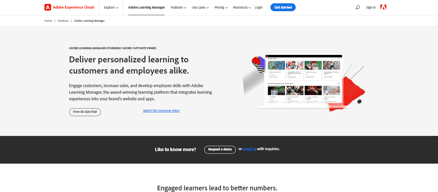
Adobe Learning Manager is a cloud-based learning management system (LMS) that creates personalized learning experiences at scale for customers, partners, and employees alike. It uses a headless learning platform that allows for integrations with Experience Manager Sites or any other CMS through open APIs.

| Capabilities |
API
|
|---|---|
| Segment |
Small Business
Mid Market
Enterprise
|
| Deployment | Cloud / SaaS / Web-Based, Mobile Android, Mobile iPad, Mobile iPhone |
| Support | 24/7 (Live rep), Chat, Email/Help Desk, FAQs/Forum, Knowledge Base, Phone Support |
| Training | Documentation |
| Languages | English |


Compare Adobe Learning Manager with other popular tools in the same category.
Highlighting option available in Adobe; flexible in choosing desktop while recording
Trimming option sometimes is a little annoying. It's not that user-friendly
I am able to produce quality training videos for my clients. And have received good feedback from my client regarding the way video appears
Captivate Prime has some of the best analytics around and is really easy to use. You are also able to get up and running in no time when initially starting the onboarding process.
The report section could be more user friendly. Also the csv files generated look nothing like the dashboard so you have to have an intimate knowledge of Excel to get the reports looking like something more than just raw data.
We are able to deploy courses to our branches countrywide effortlessly, increasing our knowledge base. We have also made use of the portfolio of evidence file submission component which has assisted in minimizing the cost and chance of portfolios going missing enroute to head office for review.
When you get used to it, you have a really powerful tool to create as complex e-learning instances as you like. You can use any multimedia you want (photos, videos, sound etc) and create from simple to advanced quizzes, to check what your users have learned. It is a really up to date e learning creation tool.
At the beginning it's complexity can be confusing. You have to create a couple of lessons to start getting acquainted with its main features. The more you use it, it gets easier, and can take advantage of all of its features.
Adobe captivate makes it easy, to train people at our company, watch their progress and check if they really learned what they were supposed to learn. What I realized was how important it was for the users to be able to watch and learn at their own time and pace.

Prime Fluidic Player - This is an interesting feature and one that should be highlighted positively it allows the transfer of Powerpoints projects, pdf documents, videos, courses and complete recordings quickly, simply and without complications. Another highlight of Captivate prime is the ability to create specific training modules for certain groups of people.
The initial setup and installation of captivate prime was a bit time consuming and with some options that are technically not very complex, so i would really cite this as the captivate prime point that needs improvement as it was almost impossible for me to find a point to be quoted here.
With captivate prime our company has achieved a vast improvement in the preparation, training and improvement of our employees and employees. Thanks to captivate prime we have been able to create specific learning modules for certain employee groups, broken down by sector and specialization. Our learning procedures were remarkable and especially useful because the company had branches in different locations and captivate prime helped eliminate the major problems of this physical distance between locations.
The ability to tailor the LMS easily to suit an organisations needs
I dislike that there is not a pricing structure that fits with a training organisation with a variable customer base. Need to have a cost per month per active user model for training organisations. Trying to guess the number of seats required 3 years in advance is impossible for an organisation that has a big variation in customer base, particularly if they are growing. This is a significant downside for PRIME and no doubt will drive potential PRIME customers elsewhere. Please address this!!!!
Trying to run a training organisation using PRIME. The LMS and features are really great, but the pricing model is a big issue. Please introduce cost per user per month model for training organisations to use.
I like the standard framework of the program. The icons are consistently used. Changed are easily made and clearly saved. I like the options I am I have limited access through my account. It was easy to pick up from my PowerPoint background.
I have limited access through my account.
developing the framework for consistent training modules has given me great options to choose from.
The flow and final interaction for the users, also the stability and support. The integration with Adobe Captivate is great and fluid.
It´s hard to convince the customer to pay for the platform, always looking for solutions open source as Moodle. The integration with live session is hard (Adobe Connect) not technical issues, it´s hard to sell two different solutions to the customer, their argument is that it should be included.
Installation in a self served server, looking to privilege the content over the technical issues. We have seen an improvement over how the users interact with the content, ease to use and the dashboard where they can see their progress. Also, we are trying to convince the customer to sell their courses to different customers, we are the provider of the content and we have serious doubts of to control the access because they dont have always the same users

I like the clean appearance interface and fairly simple website navigation are well defined.
did not really like the installation procedure was long and a bit sad, however, was key.
Adobe captivate okay great because offers perfect integration with Adobe connect. and users can also provide content through Web browsers default.
For managers and admins, there are a wide range of automation capabilities. Integration, user enrollment, reporting, synching can all be automated.
Some of the complex features needs some explainer videos for using them.
Wide range of features available here.. If you have a lot of integration and automation requirements, this tool is the best.
The catalog and course features are great, There is integration with external course catalogs.. User groups can be assigned specific courses and shared with external user groups as well.
Used a trail account and not a lot of negatives were found.
Highly recommended LMS for employee learning in organizations.
Learning managers have a lot of cool features to score and rate learners, generate transcripts and get feedback.
For education institutions, there needs to be more discounts and relevant features.
Learning managers and admins have handy tools to keep their learners on track. Overall a good Learning management system.
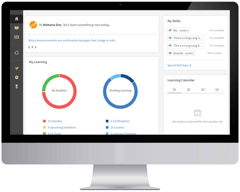
The customizable dashboard provides an easy view of all the learning progress. The abundance of features and ease of use on the desktop / web is good.
Apps on the mobile need to be improved a lot especially the memory and content display. Improvements needed for a good mobile learning experience.
Overall Adobe Captivate Prime is a good learning tool in a desktop environment. More improvements need to be made on the mobile.
I like the learner-first-approach in Adobe’s Prime LMS. The design is centered around the user. Its nice to see the feedback loop on course effectiveness which is based on tests and manager feedback. Cloud based model, security and disaster management are other key parameters that makes it rank higher than other LMSs.
It is cloudbased so it needs connectivity for most features to work. However, offline and sync facility is available when not connected.
For a multi-learner environment, Adobe Captivate Prime is good, it is most useful for organizations where learners are remotely located and need a virtual learning environment.
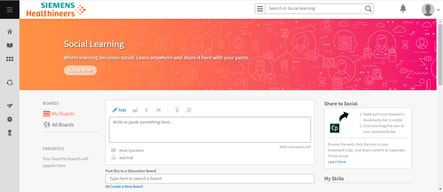
Adobe Captivate Prime has a fluidic player for playing all kinds of content whether it is videos, PPTs, PDFs and SCORM, AICC, TinCan packages. No need to search for extra plugins. The learner page has a quick glance for learning progress
If you need to integration with other tools for authoring and virtual meetings, they do not come under the package. They have to be bought separately.
Learners can complete their learning as a hassle free experience and keep track of their learning progress

Lots of positives in this LMS, especially the modular design in the architecture with access control, security and user management. It allows bulk uploads using CSVs or via FTP. The auto scaling facility (Amazon EC2) helps during learner’s peak access times.
Ecommerce facility is missing in the LMS. Allows to buy courses separately that can be consumed in Adobe Captivate Prime though.
It’s a highly scalable LMS with a modern cloud architecture, good integration and connectivity features.
Connectivity is good with Adobe Captivate Prime. As a salesforce CRM professional, good to see that admins can connect the LMS with SFDC and learners can access their learning programs from Salesforce.
Captivate authoring tool and Adobe Connect are not part of the LMS. They need to be bought separately.
Lots of connectivity options in the LMS, connected learning makes it easy for organizations. It saves a lot of time otherwise spent in manual tasks.
Most organizations have a small L&D team but they are responsible for the entire orgs learning. Here the roles in the LMS are well defined so it is easy for the Learning manager to switch roles easily. Manager, Admin Author and learner etc.. Mobile learning being available is a good thing.
Although courses are available for purchase, per learner cost can be expensive. Mobile app needs improvement.
For the Learning and Development team, Adobe Captivate prime makes it easy to administer training to the employees. If the apps and course pricing is improved, it can be a great choice.
Has a lot of features which helps learning to be fun. Especially the gamified learning where you can have leaderboards, badges and share with others. Discussion boards and note are other great features here.
It has limited color themes and options. A little more customization on the look and feel front will be good.
LMSs like Adobe Captivate Prime solve learning issues. It is advanced and the updates keeps adding more features so it is a good choice for companies.
From a User Interface point of view, the SPA single web page architecture enhances the performance of the site. Its nice that you can integrate with third party apps using the APIs that it provides. Lots of APIs have been provided for integration and customization. Thirdparty course providers, HRMS tools, Meeting tools and authoring tools can all be integrated with this LMS.
Some features need more customizations and it needs more inbuilt applications instead of third-party integration. Inbuilt applications may slow down the software a bit but it is definitely valuable to have them.
Learning in most organizations are manual and complex. LMSs like Adobe Captivate Prime makes it easy for virtual learning and online learning.

Adobe Captivate Prime has a strong and tightly integrated course management and user management module. Courses can be easily managed and linked to users, skills, gamifications, tags, workflows, notifications, reports and so on. Adobe Captivate can publish courses to Adobe Captivate Prime easily with just few clicks. Adobe Captivate 2019 which was released in August 2018 also supports immersive learning experiences such as Virtual Reality and 360-degree videos.
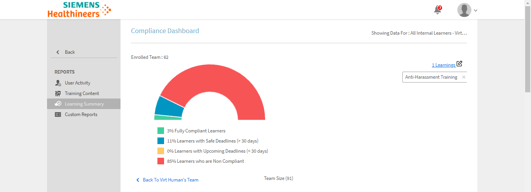
Offers basic Reporting and analytics. Need stronger reporting module which enables organization to track complex learning indicators.
Adobe Captivate Prime enables organizations to fulfill their learning objectives by delivering rich and consistent learning experience and simplifying LMS administration. Admin cockpit is simple, user friendly and enables even a novice LMS Administrator to perform all admin functions effectively.
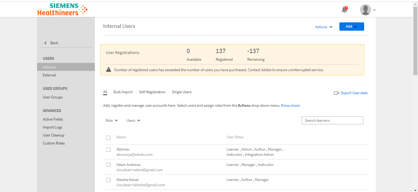
From an Administrative prospective, I like the interface and the ability to quickly change between roles (Admin/Author/Learner/Integration Admin) From an Integration Admin prospective, connectors are easy to find and access. Manuals for integration are easily accessible under Developer Resources. From both an Admin and Learning prospective, I really like that they have a "Testout" function.
Prime does not seem to have any ecommerce ability to resell courses. (i.e. Sell courses to customers or partners).
A stable environment that is easy for the user to access, as well as from an Admin standpoint.

This platform is really interesting for learning managers. It has many features that allow an effective learner administration and different ways to manage users (external or internal). You can add users by uploading from a spreadsheet, create groups of learners based on location or business unit, use self enrollment or automate the adding new users. It also supports interactive content like Scorm, AICC, Tincan and regular content like Videos, Pdfs, PPTs, word and excel files.
The tools to create courses are very basic so it is recommended to create courses using other tools like Captivate and upload the content. You can also add activities and tests, but they also have to be created using another tool because it only allows you to add an external URL for learners to refer to, or have students submit files.
This tool helps engaging learners, which is usually very difficult, thanks to these tools: • A dashboard to get a glance of their courses, overdue or deadlines, recommended learning, calendar and achievements. • Learners can see valuable skills for their position and find courses that help master those skills. • Gamification for rewarding desired behaviors. Earn and compare points with their colleagues based on rules that managers set. There are Bronze, Silver, Gold and Platinum levels and badges for students upon completing a course.
My main interest was simple integration with Adobe Captivate. Indeed, the 2017 release of Adobe Captivate provided excellent integration with Captivate Prime LMS. Discounts are offered after the 500 user mark. Many vendors only offer discounts after 1000 user mark. This was a great plus. Also Captivate Prime works with Tin Can, which is critical. It was easy to use and reporting was clear.
There is a lot of competition out there. It would have been nice if there was e-commerce.
User statistics and reporting. Clarification about user statistics.
Adobe Captivate Prime is a great LMS solution at a much lower price than most of its competition. It allows for the swift implementation of learning assets, user and course catalog administration. The UI is both pleasing to Admin roles as well as end-users. Its graphically displayed reports and ability to publish content with or without learning requirements are unique features in the market. The 30-day free trial with full access is a huge plus. I would recommend it to anyone new or seasoned in LMS administration.
The default end user landing page is a bit bland, but it only takes a few minutes to add cover images and make it look great.
We use Captivate Prime for a specific population of contractual workers that need access worldwide and across all devices.
The feature of creating a course and taking that course in the same LMS itself.
The UI can be a bit more appealing and colorful, for an end user to generate and maintain interest in the product.
Its a good learning management system to take tests for candidates applying to the company.
One of the best things that I love about this programming is the ease and flow
I do not and have not come across any dislike in my opinion
We are able to have a wider range of audiences with the program and able to program it to our liking
The ease of use with this software makes it the right choice for those looking to create eLearning materials.
Those without previous Adobe software experience may find some of the areas a bit too complicated.
We were looking for eLearning solutions for our sales training classes.
Ease of installation and simple UI - can be installed and ready to use in minutes on an iPhone.
No way to use it to broadcast your own stuff to users of your choosing.
CLE accreditation requirements
Somewhat user-friendly, Captivate/ Adobe offers an exceptional range of in-app features to make integrated learning management and
To be expected, you have to spend a fair amount of hours overcoming the initial learning curve to using Captivate. The benefits of course are a in-depth understanding of industry-leading software. Additionally, while Captivate is in high-demand to create immersive learning experiences, the price to maintain membership (Adobe CC or single app-use) is steep.
While no longer creating files, I still engage with the program and with the products/ trainings created as a result. Captivate is used primarily to draft, create and to deploy training material to our teams. It offers a streamlined source of material and consistent information across departments.
I love the whole product. The videos are uploaded and set with review questions so each learning module tests our knowledge and educates us on current issues or updates. I love how everyone is constantly on the same page and up to date with everything going on with our clients and company.
The reporting section as a manager is lacking a bit. It is hard to tell who and when learning modules were completed.
We really needed a way to educate our entire Client Success floor with all the updates and things happening in our company. This is a great way to let people learn on their own in their own time and be tested on what was being presented.