

Unclaimed: Are you working at Adobe Learning Manager?
Adobe Learning Manager Reviews: 4.0/5 — Solid Choice
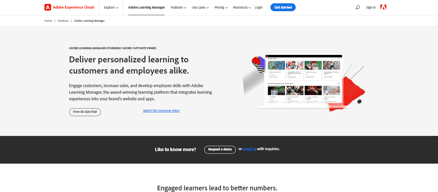
Adobe Learning Manager is a cloud-based learning management system (LMS) that creates personalized learning experiences at scale for customers, partners, and employees alike. It uses a headless learning platform that allows for integrations with Experience Manager Sites or any other CMS through open APIs.

| Capabilities |
API
|
|---|---|
| Segment |
Small Business
Mid Market
Enterprise
|
| Deployment | Cloud / SaaS / Web-Based, Mobile Android, Mobile iPad, Mobile iPhone |
| Support | 24/7 (Live rep), Chat, Email/Help Desk, FAQs/Forum, Knowledge Base, Phone Support |
| Training | Documentation |
| Languages | English |


Compare Adobe Learning Manager with other popular tools in the same category.

This program creates beautiful and professional A+ materials.
There is a learning curve. It takes quite some time to get used to using the product.
I can create great training materials!

We used this to create 1p audience segments and found great success with it across our campaigns.
Don't have much viewability into the actual product, could be more transparent
Able to reach our audience in a way we have never been able to do before
Captivate Prime LMS is a very mature and well sourced LMS. It comes with the backing of Adobe which its Creative Cloud products are legendary. It's not that difficult to learn and has a wealth of features like offline access and learner tracking.
This LMS is a little pricer than others, but then again, it's Adobe and you get top-notch support. It's also a bit inflexible in allowing customizing organizational structure and access rights. It can be done, but it's very limited.
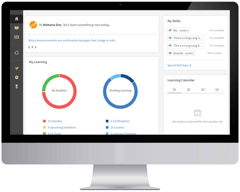
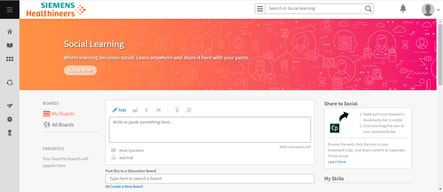
The interface is easy to use for medium to advanced LMS users and allows for fast and fluid. Its intuitive learner dashboard allows personalization with drag and drop widgets. It also lets learners know about their upcoming courses, recommends courses they need to finish within given deadlines, the skills they have learned, and additional courses they might be interested in. This is a great "Learner Based" LMS.
The best part is the ability to create content within the LMS system and not have to create everything outside of the system.
The limitations of reporting and administration to use the software with an organization that has multiple departments and team leads. The costs of the software is a bit higher than others that we have looked at and we can not afford to keep this software with the amount of users we have.
Being able to disperse training in a more efficient way to users wherever they are working remotely. We have narrowed down the amount of on ground training due to our ability to train online.
the most helpful feature is the easy of use.
I think it could use more interactive features
Using multimedia to deliver services
Adobe Captivate Prime LMS is a powerful and intuitive tool. The learning curve is almost nonexistent. Where other learning management systems require hours of upkeep and management, Captivate Prime LMS is practically ready right out of the box.
I wish there was more gamification possible.
Training and cultivating our staff.
Gamification functionality that allows our organization to make learning fun
limited themes available, I would like to customize user interface more.
Gamifying learning
Timeline is very handy to make time modifications
oldfashioned UI which is not very pleasant to work with
Fast learning movies with video caption and overlay text or voice
Captivate is the most user friendly application on the recording demonstrations
I did not find any issues with using this software.
ease of use with little training
The ability to easily track, review and administer tests to staff via LMS, cost effective. Intergrates well with Microsoft Office programs, retrained many staff members in a very short time. We also use this for monthly, quartlery and yearly mandatory trainings.
Some issues using the app from phones and non desktop sources, at times issues with reporting, showing complete to the user, and not complete to the admin/manager for a short period of time. In the begninig, very hard to navigate...once you get the hang of it is a lot easier to manage
Ensuring our staff are trained and retain the training on a repetitive basis, ensuring we track training. Cost effective to allow staff to learn on their own time or while working on company approved devices. Saves time and money to train staff

Adobe Captivate acts as an extension of heart and mind of a teacher. It has the ability to unearth the hidden layers of under or unutilized potential of a skill provider and invigorate and enthrall a learner. Be it screencasts or simulation of an application, Virtual reality walkthroughs or mobile ready courses, quizzes or plug and play interactions Adobe Captivate provides multichannel pathways to deliver content to a wide variety of audience.
Need more use cases to demonstrate where Adobe Captivate can be put to test. The support content in terms of tutorials and help files needs to be enriched. It does not run efficiently even in high end machines. Lags are often visible using the differnt functionality of the LMS.
After teaching in a public university in India for about two decades in the field of computer science and engineering, I am increasingly supplementing the chalk and board teaching with interactive quizzes during the class itself in order to reinforce the concepts. Screencasts are most suitable in order to provide hands on training and enabling students to practise during off hours.

The tracking system on how the students perform and learn, and how well the software is packaged to make the best experience. Very well done!
I haven't found anything that I don't like acctually
Educating students in different courses
Adobe Captivate Prime offers many features that help with Employee Training on our team. The tool helps to organize and manage training as well as track certificates for the employee portfolio process at our company.
There are so many features that I do not know how to use still. Some features are not user-friendly or intuitive. I need to spend more time playing around with the other aspects of the tool.
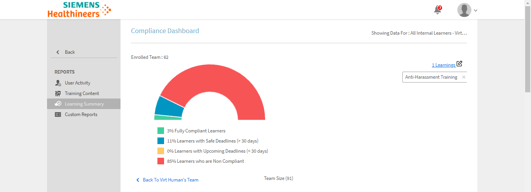
We have had issues in the past with keeping track of employee training. The training was coming from multiple locations (HR, in-house, team trainer, etc.) with absolutely no way to track what was done, if employees were meeting compliance deadlines, etc. This tool has helped to organize everything. It's easy to go in and see where each employee is at in the training cycle and who needs to complete specific trainings. It also helps the team manager when the need arises annually for goal-creation, promotion tracking, career pathing, and restorative action for employees put on performance plans.
It was fairly simple to use the application after being self taught. It is nice to have the Adobe community/forums available to assist with any questions you may have about the application.
I am not a fan of the recording features available in Captivate and prefer to use a different recording application that is more user friendly.
I have been able to create multiple simulation training videos for our employees to instruct them on new software systems that do not have a training platform available.
The ability to manage the roles centrally is one of the ky feature of AC prime LMS
A little bit insight of having it on mobile application will add further stars to this product
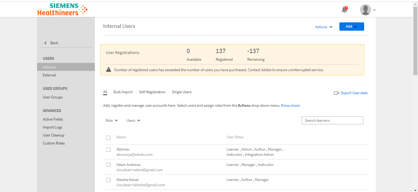
Managing users and change of roles on the fly. And also easy to upload course content is my traditional problem which is solved by this LMS
I think this LMS handles very well new pedagogies such as skills and social learning.
Though it is very good for corporation's' training, I think it does not suit for a more academic use.
My e-learning trainings are now more modern, human and so more attractive. They look less like old e-learning courses.
The interface is organized in a easy to use layout. Course building is easy. Support for different file types is a big plus. It allows users to review all different roles from, administrator to content editor, learner or manager. ADobe connect integration is very welcomed.
It is not very suitable for educational institutions like universities. Socializing facilities like comments or chat options are not easily reachable and not very convenient. Notifications of comments and replies are also not very good.
It helped me to organize a distance education module. Assigning tasks to learners is very easy. Keeping track of learners progress is beneficial.
This LMS is very easy to set up yet has a nice range of functionality. I particularly like the speed of course creation and the reporting that can be set up for team managers etc
Sometimes found the help documents difficult to navigate when searching 'how to do something'.
A client of mine wanted to start using an LMS for both internal employees and employees of their customers. Adobe Prime offered them a very low cost way to enter the market and plenty of time on the trial version to test whether the LMS was for them or not. Going forward I will defintiely be recommending other clients use Adobe Prime - especially my smaller clients who do not have good IT infrastructure and support.
Plenty of options and customization to make training modules interactive and engaging.
Sometimes overwhelming, can be easy to forget how to do certain functions at times.
Turns boring static PowerPoint training into interactive, engaging learning experiences.
- Quick to set up - Also maintains validity of certifications - Great workflow of content creation to content dissemination (seamless integration with Adobe Captivate)
- Maintaining User Groups is not intuitive - Mobile app interface is not intuitive enough - Mobile App looks dated (although it gets the job done)
- Training new sales personnel - Training field-service personnel on safety regulations for hazardous work
Be able to insert different type of questions into the lesson
Setting the questions where a little difficult
Teaching middle school math to class with multiple grade levels and ability
I like that Captivate Prime has all the tools to create a learning module, either as a rapid-prototype or deliverable ready for distribution.
There lurks a few annoying quirks in the software that reminds me of the struggles I experienced with Nineties-era software. It's sometimes difficult to manage global formatting. And, I've found the need to ALWAYS save my project after each change due to unexpected hangs and crashes. The software is 95% there with 5% of bugs needing resolution.
I primarily use Captivate for rapid-prototyping. It's quick to achieve with the many pre-built shortcuts and functions. The benefit is time and efficiency as I am able to work within one package.
Adobe Captivate Prime LMS is a nice, user-friendly platform, easy to navigate.
It would be nice to have sample hands on that end users can drop and click through that results 'real' LMS.
I'm transferring written Standard Operating Procedures into actual learning modules.
I love how easy this is to set up. The tutorial videos and guides within Captivate are great. This makes it easy to get set up and going quickly! It's easy to set up certifications and track skills. The reporting is easy to use too. Overall it's a great starter LMS. If you are in the market for a new LMs, definitely add this to your list of systems to compare.
It's not an LXP (Learning Experience Platform) and lacks some of the more modern features of newer systems. It could do with improved social features and gamification, which are on the weaker side here. If you have more advanced needs, you'll need to compare various systems out there to be sure that Captivate Prime will meet your needs. I dislike the fact that I can't tailor the system as much as others I've seen out there like Docebo.
We have 22 offices and need our 900+ employees to be able to access training as and when they need to. We also don't have the budget to fly people all over the world when we onboard new starters or enroll managers in leadership training. Captivate Prime allows us to roll out training to offices without a trainer. We've been able to upload all sorts of content from videos of our subject matter experts and business leaders. We haven't finished roll out yet but believe this will be a great system for us.

Simplicity, support and interactive interface
Not the easiest to set up. The application seems too complicated to setup initially
Reaching distant students
Very easy to use , Awesome user interface .Importing form Power Point very easy
you should have some experience to use it , not recommended for Beginners Adobe can make better software or improve it
easy way to create lessons , Publish it very quick
Learners can keep close track of their learning and be notified from time to time. Allows you to choose only relevant notifications and have too much showing up on the home pages.
Mobile apps and more video tutorials needed.
Adobe Captivate Prime is a great choice for your learning environment. It can be worth the price if you use all the features.
Its nice that the Learner dashboard can be customized and it lets learners track progress, and deadlines. It works well on all browsers and the learner experience is good.
Apps need more stability and the UI/UX on the app needs improvement.
A great choice for organizations to provide a learning platform for employees. If the apps are improved, the LMS can be the best choice.
Adobes LMS has many striking features, the notes feature helps you to take quick notes during your training and refer back when you need them. It has multi language support too.
More language options needed for locales so that it can be used by folks who want to navigate in their native language.
Adobe CaptivatePrime is superb LMS helpful for organizational learning especially for medium sized organizations.
The navigation pane is easy to follow and use. It allows us to select only what needs to be seen on the home page so that it doesn’t get confusing. Set up is fast, it can be setup and run in a couple of hours.
For more detailed features, there needs to be more how-to-use videos so managers or admins can easily use all the features.
Learning is easy and not complicated as is the case with other LMSs. Navigation and using the LMS is simple and easy for the learners.