

Unclaimed: Are you working at Bitbucket?
Bitbucket Reviews: 4.4/5 — Solid Choice
Bitbucket is a cloud-based version control platform for developers who want to collaborate on code as well as manage software projects. The software supports tools that focus on team collaboration through review tools, issue tracking, and continuous integration.

| Capabilities |
API
CLI
|
|---|---|
| Segment |
Small Business
Mid Market
Enterprise
|
| Deployment | Cloud / SaaS / Web-Based, Desktop Mac, Desktop Windows, On-Premise Linux, On-Premise Windows |
| Training | Documentation |
| Languages | English |

Compare Bitbucket with other popular tools in the same category.
- The list of features Bitbucket provides and easy to use - I use it daily for my code management/repo management and version control - Easy to integrate and implement, create your account and it is ready. - Dedicated customer support and proper documentation
- Nothing as of now, I find it very userful.
We can easily host our code and manage different versions, The main benefit, it is a part of the Atlassian product so we can use other products too and it is easily integrable with others like Jira
I like its easily manageable and easy to use compared to the similar products in the market. The software support page is much knowledgeable, its ful of helpful information that make its easier even on the implementation and start time. Its ui interface is amazing Moreso the dark mode yhe limited the interface and dashboard layout
At some time i tried to medii with something when i wanted to integrate it with Jira, afterwards i contacted the support team for assistance, they took little time yo respond.
Using it to link webhook to adobe commerce was was best. Merging pull request and reverting was waoooh amazing and easy
Bitbucket is a source code repository hosting service that stores code both locally and remotely. We can use BitBucket with a number of development tools, like Jira, Trello, and others.
very expensive Not have a strong mobile activity
Easy to use, and most features are readily available.

The very first thing to like about is the very good integration with other Atlassian products. Very easy to manage and use. As it is based on Git, a prior knowledge of the same will reduce the learning curve, if any. Also, there is a support for having any number of repositories. Creating and maintaing them is very easy. Integration with GitHub and SourceTree UI tools is also quite good.
The recent merge strategy they have started is a downer for me. You can even see already merged files in the Pull request sometimes which causes confusion for a reviewer. Also, the search functionality can be updated. Most of the time, the search does not work if you are looking for something that is not in the main/ master branch,
Version Control and Team collaboration. The Pull Request process is a godsend for the reviewer. Also, multiple branches can be maintained per code repo before moving to the main branch which helps in maintaining different code bases for different environments in the life cycle for a solution
I like that Bitbucket integrates well with various development and CI/CD tools like Jira, Jenkins, Slack, and more. This integration streamlines the development workflow, enabling smoother communication and automation. I also like the integration that Bitbucket has with Jira. It provides issue tracking and project management capabilities within Bitbucket and this helps in linking code changes to specific issues or tasks, enhancing traceability and project organization.
There is some user interface complexity with Bitbucket. Some users find Bitbucket's user interface to be less intuitive or complex compared to other version control platforms. Navigating through settings and certain features might require a learning curve.
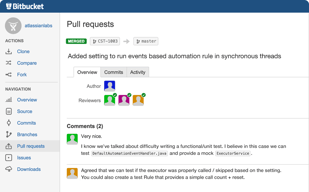
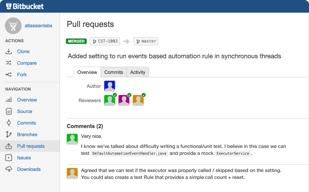
It facilitates code collaboration and peer review processes. Bitbucket's pull request feature enables developers to review code changes, provide feedback, and maintain code quality before merging changes into the main codebase, thereby improving overall code quality and reducing errors.
I really like the Pull request review feature. UI is very simple and it is very easy to understand the changes in the code.
I don't have any dislike about Bitbucket.
Using Bitbucket's version control, we work collaboratively without any problem.
Bitbucket is the most safest Version and source control software. Bitbuckets integration with JIRA's kanban and scrum board helps teams with agile dvelopment.
Bitbucket has a little confusing process in the user addition tab It'd be greeat if they could ease it a bit or launch some tutorials.
I use Bitbucket to save my version codes and manage versions with its integration with JIRA. I create tickets and tasks for agile development for my co -team and push / pull code to bitbucket directly.

Atlassian Bitbucket is the best software I have come across, and I still use it. It is best used for its version control functionalities and outstanding features. The thing which comes by the side of Atlassian Bitbucket is its JIRA software. JIRA software, the best part is ticketing tasks. This ticketing has helped many workers assign work and watch over them perfectly without issues.
There is so far nothing which I particularly dislike about Bitbucket. It's going on very well with Bitbucket.
As a junior, it helps me with the tasks assigned to me. Sometimes one might get confused with the workload and may displace some instructions ut with Bitbucket and JIRA its almost impossible to have this mistake.

bitbucket provides Branching strategies, Code collaboration, and Access control of code level. CI/CD integrations, Bitbucket Pipelines ease of implementations. we are using very frequently the bitbucket. his customer support are very best.
Ip whitelist option should be coming in all plans not only in the enterprise.
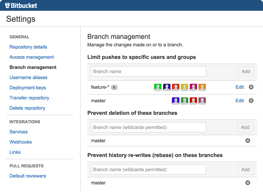
The code collaboration issue is resolved by bitbucket which is the best part of this service. bitbucket provides us with the best collaboration platform for the code. along with user access management and we can restrict the user's access on the branch level as well. if solved our CI-CD issues.

I like the tracking of branches in bitbucket. I also like the branch comparison. They customer support pages are very informative previously i need to itegrate a pipeline in bitbucket so i visited the support page so i successfully implemented after reading the support documentation. I use bib ucket on daily basis i need to push the code in my branch on daily basis. I have integrated browser stack in Bitbucket that was really awesome.
Sometimes when pushing the code using the branch suffix of JIRA it creates problems so this is the thing i dislike about bitbucket.
Integration of JIRA with bitbucket solved alot of my time when i need to check what is the branch and what are the comitts so i easily tack those when i visit the story on JIRA.

It has so many features to keep code tracking and version control.
Nothing to dislike this application, my experience is so good.
It has the features of access control that whom to give how much access.
Bitbucket is very important for developers.it is user friendly easy to understand. Easily pull request can be raised and very eqsily we can make a new branch also review the pr raised by different members in the team everything is so systematic in that tool it supports git command.
There is nothing to dislike about bitbucket. It is very useful.
Bitbucket helps in collaboration amoung the team members because each and everyone can look what is going on in the project the updates and all the pr merged open comments on that eveything becomes easy.
Bitbucket is very helpful tool. It is a git based cloud hosting tool. It is very helpful for developers because it lets them manage and keep a track on the changes happening in their project .time to time. It alao helps ỉn avoiding merge conflicts as many developers are working simultaneously so there higher changes of getting merge conflicts and bit bucket is so user friendly and built in a way that management becomes easy .so this is what i like best about bitbucket.
Till now my experience with bitbucket has been soo good so there is nothing for me to dislike it.
As i mentioned that it is very useful because it helps in tracking the code helps in minimize the merge conflicts, also in code reviewing it is helpful. Because of this tool collaboration has become easy. It also helps in tracking the issues , merging and branching creating a branch is easy ,creating a pr is easy everything is simple and user friendly.
Repositories are organised and managed easily Access control is done easily ( can create groups and provide specific acces and later add users to these groups) Branching is available Can be used for issue tracking and integration with Jira PIpelines and deployments can also be set up Very easy to implement Used every day
Nothing to dislike about bitbucket, we use the managed service by atlassian
We are using bitbucket to host our code We make use of the webhook to link it to adobe commerce Both devs and devops use it either for scripting or version control for the codes We also link Jira and bitbucket to track issues and add features Very easy to merge pull requests and revert back if needed Commits are easy to track and differences can be viewed easily
As the titile. It covers every need, Bitbucket has a long standing position in version control management. Advanced features also in the basic subscription
User interface is a bit complex, not everything is immediately reachable
We adopted Bitbucket to have an integrated solution (Jira, confluence) of Atlassian products. It solved it and is very powerful.
what I like most is that you can work with a lot of collegues around the world you can make modifications to the software code and ecerybody will be aware of those changes and that wont affect the other's changes, so evrybody can work on same code simultaneously. that makes your activitiviest faster, in the past you had to wait for your collegue to be done with its changes so that you could modify the program.
rigth now the only thing that I dont like is sometimes when you dont have the newest update it does let you clone some branches of certain program, I had that situation a couple times in the past and it was solved updating the version
you can use a lot of versions of same program, you can reverse the version if any arror was occurred due to other's changes, many people can work at the same time in the same class and you can merge all this changes quickly and simply without any error this was not posible at the past and it was very time consumming,right now there is no need to have direct contact ith your collegues to see what changes were made, you can see all of that in the history.
I like their website that has integrations with JIRA and other atlassian products. You can manage and store private repo's. The recently simplified UI makes SourceTree Visual App one of the best tree-based git history apps out there. It's really good.
Sometimes, compared to github, processing big pull requests (loading the changes/previewing) can be a little slow.
Version control for our softwares, this means we can storage and control versions without having multiple files stored in a single computer and makes merging the data more simple.
When your need platforms to Integrate easily your code, you will never get the number of features that bitbucket offers on any other git control software. It is easy to use and easy to implement your features, you'll find yourself using it frequently and happily. It also has excellent customer support.
When connecting using legacy methods of authentication (like passwords) sometimes the app could fail.
When I need to make quick changes to the code, I can easily create multple branches.
Bitbucket is more user-friendly than most git control apps. It integrates easily and customer support is excellent. Because of its numerous features, you find yourself using it frequently to implement easily your software solutions.
Sometimes it could be a little difficult to use git control on legacy software, but I believe BitBucket will find a solution to this.
Instead of having my source code files all around my local drive, I have it available on the cloud 24/7.
Bitbucket is very helpful for developers.
Nothing to dislike it is really helpful to use.
It is used to secure the old codes after alteration done, And we can recover the old one positively

I enjoy how well it integrates with the rest of the Atlassian suite, beginning with Jira. It also supports an unlimited code repository and several teams working on our projects.It is a cloud-based version control program that does not require installation on our PC.This is the best version control solution from the Atlassian group, and it also integrates with JIRA service management. We can use it to construct a large number of repositories and work with an industry standard method.
It is a bit slow as compared to github, else no dislikes for me.
It is resolving the issue. It prevents modifying the code and allows you to manage each version of each functionality using multiple branches and pull requests. So that we can follow any future changes. Being a closed repository indicates that it is less widely used by the market; for example, GitHub is widely used, whereas Bitbucked is rarely mentioned.

It is a cloud based version control software, we no need to install in our machine.This is a best version control tool from Atlassian group, which can also provides integration of JIRA service management, we can create lot of repository using this and we can work with Industry standard approach.
No dislike experience for me,Infact it is light weight application , which helps you to deploy your code from local to cloud. Language translation is a mess for me.
Bitbucket directly integrates with several CI and CD tool for continous integration and continous deployment like Jenkins,AWS cloud, This will automate your process of build,deploy,test you application.

1. UI - as compared to Github it as good user interface. 2. Connect with other software like jira. 3. Provide more configuration for companies.
Authentication from local git to remote repository is bad, they have changed auth to appkey that's is bad, no proper documentation about it.
Managing the code and integration properly as compared to Github. More clear visual in terms of user interface.
Started using BitBucket following a recommendation several years ago, mainly because they offered Free Private repositories, which other competitors didn't. It was so simple to set up and organise, and although I've looked at GitHub etc. still happy with BitBucket.
It takes a slight learning curve but is very straightforward if you are used to development. It would be nice if it played with other tools. Favours the Atlassian products.
It's a simple and secure version control system offering free plans for private repositories.
Bitbucket is very good tool for version Controlling system. It is extensively used in IT Industry.Easy to use and manage the changes for every Version of the code
Nothing to dislike as per my experience, that I have seen.It is very Light Weighted in order to deploy the code from local to Cloud using Bitbucket and creating the PR.
It is solving the problem as It avoids from overriding the code,Manage every version of each and every functionality with different Branch and pull request. So that we can track every change in future.
The security and consistency of Bitbucket in deploying components for salesforce. It also can be connected to JIRA and different platforms like Confluence for better project management.
So far what i notice was the User friendliness of the Bitbucket for a newbie it would be hard to navigate in bitbucket and also would be hard to recall every functions of button.
the use of code review in deploying a components, to be able to manage the commits, logs and deploymentin an organize way in a project makes the flow more more consistent and secure from any failures and errors in the deployment.
The most that I like about bitbucket is that it is very user friendly and has lot of intgrated tools that helps a developer. We have many deatures like sync up a branch direclty so that we need not take a pull and commit again.
The thing that I dislike is that bitbucket requires a lot of integrations with jira for project management which could be made easier. For complex projects it is good but for small projects it is bot revommended.
Bitbucket has manu advanced features that help raise PR wuickly, compare code on beanches and sync up with branches easily, which helps for faster development for a developer.
- Browser and GUI client available - Code review and pull request review - Integrate with source code scanning tools - Commit history tracking - Integrate with build tools for CI/CD pipeline
I don't have any dislikes. Works very well for us
Source code versioning
The git integration is the first and best feature I like in Bitbucket.
It may be a little complex to the new users and it will take time for them to understand their process for code maintenance.
Merging the developer's code into the repository after doing a code review by the tech lead. It is the best tool to maintain the code.
Very efficient git tool for collaboration
User interface not upto the level of its competitors
Peer code review and repository hosting