

Unclaimed: Are you working at Bitbucket?
Bitbucket Reviews: 4.4/5 — Solid Choice
Bitbucket is a cloud-based version control platform for developers who want to collaborate on code as well as manage software projects. The software supports tools that focus on team collaboration through review tools, issue tracking, and continuous integration.

| Capabilities |
API
CLI
|
|---|---|
| Segment |
Small Business
Mid Market
Enterprise
|
| Deployment | Cloud / SaaS / Web-Based, Desktop Mac, Desktop Windows, On-Premise Linux, On-Premise Windows |
| Training | Documentation |
| Languages | English |

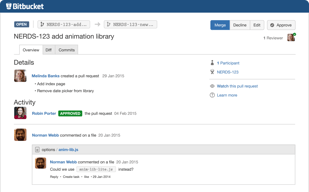
Compare Bitbucket with other popular tools in the same category.
Bit bucket is perfect version control and auto deployment tool
More platform compatibility so that deployment could be enhanced.
Core repository to keep the code and schedule deployment

Bitbucket has a smooth integration with other attlasian products particularly JIRA. It is a great tool for code collaboration and flexible cd/ci options makes it even better. It helps streamline development flow.
One downside of bitbucket that I found was that it has a cluttered interface. It was overwhelming for me to use in the start. Its performance with larger repos is an issue too sometimes.
Its connectivity with JIRA makes tracking code changes with a task very easy and it provides a feature rich solution for managing code. Its third party integrations are also helpful like with slack.
The best thing about nitbicket is that it has revolutionize coding. This all in one tool not only help coders in achieving their goals but it also enables them to achieve the goal seamlessly.
I don't think so I have anything negative to say about this app.
It has essentially made coding more accessible and easier to use. Earlier I was a little shy towards touching coding but with nitbicket I'm more confident.

It's very user friendly and it was easy for me to learn as someone with no expereince with these tools.
I haven't encountered any downsides so far
It allows me to be able to see code changes and review

I can easily manage my code in bitbucket without any tension.
Need to increase the User limit per repo.
Solve my version control problem.
1. Code repository tracking. 2. Best command line features with code branching committing 3. Deployment and pipelining became very easy.
Branching, comiting and pushing in a repository tree showing messy cant understand with structure. Can be improved by showing some graphs.
Code can be distributed within a team and can resolve conflicts in the same file
We have been using Bitbucket for all of our clients to maintain their source control and repository management. We are using this for CI/CD and seamless integration and deployments
At last there is some tool that I am really happy with. Nothing to dislike at all with this tool. It may not be the best tool for people who are used to the Command line, but definitely a life saver tool.
We are using this tool for CI/CD management, source control, daily/monthly backups of our live code, peer review and deployments and merge conflicts. It is also easy to resolve any code conflicts as well with this tool.
Bitbucket makes code hosting easy. It is free and easy to start with. It is a great alternative to GitHub. The pricing is decent for teams. I like the CI/CD with BitBucket and how it handles issue tracking and PRs.
Since it is a lesser used platform than github, most colleagues didn't have an account and had to create one to use it. It still doesn't have an alternative to Github actions, codespaces etc.
I used Bitbucket to host my code and used git features. We collaborated on Bitbucket, raised PRs etc. Our client already had a codebase on Bitbucket. We were accustomed to Github but personally found Bitbucket to have an easy learning curve with an intuitive UI.

It supports Mercurial and git VCs both. In a free account, a maximum of 5 collaborators is allowed whereas GitHub only allows 3 collaborators for a free account. Its UI is very organized and clean compared to other competitors.
Bitbucket lacks a code navigation facility which is available in github. Bitbucket sometimes becomes unstable when we are working with a huge number of files or heavy applications.
Bitbucket provides 5 collaborators in the free account, it is benefiting me a lot. Also, it code version system and UI is very good when we compare it with other systems.

Easy to use, and it follows git style command interaction.
Sometimes it's gets a bit confusing on adding ssh keys and granting access to the buckets themselves.
Keeps our codebase in check and integrates easily with our CI/CD pipelines.
Bitbucket has family integration with Jira and opsgenie that makes life easier
Not good PRs compared to Github, and it makes harder and now good experience reviewing PRs.
It has a simple and intuitive version control system along with pipelines makes life easier.
I like the seemless integration with JIRA, creating a good pair between PM and repo
I am not advanced enough to have any real dislikes, but their UI needs some work
We used to have a local bitbucket server, but the cloud server has added a lot of benefits for security and removed the maintenance.

Since its a product from atlassian, whose JIRA and Confluence is very popular and used in many oragnizations for the issue tracking and knowledge base and having a good integration with code version control system makes it very easy to work with. This also reduces headache of dealing with another vendor which is more important when you are small or medium size org. It also has almost all the popular and most used features which is available in its compititor and required for a version control system.
when you are open sourcing some of your code, its difficult to do it with bitbucket as Github public reposistry is kinda de-facto for doing this, so that folks don't have to use another login or system when they want to use your open-source code.
Version control system which nicely integrare which atlassian suite of products. this way development teams are more productive. Also it enables team to use the single platform which is easy to maintain. It's cheaper when you are big and when you are small its more convenient and saves time.
Bitbucket is one of the best software available in the market. The first thing I like about bitbucket is its UI and ease of use. When I am new to the bitbucket, I went through the website and I became familiar in less time. The management of repositories is easy in the bitbucket. I like almost every feature present today in BitBucket. When I need to trigger execution, I will run through the pipelines with my suitable device, and the execution results and reports it generate is easily accessible and understandable. Bitbucket helps in team collaboration, When a teammate creates a PR and we can manage and discuss the PR among teammates. Starting from creating a branch, working on a branch, Executing and closing the branch is easy. As it is integrated with JIRA, it is very useful to check ticket IDs and we can see the JIRA issues on Bitbucket's dashboard. The level of permissions/customization it provides is helpful in securing the code access.
The only thing I dislike about Bitbucket is When I raise a PR, The details, and files sections that are present on the right side of the PR are not understandable. And sometimes the branch which I created for my work will not work as expected and it leads me to create another branch and copy the code from the previous branch.
It helped me to collaborate with my team on my code. Coming to the PR review, the reviewer can comment on the line in the code easily and I can reply and edit them on the go. My coding standards are improving with help of BitBucket. Before bitbucket it is very difficult to discuss about code between teams, Now bitbucket solved this. The problem BitBucket is solving is by providing uptime efficiently. As BitBucket runs in the cloud, I didn't see the downtime of executions or failure in the pipelines. We can run our Executions during Weekends in our suitable pipelines and collect reports for all the executions on Monday.

Code versions, review, plus discovery sessions with your dev team can be tedious and this is where GitBucket has done an awesome job. Its integration with JIRA was the best thing that happened to our team, as this made our jobs a lot faster and more efficient.
I do not have seen any issues or flaws with the app, but I hear that there are other third-party integrations that are not working with GitBucket, and I have yet to see these in the future, maybe once we move out of JIRA into a new tool.
From the old ways, our team used to review and version our codes manually including setting up a meeting to discuss the changes. Now with BitBucket, everyone is independent and we can just simply use BitBucket to check everyone’s work and make development more efficient.

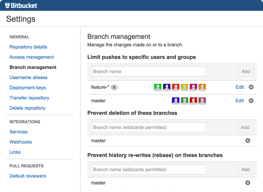
The fact that the repositories can be grouped into projects and manage the permissions at the project level is very good for admins to easily manage the applications. The configurations like branching model, and restrictions help the team to set the policies based on their developer workflow. The reviewer configuration is also helpful for those who follow the review process. It provides native integration with Atlassian products.
The SAML SSO Integration to manage the access through Atlassian Access is still not present and the Codeowners file feature is yet to be developed which we haven't seen in the roadmap!
The Source Management tool from Atlassian provides Native Integration with Atlassian tools such as Jira Software and Confluence. Bitbucket Pipelines feature is so much helpful for CI activities. Bitbucket Branching Policies and restrictions help us to set the policies within teams and follow the developer workflow

-Good repository management tool that provides almost all latest features. -Easy to use for maintaining the codes. -Supports both git and Mercurial -Provides very good security
-Difficult to resolves issues in terms of conflicts. -Difficult to integrate with other available applications in the market. -Difficult to track dependencies between the codes.
It solves the problem of maintaining and orgainising the codes. It is very helpful to create branches from repositories and maintain the codes. Very much flexible than other available tools in the market.

Bitbucket is very simple to use with simple and effective UI/UX. It's integration with JIRA Software is an excellent feature that allowed us to connect PRs and commits directly to JIRA tickets. The PR interface is very simple and easy to use. I also like the pipelines features for very strong CI/CD.
It's less popular than other competing repositories so there are fewer people to consult with when you have questions, and there are less plugins than I wanted.
Bitbucket allowed us to have a single, remote, always-online repository with code-review, pull-requests and pipelines. It allowed us to automatically deploy branches to different locations directly from the system.

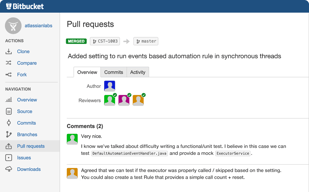
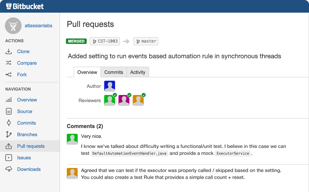
Bitbucket is that it allows for collaboration and code review among team members by providing features such as pull requests, code commenting, and branch management. Additionally, Bitbucket offers built-in integration with other tools such as Jira and Trello, making it a convenient solution for managing software development projects.
One limitation is that it is less popular than other version control repository management tools like GitHub, which means that some developers may be less familiar with it and may not have as much support. Additionally, Bitbucket is less customizable than some other tools, and it may not have as many features or integrations. Some users also dislike that Bitbucket's free plan is more limited than other offerings, with a lower limit of collaborators and storage.
Great for small users to collaborate and management of small team on small projects. divide your team into 04 and can easily develope your projects projects on BitBucket

Extensive yet easy-to-use access control. Intuitive merge strategies & conditions. Integration with various CI/CD as well as quality check technologies. Collaboration on PR is also excellent with thread comments & email notifications.
It can be very confusing to new users, as the Not Found 404 page is shown for BOTH cases where something doesn't exist AND the user doesn't have permission to access it.
We want to use Git as our SCM system, at the same time, we want the ability to integrate it with our ticketing system, as well as our document system. That make the whole Atlassian suite of JIRA + Confluence + BitBucket the natural choice.

It is ideal to maintain source coe in git repositories . Many developers can work on the same codebase using checkin checkout mechanism
Not appropriate for large file storage or for storing binary files
Good repository to maintain source code. Code changes are well documented and controlled using checkin checkout mechanism which prevents accidental overwriting of code by multiple developers

As per my experience it is the best version control tool so far. The integration feature with other tools like Jenkins, Jira & codesonar makes it more powerful. For maintaining different repositories for different platform of microcontrollers it will be consider as best tool. For me it's interface becomes user friendly after 2-3 days.
Sometimes it get crash or repositories are not accessible. But this happens very rarely not an big issue. Also it will be helpful if they improve their diff feature so that the conflicts will be more clear.
As we are working remotely this tool solves the collaboration problems. The team can eaisly merge their codes and raise the PR so that they can do some peer review and add comments. Fixing those review comments makes the code more robust and is applicable for merge.

We can easily integrate it with vscode .
None for now as haven't found any fault .
Easy access to workflows and easily maintaining branches with proper UI and showing pipeline merging process

The UI is intuitive , easy to understand and can relate to version control. Easily create,delete branches and raise pull request . Integrate with your CI CD tool to also get branch information during build and deployment!
Improvements are part of daily routine. UI could be configured to provide tool tips and information related to basic GIT commands so that user can understand its effects and after effects
Giving a user interface to version control and making easy to creation, checking out branches and manage the project!
Bitbucket is very stable and its security is also very well handled. The best thing I like about BitBukcket is its integration with Jira. Providing just the issue number in the commit description is enough to tag it with Jira and Confluence. Also, it's integration with slack is one of the fasted I have seen.
Bitbucket's UI is not as good as GitLab or GitHub. Also approving PR from the website is slow to update. Previously it was instant. Hopefully, they will improve it in the future.
Bit bucket is doing everything that a git platform should do. It's not like doing anything special from GitHub or GitLab. But what matter is how they are doing. They are fast. Their integration with other Atlassian products is very useful. If you use Jira or Confluence I will suggest you use BitBucket.
Bitbucket has been a major competitor in the Git hosting space for years and has always offered good pricing with a generous free tier. They also paved the way to integrating continuous delivery with Bitbucket Pipelines.
The interface is somewhat dated and clunky. Their Pull Request system leaves a lot to be desired as well. You can't even get the client to load large pull requests; it just loads the filenames.
Bitbucket is a great place to store your Git projects. Their Bitbucket Pipelines system is robust and great for continuous delivery, which we use to run tests before deploying our code to production.
Flexibility and integration with other tools
nothing specifically that I dislike with the product
Consolidation of all the implementation codes are done by multiple teams from the multiple locations and keeping the track of the versioning of the code

It uses git and provides a lot of security. Tests, code build-in pipelines, and deployments can be run smoothly, and are easily configurable.
It doesn't provide a public profile so it can't be used to promote yourself. Code review is not too user-friendly.
It allows control of the system versioning and provides a lot of privacy. It also provides code build and deployment using pipelines that can be easily integrated with another tool.

Its integration with Jira and other Atlassian products helps you create a very nice setup that allows you to control the commits, pull-requests based on a ticket's status
Some places where BitBucket can improve are 1. It does not have the functionality to add a tag automatically 2: It is comparatively slow from other version control tools while merging code after approving pull-request
I can integrate Jira tickets with Bitbucket and use that as a metric to see the progress of development. It also helps in understanding the effort of developers with every pull request.
Good UI, most git commands like merge, pull requests can be done from web UI itself, all git commands are compatible, good security with app passwords, good and timely professional support.
Nothing as such to dislike, intermittent downtimes interrupt development activities, but they were least frequent and were quickly resolved.
Version management, easy to plug with CI CD pipelines