
Unclaimed: Are you working at Bitbucket?
Bitbucket Reviews: 4.4/5 — Solid Choice
Bitbucket is a cloud-based version control platform for developers who want to collaborate on code as well as manage software projects. The software supports tools that focus on team collaboration through review tools, issue tracking, and continuous integration.

| Capabilities |
API
CLI
|
|---|---|
| Segment |
Small Business
Mid Market
Enterprise
|
| Deployment | Cloud / SaaS / Web-Based, Desktop Mac, Desktop Windows, On-Premise Linux, On-Premise Windows |
| Training | Documentation |
| Languages | English |
Compare Bitbucket with other popular tools in the same category.
It fits very well in Atlassian ecosystem of Jira, Confluence, and then Bitbucket by Atlassian is a very powerful addition to their ecosystem. It connects well to Jira and Confluence and that is the best part about Bitbucket.
Bitbucket is slight slow to use and that is the main problem. Other than that it is quite good.
All our code sits in Bitbucket and we use it for all code commits, code reviews, pull requests.
I used Bitbucket after having used GitHub and GitLab. I must say Bitbucket's UX and documentation are one of the best and it is much easier to start with Bitbucket.
It is hard to find anything you don't like about Bitbucket. But, if I have to nitpick, I would say not many open-source projects are hosted on Bitbucket. If that is improved, it is a winner.
We use Bitbucket as our code repository. All of our repositories are on Bitbucket. We use Bitbucket for code search through source-graph and for CI/CD automation.
Bitbucket is cloud based service that helps developers to manage their code and track the commits, change requests and branches like a git. it is managed by Atlassian. It is very easy to use, responsive, ready to use cloud based system. It is user friendly and has alot of features we can use. For example: Code Review Integrated Jira system to track PR Code read, write and merge access
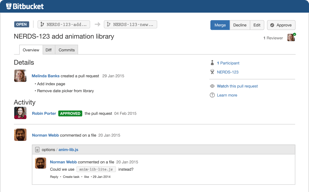
Bitbucket can work on simplified PR (pull requests) management system and userinterface to seach for perticular file on any project.
Bitbucket is helpful for managing mutiple repositories and projects in one common space. We can use it for manging code development for any langulage. Developers can tack pull requests with Jira ID and Commit.
What I like best about Bitbucket is that it easily integrates with my Atlassian tools like Jira Software, Jira Service Management and Confluence. I don't have to lose time researching about integrations.
What I didn't like about Bitbucket is that the translation to other languages is not good, often if I choose other language than english it will show me a mix of my chosen language and english.
It integrates easy and fast with my other Atlassian tools so my teams can keep up syncd all the time and interact with eachother with the tools they know, makes communication simple.
What I like best about Bitbucket is that is part of the Atlassian "ecosystem" so this tool is backed by a big company and integrates easily with tools like Jira Service Management.
What I dislike most about bitbucket is that others languages than english sometimes are not 100% translated and may show a mix of english and your language of choice.
Before Bitbucket our organization and teams used to have a lot of problems keeping up with the latest version of a code a teammate is working on, now is simple and fast to make sure we are all working in the same version than everybody else.
Being able to share our code between teams and not having to jump through hoops to do it, it's so intituive and easy to navigate, also the integration with Trello and Jira is like a ring to the finger for us.
Being a closed repository means that there's less adoption by the market of it, for example, I've seen GitHub being used by a wide margin while Bitbucked is barely talked about
When we implement Jira or Trello for tracking, using Bitbucket is a must, sometimes whenever someone else picks the job up, we can be assured that our progression is being saved on the platform
User friendliness. Even if someone is new to bitbucket they can easily get the grip of it as it is very user friendly and easy to understand how we can manage our code and repository
I don't find any feature which is not likeable .But they can improve on UI part where they can make it more colourful or interactive appearance and make it little faster
Code merging Creating the repository Easily accessible pull request creation Code review
Bitbucket is very reliable and easy to use tool for managing code and very useful for collaborative coding. It also provides unlimited repositories to manage our code.
It lacks some features that github provides. It does not provide proper issue tracking and a simple commit record graph. It is not that easy to configure bitbucket.
Bitbucket allows us to collaborate on coding and can integrate some popular tools like slack, jira. It has a simple and effective ui and fetaures that allows us to merge, approve faster.
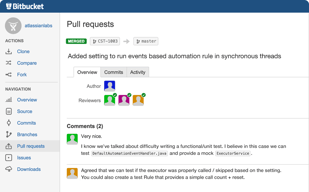
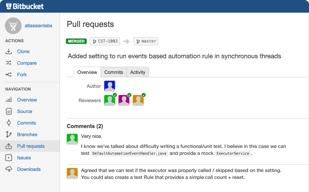
The branching strategy is very helpful which helps multiple developers to work on the same codebase simultaneously. Different teams can work on the same codebase without affecting each other's work seamlessly. The platform helps in locating an individual's merged code and it becomes easy to find out the concerned developer responsible for the change very easily. The review and commenting can be done by other developers with much ease and the facility that the code can't be merged to the main branch before the pull request gets a certain number of approvals (sometimes some mandatory approvals from specific team members) are very useful. It ensures that only quality code gets merged into the main branch.
The bitbucket user interface and functionalities were a bit outdated and non-responsive before the last release. But with the latest release, these problems and issues have already been addressed. Even, when any file from the code is modified or deleted after any comments by other developers, the comments get modified as it is being commented on an "outdated file" which was missing before the last release. Also, the platform did not have any information on the successful build of the pull request. After the latest release, the information on the build, whether it is successful or unsuccessful, can be obtained from the portal of the bitbucket only.
Bitbucket is help in collaborative coding on a single codebase. It is helping in the fast shipping of quality products reviewed by multiple stakeholders. It helps in taking ownership of the codebase because each line of change can be traced back to the owner who altered the same.
Version Control , Code Hosting and Repository Management , Collaboration and Pull Requests , Integration with Other Development Tools .
User Interface , Performance Issues , Limited Third-Party Integrations , Limited Community and Resources , Limited Documentation .
Code Collaboration , Version Control , Code Hosting and Repository Management , Integration with Development Tools.
I have been using Bitbucket for several projects over the past year, and I must say it has been a game-changer for our team's collaborative software development process. Bitbucket offers a wide range of features and functionalities that make it an exceptional platform for version control and code collaboration.
Occasional performance issues, a slightly complex user interface for newcomers, and limitations on the number of users and repositories for free accounts.
Version Control: Bitbucket serves as a powerful version control system, enabling developers to track and manage changes to their codebase efficiently. It allows for easy collaboration among team members, seamless branching and merging, and provides a comprehensive history of commits, making it easier to revert changes if necessary. Code Collaboration: Bitbucket facilitates effective code collaboration through features like pull requests, inline commenting, and code reviews. These tools promote better teamwork, code quality, and knowledge sharing among developers, leading to improved overall project outcomes. Integration and Automation: Bitbucket integrates with various development tools and services, such as project management systems, CI/CD pipelines, and deployment services. This integration streamlines workflows and automates processes, saving developers time and effort by reducing manual tasks and ensuring smooth coordination between different tools. Access Control and Permissions: Bitbucket offers flexible access control and permissions management, allowing developers to control who can access and modify repositories, branches, and files. This helps maintain the security and integrity of the codebase, ensuring that only authorized team members have appropriate access levels. Documentation and Support: Bitbucket provides comprehensive documentation and a supportive community, offering valuable resources to developers. The documentation helps developers understand and utilize the platform's features effectively, while the community offers assistance, advice, and solutions to challenges, fostering a collaborative learning environment. Overall, Bitbucket's solutions benefit developers by streamlining version control, enhancing collaboration, integrating with other tools, ensuring code security, and providing access to valuable resources, ultimately improving productivity, code quality, and project success.
That you can mostly automate everything, except key parts where a human have to review the code and what's happening.It is really is a useful tool that is easy to lean and master and has many useful tools that will help you speed up your work.
I think is kind of expensive for large corporations, I think is $6 per user, so it can become costly pretty quicly.
We use Atlassian as well, so bitbucket integrates really well with it. We also use Jira and Salesforce, so the integration is really great.
Working on project as a solo developer or in a team with other developers. Branch merging is easy, code review and branch policies are also good.
Something like pipelines could work more stable.
Managemenent of software development process from the code side
It is very easy to store all my code in bitbucket, get comments on specific check-in by my colleagues and get necessary approval just before the merge of the code completing the four-eye principle.
Not that I can think of. Its works 100% for me.
It helps me enhance codes for the Jar application we use and release a newer package with changes asked by users of that app every 3 months. (Frequency may change depending on the number of JIRA's to be prioritized for the current release)
Our enterprise currently relies on Bitbucket for source code management, and one of the most impressive aspects of this tool is how easily it integrates with other tools like Jira and Jenkins. Bitbucket links Git commits with Jira issues, enabling us to track what a particular commit is doing and which issue it is solving. Another noteworthy feature is its ability to compare current production release code with the code in our main branch, facilitating auditing of each production release's changes. Furthermore, Bitbucket allows us to quickly build our applications by integrating with Jenkins, and its hook system lets us customize our pull request configurations. Additionally, Bitbucket's ability to detect and help resolve merge conflicts is invaluable. Overall, Bitbucket has been an indispensable asset in managing and integrating our source code with our project management and build processes.
I currently don't see anything wrong with Bitbucket. It solves all our requirements so no complaints may be the cost of the product will be high but that's not an individual concern. As a developer, I am very happy to use that tool
1. Definitely, the first thing on the list will be source code management 2. Ease of integration with other tools like Jenkins and Jira 3. Very user-friendly UI to review the code and see what all are the code changes 4. We can use this tool to audit which production release has which changes 5. Reduces a lot of toils 6. Easily configure/customize the pull request hooks
Easy to create branch, make a pull request, review code and leave a comnent. I can also view all commits of the PR.
Nothing so far, but it would be nice if I can select which commits to be PR instead of cherry-pick with new branch.
easy to control different versions, peer code review and support CI/CD
An excellent tool for collaborating all your code with the other team members or simply using it across different systems.
Nothing really! It has a free version to be able to use across different platforms, good cloud storage, good permission management, etc.
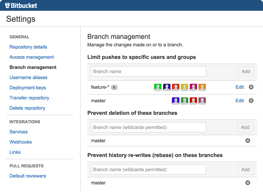
Bitbucket has a free version to be able to use across different platforms, good cloud storage, good permission management, etc. Branch permissions are great and webhooks make life so much easier and makes life "automated".
Ease of Use. Amazing Detailed Documentation. It can be easily used in GitHub Desktop. Members and space management is easy. The user interface is pleasing and attractive.
It cannot be easy to wrap your head around it for the first time. The user interface is good but can be made simple to improve user accessibility and navigation.
Version control of source code. Maintaining repositories of source code. Creating and maintaining branches for development. Integration with CI-CD pipeline to trigger continuous flow.
I used butbucket during the early days of my organization. There are multiple things I liked in it. 1. Bitbucket has a clean UI; it helps me understand the flow easily. 2. It support git version control system like GitHub and GitLab. 3. Easily Integrated with Atlassian tools like Jira and Opsgenie. 4. In-house continuous deployment. 5. Great community support. Clean UI.
There will be no complain if a person id good with git commands. Community support is good but not as other code collaboration platforms.
I write code and need to share it with fellow developers to work with. So I use Bitbucket as a code-sharing platform so other dev can do participate and made great product. It helps me in version controlling of software/ features.
A lot of features, I like the feature which lets Bitbucket link to a Jira ticket using the ticket name. Another feature I like is the visual representation of branches when merging branches and the overall UI when merging branches. Also when reviewing code, the UI lets you hide white spaces from the diff so reviewing the commit or PR becomes a lot easier.
While working at my last company, we would often face issues with Bitbucket not being syncing updates properly. We'd push updates to branches but Bitbucket UI would be missing those updates, but that was because of some internal issues with Atlassian's servers. And sometimes the Bitbucket app won't even load, which can be annoying sometimes but those are minimal, doesn't happen all the time..
It helps me and my team link tasks, documentation (using Confluence) and code. So we can have everything in one place, something that I haven't found in similar solutions (Github for example). The way Bitbucket integrates with Jira and other software we use daily is the best thing, so I'd say integrations within Atlassian's products and third-party ones are solving a lot of problems, notably Jira and Confluence.
I find bitbucket very stable and reliable. It's very secure as well. I liked the web interface too where you can create a pull requests and compare the changes in the browser.
Nothing much to change, its all very good and thought through.
multiple team members are working on the same code together, code reviews and version control
It helps developers to store and manage their data, as well as track and control the changes to their code. It's interface is user- friendly enough so even novice coders can take advantage of Git.
We can't store the data for your pipeline reliably. With the pipeline working off the docker image you get a fresh image each time, any data created on the last pipeline is lost unless it is cached.
Bitbucket is a version control repository hosting service, which is owned by Atlassian. direct interaction with jira, bamboo,crucible, and Jenkins. It has the ability to import repos from git.
Bit bucket has always been an option to have private repositories for your code with options to share and contribute with all your team members.
User interface could be a little confusing if you come from Github.
Share private repositories between team members and version control for several projects.
Great Repository control with simple UI and user experience. It has a concurrency control function.
Nothing I can see till now everything is great.
Version Control Code Push/Pull
It helps easily maintain and integration with jira provides more collaboration . It helps team with many developers to easily maintain the branches.
For bigger teams, cost will come as concern because it is bit costly
Code maintenance and deployment in a effective and easy way. Automating pipelines and deployment on different environments
Simplicity and ease of use. It's very easy and widely used by developers.
Sometimes it is hard to find the shortcuts
It is helping me in managing my code repository and branching.
Seamless integration with jira and bitbucket
Project management requires some improvement
We are using it for remote teams and version control
The pull request and merge conflict are easily visible
We can not add new file directly from gui
We store our code on bitbucket and manages the access for code merge
It allows to integrate with third party plugins like slack, jenkins, unity cloud etc. Raising PR is very simple and reviewing is much easier with all the details highlighted. Overall it makes our lives easy for maintaining the repo.
The Repo size is just 2GB. Try to increase it if possible. Try to provide some more features in resolving the conflicts, as conflict resolution consumes more time.
We are a team of 10 people working on the same project. Maintaining each person's code and merging it is a challenge, and with the help of bitbucket, it is a cakewalk to do all these actions. Very helpful in maintaining the complete repo.
Bitbucket is used as a version control system which helps quickly to deliver code from development till production.best part is it can import repositries and can be configured with Jira for project managment. All things at one place for project life cycle
Backward tracking issues with slowness expirenced sometimes
A good alternative to traditional methods of deploymnet and we create piplines without using other other scheduling tools