

Unclaimed: Are you working at Box?
Box Reviews: 4.2/5 — Solid Choice
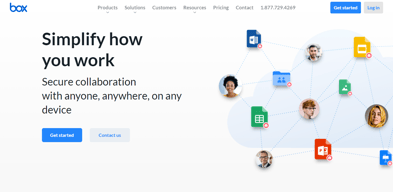
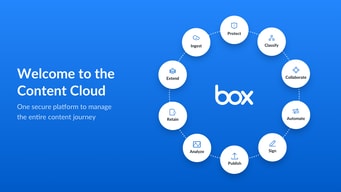
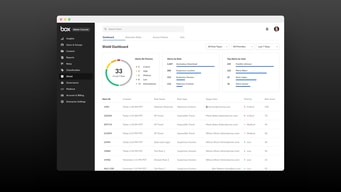
Box is a file-sharing and content management platform that runs on the cloud. The platform lets users store, share, and collaborate on files, regardless of where they are, through the use of workflow automation, security controls, and various integrations with business applications. Using Box, businesses can help their teams streamline internal processes and boost team productivity.


| Capabilities |
AI
API
|
|---|---|
| Segment |
Small Business
Mid Market
Enterprise
|
| Deployment | Cloud / SaaS / Web-Based, Desktop Mac, Desktop Windows, Mobile Android, Mobile iPad, Mobile iPhone |
| Training | Documentation |
| Languages | English |

Compare Box with other popular tools in the same category.
I like having access to my data from any place and any device. I no longer have to rely on remote connections or VPNs to my office network. It works well for our office for effective communication when sending and receiving documents from our clients. I am not certain about comparisons to other products as I have been a box used for several years now. They offer the most features and abilities for a competitive price. Hopefully, it remains this way. I have recommended it to a lot of my clients for personal storage as well.
I use Adobe Acrobat for e-signatures. Box released its e-Signature capture feature I was super excited about. They have been improving it over time, but for now, I feel that Acrobat Sign has more features I am used to at this time. I do currently use it internally for signatures.
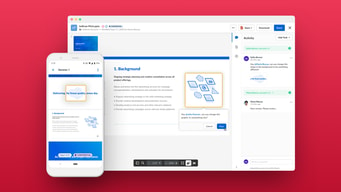
They created a workspace environment where I can get feedback/comments on documents and opinions from other co-workers without having to email a document back and forth. I can securely send documents to co-workers and clients outside using links/passwords to the same document. It also tracks versions and due to the link sharing vs emailing a document, there is no confusion about which version of a document we are viewing.
Box have user-friendly interface, efficient collaboration tools, and robust security features. The platform excels in simplifying file sharing and management, offering a seamless experience for teams. The focus on secure storage and sharing of documents, along with version control, makes Box a preferred choice for businesses prioritizing data integrity. Additionally, its integration capabilities with other applications contribute to a well-rounded and versatile solution for collaborative work and document handling.
It is expressed concerns about Box, including occasional syncing delays that can impact real-time collaboration. Additionally, users might desire more advanced customization options to tailor the platform to specific needs. While these points are mentioned as potential drawbacks, individual experiences may vary, and many users find Box to be a valuable tool for their collaboration and file management needs.
Box addresses key challenges in collaborative work environments by providing secure and efficient file management solutions. It facilitates seamless collaboration among teams, allowing them to share, access, and edit documents in real-time. This capability helps in streamlining workflows and improving overall productivity. Box also contributes to data security by implementing robust measures for storing and sharing files securely. This is particularly beneficial for organizations dealing with sensitive information, ensuring compliance with data protection standards and regulations. Furthermore, Box's version control features help prevent data inconsistencies and loss by enabling users to track changes and revert to previous versions when needed. This contributes to maintaining data integrity and minimizing the risk of errors. In summary, Box solves challenges related to collaboration, data security, and version control, ultimately benefiting organizations through improved efficiency, enhanced security, and streamlined document management processes.

We migrated over to box 4 years ago and now have over 3k users accessing box daily. The web interface is intuitive and packed with features, but in a way that allows different types of users to either take full advantage or to just use it as a content repository. It's really easy to get users in and working on your content and I particularly appreciate the solid version control and ability to see exactly what's happened/is happening with a given piece of content at any time. Box also integrates with just about anything so in addition to the baked-in features, you can link it with lots of other applications, making the whole experience very seamless. On the admin side, the controls are very straightforward; we found the initial deployment pretty easy and migrating additional data into our instance over the last 4 years has been very simple. With the new data onboarding options, I can see this would be even more straightforward for new customers to move large initial datasets. Our support team at box are helpful and friendly - I enjoy being able to discuss new ideas with them and contributing to the ongoing development of box (where I've already seen several updates related to ideas I've had or supported). Frankly, I can't recommend box enough!
There's isn't anything I specifically dislike about box itself. One challenge we've had is weaning users away from the box drive interface and over to the more powerful web interface. I'm looking forward to some upcoming changes to some of the admin reports which I think are important for anyone with a bigger instance.
Box allows us to collaborate seamlessly on content all around our global business. The search function (combined with tags and/or metadata) make it easy for people to find what they need and get on with their daily work with minimal fuss. The security of knowing our data are backed up in multuple locations means that we won't lose anything and the ability to assign specific sets of content to specific regions makes it easy to comply with differing client requirements (e.g. if a client requires that their data be stored only in the USA, that's possible). One very important feature for us is the solid access controls which enable different parts of our business to be firewalled from one another - a feature that realistically extends right down to invidual users. We deployed at the end of 2019 and it was a life saver during covid - our old systems would certainly not have been able to cope with such a sudden and large-scale shift in working practices. I also like the simplicity of the waterfall permissions system - it means that, with a little organisation, giving people access to the content they need stays simple and doesn't end up in a rabbit warren of user-level permissions like some other cloud storage solutions do.

Ease of use Ease of integration Ease of Implementation
The design The layout of the folders That's all
Admin and file management

I like that box is easy access and navigation.
There is nothing that I dislike about box.
Box is solving easy file storage and colaboration.

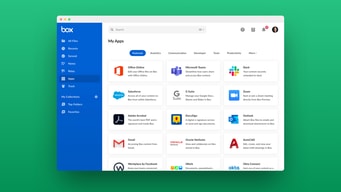
Box takes data security seriously, employing industry-leading measures to protect your information. All data is encrypted at rest and in transit, and access controls can be configured to restrict access to authorized users only. Additionally, Box offers a variety of data residency options to ensure that your data is stored in a region that meets your compliance requirements. Box's interface is designed to be easy to use, even for users with limited technical experience. The drag-and-drop functionality makes it simple to upload and organize files, and the search function allows you to quickly find the information you need. Additionally, Box offers a variety of resources, including tutorials and videos, to help you get the most out of the platform. Box integrates with a variety of third-party applications, making it easy to incorporate it into your existing workflow. For example, you can use Box to automatically save files from Microsoft Office 365 or Google Workspace. Additionally, you can embed Box files into presentations, websites, and other documents.
It has been observed that slow response times from Box's customer support team. This can be frustrating if you need help with a technical issue or if you have a question about your account. However, Box has been working to improve its customer support, and there are now a number of different ways to get help, including phone, email, and live chat. It has limited storage space. Msuct increase some storage space foe better user experience.
I deal with vast amounts of text and code data, which requires secure and reliable storage solutions. Box's cloud-based storage infrastructure provides a secure repository for my training data and generated responses. The encryption at rest and in transit ensures that my sensitive information remains protected from unauthorized access.
It is easy to use, implementation is strong, and wonderful customer support, frequency of use is also fine, and the end number of features, ease of integration
Nothing so far just it lags a bit while signing in and signing out
It helps in database implementation
Fast response and can easily implemented The customer support which they are providing
UI could have been better sometimes i feel bit slow
I have been used for e signatutre it has worked like a charm
The collaboration features that it provides out of the box is top notch enabling visibility into who has done what in the content space. The usability is also something that I personally like.
Experience on app is different compared to desktop
One stop shop for content management. Box has put their users in mind while developing this as no other tools in the market enables content management so good
it is easy to use, easy of impleme, it is customer support, frequency of use, number of Features, and integration
nothing so far. just few bugs & cookies makes the experience slow.
It's all about data base problems. & helps in exploring files.

One of the conveniences of Box.com is its ability to effortlessly facilitate the sharing of large files with clients, overcoming the common email limitations associated with file size restrictions.
I'd like a quicker or even seamless login process for Box.com, and the option to easily share the complete file tree when sharing deeper folders with clients or colleagues. Sometimes, it's not necessary, but having the choice to include the file tree location would be great.
Box has greatly improved my cloud content collaboration. Its user-friendly interface, effortless file sharing, and features for managing permissions and tracking changes have streamlined our teamwork. The ability to access and edit documents from any device, coupled with robust security, offers flexibility and peace of mind. In essence, Box is now a vital part of my workflow, enhancing the efficiency and effectiveness of teamwork.

Box application is the best application which help us to take our organisation to the top level.
This box application user interface can be make more accessible.
It is helping our organisation in maintaining our sheets which can be more efficient.

It is a good application one can use for their organisation growth. Highly recommended.
This box application user interface should be more friendly.
This box application is very helpful for one organisation that can be grow at next level.
The option to have access to my files online via the computer or through the app on my phone.
When you click the back arrow it takes you to the first page rather than the previous page after you’re done viewing the file.
I’m able to upload photos to box and not have to email them to myself from my computer. I can simply just download them on my phone to post/share from there.
I like that you can save massive amount of information and files online and in the cloud. This allows me the opportunity to access these files on other devices. Also, I don't need to bog down my laptop with all of this information. Being able to have a file on my computer that auto-syncs to the cloud helps me quickly back up my laptop rather than going to the website each time and uploading the information. Receiving emails letting me know when the files have been changed or updated is beneficial. Especially when we're on time crunches and we're trying to track when employees update documentation.
When you first sign up for the service and add 'Box Sync' to your your computer, it has to sync all of the information. Having a BOX with over 5 gigabits worth of data took longer than expected.
Having an online back up space has been great. Having an online file cabinet so all employees can have access to the information makes things easier! No employee is without the most up-to-date files. Also, getting notifications when files are updated helps keep the team up to speed on which files are being changed and when they're being changed.

The ux is the best feature: easy to use, intuitive, simple
The sync mechanism: sometimes it's not easy to work on the same document switching from mobile to laptop and viceversa
To access documents from everywhere and always
Box is very helpful for a organisation that will help everyone to grow their business.
It User interface can be more upgrade to use.
Box is very helpful for a organisation that will help everyone to reach at next level.

Box is very good application one should use this for future purposes. Everyone should use this and it will be very helpful for one for future generations. Very knowledgeable
It should be more user interface everyone can use this box application but it can be more greatfull if it will be more User interface. Application can be more modified.
It is solving whole problem related to IT industry it is very much helpful for whole company as well. It can be used easily for maintaining data of IT firms on daily basis.

Box can be used by anybody. One should use this box so that it will help someone to be used in a very such way so it will help everyone about box and how to use it.
Box is created One should use this box so that it will help someone to be used in a very such way so it will help everyone about box and how to use it. It should
One should use this box so that it will help someone to be used in a very such way so it will help everyone about box and how to use it. It will help everyone to

I examined every product utilized, put it through testing, and then wrote a review for it. The majority of the products were new and had incredible new features that set them apart from the competition, which motivated me to write honest reviews for them.
User interface could be better and it should be user friendly for new people or unteck savvy. There should be more features in the trial period. Otherwise it's a great product.
It's a great tool and help in solving my work very quickly. By the help of this tool I am able to do smart work in lesser time of period. Takes less time to perform

It is the most simple and secured tool and easy to use. The best is that it is accessible from different devices as I work digitally and this has made my life very easy. Now I can finish half the work at the comfort of my home.
There is nothing ỉn specific that I dont like about the box. However maybe it could be a bit more cost friendly and a bit slow with larger files and low internet speeds.
Time saving is one problem it saved for me as now I can finish my tasks at home after the research before actually presenting it to my clients hence it gives me for confidence as I feel more prepared with my work.
Personally, my favorite Box feature is the ability to lock a given document that is shared in a folder with other users while you make changes to that document so that there are not multiple versions floating around that will later need to be somehow integrated. As someone who edits documents for a living, this is incredibly invaluable!
Not much that I dislike about Box. It's a thoughtfully built out software that I have used to collaborate with other organizations to write multi-institute grants and it has worked beautifully for us.
Box is an intuitive and easy-to-use software that allows me to collaborate with other writers across insitutions. When we are working on large projects (like grants) with multiple documents and iterations involved, the ability to collaborate seamlessly (and with the security of knowing it's on the cloud) is priceless.
I like that box allows for easy and efficient file sharing and file stroage. Makes it easy to collaborate with colleagues.It is also very user friendly.
I wish that teams had the ability to live update files with one another in box. Currently only one user can edit a doc at a time by locking the file and then re-uploading the new content.
Helping me collaborate cross functionally within my company. Helps keep all files in one place.
It helps us to share the files at large with all of the firm memeber employees and we can share large file data.
We have save it in desktop and then move it back to box, since it'll take time for it to sync in box
It helps in resolving the issue with sharing data at large with just one link and you can provide access to whomever is concerned
Box offers secure cloud storage with collaborative tools making teamwork seamless. It's easy file sharing an integration options enhance productivity full stop with mobile access and real time updates users can work efficiently from anywhere. Limited offline access to files and occasional sync issues have been
Limited offline access to files and occasional sink issues have been noted. Some users have find the pricing higher compared to similar services and customer support responsiveness could improved
Box provide many benefits including secure cloud storage for files with easy collaboration along the team members and integration with various apps. Overall box enhancers productivity it streamliness teamwork and simplifies file sharing and storage.

I like Box because it makes sharing files extremely easy and intuitive. When you receive a Box invite, you know right where to to and what you will find when you get there!
I really can't think of anything I don't like. Its simple to use, easy to understand, a perfect way to communicate with others across the world! Don't change a thing!
The problem Box solves for me, as an independent contractor, companies can send me documents quickly and easily without giving me access to stuff I do not need to see or work with.
Box is a platform which provides cloud space to organisations for data management and derived better data management and also helps with better management kf your data in cloud
Refresh rate of the software and the loading time of the website and the representation of the icons on the screen and sometimes it shows error while editing the documents
It consumes less time has a faster and has a better user experience and the UI is better than the competetion and it also protects the content of the organisation
1.BEST TOOLTO MANAGE DIFFERENT SOFTWARE IS INCREDIBE 2.THIS IS ABLE TO TO PROVIDE GENUINE FEEDBACK TO ALL OF THE TOOL THAT WE WANT TO IMPLEMENT IN OUR INDUSTRY PROJECT. 3.IT HELP TO IDENTIFY WHICH PRODUCT IS MORE RELIABLE AND BENIFITIAL FOR A CUSTOMER BASED ON THE REVIEWS AVAILABLE.
1.I ALWAYS FACED SOME UNWANTED BUGS. 2.THERE ARE SOME SOFTWARE WHICH ARE NOT LISTED IN THE SITE. 3.ONE ISSUE IS REPLY LATE TO THE TICKETS . RATHER THAN I STILL HAVE NOT OVSERVED ANY DISLIKES ABOUT G2.
JUST RECENTLY WE STARTED USING G2 REVIEWES SERVICES TO GET THE BEST APPLICATION SUITABLE FOR OUR PROJECTS NEEDS.IT OFFERS DEALS ON VARIOUS TOOLS AT VERY BEST PRICES WHICH IS COMPARITIVE LOWER THAN THE MARKET PRICES BY THIS WE CAN SAVE A LOT OF MONEY.
Easy, the UX is intuitive, more affordable than alternatives
Wish it were free that's about it otherwise suits my needs.
Easy collaboration and esign as well.
storage is made so easy and it help with an autosave option ,
I personally like box to be my goto cloud appliation for storage
Helps with all my professional document storage Auto save option cloud storage