

Unclaimed: Are you working at Cal.com?
Cal.com Reviews: 4.7/5 — Highly Rated
Cal.com is a meeting and event scheduling platform for individuals, teams and organizations. It provides booking pages, calendar syncing, routing and workflows, built-in video conferencing, payments, APIs/webhooks, developer tooling and a self-hosting option (Cal.diy). Cal.com supports team features (round-robin, shared availability, routing forms), enterprise compliance (SOC 2, HIPAA, ISO-27001) on higher tiers, and localization for 65+ languages. The product offers hosted SaaS plans plus a community self-hosted edition with differing feature sets.

| Capabilities |
API
|
|---|---|
| Segment |
Small Business
Mid Market
Freelancer
Enterprise
|
| Deployment | Browser Extension, Cloud / SaaS / Web-Based, Mobile Android, Mobile iPhone, On-Premise Linux |
| Support | FAQs/Forum, Knowledge Base |
| Training | Documentation |
| Languages | 65+ languages (booking pages and UI), English |
Cal.com Pros and Cons
- Generous free plan with unlimited event types, calendar connections and payment support.
- Strong team features (round-robin, managed events, routing forms) at competitive pricing.
- Enterprise security & compliance (SOC2, HIPAA, ISO-27001) on higher tiers.
- Good developer tooling: REST APIs, webhooks, embeds and self-hosting (Cal.diy).
- Localization and support for 65+ languages.
- Main production codebase moved closed-source (April 2026); only Cal.diy remains open source.
- Enterprise pricing is custom and not publicly transparent.
- Complexity from many settings/toggles may overwhelm non-technical users.
- Some features and integrations are gated to higher paid tiers; self-hosted edition lacks enterprise features.
- Mobile app experience and desktop app capabilities may be limited or vary (verification limited).


Cal.com puts Stripe payments and two-way Salesforce and HubSpot sync on its free plan. Most scheduling tools treat both as upgrade triggers, which makes the free tier here materially more useful than the category norm — a freelancer can take paid bookings and keep a CRM in sync without paying anything. The paid tiers are not really about individual capability at all; they are about coordinating a team. It is also open source, with a self-hosting path, which matters more than it sounds if scheduling data is sensitive.
- What it is: Open-source scheduling software — booking links, calendar sync, routing, payments.
- Best for: Individuals who want a genuinely free scheduler, and teams needing round-robin.
- Pricing: Free forever. Teams $12/user/mo, Organizations $28/user/mo, billed yearly. Verified August 2026.
- The honest catch: The free plan is one user only — any collaboration means paying.
What Is Cal.com?
Cal.com is a scheduling platform that replaces email back-and-forth with a booking link, positioned as the open-source alternative to Calendly.
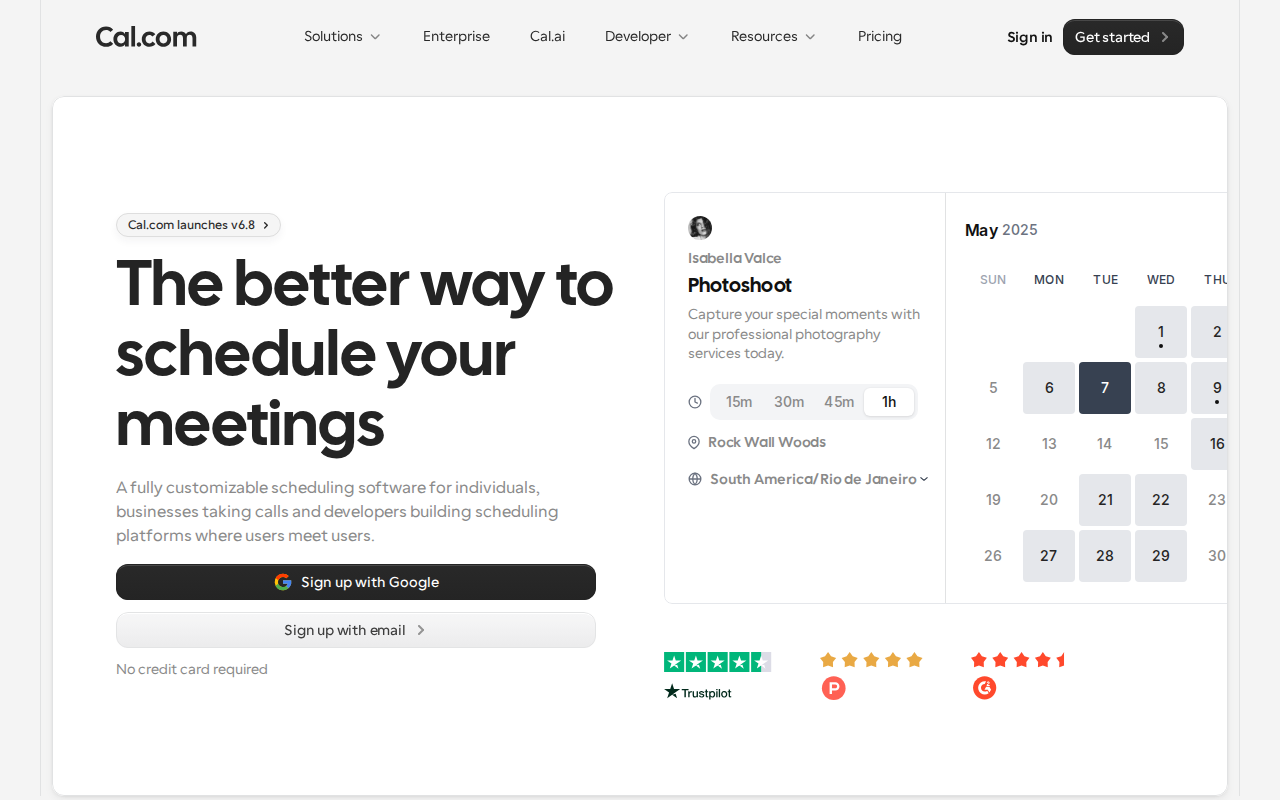
It syncs against your connected calendars to prevent double bookings, honours availability windows and buffers, and handles video, phone and in-person meeting types with automated confirmations, reminders and follow-ups. There are more than 100 app integrations, embeddable booking pages, an API for developers, and support for 65+ languages.
The two things that distinguish it from Calendly are the free tier’s scope and the open-source licence. SOC 2, HIPAA and ISO 27001 compliance are available on the Organizations tier, and there is a self-hosted community edition for teams that need scheduling data on their own infrastructure.
How Cal.com Works
- Booking links backed by two-way calendar sync across providers.
- Availability windows and buffers, with per-event-type rules.
- Cal Video built in, plus Zoom, Meet and Teams if you prefer.
- Payments through Stripe and PayPal — on the free plan.
- Round-robin and collective scheduling for teams, from the Teams tier.
- Routing forms send bookers to the right person based on their answers.
- API, webhooks and embeds for developers.
- Self-hostable community edition alongside the hosted service.
Cal.com Pricing
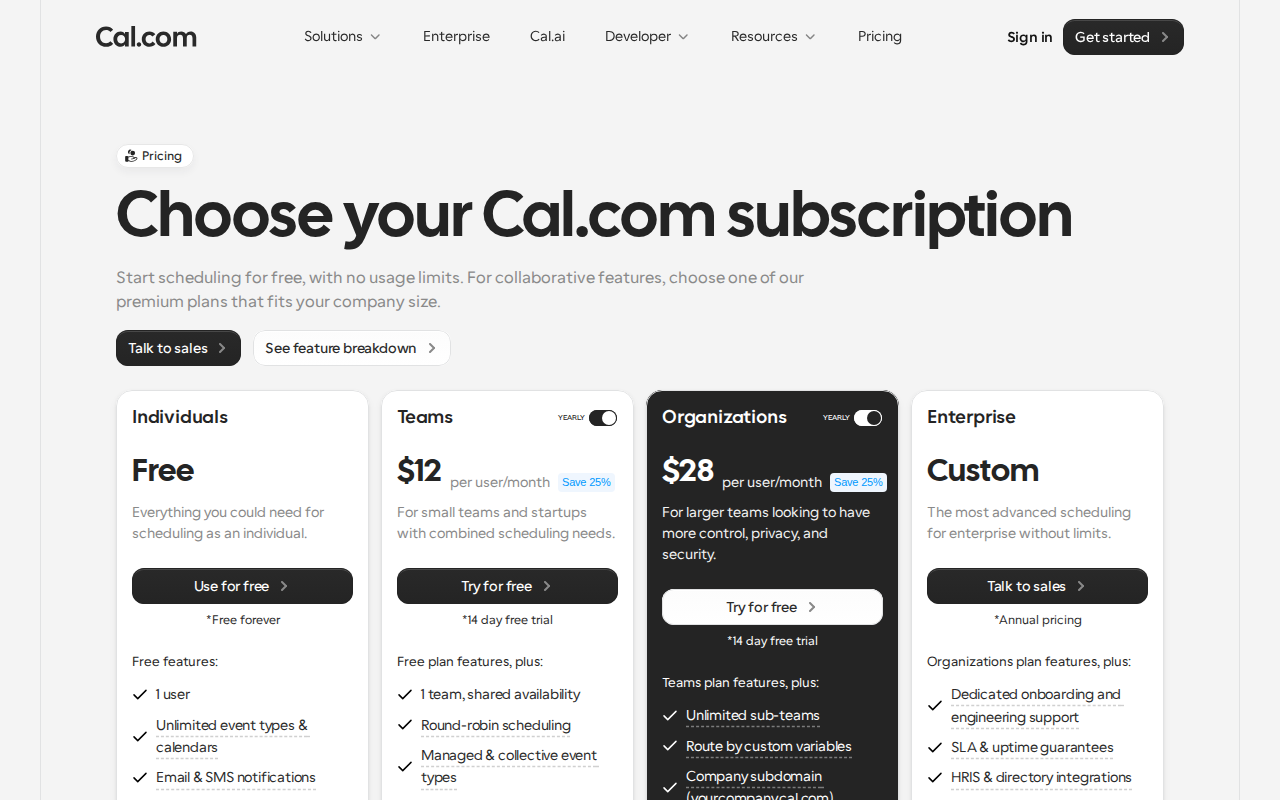
| Plan | Yearly | Monthly | For |
|---|---|---|---|
| Free | $0 | $0 | 1 user, unlimited event types |
| Teams | $12/user/mo | $16 | Shared availability, round-robin |
| Organizations | $28/user/mo | $37 | Sub-teams, SSO, compliance |
| Enterprise | Talk to sales | — | Custom terms |
Yearly billing saves 25% on both paid tiers, and each comes with a 14-day trial. What is unusual is the split of what sits on which side of the paywall:
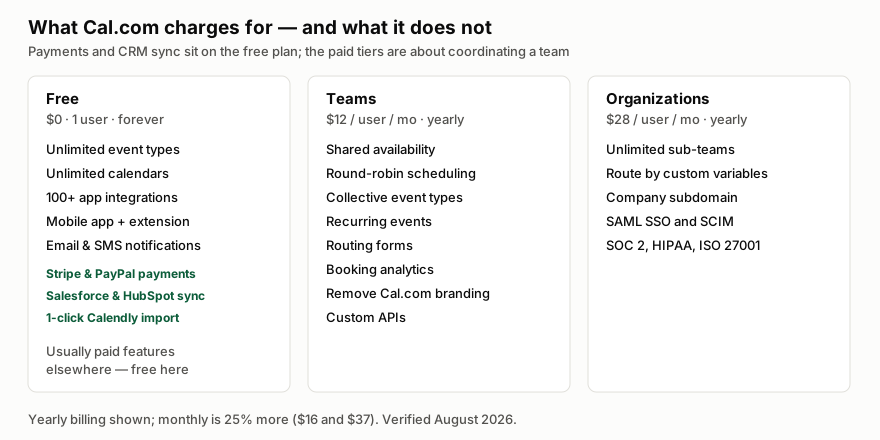
Payments and CRM sync are free here and typically are not elsewhere. For a solo consultant taking paid bookings, that is the entire product at zero cost — and it is the strongest argument Cal.com makes.
The paid tiers are priced against team coordination, not features an individual would miss. Teams buys shared availability, round-robin distribution, routing forms and branding removal. Organizations buys governance: sub-teams, a company subdomain, SAML SSO with SCIM, and the compliance certifications. If you are one person, there is genuinely little reason to upgrade, which is a rarer thing to be able to say than it should be.
The corollary is the catch. The free plan is one user. The moment a second person needs shared availability you are at $12 a seat a month, and there is no small-team middle ground below that.
Who Should Use Cal.com
For individuals — consultants, coaches, freelancers, recruiters — Cal.com is close to a default recommendation. The free tier does what most people need including taking money, and the ceiling only arrives when you add colleagues.
For teams that need round-robin or collective scheduling, $12 a seat a month billed yearly is competitive against Calendly’s equivalent tier, and routing forms are a genuinely good implementation of a feature most tools do poorly.
For regulated or privacy-sensitive organisations, the self-hosted edition is the differentiator. If scheduling metadata cannot leave your infrastructure, almost nothing else in this category offers a supported answer.
It is a weaker fit if you want a polished all-in-one appointment business system — deposits, packages, class bookings, resource management. Cal.com is scheduling infrastructure, and vertical tools serve salons, clinics and studios better.
Honest Pros and Cons
Strengths
- The free tier is unusually complete — payments, CRM sync and 100+ integrations without paying.
- Open source with self-hosting, which is a real option rather than a marketing checkbox.
- Routing forms are strong, sending bookers to the right person by their answers.
- Developer-friendly: API, webhooks and embeds, so it can sit inside your own product.
- Compliance available — SOC 2, HIPAA and ISO 27001 on Organizations.
- 65+ languages and broad platform coverage including mobile and a browser extension.
Limitations
- Free is capped at one user. Any collaboration jumps straight to $12 a seat a month.
- No cheap small-team tier between free and Teams — two people costs the same per head as twenty.
- Self-hosting is real work, and the community edition’s feature set differs from the hosted one.
- Not a vertical booking system — no deposits, packages or resource management out of the box.
- Organizations at $28 a seat is a significant step, and much of what it adds is governance rather than scheduling.
Cal.com Alternatives and How It Compares
Calendly is the incumbent and the honest comparison. It is more polished and has a larger integration ecosystem, but its free tier is deliberately thin — one event type, no payments — which is exactly where Cal.com attacks. If you are an individual, Cal.com’s free plan beats Calendly’s paid entry tier on capability.
SavvyCal competes on booking experience rather than price, and is genuinely nicer for the person receiving the link. It is a reasonable choice if scheduling is client-facing and the impression matters.
Google Calendar’s own appointment schedules are free and adequate for simple availability, with none of the routing, payments or team distribution. For a lot of internal use, that is enough — and Cal.com’s answer is everything in the paid columns above.
The Verdict
Cal.com is the best free scheduler available, and a fair-value paid one. The free tier is not a lead magnet with the useful parts removed; it includes payments and CRM sync, which is the opposite of how this category usually works.
The decision is simple. If you are one person, use the free plan — there is little reason to pay, and you can take money on it. If you are a team, the question is whether round-robin and routing forms are worth $144 a seat a year, which for any team distributing inbound meetings they usually are. And if you are in a regulated environment, look seriously at self-hosting, because almost no competitor offers it.
FAQ
How much does Cal.com cost?
The Free plan is $0 forever for one user. Teams is $12 per user per month and Organizations $28 per user per month, both billed yearly; monthly billing is 25% more at $16 and $37. Enterprise is contact-sales. Verified August 2026.
Is Cal.com really free?
Yes, for a single user, and unusually completely — unlimited event types and calendars, 100+ integrations, mobile app, browser extension, Stripe and PayPal payments, and two-way Salesforce and HubSpot sync. The limit is that it is one user; collaboration requires a paid seat.
Is Cal.com better than Calendly?
For individuals, on capability per dollar, yes — Cal.com’s free plan includes payments and CRM sync that Calendly charges for. Calendly is more polished with a broader ecosystem, so for teams already invested in it the case is much closer.
Can I self-host Cal.com?
Yes. Cal.com is open source and offers a self-hosted community edition, which is the main reason privacy-sensitive and regulated teams choose it. Note that the community edition’s feature set differs from the hosted service, and running it is genuine operational work.
Does Cal.com support round-robin scheduling?
Yes, from the Teams tier at $12 per user per month billed yearly. That tier also adds collective event types, shared availability, routing forms and booking analytics — the features that matter when inbound meetings need distributing across a group.

Compare Cal.com with other popular tools in the same category.
Upsides: Great workflow tools, attentione to detail, features such as "impersonate team member" to make updates on their behalf as admin are super helpful. Great customisation options. Customer service is epic
Downsides: Not yet fully integrated on Zapier (ie. only triggers no actions) and with other payment platforms outside of Stripe and Paypal. Really looking forward to updates that include other payment gateways more commonly used elswehere in the world ie Paystack, Flutterwave.
Scheduling for a team of independent contractors and standardising workflows, user experience etc.
This product is a winner. Quick setup, stylish dark mode, and incredible support. Kudos to Milos, who provides support helpful guidance and goes beyond and above to fix issues, or get feature requests up for us.
The automation for emails could be more advanced, but it totally does the job for us.
Helps us to book, and manage calls.
The free support. I've had an issue, and one of the team sent me a screen record in which he re-preduced the issue and show me what I missed and explained how it works. Which was amazing! Not to mention the neat interface and everything just works together in a perfectly integrated piece of software.
The fact that they have a plugin system (Apps) is amazing, yet there are, relatively, a small number of Apps. There are apps that will cover almost all the essential use cases though.
Integrating my Google Calendar, MacOS Calendar, and Gmail. Everything is automated!

It has all of the advanced features I need while also being insanely intuitive and straightforward for both end-users and booking recipients.
Nothing. There are no limitations and it just works as expected.
Making it as easy as possible for other people to get time with my on my calendar, keeing in mind my own schedule / calendar and letting people select platform of choice: Discord, Zoom, Google Meets, etc.
Cal.com is very helpful is getting mettings scheduled without clashing. Especially love the + feature to add or schedule meeting with people at once
It could also include calendar view to show the meets.
Cal.com is solving the scheduling problem and its really helpful to send people a link to just schedule a meet, instead of going back and forth
It is free and super fast. It helps me schedule meetings without any cost.
Interface could have been a little better.
Scheduling meetings has never been easier, it helps me set my username which helps me directly type the link anywhere.
Scheduling is quick + easy to do, the platform itself is extremely user friendly.
There aren't any fancy features, it's a very simple product.
Cal.com makes automatically scheduling calls easy. I don't have to physically do the scheduling myself.

I love everything about Cal.com! Starting with the free plan that offers more features than Calendly, through its beautiful design and customized url. As a freelancer, embedded payments is also a big plus.
Can't think of any, so far everything has been running smoothly.
Cal.com helps me to schedule my online appointments, and I no longer waste my time on emails. Payment acceptance is a big plus too!

Cal.com offers plenty of robust features packaged in a sleek and minimalist interface that is sure to leave a striking impression on just about every type of user. The fun and intuitive calendar comes packed with useful integrations and creative apps to create a truly personalized experience.
Honestly, nothing! I'm really surprised not more people know about this product. It's a much better option than Calendly.
Cal.com helps me to offer a unique and customized experience for clients booking events, with a beautiful and minimalist aesthetic. While pretty on the surface, its capabilities run deep and it gets the job done efficiently and well. Cal.com also offers HIPAA compliance for healthcare use.

I came from calendly, where I had a lot of features I didn't need in a paid account. Cal.com's free account for a freelancer like me is great. It packs quite some features, including Google Analytics and workflows. Support has been very responsive in fixing things, big plus!
There's not a lot wrong with Cal.com. Only thing: My current plan (free) doesn't include SMS/text messages to audiences. Which is completely fair; they need to draw the boundary somewhere.
I can be more professional towards potential clients and I can avoid a lot of scheduling emails. Works great.