Unclaimed: Are you working at Evernote?
Evernote Reviews: 4.4/5 — Solid Choice
Evernote is a top note-taking platform that is used to create and organize notes and lists. With Evernote, it’s easier to take note of ideas and access it through different devices. The platform also offers features that help facilitate a better and more efficient note-taking experience. Tools such as web clipping and easy integration with other applications are well-known features.

| Capabilities |
API
|
|---|---|
| Segment |
Small Business
Mid Market
Enterprise
|
| Deployment | Cloud / SaaS / Web-Based, Desktop Mac, Desktop Windows, Mobile Android, Mobile iPad, Mobile iPhone |
| Training | Documentation |
| Languages | English |


La versatilidad. Uso evernote para elementos básicos como listas de compra o insumos de la oficina, hasta en apoyo de proyecto de tecnología, utilizo para trabajar en linea archivos de investigación.
La nueva vista. El diseño actual de evernote es muy milimalista y no me agrada, antes era más grande y vistoso.
- La Administración de accesos a software - El trabajo en linea - El periodismo digital
I can connect all my devices with my notes and my email. So, if I use my laptop, iPad, or phone, I have all my notes, tasks, and reminders. I love it!
It would be perfect if I could connect more than one email. I would like to have my work email and my personal email so I could have all my reminders and tasks in just one place.
I manage a team of 20, and I manage events. I note everything we have pending, all the meeting notes, things to do, tasks, etc. Evernote is the one platform that keeps me organized.

I am able to use it across my different devices. That makes it very convenient because I am often on my phone, laptop, or desktop.
The menu buttons are a little confusing. I think it needs a cleaner interface.
Sometimes I need to have quick access to my personal information. The companies I use require frequent password and other identification methods.

It keeps me organised and best thing is it has easy data entry through typing as well as recording of voice notes. Data can be stored, easily accessed and edited.searching documents is very accurate and fast.
It is very perfect application but few problems I am facing like acessing notes with offline browser also sharing notes with non Evernote user is difficult. Storage for free user should be increased, or else it's very convinent application
I am preparing weekly schedule along with things to do list with beautiful templates as well I am writing class notes as well meeting notes. It is really helping storing and acessing anytime Scanned documents. It helps me to memorize things with its beautiful features like sticky notes and vioce notes
It is easy to use and easy to customize a specific organization and productivity system to meet a number of productivity needs. The application is fast and can be used on multiple devices.
There are not many negative aspects of the program. It does not have AI integration at present time, but some might not thing that is a negative. There are an occasional sync issue where notes are duplicated.
It is helping me archive and find information from a multitude of meetings, emails, notes and files. It allows me to organize tasks so I can get things done efficiently.
I like how easy and accessible Evernote is. They make everything organizational and easy to see in one place.
The different option plans are great, but the basic one offers barely anything so you pretty much have to go for a higher package to experience anything different than Microsoft Word.
Staying organized can be a challenge. With Evernote, it makes it easy to keep everything together in one area.
I use it very simply with two tiers, the notes and the notebooks. This keeps me totally organized.
I would like to be able to make rectangles around key parts of text. Maybe this is possible and i don't know how. I now use highlight colors to do this.
I used to take notes on paper, the moved to word documents into file folders on Word but still had trouble finding just the paper i needed. Now i can always locate what i want and add to it.

Evernote is my digital notebook and a to-do list that helps me remember everything, from the big picture to the small detail. Ensure my ideas, projects, and plans aren't lost in cyberspace. Evernote allows me to save all of life's little moments - inspiration, ideas, photos, articles, research and more - so I can easily find them again when I need them.
I've never encountered any problem with Evernote. It is the best online notebook platform.
It is a powerful, easy-to-use tool designed to improve productivity by letting you save all your thoughts and ideas in one place. Whether on your computer or phone, Evernote allows you to take notes, make lists and create reminders effortlessly.

Evernote has a very clean interface and is very easy to use. It makes note-taking easier.
Instead of a monthly subscription, a one-time fee would have been great.
It helps me organize my to-do list, daily schedule, and many more daily activities.
It is the best solution to keep all the meeting notes, reminders at one place. It helps a lot by keeping the data well organised. There is lot can be done around notes with it.
Nothing to dislike with Evernote, everything seems perfect and upto date.
Evernote is helping me organizing all the notes, be if follow up notes or meeting notes. Setting up tasks is very helpful feature.

The best part about using evernote is its accessibility I can save a note on my tablet and can later on use the evernote website on my computer to access what I wrote
The limitation of its free usage is what bothers me, when compared it to other Note services it feels a lot to limit a note-keeping service. Lot of plans to select from
Evernote offers extensive integrations with third-party apps like Google Drive, Slack, Microsoft Teams, and Outlook, which makes it useful and even more versatile. Such feature cannot be seen in any other app
It's easy to capture the information you want to access later, whether you do it from your computer or your phone.
Nothing. I love everything about Evernote.
I'm solving hte problem of organizing important information and realizing the benefit of being able to access information when I need it.

Evernote quickly allows me to: - Save important articles from websites I read throughout the day - Keeps financial info for me and makes it easy to retrieve, copy and paste that info - Take quick notes throughout the day - The new task list function allows me to keep notes and task readily available - The ability to scan documents into Evernote making them searchable It has become my working space for writing rather than MS-Word except for projects that need more formatting capabilities. Evernote's outlining function is more reliable and easier to use than MS-Word.
Searching could be easier Difficult or impossible to add new tags to articles on the fly Spell checker and thesaurus could improve
The ability to take notes quickly and to retrieve them. It serves as a mini-project manager allowing me to have a diary and a task manager readily avaialable.

Go to platform for recording data or even organixing tasks
Premium options have a higher price, which can be worked on
Easy handling of meetings and presentations. Evernote helps breaking down a large content into short and precise tasks or points
I like that I can have a ton of ideas going on and have different spaces for each. I use this for ideas to write and grow my business. I use notetaking, story style, and drawing options.
I really enjoy this product so I don't think there is anything major that I dislike about it. If I had to think of one thing it might be that I would like more options of nesting notes in folders on the left side panel.
I am using evernote to process ideas and get big business development ideas onto paper. I like that I can use it to draw and type out ideas as where I am in the day or the ideas I have can fluxuate on what the best way to jot it down is.
I like the variety of things you can do in the app.
There are not a lot of things I dislike it just takes longer than notes you can do on an iPhone.
Scanning and adding notes and reminders
Evernote is TOTALLY FLEXIBLE. I use it to manage web-sourced data, scanned data, scanned business cards (from my phone) and as a place to draft documents, notes and all manner of information. If I want to remember it - it goes into Evernnote.
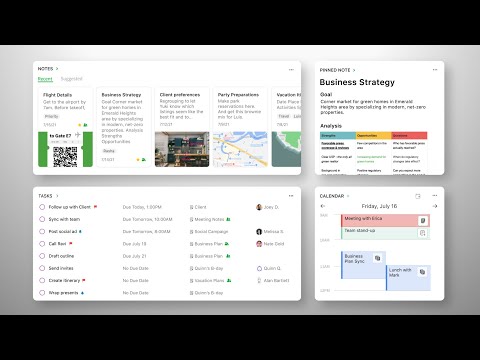
Some of the newer features are not well-integrated. I love the new "HOME" screen, and the inclusion of a scratch pad, but am frustrated to distraction because the calendar integration is so buggy. (Frankly, it does not work. And Evernote support has confirmed that integration with GMAIL is a known issue.)
Major time saver, and it connects with CHROME / GOOGLE SEARCH to provide additional search functionality from YOUR NOTE on a search. Sharing a note is very easy, even with someone who does not have Evernote. Also, linking notes is a breeze.

It is indeed one of the most useful applications I've ever used. In addition to allowing you to access all of your ideas, insights, and memos from any device, including those inaccessible, Evernote does have a few highlights that I find particularly useful in the document management mines, such as web clippers, zones, and layouts. With Evernote Basic, you could use a personal account to access multiple products, which I believe is enough given that it is available for Android devices, iPhones, and desktop computers. I now can collect thoughts that come to me instantly using Evernote, and I can mark them in a way that allows me to categorize and group them for your organization. What I like about Evernote is that it makes it very simple for someone like me to save documented and saved notes, link photos, and link web pages. For me, this opens the door to a broader range of options and solutions. You can email the documents to a specified email ID, and the files will be saved to your Evernote account as soon as they are received. Because the content would be first retrieved from the mailbox and then posted to Evernote, it saves time and effort. Evernote has keywords that are used to organize the content of my notes, making it far easier to find the information I'm looking for.
It is not possible to add tags that contain unique selections from the text. It is only possible to correlate tags with a document, which is inconvenient because I have to browse the entire document to discover the essential info if the report is big.
Evernote has expanded into a web-based and smart tool for creating, sharing, and receiving notes, even during meetings and presentations. My ipad and stylus have been removed as well. Additionally, you can manage checklists quickly, allocate them to the appropriate record, create reminders that are simple to use, and move tasks simultaneously. It enables you to save and access a lot of information quickly and simply. This is a website that can be used for a variety of purposes. If we take a look at Evernote, we can add functions through the use of add-ons. Evernote would be a good option for someone who is looking for something offline as well as someone who needs to take notes.

First, I like that my notes are available on multiple platforms, and that's what first attracted me. I access it on my phone, work computer and home laptop. I also like the notebook/folder structure and tagging opportunities. I use the Stacks to separate work from personal notes, and then in each stack I have additional folder structures. It took awhile to figure out my system, but once I did, it worked well. I especially like the ability to set reminders on specific notes. Recently they've added a Task feature which I'm using more and more - rather than the reminders on the notes. It's helpful to be able to view all tasks (across all notes) in one place.
Can't think of much I don't like. I am hoping they introduce the ability to export Tasks through a product like Zapier to integrate with other systems. I could see it being beneficial to integrate with my project management tool
It supplements my basic CRM software. I use Evernote to record all my sales visits, essentially keeping a log of activity, special notes and reminders to contact or carry through with them on some task.
Evernote's keeps track of what I need to do and what I have already done.
I don't always set a reminder so sometimes I forget to do things.
Making sure everyone is connected and knows what they are doing for the project.
It is super easy to jump between notes without having to open up multiple documents/tabs
I would like there to be a little more functionality while searching.
I used to have very poor organizational skills, Evernote helps me keep all of my notes organized and easier to pull up.
Evernote does not own our data. Our data belongs to us and content ownership does not change when we put it into Evernote
They keep on adding new features which is a good thing but the price keeps on rising
Transfer of notes between teams in different locations and sync to the cloud to make them available outside the office
Makes it easy to show my work to anyone I need to even if they don't use Evernote
Nothing much that can be added to Evernote
Collaboration in the sales department is thriving since everyone is involved in transforming ideas into opportunities
Handwriting notes, sharing whiteboard sketches, photos and annotated PDFs
Free accounts can only send limited size of notes
Sharing key data with selected individuals. Tracking tasks in daily meetings
I like that Evernote syncs across multiple devices.
I wish that I could add more devices to my account, but understand the limitation since I am using the free version.
I use Evernote to make to do lists and to save articles to review and find it helpful to keep me organized.
Evernote helps with all of those reoccurring lists and to do's, while saving time. It is accessible for free across two devices, and more with paid membership. It lets you grab whole pages into a note, and you can give others access to a note using their email address.
I'm not entirely sure how upgrading would be of any use to me.
Shopping check lists are awesome with Evernote. Eliminates repetitive list making. It's on my mobile and my desktop. Prints well.
Our meetings and notes have context so nothing gets lost in the shuffler.
Sometimes it can't export data easily to other applications.
Making notes more useful by adding text,images, audio, documents and keeping important info handy our notes sync automatically to all our devices.

Me gusta mucho la organización, por lo que este software me viene como anillo al dedo. Lo que más valoro es la aplicación movil. Me encanta que se sincronize con los demás dispositivos y sin importar cuál use, tengo mi información disponible en todo momento. Puedo organizar la información por etiquetas y libretas y esto me encanta porque, como dije antes, amo la organización y lograr conseguir la información que necesito rapidamente. También me gustó mucho que, para optar por el periodo de prueba, no hizo falta colocar mi tarjeta de crédito, lo hice con mi cuenta de Paypal, y fue más rápido el registro y luego el pago. Todo muy bien.
No hay nada en específico que no me guste aunque a veces se ralentiza la app, pero no es algo que suceda con frecuencia. Estoy realmente contenta con este software.
Como dije antes, me encanta organizarme y hacer listas de tareas, también me ayuda mucho registrar mis ideas durante el día a medida que van llegando a mi cabeza. Ahí entra en acción Evernote. Uso generalmente la aplicación movil por comodidad, y luego, para ahondar en esas ideas o desarrollarlas, paso a la PC y tengo todo sincronizado, lo cual es genial. Las etiquetas, libretas, la lista de actividades, todo me ayuda a organizar tanto mi trabajo como mi vida cotidiana y estoy muy contenta con esto. Evernote me hace la vida más fácil!

It meets all of my requirements since I enjoy writing notes. By using this program, we can save all of our information in a centralized zone. The fact how I can view my notes from just about any platform ( device ) with relative ease is a significant plus, particularly for project administrators or other people who move the multiple devices on a project. I've gotten into the routine of making all of my notes online so that I can easily share twith others With this simple and effective note-taking tool, I can easily handle my everyday regular activities as well as the complete assignment from a single location. I enjoy the screen recording feature, as well as the option to select which section of a webpage to screen record, and the web clipper feature.
It's doesn't run on an Ubuntu server. However it does give deployment choices, and can be loaded on such systems, but it requires a complicated config to function correctly.
Keep all of my paperwork in one place so that I don't have to worry about losing notes in the future. I put a message on the board and selected the closest item. I do use this for corporate meetings, as well as for personal purposes. Using it to ensure you wouldn't miss anything when making a presentation or daily meeting minutes

Evernote is handy in use, you need just to register then choose something from its crossplatform and begin to save and manage any texts, URLs, notes, etc you want. My choice is Chrome extention, I found it the most convenient.
Desktop application's size and requirements are too much for this kind of software (that's why I picked Chrome ext.)
Fast and easy access to every data I collect during web surfing