

Unclaimed: Are are working at Float ?
Float Reviews: 4.2/5 — Solid Choice
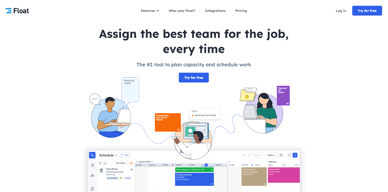
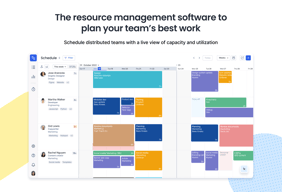
Float is one of the best resource management tools for robust scheduling and time tracking, trusted by companies like BuzzFeed and Deloitte. Project scheduling is easy with its click-and-create and drag-and-drop interfaces and users can set tasks easily and assign them to the relevant people/teams. Float’s scheduling tool also is simple and visual, giving you a clear picture of your team’s workload, as well as project progress all from a single dashboard. With Float, you can easily plan, manage and monitor projects and teams. Time tracking is simple, task management is streamlined, and the platform provides accurate forecasting based on gathered data.

| Capabilities |
API
|
|---|---|
| Segment |
Small Business
Mid Market
Enterprise
|
| Deployment | Cloud / SaaS / Web-Based, Mobile Android, Mobile iPad, Mobile iPhone |
| Support | 24/7 (Live rep), Chat, Email/Help Desk, FAQs/Forum, Knowledge Base, Phone Support |
| Training | Documentation |
| Languages | English |

On a weekly and daily basis, it is easy what projects/tasks I should be working on each day. I use this in tandem with my project portal.
Schedule update emails (automated) are confusing to read and do not clearly state what has been changed.
Breaking down of project time allocation by the hour
Easy to update scheduling program. Has a basic integration with Teamwork.
Few minor browser-related bugs. The API could be more robust.
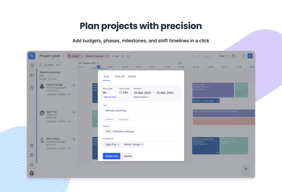
Helps us scheduling. Allows us to easily see which tasks team members are doing and ensures they aren't over booked. Allows us to quickly move an entire project timeline.
Easy to see entire workload at a glance. Powerful filters to show only the information you need.
Can be slow when loading complex views. Some UI elements aren't that intuitive.
Keeping track of a remote team. Visual aid for daily meetings.
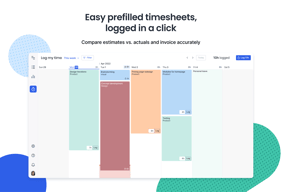
Float makes tracking time/hours for each project you are assigned to very quick and easy. Each task has its own tab that is very specific to what you are working on.
Logging in time should definitely be the responsibility of the user, however, I think an alert/notification feature to remind users to track their hours would be very useful. I dislike that it is up to managers and higher-ups to reach out about missing days or time.
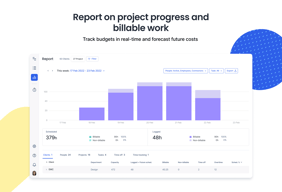
Float solves the issue of employees being unsure about how often or how little they dedicate time to certain projects; with Float you can visualize in the reports how much time is spent on a task, and this is beneficial in showcasing how your hours are being distributed throughout the day.
Intuitive and easy to use with a friendly UI in both mobile and web interfaces. Using Float has given our team insight on unused capacity and improved team scheduling.
Does not have native integrations with MS Project, so the export then import function is fumbly to use. Works better as a resource scheduling tool (which it is) than a project management tool (which it is not).
Prior to using Float our team depended on after-the-fact time reporting on an Excel sheet and had limited vision on future capacity to take on new projects. Float is providing both real-time resource tracking and future capacity insights, allowing multiple projects to be coordinated and future planned. We are tracking 18 simultaneous projects and 7 future projects with Float for a 6 person project team. Float's reporting is giving upper management valuable insight into time spent and team capacity, allowing long term planning and reprioritization based on available resources.
I like the option to set any colour you like for different projects and make the schedule look any way you want; setting tasks to repeat weekly / on certain days and then being able to update them all at once - a very time-saving feature! I also like that you can drag and drop tasks or drag to change time - simple yet super useful.
Not being able to split tasks if they repeat weekly; a very confusing hours/day field that sometimes leaves you having a task happening for a year (still didn't quite figure it out but it's a minor issue). If you chance Billable / not-billable tasks, the hours update only after you log out and back in.
It's very easy to manage large teams, working on multiple different projects. Makes it easier to plan the work ahead and control the budget since you can set the tasks to be billable / non-billable.

It allows me and my team to work seamlesly, I manage all of our workflow through this product and we have never been more efficent.
nothing at all to be honest, it makes perfect sense and allows me to do more with my team
In advertising scheduling is often a nightmare, this is no longer the case as the whole office can see and work through workflow due to the open nature of the platform.
I have, as of late, started using this item, and at this point, I have my excess responsibility sorted out for myself. It additionally has continuous update ability so you are educated all of the time of what you ought to be chipping away at any current time.
I disdain that I want to press the 'sign in' button with Google twice, yet I don't know whether this is an issue with Google or Float. The altering project name was not the most straightforward to sort out. It was simple on the off chance that you knew what you were doing but not for another client.
I was settling the issue of being compelled to telecommute. I work in accounts which implies I have many undertakings and clients.
As an engineer, it's not difficult to get diverted. That is the reason we have project administrators and Float. Float assists me not just keep with following how I ought to treat when I ought to make it happen, yet it additionally helps me with monitoring what my associates are doing.
Perhaps I don't know that this element exists, but I want to reorder sections. I have a ton of reiteration for work extended step by step to save personal time on the off chance that I didn't need to enter a similar task consistently physically.
I am adjusting group responsibility so not one individual is overburdened each week. I'm utilizing float to get a refreshed perspective on presently allocated and future undertakings.
The design is straightforward and clean, making it simple for me as well as my group to monitor our everyday assignments. At the point when I initially began utilizing it, it invested in some opportunity to dive more deeply into the buttons, and all the other things were a breeze.
By and by, I think that it is a piece hard to keep track arranged versus genuine one next to the other except if I open it up in two program tabs. Ideally, the group will enhance this in ongoing updates.
It empowers me to follow the genuine time spent on each assignment, particularly those which are not initially in the arranged timetable. This is essential to develop efficiency further and go about as a decent reference for better future preparation.


