

Unclaimed: Are you working at Float?
Float Reviews: 4.2/5 — Solid Choice
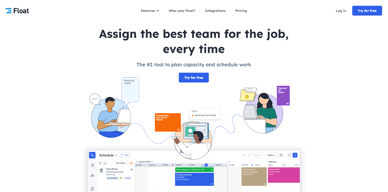
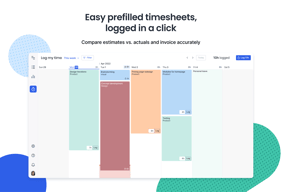
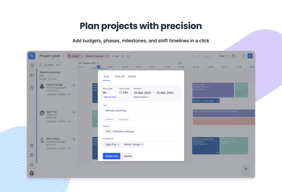
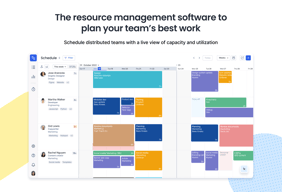
Float is one of the best resource management tools for robust scheduling and time tracking, trusted by companies like BuzzFeed and Deloitte. Project scheduling is easy with its click-and-create and drag-and-drop interfaces and users can set tasks easily and assign them to the relevant people/teams. Float’s scheduling tool also is simple and visual, giving you a clear picture of your team’s workload, as well as project progress all from a single dashboard. With Float, you can easily plan, manage and monitor projects and teams. Time tracking is simple, task management is streamlined, and the platform provides accurate forecasting based on gathered data.

| Capabilities |
API
|
|---|---|
| Segment |
Small Business
Mid Market
Enterprise
|
| Deployment | Cloud / SaaS / Web-Based, Mobile Android, Mobile iPad, Mobile iPhone |
| Support | 24/7 (Live rep), Chat, Email/Help Desk, FAQs/Forum, Knowledge Base, Phone Support |
| Training | Documentation |
| Languages | English |

The software is very intuitive to use. The initiation period for all to use measured in weeks. Most were proficient within a couple days.
The phone app is a little different than the desktop version
The ability to schedule resources in real time is very valuable.
Float has been very useful in our project management and time allocation. We use it to delegate tasks and projects. It is a great visual representation for scheduling. We also find the time off and milestone features very useful.
Float can be tricky to use at times and there aren't many resources like guides or videos to reference. Other minor things like the split tool gets stuck sometimes and there isn't a way to unsplit tasks. Sometimes when trying to assign time off the website won't let you do it until you refresh. The differences between admin, project manager, owner are not very clear.
The visual aspect allows us to ensure we are meeting deadlines, making sure we don't overschedule team members. It has been very beneficial in terms of time management and making sure tasks are completed in a timely manner.
I love the simplicity of use. I open every day and I know exactly where I am and what I have to do. All synchronized with all my devices.
Not being able to add commitments from your personal calendar to float, but just the opposite.
Every day and I know exactly where I am and what I have to do, all in one place.
Really easy to use. Changes in the schedule can be done very fast with a lot different ways to handle it. In our dynamic environment it's really helpful.
We're missing some kind of dashboard with general overview of schedule which can be easily use with digital signage.
It helps us staying better organized and enables everyone to easily check other people workload.
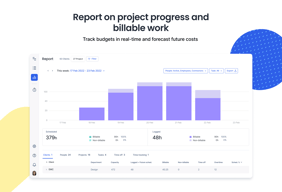
Compared with other similar apps, the float reports are great. We can easily check how we are using our resources and distribute the workload between them.
Float could explore more integrations with other management apps.
With float we can plan and forecast the resource allocated to each project.
The software is easy to use and very modern
I did not like the segmentation of the menu
Timemanagement and To dos I submit in float and work it step by step
Easy and intuitive interface, self-explanatory
Would like to see more information on one screen
We have to keep track of the project assignments of around 50 employees in three countries. Float helps us to do this.

I like the visual aspect of Float, it is easy to understand at a glance and easy to plan. Employees enjoy using it which means they are more inclined to update their schedules, which is important for accurate planning.
I wish there were more access levels. I am managing an increasingly large group of people and I need them to be able to edit anyone's schedule in their Department. Currently there is only "Project Manager" or "Member" and neither one suits my needs perfectly.
I have been able to quickly and accurately measure bandwidth and plan accordingly. This has allowed me to project headcount needs as well as give better completion projections to stakeholders.
Float is SUPER easy to use and very user-friendly. I had never used this kind of software in any of my previous positions and it's so helpful! My managers use it to assign work and make sure that everyone stays on top of their projects. Even on the user end, it's very simple to get the hang of and it makes my life so much easier!
I haven't run into any problems using it so far so I don't have anything negative to really say about it!
I've been able to keep better track of my schedule, and I love that I can access Float on my phone and personal computer as well. It has increased team productivity, increased accountability, and is so easy to use!
Being able to see the next three months of my team planning. I know when each of them will be available to work on something else. Also, I can set an amount of time per project, that let me know if we're on budget or not.
The view on the milestones is not really clear. I'd like to see it better so we can rush in time to finish!
I now have a clear view on who is available or not to start a new project.
Float has given me more overview in my day-to-day planning at work. It's a wonderful tool that does what you'd expect. Besides the wonderful functionality and ease-of-use, it looks very good, too.
I'm personally missing a few key features: - I'd like to see Google Calendar integration, it'd be nice to see my day in my calendar on the go. - Notifications would be handy, I've had it happen my planning has been changed without me knowing. - A dark theme is always a good thing, would love to see that added.
My day-to-day planning is solved and filled by using Float. Others and myself know what I'm expected to be doing that day.
Float is very easy to use and makes you activities for the day very insight-full. As project manager it is possible to see all the activities for the team in a blink of an eye. The sorting functions are great; by project, by team and more. Also adding repetitive tasks and scheduled items is very easy. This tool improved our daily workflow greatly!
For now we really don't have any dislikes at all. All our requirements for good planning/team management software are met in Float.
Planning of all current and upcoming projects. With Float we can easily see which employees are assigned to which project and who aren't. Because employees can be assigned to teams and projects it is easy to change the view to get different information.

It's a very accessible and easy to use tool!
I haven't been using it for that long so i haven't had any bad experiences so far
I'm an intern here so it's really nice to see what project I have to work on with who and at what time
Makes it easy for me to organize my day. I can log in in the morning and know exactly what I need to do.
It is hard for me to contact the person whom assigned me that task.
Time management.
Good user interface which is nice looking.
Some functionality missing currently which could be added in future.
Using for team workflows, some benefits for tracking of projects vs Excel
I like that it is very easy to add projects and tasks within the same view. I also love that the scheduling view looks very similar to Google Calendar on both desktop and mobile.
If there is a better way to add project start and end dates as well as viewing project budget burn that would be great!
Prioritization of tasks in scheduling view as well as marking tasks tentative or completed has been very helpful.
I love the ability to zoom out and view the entire lifespan of a project.
Clicking into a task can be a little clunky, especially when it comes ot logging time.
Float has been great for managing bandwith.
Easy to figure out what stage the project is on
Glitches sometimes when moving tabs within the day
Keeping the project managers in line with how long a project actually takes
It's really easy to drag and drop time allocations in, so you can quickly shuffle projects and resources around and see the impact of it, very helpful for trying out different approaches.
Managing reoccurring events can be a bit of a faff, it's easy to make a mistake and end up with multiple copies of the same thing.
Mostly when a change of plan occurs (i.e. resources of timeframes change, or another project comes along), float allows me to quickly try out new schedules and to see the impact that has on the various projects.
I loved the interface, it was very easy to view my projects, teams and manage my schedule.
Some data fields were not required, so the information is only as good or detailed as the person who is documenting.
managing team schedules in a timely fashion. Less questions to management about my projects.
My entire job is on this site - there is no other program as comprehensive and robust, collecting data reports and scheduling for digital design and production teams. I can add and move tasks with ease, follow up to ensure tasks are completed, place holds, and optimize work flow.
I wish the program shown real-time collaborations, rather than needing to be refreshed to show changes.
I love the Reports option after scheduling - this allows me to create a capacity chart to analyze bottlenecks within the production process.
UI is simple and user friendly. Easy functionality
Lacking Customisability and no attachments
Easy to show different parts of the company the work flow for different employees
The layout and the organisation. Ease of use.
It has improved my daily job, therefore there are no cons.
Organisation of my daily jobs. We use the notes section to link to Teamwork which is also handy.
Easy to access and being able to see what projects I am assigned to in the long term
Filtering by installer/project could be more user friendly
Long term project assignment

The platform is very useful for daily workload management. Easy interface and great features!
Very rarely does it happen but sometimes there is a glitch which misplaces tasks.
Time management is the main problem that is solved with this. Being in media, account managers can view your workload and book time in accordingly.
Easy to change work schedule as client demands change; also get a complete view of entire team's workload
Only a few people control access so you're reliant on the them to make updates; more decentralized control could be better (but that's probably just the setting our company chooses)
Our team is better utilized now because it's easy to see gaps in work schedules and fill them.

We are big fans of Float, it schedules our studio and keeps us organized. We have tried many other solutions over the years.
It's a positive and a negative, the software doesn't have a ton of features, but that's what we like about it. It does scheduling really well, and is super fast now that there's been an update. We really like it, despite its narrow focus.
Getting everyone on the same page, daily, with what work needs to happen. Also forecasting big batches of work and making sure we're covered - resource-wise.
Simplicity and convenience. Easy to use interface and the most needed informations visible immediately.
Scrolling speed through tasks, it's a little bit buggy
My team is planning tasks for designers and developers with Float. Our work is well organized and simple to make changes in somebody's weekly plan
East to manage team projects and assign work flow
Wish there was a way to track hours by account and team member
scheduling

Being able to visually see what the whole team is up to in one place. The simplicity of moving around/adjusting schedules on the fly.
When tasks need to be reassigned (to other team members) there doesn't seem to be a way to do this in bulk. I have to manually move each piece of the project to the assigned person. I'm pretty new to Float, so I may have not learned how to do this, but at a minimum, it's not obvious or easy to figure out.
We have approximately 34 team members and constantly fluctuating project schedules. Float is super helpful for having one place to see what everyone is up to and being able to efficiently schedule project resources.