

Unclaimed: Are you working at Float?
Float Reviews: 4.2/5 — Solid Choice
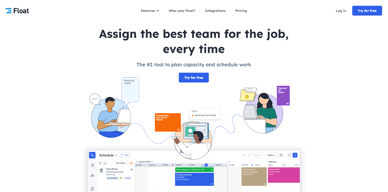
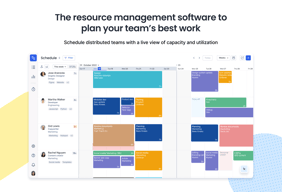
Float is one of the best resource management tools for robust scheduling and time tracking, trusted by companies like BuzzFeed and Deloitte. Project scheduling is easy with its click-and-create and drag-and-drop interfaces and users can set tasks easily and assign them to the relevant people/teams. Float’s scheduling tool also is simple and visual, giving you a clear picture of your team’s workload, as well as project progress all from a single dashboard. With Float, you can easily plan, manage and monitor projects and teams. Time tracking is simple, task management is streamlined, and the platform provides accurate forecasting based on gathered data.

| Capabilities |
API
|
|---|---|
| Segment |
Small Business
Mid Market
Enterprise
|
| Deployment | Cloud / SaaS / Web-Based, Mobile Android, Mobile iPad, Mobile iPhone |
| Support | 24/7 (Live rep), Chat, Email/Help Desk, FAQs/Forum, Knowledge Base, Phone Support |
| Training | Documentation |
| Languages | English |


A great way to stay on top of your own projects while also seeing what other team members are up to and how you might be able to assist or pass off rounds of revisions .
The granular controls and administrative functions could be improved in order to provide even more insight into projects, teams, and deadlines.
Project and deadline management.
Usability, ease of access and the bird's eye feature is a must, it allows for full visibility of the whole team, or segments of it, and allows managers to keep track of current, past, and upcoming projects.
I have not had any problems when using Float.
Employee scheduling, project management, project planning, time scheduling.
How easy it is to use, it doesn't require training to know how to use it
I don't like that I can't create my own project/client -- that my boss has to create them for me.
It is helping to visually communicate to my colleagues how much time I actually have available.
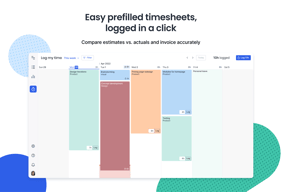
Clear view on the scheduled project timeline. Holidays and sick leave days are imported. Easy to choose which project and task I was working on at logging times. Easy to log time for a time interval, no need to split it by days.
Design of the Schedule page, a calendar view would be a nice option.
Project time and task log. Easy to use at every Friday afternoon logging what had happened during the week.
- the ease of the interface - how quickly I can schedule things - our team is able to block off time off and have it all in one spot.
sometimes the drag and drop of the scheduling tool can be frustrating/glitchy. i wish you could duplicate projects.
resourcing for our team - helps me a bunch to have all of the team's schedules side by side in order to have the most efficient resourcing process.
Float offers an easy way to view schedules across an entire organization, changing the minute details of your schedule as needed.
Some of the UI/UX elements of Float's interface feel slow and clunky at times.
Float helps us as consultants to understand how much time is available for new work across our organization.
Float is a great tool for resource planning. I like that you can assign hours, dates and tie things to projects.
I wish it integrated into my project management tools.
Float solves for capacity planning. It's easy to see when someone is overallocated and be able to pivot.
Easy to use software for managing resources on a project: scheduling time, team members logging their time themselves, seeing at a glance who is available.
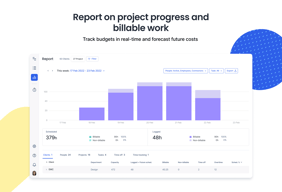
Limited reporting and budget management capabilities.
Managing engineers' resources by easily planning resources for a future project and quickly seeing who is working on what.
Being able to easily edit and click and drag my schedule around is helpful
The biggest pain point I have is that notes do not carry over from schedule to log time. This is very frustrating as I need descriptions for logged times to sometimes go to the client as a line item for an invoice or to associate with a phase of a project in the invoice.
Float is helping to solve the problem of quickly and easily accessing my ever-changing schedule and helping to remind me of planned work. As someone who is constantly jumping around it is helpful in keeping me grounded at times.
I like the fact that I can easily track the time I spend on my projects.
I can't get the sync with Google Calendar working.
I no longer have to count the work hours spent on projects – I save a lot of time.
The ability to plan your week with rough time slots allotted to individual projects is very helpful to keep yourself on track.
I am still learning, but the ability to color-code projects would be nice.
Managing workloads within our team.

User friendly, easy to access and filter
N/A - no bad experience for me using Float
Work flow - able to see who myself and colleagues are working on
UI is great, and very intuitive. Allows very easy comparison of team resourcing, which is great for meetings.
It would be nice to have the ability to copy/paste so i can quickly load up my week with one task, but allow each day to be removed if needed.
Team resourcing and identifying overloading for each team member
It shows a very good overview of all emplyoees
There is nothing I really dislike. It does what it needs to
Overview of employees on projects is shown in an easy fashion
Visualising day's workload and being able to schedule specific time or duration of task.
That it doesn't work with the archaic scheduling system my company currently adopts across the board.
Visibility of workload across my team, allowing me to offload or request more work.
Float is very easy to use, incredibly well organised and allows for really effective management of time across creative, editorial and client services teams. Many people can use it at the same time, and it updates real-time which is fantastic for managing tons of updates all happening throughout the day.
There should be a few more colours or ways to differentiate my projects from someone elses. It sometimes gets difficult to find which projects are mine, and which are others.
It helps us to manage time across all teams, meaning work doesn't get lost and everyone can have a successful day.

Filtering and reporting - it is easy to get information about the time spent on a specific project.
When someone enters the name of a project to which he/she is not assigned (because, for example, the project manager forgot to add a given person) he/she does not see that the project exists. It should be possible for such people to ask to join the project team. This generates a lot of unnecessary communication and misunderstandings.
It allows us to measure the profitability of projects, so we know which projects are profitable and which are not.
The best thing about Float is that you can insert time according to the projects instead of just putting in one cumulative block. Moreover, you can move the blocks around the timesheet according to importance or preference.
There is no feature to copy paste time blocks - in other words, duplicate time blocks - since a lot of time one needs to enter the same amount of time on different days with the exacts comments.
Float helps me to record and maintain my time spent during various projects on a day in an effective and efficient way. I'm able to track how much time I am allotted on a single project.
It organizes my calendar and time. I know well before time what I would be doing in the following weeks.
The privacy is very limited. It should have not provided access to everyone's timetable.
It is solving the problem for my tasks list and free slots available for other work.
The simplicity, click on a day and just select task, project and enter a notes..
Despite the sync feature with Outlook, I have never had a single Float record go down in my calendar.
No problem constated or solving
It is a good solution to monitor a project's resources and how they allocate their time to different tasks.
It does not allow you to easily move a bunch of small tasks along in the timeline. Also, when trying to put half-day tasks, it's not so user-friendly because sometimes the cursor from neutral turns into cursor of completion or deletion without warning. Another point would be when you try to log in your time off - it took a while to discover how to do this without deleting the previous log-in recordings.
It helps allocate the gaps from the resources time to different other tasks to support other projects or allocate that time to improve professional or soft skills.
Great tool to plan and view my schedule each week. Also helps with comparing my schedule with others in my team. The visual UI to display events/schedules makes it very easy to view and compare.
Making edits/modifications to existing schedule on the fly could be better, especially when there are multiple blocks scheduled in a day. Right now, if you edit 1 block of time, you have to edit the others to fill in any gaps (or remove any overflow). It'd be nice if the boxes were able to be dragged and snapped into place.
Float helps me to plan and track my schedule for past and future weeks. It helps me to align my schedule with other team members to ensure that we always have enough resources to perform required work. As I work with multiple teams in the organisation, it also helps other teams to schedule work/events into my calendar as well.
What I love about Float is how easy it is to use the user interface, it's intuitive and it gives an amazing overview of your planning. The daily updates on mail make sure that you never miss a thing.
It's probably a small little thing but having to log in every time you visit float is a little frustrating, I would prefer if you're logged in right away. Nothing too big though.
Float is solving a quick simple but complex problem at the same time. It's keeping a great overview of our personal planning within the company and not a day goes by where you don't know what to do.
Great for planning out a week or two, worth of work, for a small team.
No single member view, this would be ideal for a web developer who can create a waterfall view of their work.
It's allowing the entire team to view what each other is working on.
Seeing what my colleagues have in their schedule.
Not the easiest way to log hours. It takes a few more clicks than the previous application i used.
Time management. I can clearly see how much time I have on various projects.

The main interface is clear and offers a great overview. Planning time on projects and tasks is intuitive and easy. Tracking your time along those tasks also works great. We were looking for a tool that did some high level planning and tracking, not track-per-minute. Float has been great to use.
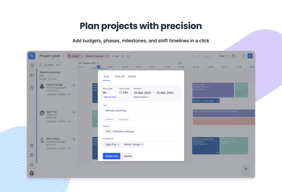
Project planning is a bit harder in float. Planning different phases offer less overview. We also really love the time tracking tool, but it is not available separately.
We wanted to plan and track our time on projects. Float does both of these. It helps us to identity how long we are working on tasks, we bill clients through the hours we track and we know how much recourses are left in a project.
The best thing about Float is the overview of the projects and of the work the team is currently executing, it allows you to keep control and follow each one of your tasks. It gives you the freedom to manage your time.
I don't like that each task has to belong to a project because it limits the possibility of tracking day-to-day tasks like answering emails, doing check-ups on the team or talking with other team members. It empowers the productivity culture.
The design was changed from the very first time I started using it so it was great seeing the UI change and the way it made friendlier the navigation throughout the site.
Float helps me plan my day in the most efficient way, and not overschedule myself. It gives me a guideline for how much work I can take on without taking on too much.
It can be buggy, and the calendar integration doesn't always work. it's not super intuitive but once you get the hang of it, it's worth it. The support team are really helpful too if there are any issues.
It's making it easy to spread workload across the whole team and make sure we can fit all our jobs in without over or under scheduling people. It saves wasting time and makes us more efficient.
Time logging is simple and fast as UI is clean and understandable.
New logged events in time logging isn't added to the schedule.
Keeping track of project times.
That i know exactly how much time i need to spend a day on each client
That my account manager does not include the job description in the hours i need to work
It is helping me not be overbooked, and keeps track on exactly what i am doing each day so my manager can review it


