

Unclaimed: Are you working at Float?
Float Reviews: 4.2/5 — Solid Choice
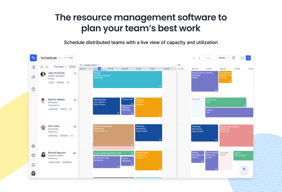
Float is one of the best resource management tools for robust scheduling and time tracking, trusted by companies like BuzzFeed and Deloitte. Project scheduling is easy with its click-and-create and drag-and-drop interfaces and users can set tasks easily and assign them to the relevant people/teams. Float’s scheduling tool also is simple and visual, giving you a clear picture of your team’s workload, as well as project progress all from a single dashboard. With Float, you can easily plan, manage and monitor projects and teams. Time tracking is simple, task management is streamlined, and the platform provides accurate forecasting based on gathered data.

| Capabilities |
API
|
|---|---|
| Segment |
Small Business
Mid Market
Enterprise
|
| Deployment | Cloud / SaaS / Web-Based, Mobile Android, Mobile iPad, Mobile iPhone |
| Support | 24/7 (Live rep), Chat, Email/Help Desk, FAQs/Forum, Knowledge Base, Phone Support |
| Training | Documentation |
| Languages | English |

It's nice seeing what capacity is available for scheduling projects and seeing what coworkers schedule looks like.
No times assigned to work segments. You can only see how long a segment is but not what time that is planned to be worked on
We are solving issues with scheduling as we grow.
User interface Project, timeline, people overview and management
User experience is not so obvious in some cases - clicking on project in some cases not always results in expected effect.
Managing multiple projects across departments; Tracking timelines
The visuals that allows us to see the team and what they are assigned and also the reporting. Also quite like the fact that new features are being added that are enhancing the tool as an over project management tool
There isn't a issues register that we can keep for the all the projects running and monitor change requests, etc. Also often when we update team members float does not make the changes until you have refreshed it a couple of times and re-entered the data
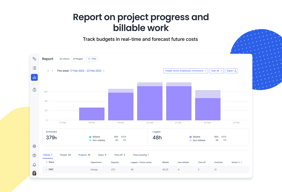
Utilization of staff members is important and float allows us to track them - trying to solve the problem Reporting is the main benefit
Easy to see your own and colleagues tasks, email notifications
Would like more tools to report back the level of completion of tasks
No more ugly spreadsheets that are impossible to follow
Simple appearance and different colors for each project
improve features in detail, maybe you can add pictures / videos
Project management, with float, I was greatly helped because I was biased to know what I would do today and tomorrow.
That it is helpful for a large group or organization to see schedules of all in the group. I also liked that you can move things around fairly easily.
Adding projects and tasks initially was cumbersome. It isn't very intuitive, and requires a little learning curve to get that set up correctly.
Still new to it, so haven't seen huge benefits or problems solved to date.

Aesthetic is lovely and once you have all your events recorded it’s easy to see your teams schedule.
The navigation is klunky. When copying/duplicating/splitting events it is not very intuitive. The automatic window that comes up whenever you click the calendar is a little much.
It can get disorganized when privileges on projects are done correctly. When end up with duplicates of jobs because we can’t use the one someone started if they don’t select certain options.
A self-explanatory and handy tool to easily overview tasks and capacities
A space for personalized notes and comments is missing
It helps keeping track on your capacities and makes it easier to plan the week's tasks
Ease of Use Ease of access anywhere Colourful interface
Setting up the set time of appointment can sometimes result in unintended consequences as a result of how I'm used to setting up appointments in most other software. you must state the time in am and pm otherwise the software will assume an am time.
Organization for people who are away from a desk or computer

User interface Fast Non lagging Useful information upfront on the display
Could have linking to Jira tasks Could have swimlanes to classify users instead of just filters. Swimlanes could be skillset, designation, etc.
Overall task delegation in a unstructured organization where any developer can be picked from anywhere in the world to perform tasks. Float helps check who is free and who is occupied.
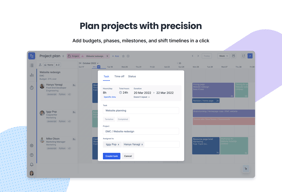
- Color coding - Easy keyboard shortcuts - Smooth interface - Detailed project information on budget, timing - Information on activity e.g. what has been changed by whom
- Sometimes it has issues updating in real time - Drag and drop feature at times jumpy and unprecise
We now have a great overview of the capacities available from all our designers and copywriters. It has made resource management a lot easier.
I like being able to see our teams schedule anytime and place as long as I have wifi or cell data reception.
I dislike the navigation method on a cell phone; to move left and right on a schedule (forward and back in time) I have to click on two little buttons instead of having a normal slide/scroll bar to move around. This is a bit slow and clunky.
Following the teams schedule when offsite.
It's easier to use than other time management software
Some features not intuitive or straightforward
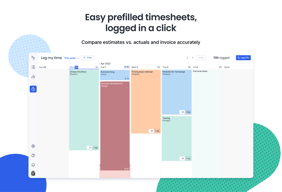
It's easier to track time spent against jobs
Drag and Drop functionality. Colorful and organized interface.
Difficult and confusing to know who is on my team for a giving project. Time tracking could be improved.
Much better time management.
The fact that it is easy to use and understand.
Generating our weekly hour reports and how difficult it can be
Keeping track of time spent on projects and how they spend their day,
This piece of software is fantastic. Its easy to comprehend, easy to navigate, as easy to change when your in a hurry.
There isnt really anything negative about this software.
I am no longer short of staff as I can pull staff from other departments to help with my tasks.

For me, the most helpful feature of Float is the ability to see what everyone else in my team is up to and when they're away. What's also helpful is the ability to retrospectively view what I have worked on previously.
Float offers the facility to link with other calendars with an iCal link, unfortunately this can sometimes be unreliable as the link seems to expire meaning it needs to be set up again.
Overall Float is a very helpful tool, but has a few minor technical issues that can be a source of frustration.

Float allows me to see what projects people are allocated on easily, or who is allocated on a project. It's easy to visually organise time off and adding tentative projects.
For the resource or user themselves, there is no email notification if a project has been added, deleted, or updated, so we have to check float regularly, which I think is a bit pointless if you're not a PM.
Float lets me easily check who's doing what and what I'll be doing in the future.
I like how visually seeing my workload for the day/forseeable future looks and how simple the initial use is.
Sometimes the site is very slow and the scroll doesn't work. It is hard to set up new teams and remove/add when creating my own team. I recognise I don't do this very often myself but it's not simple to navigate and find on initial use.
It's super easy to ready what I'm working on each day and throughout the week. I can see what I'm doing at a quick glance which is super helpful.
It works fine, the colour doing is clear.
Nothing, although I only use it to see what projects I'm on.
Before I had to ask the project managers which jobs I was on when and chase them for job numbers to do my timesheets.
Float is visually very easy to read and allows users to be succinct but detailed at the same time.
Float tends to not register all our changes and tends to not be completely "LIVE" as it requires multiple refreshes at times to attain the most updated information. This is mainly happens when there are multiple project managers. The export report is not as detailed as I would like it to be. It would be more beneficial to have monthly exports with breakdowns per job, per person and per week. I need to use the raw data more often than referring to the online report so it would be good to see some improvements on this.
Float helps us accurately manage our project life cycles and also individual workloads to ascertain useful information about performance rates and also account health.

Like how easy it is to manage resources and the visual aspect of the software.
I did not find anything yet that I do not like.
Resource Management and task management. Much better overview than spreadsheets.
Easy to see what my day is going to be blocked out as
Sometimes it will allow for more hours set than are in a work day
time Management
The ability to automatically map hours across the team with holiday, sickness already considered. As a user the dashboard was user friendly and a helpful reference when progressing through a month.
The inability to spread project hours unevenly across weeks/days for the regular roundup e-mails to users. Users requested an additional level of detail that reflected their evolving day to day capacity.
A helpful view of capacity, work distribution and team member availability.
Float lets me forecast hiring for my team, balance workload among team members, and block schedules for project manager visibility
The selection/moving functionality on Float is pretty touchy and since undo functionality feels hit or miss, it can get a bit frustrating.
Resourcing for agency-side work is a huge business problem we try to solve every day. Float helps me see how billable we can be.
only show a certain project (by search) no page loads
too simple at times does not remove people who are not on a search project
currently we are float to help with sprint schedule across our team
The easy of being able to view my day/week at a glance.
That it didn't integrate with other software we use at work, so was just another thing to check...
Visibility and capacity.
The flexibility it provides in moving tasks from one person to another - the drag and drop feature is great.
Sometimes it can tend to get laggy especially if you have a lot of people loaded onto the system. Also I don't like the fact on the notes you can't press enter to go onto the next line.
The ease of moving resource around and the reporting capabilities.
I like the ability to be able to see multiple schedules in a single view.
I wish there were more "style" options and ability to see schedules in different ways.
Viewing and checking schedules for multiple individuals.
+ ease of use + functional schedule view + works pretty fast + reports feature
- no Android app (iOS is available from some time now) - new updates and features are added pretty rarely
I use Float for traffic management in a software house. It helped to visualize the process tremendously and is very easy to use which helps with productivity.