

Unclaimed: Are you working at Float?
Float Reviews: 4.2/5 — Solid Choice
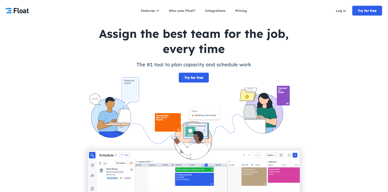
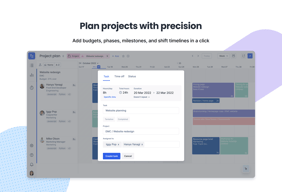
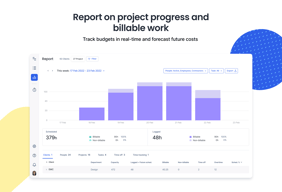
Float is one of the best resource management tools for robust scheduling and time tracking, trusted by companies like BuzzFeed and Deloitte. Project scheduling is easy with its click-and-create and drag-and-drop interfaces and users can set tasks easily and assign them to the relevant people/teams. Float’s scheduling tool also is simple and visual, giving you a clear picture of your team’s workload, as well as project progress all from a single dashboard. With Float, you can easily plan, manage and monitor projects and teams. Time tracking is simple, task management is streamlined, and the platform provides accurate forecasting based on gathered data.

| Capabilities |
API
|
|---|---|
| Segment |
Small Business
Mid Market
Enterprise
|
| Deployment | Cloud / SaaS / Web-Based, Mobile Android, Mobile iPad, Mobile iPhone |
| Support | 24/7 (Live rep), Chat, Email/Help Desk, FAQs/Forum, Knowledge Base, Phone Support |
| Training | Documentation |
| Languages | English |

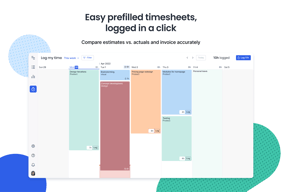
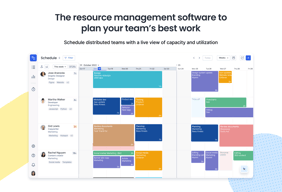
It's easy to track time spent and my planned schedule for the current (and following) week.
When logging time, it could be easier to spot wrong weeks, specially for recurring tasks. If I'm logging time on a task for the future, it should prompt me to confirm whether I'm not making a mistake.
Float in the organization has a purpose to track time and resource allocation. So far, I'm only a user of time tracking and so far, so good.
Float can easily help you find out who is overwhelmed with work and who has too much free time. Perfect for companies that need to make efficient use of employee time. Especially those that bill time to clients. My favorite is probably the vacation scheduling feature.
There's a little bit of a learning curve to it and feels clunky at first but becomes natural over a short period of time.
Float has given our managers ability to view who is available for new project assignments.
I like the look, and functionality of this tool.
The overall UX is pretty bad. I need to long to see the things i like to see. I feel like it has a too complicated navigation for the small number of things i want to do with this tool.
I can now see very easy on which project i'm going to work in the next couple weeks. It was a excel sheet before that, so this feels like a big step up.
The ability to track people's available time and percentage utilization.
Some of the input methods are confusing or counter-intuitive. For instance, when creating new tasks, the duration often changes based on other inputs (hrs per day, # of days, etc). This makes it too easy to make mistakes. Also, I would like to be able to see reports and the weekly schedule in the same window simultaneously, so that I don't need to flip back and forth between tabs. Both are useful tools, but the extra step of switching while not being able to see the other form of info makes a complicated task even more complicated.
Resource management, tracking utilization and task efficiency
Can see what I'm booked to work on weeks in advance. Can also see what my team is working on, all in one place.
Not connected to timesheets so end up having to duplicate info.
People can see how much time you have free before booking you onto new projects to make sure you're not overbooked.
- Simple to use and learn - Simple to get a full picture of a team's scheduled vs capacity percentage
- Lacks customization options and functionality, such as how tasks are added and repeating at certain intervals - Adding resourcing tasks is manual, very little options to automize as interval-usage is not as robust as I'd like
- We're using Float for internal resourcing of team members, and it does its job fine, but it's lacking some quality of life improvements that would make using it generally more pleasant. It does improve our resource management
The app is available for tech on their personal and company devices
Not as customisable as we would like as far as team set up and emailing reports to our clients
Not having to send the schedule out each day as its live

Being able to clearly see what it is that you are scheduled for.
I like the look of it but feel that the UI can be updated.
No clashing of schedules. Everyone in the team is able to see what they are doing. If one is too busy to take on more work or not, and so on.
The structure of the planning and schedule took. Graphical interface was appealing.
Lack of functionality to copy paste tasks. The mobile version where you can’t schedule many weeks ahead.
We are using it as a planning and scheduling tool. It also work as a platform to see what others in the company are working with.

The user interface is easy and clean to look! Best part, colour-coded!
Need to use through web and sometimes, confusing when many tabs are in use.
Better planning and overview of work at the end of each month.
easy to access on mobile, fairly easy to learn to use. pretty colors.
it doesn't work as well for people on multiple projects - think 4 and above - and changing hours from week to week
visibility across the entire team
Its easy to see what everyone is on in a glance.
It doesn't show capacity for resource in a snapshot which I use to forecast resource requirements
Its good for having line of site what someone is on when looking at what can be moved around.

The most useful features in Float is to accurately dispatch resources amongst different projects. It is a very useful tool to visualize who is 100% or not
There is no dashboard that helps you to have important statistics. Also, with over 200 users, the application gets really slow
We are using Float to have a better understanding of the traffic of our employees; it helps us allocate resources usefully.
The general look and feel of the product. The fact that you can access is anywhere.
The functionality to maintain my projects. The user friendliness is not the best.
Project planning and overview of team members on a project.
Real time updates and strong visualisation techniques
Too streamlined, needs more complex options available
Time tracking
It's easy to use, share and visualise timings/deadlines/etc. It helps get everyone on the same page in terms of project activity, and is especially good at helping individuals manage their deadlines and daily tasks. Especially individuals that seem to struggle in this area.
The biggest feature that's missing from this service is a method to measure Float predictions against actually output. And get suggestions to optimise! As in, how much time did we actually spend on that project? Was it 10 when we estimated 4? Or 2 when we estimated 8? We could get better at making Float work for us rather than making us work for Float if this were an option.
It has had some inverse effects on our team and team dynamics. Our team now works to make our work match Float, not to make Float match our needs. This is probably a management on our issue, but the nature of the platform to make shapes fit perfectly means we neglect key human features that would be nice to have the system flag: i.e. Do we now have six people working on the same project in order to meet a deadline? This isn't really efficient to have multiple people on the same project at once. In reality, we loose time. And neglects the expertise of any one individual and the time they've invested in that project in the upfront.
Easy to setup and use. Easy to get start with
Cost is high and nothing extra-ordinary that can separate from the competition
Resource Scheduling for projects
Allows you to quickly see the upcoming schedule
Scrolling on web an iOS app is very fiddly which makes viewing anything other than the next few days very tedious.
Workload scheduling, team annual leave
I like the clean design and the nice colours.
It gets cluttered when a lot of people are involved.
Assigning resources and being able to see at a glance everyone's availability.
Worked well with our business model of tracking time
not being able to actually track time within the app
The utilization of our employees
- Very clear readout & screen real-estate used - Works very well on all browsers/mobile - Colour-coding
- Reduced functionality for splitting up days - Unable to mix time-allocated jobs with 'general' task lists for employees which have no discernible time attached
Float is very difficult to work with if all your staff don't get on board - we often run into trouble where someone has booked a staff member out casually and not used Float because it was a 'quick job', and then the producer is surprised when that staff member isn't working solely on the tasks allocated by Float. An integrated desktop environment or secondary task list would help manage these 'little' things which crop up.
float is user friendly and does not require training.
Sometimes it is not clear why it is not possible to add jobs to your float because of admin reasons.
i fill in my jobs so that people know exactly what i work on and how much time i have.
The quick visibility of my schedule for the week.
Since I'm just an employee who doesn't actually do anything in Float, I really have no cons on my end. It does what I need which is to quickly check in on my allocation.
It's a tool to easily keep an eye on your allocation without all of the other managerially junk in the way. As an employee, I can quickly sign in, check my allocation and sign out without ever wasting time interacting with anything else.
easy to use, keeps my timeline clean and simple
I wish there were more integrations with the software
It organizes my tasks.
Very simple design and concepts which is great to see things quickly and at a glance
Cant really say much negative except that it is very simple so if you are looking for a product with a lot of additional options this probably isnt for you
A lot of staff with a lot of different projects, easy to see what a particular staff member is doing at that partiular day
Being able to see what other people in my team are working on, quickly.
Adding new tasks can be a bit difficult, autofill seems more a hindrance than help.
Seeing what team members are working on, and when they have spare time for other job is useful.
Manager can see my availability at any time
It is difficult to create some tasks that should be simple
N/A
Ability to track progress on multiple projects
Some of the features are hidden and hard to find
Tracking costs Tracking our collaborators
I like the built-in keyboard shortcuts to expedite common tasks (logging time, eliminating tasks from view)
The UI is not very intuitive. I find it a little difficult to navigate
It helps me log hours for work to keep tasks organized time-wise
The visual aspect of Float is fantastic. We rely heavily on the ability to color code by project manager (matched to our KanBan board) for better overhead visibility. The clarity around capacity limits (turning red at 8 hours), PTO, and project owner give a great overhead view of each resource. Also, the edit history is incredibly helpful.
The software can be glitchy and hard to rely on at times. Often when moving blocks of time, the software will prompt you to refresh the page and you will lose whatever action was in progress. Sometimes the software will not let me drop a block where I want to, and I'll have to place it a few days and then manually extend/shorten the time block. The reports section was recently changed, without warning as far as I know, and it has been a huge pain point for me. I run Capacity to Contract reports using Float exports, and this structure change completely crushed my existing workflow to the point where we abandoned our old spreadsheet in favor of a completely new report. Sometimes ghost data will not show up on the schedule view, but will skew the reports for each resource. This causes a headache when running reports because I have to manually keep tabs on all numbers for each resource, given I can't trust they are 100% accurate.
We use Float for our resourcing and utilization monitoring, so we are able to identify what type of work needs to be brought in at which points in the year, informing sales. We also use this as an overhead planning tool week to week.