

Unclaimed: Are you working at Float?
Float Reviews: 4.2/5 — Solid Choice
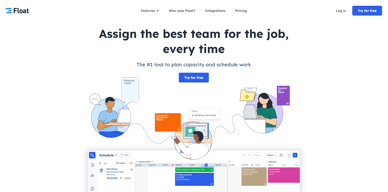
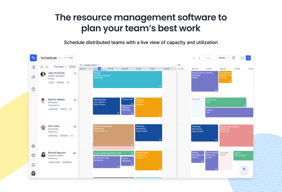
Float is one of the best resource management tools for robust scheduling and time tracking, trusted by companies like BuzzFeed and Deloitte. Project scheduling is easy with its click-and-create and drag-and-drop interfaces and users can set tasks easily and assign them to the relevant people/teams. Float’s scheduling tool also is simple and visual, giving you a clear picture of your team’s workload, as well as project progress all from a single dashboard. With Float, you can easily plan, manage and monitor projects and teams. Time tracking is simple, task management is streamlined, and the platform provides accurate forecasting based on gathered data.

| Capabilities |
API
|
|---|---|
| Segment |
Small Business
Mid Market
Enterprise
|
| Deployment | Cloud / SaaS / Web-Based, Mobile Android, Mobile iPad, Mobile iPhone |
| Support | 24/7 (Live rep), Chat, Email/Help Desk, FAQs/Forum, Knowledge Base, Phone Support |
| Training | Documentation |
| Languages | English |

The transperency in the team tasks is very appealing
still not an advanced version of itself, could be made better
The float is helping me to get to know the schedules of the colleagues without wasting time in contacting them repeatedly
I like the idea of being able to colour code tasks, assign tasks to an email and define time requirements as well as project details within a task. I also really enjoy the reporting side of things.
I would like it if Float offered the ability to change the title of some of the input box titles. For example, where it says "Project" I would like to be able to edit that to my own title.
It gives a good helicopter view for me and my team of the ongoing projects, up and coming projects as well as the capacity of each individual team member. Using the different colours also gives a good overview of the types of work that is going on.
Its interface. It is super easy to use. My team loves it and It is super convinient for me. Makes me managing and tracking their time/schedule easily without any complicated operations.
Honestly, so far absolotely nothing. It has been such a convinient tool for me and my team to use and I haven't found anything better yet. Nothing that comes to my mind as of now.
It is super convinient and easy for me to manage my team member's hours spent and plan their schedule . A few things that can be improvised is probably attendance? and duplicating a task on the log screen.
Modern, interactive, easy to use. Filtering function. Effective visuals
Not always live updates, but thats all really
Resourse management to plan ahead and ensure people dont overwork
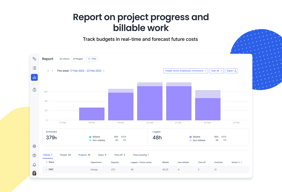
I am able to see my whole team's capacity at a glance, and getting insights in the form of reports is always really useful when conducting end-of-year reviews with team members.
I wish non-admin users could have better control of their own time, and be able to add and edit projects. We are not a team that micromanages our employees' tasks.
Tracking the capacity of our team members is what we use Float for the most. It would be hard to show our stakeholders when were are at full capacity (or, in the other hand, when we are available) if we didn't have this visual tool to back up our data with.
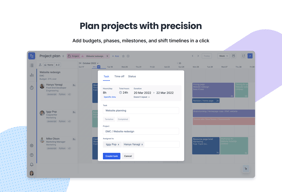
Scheduling tab is so responsive - create, drag and drop, copy bookings, reassigning are all super smooth. Tracking budgets by projects is easy making initial planning of projects a dream. The Reporting tab is fantastic, with insightful 'out of the box' visualisations.
Drill down reporting - specifically with translating work hours to work days and excluding tentative time - could be finessed. Assigning time budget at task level - or grouping tasks into phases would be a nice feature. Currently phases are visual milestones only.
With 100+ consultants and a fast-maturing pipeline, Float is indispensibe in ensuring we have appropriate capacity of skills and seniority to meet ever-changing project needs.
It's easy and fun to use. Stylish and useable.
A minor detail is the fact that when registering, it's very common to register the hours in the wrong week. I keep assuming I'm in the current week, but it automatically switches to a different week every once in a while.
Automation and useability have made a dull task more enjoyable. Clear reporting helped giving insights in the project.

I like how easy it is to use and all the customisation
Can't think of any downsides! It's a great software for the workplace
It helps with task management in my daily workflow, where I can move tasks around and edit them easily
We use float everyday as it is very easy to use and we never run into issues with the software. It make managing a team very easy as you have a live overview of availability.
I don't currently dislike anything about the float platform. I perhaps need to explore the functionality a bit more as I don't use this for anythign other than scheduling.
I get a clear view of the team's availability and it helps spread our workload of new projects that come into our design studio. It also makes it clear to employees what is expected of them each day.
Being able to see all of your project in one place clearly.
I don't see any downsides to using float typically.
Helping to keep the agency work flow organised and on time
Easy to use and to see our teams workflow. Nice interface and relatively straightforward
Can be tricky to delete items or have multiple overlapping schedules. Lacks integration with Microsoft Teams calendar
Visibility across the office resourcing
The simplicity and UI/UX. Easy to use and understand.
There is nothing particularly that i dislike about Float.
easy scheduling of tasks, reporting on tasks done and management of users acroiss the org.
As an UX/UI designer in a company of 50 people, I find Float app extremely helpful for managing my time and collaborating on projects with my colleagues. The app's user interface is simple and sleek, and I really appreciate that everything is organized in an intuitive manner. One of the best things about Float is the ease with which I can create and assign tasks, and track the progress of different projects. Overall, using Float has helped me stay on top of deadlines and work more efficiently.
However, there are a few downsides to using Float that are worth mentioning. First off, the app can be a bit slow and clunky at times, especially when switching between screens. Another issue is that the app is not as customizable as I would like it to be - I would love to be able to personalize certain features to fit my working style better. Overall, while there are definitely some areas for improvement, I would still recommend Float as a solid tool for time management and collaborative projects.
Float is primarily solving the problem of project management for businesses, specifically the need to manage and optimize their resources effectively. Another great feature that Float offers is the ability to plan resources across multiple projects. Managing resources across multiple projects can be an overwhelming task but Float simplifies the process by giving you a clear overview of the various projects, their timelines, and the resources being used. Float also allows me to track the progress of a project, making it easier to identify potential bottlenecks or delays in development. This allows me to quickly pivot and adjust project timelines to ensure smooth project completions.
That it integrates with teamwork, making it easy to drag/drop and rearrange tasks.
When I modify the notes within a task and accidentally click cancel instead of update, it doesn't give a prompt double checking that this action was purposeful.
It helps us have a transparent approach to our work flows and plan resource ahead within the team
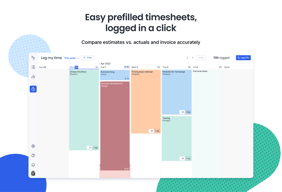
Help me to track my work hours and workloads for the whole month, i really love that i can put specific hours in each job or project that i went in. It really helps me to track.
None, because everything works on my end, and i am really thankful that my iemployer tdiscover this website and share to the employee, it make our lives more easier and efficient.
The problems thats has been solve using float is inconsistent time tracking, because i put my notes schedule all over the place, with the use of float, its a one stop shop.
It's really easy to use, without any bloat.
There's nothing to dislike, but the UX could be even better if I could set a default view. I only really use float for the 'log time' page.
I complete my weekly timesheet in float and I can see when my SOWs are stopping or starting thanks to my admin.
I can see visually the workflow of the full team in one view. Easy to update/ change projects/ resource quickly and easily. Have not used a competitor tool for this.
Would prefer the 'and/or' filter to default to 'or' instead of 'and'. Find it difficult to see easily how many people hours have been assigned to a project, which would be really useful from a budgetting perspective.
Planning the resource of the team in advance, getting a clear view across multiple expertise. Not necessarily more productive, but definitely better organised.
I really appreciate the custom tracking categories and the team schedule.
Float has had one or two bugs over my time using the platform, but they were promptly fixed.
Float allows us to track our time on specific projects while getting insights into resource allocation.
Easy to use, friendly interface,easy to manage.
no downsize, i only with that the system we use for capting timesheets has some API that could link to float. Unfortunately it was possible.
Clear view on bookings, time spend, deadlines.
I like the layout, speed and ability to see my teams schedules with ease.
App could do with little touches to update it to same standard as web version however the app works perfectly find.
Allows me team to delogate work to me and give me sufficeint warning on what needs to be done and when, taking all the guessing away from my job and allowing me to work effeciently
The neat layout and design - it is not cluttered or difficult to navigate. From a UX perspective it also makes sense and every click is easy and takes you where you need to go.
Paying per person/member is a bit of a bummer. I think there needs to be different kinds of accounts with a range of the amount of people you can add instead of billing per person.
Well it helps me keep track of who is doing what and when. And because its easy to adjust I rely on it over excel spreadsheets and other kinds of trackers. Hope that helps.
The tool does what it should and is very intuitive. You quickly understand how to use it and how to integrate it into your everyday life. The fact that the people involved receive messages about what they are scheduled for via Float is also super beneficial.
There is not much to dislike - i as a user am very pleased with this tool.
- We have a high level overview about our ressources / colleagues - There is an automation that people receive messages on their shedule, that i can set up - if neccassary we can get an budget overview
Helps with optimizing productivity and maintaining a well-structured work process. With its useful set of features, it enables individuals and teams to stay on schedule and remain engaged with their tasks. Allows to update and modify schedule and planning easily.
Sometimes I experience glitches that make me reload my page and lose the filters I had set - like filtering by people, task, project, or department. However, I believe it might be me who does something wrong.
Offers a range of features that facilitate effective task management for remote teams. It allows managers to assign tasks to team members, set deadlines, and track progress all in one centralized platform. This ensures that everyone is aware of their responsibilities and helps keep the team aligned towards their goals.

Clear, minimalistic and great interface with awesome interactions/microinteractions. Integrations with tools like Asana, calendars, collaborations with the team, and simplicity of use! Fantastic mobile apps.
I don't have any points to add here, I have not had any problems using Float - maybe a desktop application for Mac would be useful ;)
Allows us to organise current tasks and plan the next ones for the whole team, we are basing full tarffic on Float - we are more productive and everyone knows how to start the working day

It is user friendly and intuitive. With its interactive dashboard, I can easily show the volume of work that I am getting. The workload of my teammates are also visible to me, so it's easy to get coordinated and work out resourcing.
Float is really easy to use but things can get messy if the admin does not watch the entries. Maybe admin controls need to be tighter.
Resourcing and allocation, team visibility, time tracking, workload distribution, productivity maximisation, data tracking, among others.

friendly interface, very clean and simple
When I use functions like add/split/delete, the cursor gets stuck
Ensuring studio people are being allocated jobs at the right times. It's helpful for me to see what I'm working on and when
easily accessible to update and edit the tasks. IT provides a quick and simple overview of everything you need to stay on top of your schedule. Helps to See a live view of your schedule with multiple views and sorting options available.
It's not that mobile-friendly at the moment. I've got trouble scrolling all the way to the bottom.Not a lot however I say that when you have more than one client with same name it's confusing.
You have a good overall view, scheduling is easy, the design view is great, reporting is easy and everything comes initially so you are really fast in knowing how to use it
Flexibility to change our hour already scheduled. And log some more if the project was longer, or done quicker than scheduled time.
Maybe improve UI for creating and deleting some hours from the float. This means i can accidentally delete with double click because i choose to delete instead of add
In our job, we can check who is available at what time.
What I like best about Float is its intuitive and user-friendly interface, which makes it easy to create and manage schedules. The real-time collaboration and visual representation of team availability are also big advantages.
I don't have any specific dislikes or areas to improve for Float. It meets my scheduling needs effectively and efficiently
Float is solving the challenge of efficiently managing team schedules and resource allocation. This benefits me by providing a clear overview of team availability, allowing for easy assignment of tasks and projects. It ensures optimal resource utilization, minimizes conflicts, and enhances overall productivity.
Visual. Simple. Intuitive use. I also like the ability to export data for financial control purposes.
The ability to perhaps attach documents and links to be able to follow up on projects...
Visually helps to manage workload.