

Unclaimed: Are are working at Jira ?
Jira Reviews & Product Details
Jira is a project management software for team planning, tracking, and project management. The platform allows for better project transparency and collaboration through tools and integrations that are designed to boost team and project efficiency.

| Capabilities |
API
CLI
|
|---|---|
| Segment |
Small Business
Mid Market
Enterprise
|
| Deployment | Cloud / SaaS / Web-Based, Desktop Mac, Desktop Windows, Mobile Android, Mobile iPad, Mobile iPhone, On-Premise Linux, On-Premise Windows |
| Training | Documentation |
| Languages | English |


Compare Jira with other popular tools in the same category.
- Been working years with it, no complains
- Price is too high - Dark theme not fully released
- Helping the teams to have better workloads - Saved a lot of time tracking issues
It helps to track the issues effectively without any hassle and is very user friendly.Its really helpful in Agile project management.
Initial set up for beginners is time consuming.
Jira helps me to create my Project plans and manage it effectively.It helps me to create issues,bugs,stories for my product backlog and is very useful in all aspects for Agile project management.

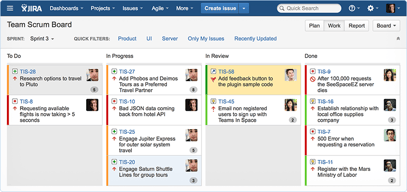
easy to use, easy to deploy , easy to integrate and solves multiple puropuses –eg.backlog planning ,bug tracking, and project management. Development tracking in one place,i like the way u can modify the view of sprint board and can do this in real time with the predefined tools on ui.its useful and irreplaceable tool.
Its not beginner friendly if beginner will start using it then he may get confused..and sometimes it keeps on loading and does not show the ui rendering on screen. its not free either.its too expensive and not worth it for small scale organizations.
i am a developer so the card gets assigned to me to keep track of its stages eg. requirement gathering, development or prod deployed etc.
Jira is a platform where you can track your work progress . You can create tickets, issue , stories , epics in the Jira platform. You check the work progress in the dashboard , issues that has been assigned to you and helps you to tracks the tickets which have been done or are in progress.
i personally dont think of any disike abou the jira , it has everything to offer what user is needed.
Jira has solved the problem where you can track the bugs tickets, development tickets etc. you can check the work log hours who has done , you can track the time of the user how much user has spent in the that ticket. you can see the dashboard and track the sprint progress.
Great interface, easy to implement and use.Great how to articles online for ease of use.Has many usefull features and the best part is that it can easly integrate with other softwares/platforms for collaboration.Example: Service now integration
Not much to dislike, sometimes can be tricky to implement a custom feature.
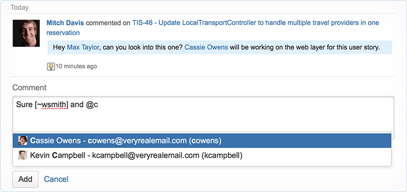
Keep track of issues and projects, collaboration with other team memebers, notifications for posts or comments on tasks
it includes all needed for a project ot be managed , from bugs to feature tracking and agile workflow
sometimes struggle with the UI , and the maintinance
it makes bug reporting and tracking easy , internal and on the customer side
We are getting end to end visibility over the entire project's scope and activities done by different stakeholders at each step of the pipeline.
The tool takes a bit time to adapt, but it is worth it
It is a easy tool for sales and product to cooperate on different tasks

First, I love how Jira integrates with the most crucial development tools , I rely upon in the workplace such as Gitlab , Slack, Confluence and the likes. This strong integration quality eliminates the need for me to constantly switch between different screens when coding, while also automating critical small tasks within my daily workflow. For example, I can conveniently access my repository codes on Gitlab directly from Jira, without needing to even leave the Jira interface.
While Jira excels in key aspects of project management, it does however has visible limitations in areas like content collaboration and knowledge management. This has made us have to rely on other software tools for the aforementioned missing features on Jira.
Jira takes care of critical aspects of my department's project management processes. It brings a lot of automation to my team's project workflow through integrations, Kanban boards and Scrum boards. This saves my team valuable time and enable us coordinate and complete projects faster.

Jira allows my team customize and setup triggers, which we have used to bring a lot of automation into how we manage projects. With these triggers, we are able to focus on core tasks and bother less about administrative responsibilities. The above ability to bring automatic into project management processes through triggers has boosted our overall efficiency while saving us time that we can dedicate to our core tasks.
Jira focuses primarily on project and issue tracking and has lapses in important project management aspects like content collaboration and knowledge management .
Jira takes care of my teams project management needs, allowing us better organize our projects , while providing visibility into the progress of assigned tasks and enhancing collaboration amongst team members.

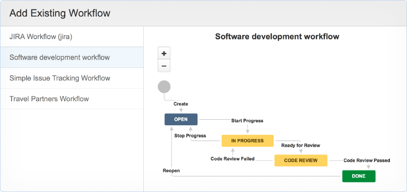
The user friendly UI is the best thing about Jira. It's ability to integrate effectively and easily with other important tools is one of the best parts. The Kanban/Scrum boards are self-explanatory. The ease of ticket creation and managing your own tickets/tasks makes Jira a very effective tool to keep track of our assigned tasks. Ease of workflow creations and availability of various postfunctions/validators/conditions etc. Availability of Jira forms/Automation using GUI makes things easy. Additionally, the Atlassian support team is readily available to help whenever we're stuck on something.
-The loading time for complex queries, list of custom fields (in Data Centre only) , workflows etc. - Lack of idea management feature to keep track of ideas or plans (though we can use Confluence for that) - Limited upload size for attachments sometimes become irritating. - Unavailbility of multiple Project Leads for a project - Unavailability of customisatins for in-built Jira reports and it's reliance on third party apps to achieve the desired results (which sometimes don't work as expected) - the software isn't much cost effective. Sadly, only companies with high budget can afford Jira.
With Jira it has become easier for me to undetstand what is the project/task assigned to me about, what is the status of the project/task and when were the tasks last updated. The Kanban/Scrum board is the place where we can also track the task updates of our team members (in case we're working collaboratively). The jira board provides transparency during a project development process for each of the people involved in it. Jira dashboard is a great feature to see all your tasks (even if they're in different projects) in a unified place. It also helps in project estimation to help know if the project is advancing slower than planned.