

Unclaimed: Are are working at Jira ?
Jira Reviews & Product Details
Jira is a project management software for team planning, tracking, and project management. The platform allows for better project transparency and collaboration through tools and integrations that are designed to boost team and project efficiency.

| Capabilities |
API
CLI
|
|---|---|
| Segment |
Small Business
Mid Market
Enterprise
|
| Deployment | Cloud / SaaS / Web-Based, Desktop Mac, Desktop Windows, Mobile Android, Mobile iPad, Mobile iPhone, On-Premise Linux, On-Premise Windows |
| Training | Documentation |
| Languages | English |


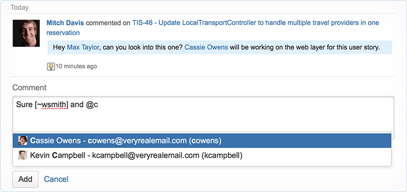
Compare Jira with other popular tools in the same category.
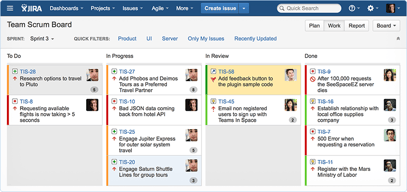
I love this application because it is easier to manage projects, I can track the development of projects, generate reports and be in constant communication with the work team, it contains Kanban or Scrum type boards that are very comfortable to use, tracking The project is optimal, it is very easy to visualize the current status of the task, you can also share and assign tasks with colleagues, it has functions such as deadline, I can generate reports easily and quickly, I like that I can perform simple daily tasks or create a long-term project, it works well integrating with other applications.
I found no details or annoyances, I have no complaints.
Communication with the team, collaborative work improved significantly with JIRA, tasks are easy to assign and for everyone to fulfill their assignment, I like that I can also share files, the boards are easy to edit, the management and creation of tickets is very practical, it is also very customizable software, I loved the integration with Slack, it has very good add-ons, plus the installation is simple, and the learning curve is relatively fast.

The best thing about jira is staging of every task at different level of software development.
I didn't find anything to dislike because my experience is so good.
It's solving the problem regarding the task tracking and employees work status tracking.

The type of project we choose to deliver the management is AWESOME
Till now all is working well for me. There is no issue
Evaluation the process is best to use
I have been using JIRA for the past four years at multiple organizations to make and work on Tickets, plan sprints, and execute tasks that could easily skip someone's mind. I have listed all the features that I like most: - Planning sprints - Executing tasks - Creating Internal team workflow for resolving tickets - We use it along with Intercom and Confluence to create user tickets and Internal documentation, which works like a charm. - Their Internal plugins with most applications are fantastic to use - Gives you the option to create Custom dashboards that somebody could use to keep track of tickets
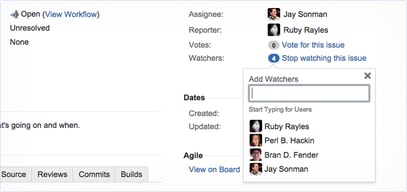
I do not have anything to dislike with JIRA as I am very impressed with the product. It is an amazingly refined product over the years which works nicely for me. There might be a lot of big teams who might be facing problems with managing their tickets, but if they divide their teams into smaller sizes, they would be easily able to work straight out of JIRA on their tickets. - Also, the Watcher option is excellent, but not when you have a lot of tickets because you get bombarded with a lot of notifications, and we all can accept that no one likes a lot of notifications.
- Internal ticketing - Sprint planning - Testing and troubleshooting - Escalations - Finding and squashing bugs
Easy to put tasks in order and work accordingly
Nothing is bad could be better in terms of ui
Product management solutins
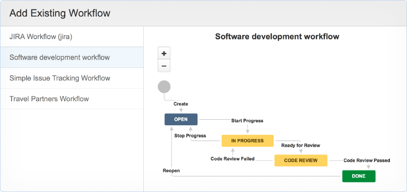
JIRA allows us to create different projects and within those projects, we can create a sprint in which we can add the tasks we will be working on and track their progress. To create stories for the upcoming sprint, we have a backlog bucket. Several types of issues are used, but the most common ones are epics, stories, tasks, features, spikes, and bugs. Working on a story requires an update on its status. We can create a workflow to do so. It can be linked to Git Hub or Big Bucket so that we can see the progress of a particular story. In addition to story points, work logs are included that track the amount of time it took to complete that task, and assignees indicate who is responsible for developing the story. A sprint burndown chart can be checked at the end of the sprint to see how the sprint progressed. In addition to the above, there are many other advantages.
Since I did not encounter any issues, I do not have anything to dislike about JIRA, except that sometimes sprints disappear from the backlog.
Assign responsibilities effectively, track tasks in detail, and make real-time decisions based on data. As a result, communication and collaboration within the team have improved.
1. It will manage all the reports like billings, Accounts and management. 2. As a QA , Jira devops helps us to plan , execute , code and so on. 3. Integration also help us. 4. Our company use slack so with the help of jira we can also collab it through slack.
1. Use more filter to ease filtering the report. 2. Add by default tags which help new joiners. 3. Add a method to switch one report to another project report.
1. As you know raising the bugs and manage it are the big task. 2. Date and time help us to known when i raised this bug. 3. Filter by name help us to filter the bug to a specific person 4. Discussion is a very impressive thing inside the jira. 5. With the help of tags also you can filter bugs. 6. You can also use sprint for the developers to solve the bugs for a specific time and days.
Jira offers efficient project management, task tracking, collaboration, and reporting, streamlining workflows and enhancing team productivity and accountability.
Common drawbacks of Jira can include complexity, high learning curve, potential over-customization, licensing costs, and occasional performance issues with extensive usage.
Time tracking, project tracking (status, people working on the project)

The best tool that can be used for task management of a project
a lot has to be managed by company admins
task managment and time managemnt
Jira is a great time saver. It is loaded with good filter options.
The customization is dashboard is limited
Helps me keep track of the customer tickets daily.