
PDFLiner Reviews & Product Details
PDFLiner is the all-in-one online platform for working with PDF files (creating and editing files, adding electronic signatures, filling out forms) and electronic document management (cloud storage, form catalogs, document sharing, PDF conversions, locking and unlocking PDFs).

| Segment |
|
|---|---|
| Deployment | Cloud / SaaS / Web-Based |
| Training | Documentation |
| Languages | English |

Compare PDFLiner with other popular tools in the same category.

PDFLiner is the assistant I was looking for! Filling out the many forms I have to deal with has become easier. I can make notes right on my phone. No complicated tools or extra gadgets are required. I like that I am very mobile and can come for an examination with all the documents I need in my pocket.
The site has a huge library of docs and forms. It is so big that I was even confused at first. Fortunately, a little later, I realized they could be searched by sections.. I haven’t noticed any other shortcomings.
With PDFLiner, I can quickly upload and edit the files required for my work. Thanks to this service, I am not tied to a computer, scanner, or printer. I can do all paperwork on the go, anywhere, and from any device. If I do not have the required form with me, I know for sure I can find it in the site library.

I use this service to quickly sign my personal and work-related documents. What I like the most is the option to use e-sign from all the devices I use. I have a PC at work, a Mac at home, an iPhone, and an iPad. I can be logged in on all these devices and quickly insert my saved signature into any document. The best thing is that algorithms make the signature compliant and protected from theft.
I noticed a couple of weaknesses in the mobile version of the website. It works perfectly fast, but drawing a signature on a small screen can be a bit inconvenient as I can swipe away the window at times. I also can’t switch from the front-facing camera to the main camera on my iPhone for some reason. I sent the request to the support team, and they promised to fix it asap.
PDFLiner is the most straightforward e-signature service I’ve ever used, and I love that it’s available from all my devices. To be fair, I hate installing software and want to keep as many things as possible in my Safari browser bookmarks bar. This PDF editor lets me ditch all the irritating phases and get straight to action wherever I am.
I came over PDFLiner when I was looking for the latest IRS 1040-ES form template. The website offered not only to download the form but to fill out and sign it online as well, so I agreed to a 10-day trial. Now my entire family fills out personal and business tax forms with this tool. It seems that PDFLiner has all the existing tax forms and straightforward articles explaining each of them.
I asked the service guy if there’s an option to submit my complete forms directly to the IRS without leaving the website, but, unfortunately, it hasn’t been added yet. Well, the word “yet” in the reply satisfied me as I don’t see a better solution for my family in terms of features-price ratio, but I’d love to have a 100%-comprehensive solution instead of a 99%-comprehensive one. It’s forgivable, of course.
I have a special bookmark in my browser that sends me directly to the PDFLiner’s tax calendar. I open it to see when it’s time to file my papers and start doing that right away by clicking the hyperlinks in the calendar. The editor is streamlined and lets me get through the pages quickly. Besides, all my complete forms for previous years are stored on the cloud, so I just copy all the unchanged data to the new forms.
At work, I often have to fill out all kinds of questionnaires, surveys, and other documents. PDFLiner greatly simplifies all these processes. I like that I can customize any form to suit a particular situation without bothering with complex tools. If I have an urgent need to fill out a form, I can do it at any time.
Apart from the fact that this service does not have its own app, I haven’t noticed any significant shortcomings. And given that it's quite comfortable to use even in the phone browser, it's not a problem at all. Otherwise, it completely suits me.
Filling out a ton of paperwork is no longer a problem for me. PDFLiner helps me stay organized and don't miss out on important information. Whether I use my own files or fillable forms from their library on the site, any task is faster. Besides, all docs are saved in my account, so I can dig them up and use them again if necessary. Just what I need for my position.
Why do all those expensive PDF solutions like Acrobat can’t have such straightforward UIs as this one? I don’t know, but I’m using only PDFLiner for now. For less than 10 bucks a year, I get a thoroughly crafted online PDF editor that works without flaws and doesn’t take me through mind games when I need to find a feature quickly. All the tools are listed on the home page, and you can easily reach every tool in the editor.
Although the interface is perfectly clear and straightforward, I really lack the dark theme when I work on my documents in the evening. The dark theme would make it easier to use the website at low brightness. I’m sure it will be added sooner or later as most websites already have it.
I usually use PDFLiner to deal with the tax forms for my business and family. The website lets me store and access all my past forms, and find fresh IRS forms in seconds. I also like that there’s a blog that guides me through various IRS forms and other important documents in a very helpful manner, which is just opposite from what the official IRS website offers!

I have compared 5 or 6 different PDF editors, including both online and offline apps. This particular one caught me with an affordable personal tier that covers all the website features but collaborative editing, which I don’t need. However, I need everything else, including electronic signatures, tax form library, and online editing! Unlike other solutions I’ve tried, this one has it all for me.
It would be great if PDFLiner had a mobile application for document editing. It’s not really a problem as I can use the mobile version of the website without any issues, but an app would make reaching out to the tools a bit faster and reduce the amount of mobile traffic needed to load the website every time, I guess. Please, PDFLiner, let me know when you will make an app for smartphones!
I’m not very good at picking up new tech tools and apps, but I didn’t face any irritating learning curve when switching to PDFLiner after testing other solutions. The obvious benefits of the service are quick loading on any device, straightforward editing process, cloud storage, as many as 4 e-signature options for all your tax forms and alike, and, of course, pricing that’s friendly enough for average users.
One of the best features it offers is its vast templates library. It’s loaded with hundreds of professional-looking documents that make it easy to create any type of document I need quickly and easily. Whether I'm creating a contract, invoice, tax file, or report - there's something for every type of project. Plus, pdfliner.com has smart tools like esignature and automatic form-filler that I usually use.
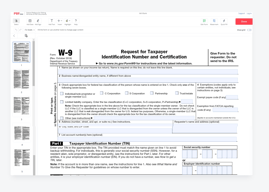
I don't like the subscription pricing model. I use pdfliner.com often, but not always, so I don't need the subscription. It would be MUCH better to pay per pdf document. Like I need the w-9 form, so I pay for it once to edit this document. Btw, I've already discussed this question with pdfliner team, and they met my idea well.
As a self-employed, I have to account for myself, so I rely on pdfliner.com to streamline my business processes, as it provides lots of pdf templates I can use. More often, it's 1099s, 1040 es, and w-9 tax forms that I file with pdfliner.com. Fewer times, I craft invoices, bills, and contracts with already-made templates. Honestly, I picked up this tool precisely for the number of templates available on their site. There are many tools on the Internet (including free ones) for editing PDFs, but nowhere is there such an extensive library as pdfliner.com has.
I love PDFLiner because it makes managing documents and paperwork so much easier! It's an incredibly convenient tool that lets you easily upload, edit, sign, and share documents securely online. It also helps to stay organized by allowing me to store my documents in one place. With PDFLiner, I no longer worry about losing necessary paperwork or keeping track of multiple versions of the same document.
Honestly, there are a few things that I would like to see improved in PDFLiner. The first is the user interface. While it is easy to use, some features can be challenging to find and understand. Additionally, the editing tools available could be better organized and more intuitive in their design. Another issue I have noticed is with support services - sometimes, it takes much longer time to get an answer from them than I expected. That upsets me a bit, but overall PDFLiner is a good choice.
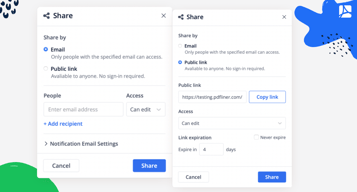
As I said above, with PDFLiner, I can quickly and easily fill out forms without printing them or downloading any software. This means I save time and effort when completing paperwork – all from the comfort of my home or office. Additionally, PDFLiner makes it easy to securely share documents with colleagues or clients for a seamless workflow free of any hassles.
As an employed person, I have to create MOUs and invoices on a regular basis. PDFLiner helps me a lot with it. I can find any form I need in the library on the site, fill it on the spot, and send it to a client right away. Most importantly, it doesn’t make a hole in my budget. Its cost is much more attractive than many other editors.
Due to my work, I have to be constantly on the road. I wish I had the PDFLiner app on my smartphone. Although I have no issues using the web service, mobile versions usually feature an optimized interface. Hopefully, the app will be available in the future.
This editor simplifies the process of creating, filling out, and sending documents that are key to my work. Getting a signed agreement from customers is also easy. I like that I have a choice: I can use templates from the library or upload my own file and work with it. All the docs are stored in the cloud, which is very convenient.
I highly appreciate the security of the documents I send to other people for work. PDFLiner even offers the time stamp for this. I am really thankful for the extra encryption of the PDF doc that my clients receive. I don’t want to share personal information with any scammers or even competitors.
I wish there could be even more security measures, which is almost impossible since they offer multiple possibilities. I have had several consultations with the team of this service, and I see extra locks that they have provided to their clients' sensitive documents for years.
I usually exchange highly important information with my colleagues. Normally I used third parties to increase security. PDFLiner offers several locks and advanced technology that keep these documents secure, so I don't need any other programs.