PDFLiner Reviews: 4.9/5 — Highly Rated
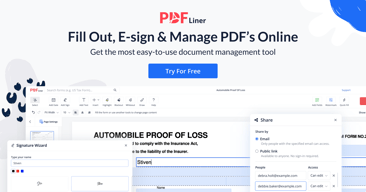
PDFLiner is the all-in-one online platform for working with PDF files (creating and editing files, adding electronic signatures, filling out forms) and electronic document management (cloud storage, form catalogs, document sharing, PDF conversions, locking and unlocking PDFs).

| Segment |
Small Business
Mid Market
Enterprise
|
|---|---|
| Deployment | Cloud / SaaS / Web-Based |
| Training | Documentation |
| Languages | English |

Compare PDFLiner with other popular tools in the same category.
There are millions of forms for any type of operations, from real estate forms such as a rental agreement or a standard lease to sales and marketing teams. There are contracts, mortgages, share purchases, invoices, marketing infographics, postcards, and even documents for pet owners! I can always send the pdf form to my clients right from the library. The job was never as easy as it is now, and I am grateful for this helpful tool that saves my time.
I still have to explain to my clients some aspects of digital forms. I can’t blame PDF Liner for this. Instead, I hope that there was some way to spread the word about the paperless way of work. Now I have to print some of these forms, so some of my clients would scan them after filling them. Do you think this is crazy? I wish the situation could change in the future. Digitalization will help me to go to the international market too.
I realized I don't need to steal my own time by sitting in the office and creating document templates for any occasion. PDF Liner solved this problem for me. Before this solution, I had to make extra room in my schedule just to concentrate on the tons of papers I believe no one would even read at the end of the day. Now I have all these templates I already use or will use in the future one click away from me.

I bought PDF Liner for my work and personal use almost half a year ago, and I use it every day. The program is reliable and secure for any documents you work on. Personally, I need all the editing features it offers, from highlighting the text to erasing things I don't need or even hiding some pieces. If I don't like the page, I can delete it and add the new one in a blink of an eye.
To be honest, I did not know anything about the program in the first place. One of the partners I work with recommended it to me. Now, I need to tell other managers and accountants about it to ease their life. I wish there were more publicity about the great service I have discovered. I hope PDF Liner’s team will listen to my recommendation and reveal the features to a broader audience around the world.
I work there daily and spend numerous hours on each edition. Yet, I still discover something new for me in this program from time to time. For example, recently I needed to add an electronic signature to the official document from the editing house. I was searching for a third party when I realized I saw an icon in PDF Liner. Yep, I’ve created my personal signature and saved it for the future.

The ease of use with PDF Liner is an understatement. You know when you have to e-sign documents or edit PDFs but you can't/find it difficult to find reliable options, or you have to pay an exorbitant amount just to do simple document editing? Well, PDF Liner to the rescue!
I wish I didn't have to provide my email address and other personal information. Just simple, to the point editing would be nice for a change without collecting data!
eSignatures, PDF editing and basic form filling, are some areas where PDF Liner helps me.
Simplicity! This is the first that comes to my mind when I think about this editor. All the tools I need are right in front of me and easy to reach. While some programs are quite tricky and require specific knowledge, pdf liner is so simple that I believe even a school student will easily deal with it. I don't even have to keep in mind the page I've done editing since I can always reopen the program there. I also like the ability to convert PDFs into JPGs, which is crucial for my work.
I wish I could work on my PDFs on my phone as simply as I do on my computer. Unfortunately, there are no opportunities right now, but I believe the problem will be fixed. Still, I can send documents to other people on their phones. I know that not many people edit PDFs on the go, but sometimes I just need to fix a small problem or fill another document section before sending it.
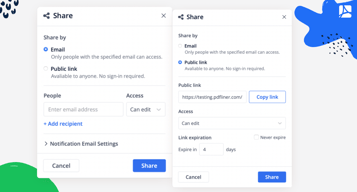
I have to accept dozens of documents from my colleagues and international partners in the company. They all use pdf liner and now we can fix the problems right away. I can ask for remarks on the fields and will see them after my colleagues share the document with me. After I fix everything, I can share it with them back.

I rarely worked with PDF files before I tried this program, to be honest. The first feature I saw was the ability to exchange footnotes with my editor right in the text. I've learned how to create the text there and edit it with simplicity. This program offers a wide range of tools and is way better than having to write anything on paper and later send it by regular mail.
I still wait to see more writers use this program to be able to exchange helpful tips with each other since we are doing quite a specific job. Yet, I’m helping my editor become familiar with the tool. Now we can communicate using the program.
I significantly decrease the amount of paper I usually waste during the day. Perhaps PDFLiner deserves the award for making this world paperless. It also allows me to be whenever I want during the day and write texts even in the café. I don't have to stay close to the editor to work together.

I was amazed by their personal approach to any client. I did need help with my account. When I was writing them, the letter was sent, and I did not expect anything nice from support. Yet, the girl, her name was Helen, I believe, responded to me in no time. She apologized… which I did not expect since it turned out to be my mistake, and we registered my profile easily together. I am grateful for the quick answer and professional help.
There are too many tools for me. I mean, I don't need a PDF converter and all these ready-made tables and charts. It may be an advantage for some people, yet, it confuses me. I'm still a beginner, and I'm learning how to work with the program. I need to change my many year's traditions of paper documents into paperless since it is the office's demand. I wish there were fewer features.
I have to digitalize the entire office's library and help my colleagues to find a way to communicate with me online. PDFLiner does all I need and even more. It helps me edit documents and contains all the forms I use in my work, so I don't need to scan anything. I can just pick something from their own library and save it to my storage. I use instructions on the website and contact their support team frequently.

It has simple-to-use instruments to draw a wide range of figures and tables online. I can draw completely new shapes or use the figures already there, available for everyone. Moreover, I can take several figures and combine them into one. Whenever I need something specific but can't find it in the library of pdfliner, I download it from my own laptop.
There is nothing I dislike about this program. I do have a wish for the developers of the service. I wish they could extend their standard figures. For now, I don't need anything more. Yet, I've seen that my fellows download their own templates there to work at.
I am a future architect, so I have to build numerous projects and make a wide range of presentations to almost every class I have at my colleague. I have realized that it is really hard to keep up with the dozens of different programs I have for my studies. Instead, I began to use pdf liner and it saved my time. The program is user-friendly and quite fast.

It’s a convenient and functional editor suitable for a variety of tasks. However, its huge fillable forms library deserves special attention. Here I could find literally any document for the insurance, medical, and legal industries. I especially liked the blog with detailed instructions on how to fill papers out. I was really impressed when I found PDFLiner! Not every service can boast of such a collection.
Although the site has a blog with step-by-step instructions, it would be very convenient if they appeared next to active lines while filling out forms. Tooltips are always a good option.
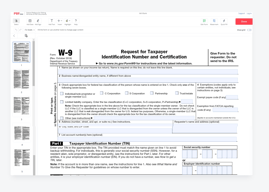
Filling out tax forms and other necessary paperwork can be a real headache. PDFLiner makes this tedious process as simple and convenient as possible for me. I get a suitable template, fill it out, sign it, and send it to the right place. That’s it!
PDFLiner has everything I need for processing electronic documentation. It’s easy to create a document, easy to fill it out, and effortless to send it to customers or employees. All generated files are stored in the cloud, which means no more archives with a bunch of papers. Even some of my clients have switched to PDFLiner because it is simple and convenient.
Nothing to complain about! There were small troubles with using it on a small smartphone screen, but these are trifles compared to the huge benefits of the service.
No more routine work of filling out documents manually. The nightmare of finding the right paper in my physical archive is a thing of the past. I save my time on filling forms out and don’t waste money on stationery. Also, I don’t have to worry about where to store it all. With PDFLiner, I’ve organized a paperless workflow without the hassle.
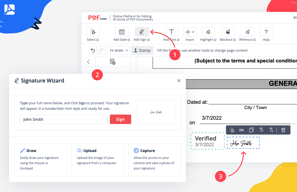
In the first place, I liked PDFLiner for how many different signature options it offers. I don’t have to fill out paperwork too often, but I do it sometimes. I don’t need all those fancy editors that allow me to lay out an entire book. Simplicity and accessibility — that’s what I’ve found in PDFLiner.
I would appreciate the option to put signatures on documents in other formats such as Word. However, I understand that PDF is much more commonly used for documentation.
This editor offers four options for using the “Signature” tool at once. I don’t have a personal electronic signature, so I usually write it by hand on the screen or touchpad as if I were signing a real document. Just a couple of clicks, and the form is signed. No need to fiddle with complex software or scan signed papers.