

( 551 )
Unclaimed: Are you working at Superhuman?
Superhuman Reviews: 4.7/5 — Highly Rated
Superhuman is an AI-powered productivity suite centered on email (Superhuman Mail) and expanded to include AI writing, collaborative docs and workflows (Docs), and a cross-app intelligent agent workspace (Go). It automates inbox triage, email drafting, reminders, shared documents, and agent-driven automations and integrates with CRM and productivity tools. The product targets knowledge workers and teams and offers enterprise-grade security and admin controls.
| Company | Superhuman Ltd. |
|---|---|
| Year founded | 2014 |
| Company size | 501-1000 employees |
| Headquarters | San Francisco, California, USA |

| Capabilities |
AI
API
|
|---|---|
| Segment |
Small Business
Freelancer
Enterprise
|
| Ease of use |
Intermediate
Advanced
|
| Deployment | Browser Extension, Cloud / SaaS / Web-Based, Desktop Mac, Desktop Windows, Mobile Android, Mobile iPhone |
| Support | Email/Help Desk, FAQs/Forum, Knowledge Base |
| Training | Documentation, Live Online, Videos, Webinars |
| Languages | English |
Superhuman Pros and Cons
- Highly polished UI and speed; extensive keyboard shortcuts and efficiency tools.
- Strong AI assistance for drafting, summarization, automated follow-ups, and auto-labeling.
- Deep integrations with CRM and productivity tools and external AI models.
- Robust team and enterprise features including shared collaboration and advanced security.
- Relatively high price for full Mail and business tiers; may be cost-prohibitive for some individuals or small teams.
- UI localization of menus and system text is not yet broadly supported.
- Some advanced features are in beta or have limited trial access.
- Core product is proprietary (not open source).

Superhuman is the fastest email client most people will ever use, and it costs $300 a seat a year to find that out. The speed is real — keyboard-first navigation, sub-100ms interactions, triage that genuinely moves faster than Gmail. What trips buyers up is not the price but the packaging: Superhuman now sells two different products under one brand, and the Free and $12 tiers you will see quoted do not include the email client at all.
- What it is: A premium email client plus a separate AI docs and agent workspace.
- Best for: People who spend hours a day in email and can put a dollar value on the time saved.
- Pricing: Mail starts at $25/member/month billed annually. Business is $33. Verified August 2026.
- The honest catch: The cheap tiers are the Docs product. Mail begins at $300 a seat a year.
What Is Superhuman?
Superhuman launched in 2014 as a rebuilt email client for people who live in their inbox, and its reputation rests on speed and keyboard control rather than features nobody uses.
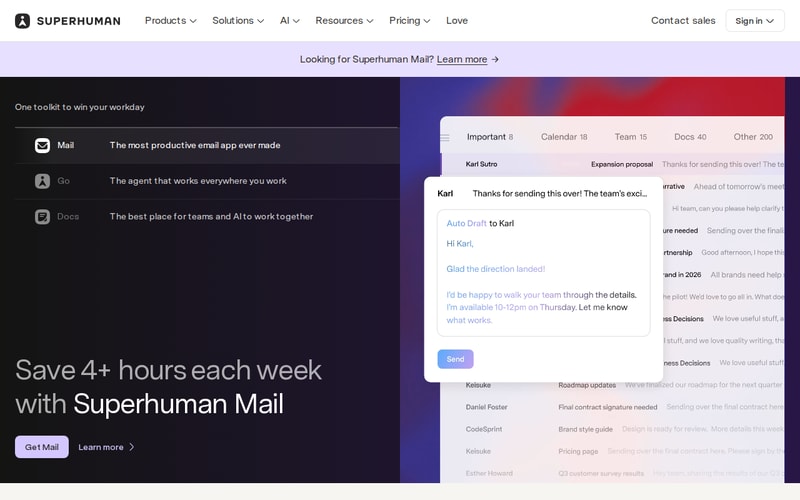
The homepage now leads with three products rather than one, and carries a “Looking for Superhuman Mail?” prompt in the header — a fair signal of how easily buyers end up on the wrong one.
The core experience is a stripped, fast interface over your existing Gmail or Outlook account, driven almost entirely by shortcuts. Split Inbox separates real mail from noise, AI drafts replies in your voice, Ask AI searches across your history conversationally, and auto-labels file things without rules you have to maintain.
Since then it has expanded into Docs (collaborative AI writing) and Go (a cross-app agent workspace). Those additions are why the pricing page is confusing, and they matter to what you actually get for the money. The company is now in the 501–1000 employee range, based in San Francisco.
How Superhuman Works
- Sits on top of Gmail or Outlook — it is a client, not a new mailbox.
- Keyboard-first, with shortcuts for essentially every action.
- Split Inbox and auto-labels for triage without manual filters.
- AI drafting in your writing voice, plus Ask AI across your mail history.
- Follow-up reminders, snooze, send later, undo send as standard.
- CRM integrations — HubSpot and Pipedrive on the higher tier.
- Runs on macOS, Windows, iPhone, Android, web and as a browser extension.
Superhuman Pricing
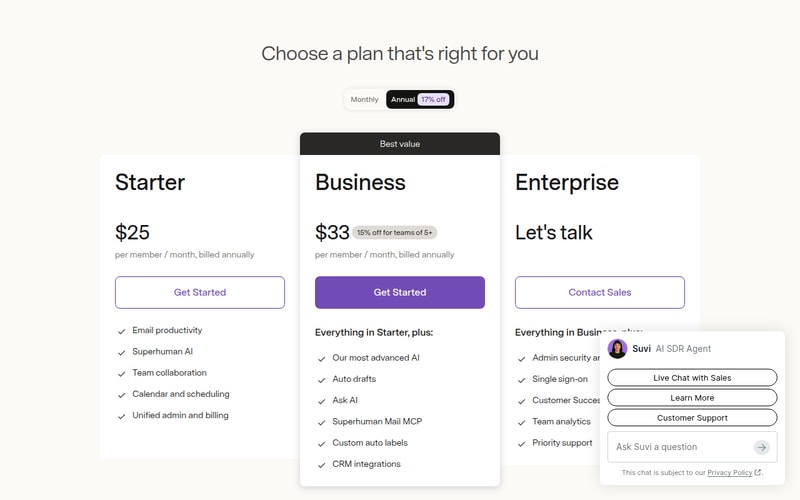
Read the plan names carefully, because two product lines share one page:
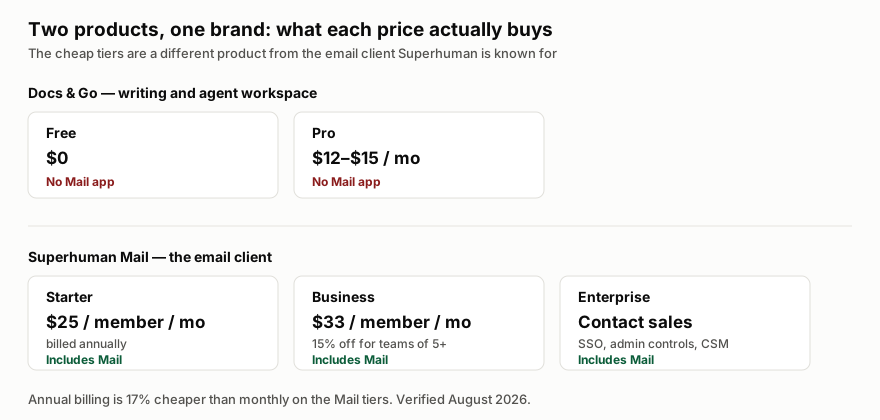
| Plan | Price | Includes Mail? |
|---|---|---|
| Free | $0 | No — Docs and basic writing only |
| Pro | $12–$15/month | No — advanced Docs and writing |
| Starter | $25/member/month, billed annually | Yes |
| Business | $33/member/month, billed annually | Yes |
| Enterprise | Contact sales | Yes |
Starter at $25 a month billed annually is $300 a seat a year — the real entry price for the product Superhuman is famous for. Business is $396. Annual billing saves 17% against monthly, and Business carries a further 15% discount for teams of five or more.
What Business adds over Starter is the AI: auto drafts, Ask AI, the Mail MCP connector, custom auto labels and CRM integrations. If you are buying Superhuman for AI assistance rather than raw speed, Starter is not the tier you want, and the effective entry price is $396 rather than $300.
Who Should Use Superhuman
The arithmetic is unusually simple here, and it is the right way to make this decision. At $300–$396 a seat a year, Superhuman needs to save roughly an hour a month to pay for itself at a typical knowledge-worker rate. For someone processing 150 emails a day, that is a low bar and the tool clears it comfortably.
For someone processing 20 emails a day, it does not, and no amount of polish changes that. Volume is the variable that decides this purchase, not preference.
It also fits sales and customer-facing teams specifically well, because the CRM integrations and follow-up reminders map onto work that has revenue attached. The case is much weaker for internal roles where email is incidental to the job.
Honest Pros and Cons
Strengths
- The speed is not marketing. Interaction latency is genuinely below what Gmail and Outlook deliver, and it compounds over a day.
- Keyboard control is exhaustive, which is the actual source of the time saving.
- AI drafting is good and trained on your own voice rather than generic business English.
- Split Inbox and auto-labels cut triage without rule maintenance.
- Real enterprise posture: SSO, encryption, audit logs, SOC 2 and BYOK.
- Broad platform coverage — desktop, mobile, web and extension.
Limitations
- It is expensive. $300–$396 a seat a year against a free, competent default.
- The product split is genuinely confusing. Free and Pro do not include Mail, and the pricing page does not make that obvious at a glance.
- AI features are gated to Business, so the advertised entry price gets you the fast client and not much of the intelligence.
- UI localisation is limited — menus and system text are not broadly translated.
- Some features are in beta or have restricted trial access.
- You are still on Gmail or Outlook underneath, so provider-level limits and outages remain yours.
Superhuman Alternatives and How It Compares
The honest competitor is Gmail with keyboard shortcuts turned on, which is free and, for a low-volume inbox, sufficient. Superhuman’s answer is that shortcuts alone do not give you the latency, the triage or the AI — which is true, and worth $396 only at volume.
Among paid clients, Missive and Front target shared team inboxes rather than individual speed, so they solve a different problem; if your need is collaborative support triage rather than personal throughput, they fit better and usually cost less.
Against Wispr Flow, there is no real overlap — Flow speeds up the writing itself across every app, Superhuman speeds up the mail client. Heavy correspondents often run both.
The Verdict
Superhuman is a very good product with a pricing page that works against it. The speed claim survives contact with daily use, the AI drafting is better than most, and for high-volume email the payback maths is comfortable.
Do two things before buying. Work out your actual daily email volume — under about 50 a day, the numbers do not support it. And be clear you are buying Business at $396, not Starter at $300, if the AI features are what attracted you, because that is where they live. If email is not central to your day, this is a luxury, and it is fine to say so.
FAQ
How much does Superhuman cost?
Superhuman Mail starts at $25 per member per month billed annually ($300/year) on Starter, or $33 ($396/year) on Business, which is 15% cheaper for teams of five or more. Annual billing is 17% less than monthly. Enterprise is contact-sales. Verified August 2026.
Is there a free version of Superhuman?
There is a free tier, but it does not include the Mail app. Free and Pro ($12–$15/month) cover the separate Docs and writing product. The email client Superhuman is known for begins at Starter.
What is the difference between Starter and Business?
Starter gives you the fast client, Split Inbox, calendar and team collaboration. Business adds the AI layer — auto drafts, Ask AI, the Mail MCP connector, custom auto labels and CRM integrations with HubSpot and Pipedrive.
Does Superhuman replace Gmail or Outlook?
No. It is a client that sits on top of your existing Gmail or Outlook account, so your mail, provider limits and any provider outages stay where they are. You can stop using it and your mailbox is unaffected.
Is Superhuman worth it?
It depends almost entirely on volume. At $300–$396 a seat a year it needs to save around an hour a month to break even at typical knowledge-worker rates — easy at 150 emails a day, not achievable at 20. Work out your own volume before deciding.

Getting to Zero approach & the idea of seamlessly creating calendar events.
Marking Emails as done did not work properly, calendar takes a long time to load when looking for suitable timeslots and only English supported for AI Creation and Auto-Correct.
Writing emails.
It is fast and has friendly functions for the operations
It lacks more Visual functions, not everyone likes to use the keyboard, on the other hand it does not have a built-in translator function, not to mention versions in other languages.
So far it hasn't solved any problems for me, nor has it made it easier to read and respond to emails.
Super fast and intuitive especially with the commands
I honestly would not pay for an email app. But referrals got me a few free months so I'm happy
I enjoy optimizing my life and superhuman is more optimized than browser gmail
Diferent look platform. force me to use shortcuts on the keyboard.
very expensive for just an email client.
not sure. I still dont see any vantage
Snappy, keyboard shortcuts, overall clean experience
Some issues with contact syncing, search at times misses things and requires opening Gmail. Overall hard to justify $30 _for me_ but mostly letting it run since company's covering cost.
None _significantly_. I'll probably get as much done directly via Gmail, saves a little time with the experience but not major.
It has some features that are helpful from a marketing/lead gen perspective- email open data, email scheduling capabilities, etc.
The visual design makes it harder for me to look at my inbox and see what new/unread emails I have. I find it easier to review and organize my emails in Gmail. Overall a lot of hype but not enough substance to justify the monthly payment (unless someone else is paying).
I use it to send emails when I want to track delivery, open rates and times, etc.- more marketing/lead gen email sends. I like these Superhuman features but they not truly its intended functionality- if I want an email tool for marketing/lead gen, I should use something else.
I do like the shortcuts and the fast responsiveness of the program.
that its expensive and only works with Gmail. I really wish it provided support and worked with icloud.
Doesn't solve any problems as it does the same thing as other email clients.

I changed my habits around email from foldering them for later to batch addresses to quickly moving through them and addressing only important ones. They jumped on a call with me at the start and really helped me find the best practices, including shortcuts I hadn't realized before. Easy to download and run on both my mac and iPhone.
All of the features are pretty slick really. I'd like to be able to edit events in Superhuman, but I realize it's a mail app and not a scheduling app.
It's letting me quickly sort through emails and save me time in the process.
As a Google Workspace user I was hopeful that superhuman would save me time. I think superhuman could be very effective for those who do not rely upon folders. The customer service was excellent, I really appreciated the hands-on support in getting started and also the ease with which they supported my canceling the service.
I did not find the Superhuman shortcuts to be more efficient than the out-of-the-box Gmail shortcuts (in fact most are the same) that combined with the price and limitation of folders ultimately made me decide to cancel my subscription.
None - I canceled my subscription after three months.
Their concierge onboarding was awesome and, notionally, I think they're trying to teach people better practices with inbox management, Ai, etc. Definitely was impressed for the first few minutes. Also really liked their unsubscribe feature to auto-unsubscribe from different services. Clearbit integration was convenient for seeing more details on my contacts.
Overly complicated. Keyboard shortcuts already exist in Gmail, so I don't understand the value they bring to the table other than the Clearbit integration. There is NOWHERE in their product where you can manage your account with Superhuman and, given that you need a credit card up-front to get access to the product to trial it (which they charge as soon as they've onboarded you), you absolutely MUST give people a means of opting out. I scoured their product and couldn't find it anywhere in the settings. The Chrome extension kept failing once I installed the mobile app and I had to keep removing it and then REDO the onboarding, including connecting to Gmail again. Lastly, and this was sneaky, Superhuman does pixel tracking of emails. I suppose that in order to do this they needed to remove or deactivate my Outreach integration. This was done without warning me and is completely unacceptable.
I thought it was going to help me get my inbox organized, but it basically uses the same simple principles that are already in Gmail.
On boarding was pretty descriptive. Filled out all the necessary information. Seemed to be a solid start as they were very responsive at first.
They sent preliminary pricing after I filled out the questionnaire. Having not even seen a screen shot or what it can do I asked if they had a 30 day demo. They never reached back out even after I followed up, twice.
Saw a few colleagues that have been using so I was intrigued with the value prop they propose. However was never able to see or gain access after all the setup work. Poor execution, communication, or both.