

Unclaimed: Are are working at Visme ?
Visme Reviews & Product Details
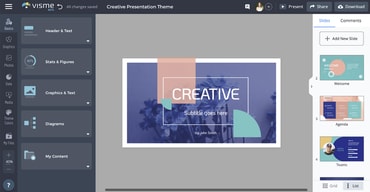
Visme is a comprehensive online graphic design software that’s perfect for creating visuals for presentations. It lets users create charts and infographics, social media content, and digital artwork, even with little design experience. The platform is simple to use, user-friendly, and intuitive, and provides users great guidance as they attempt to create their designs. You get access to numerous templates that simplifies creation and templates are also categorized by industry. Visme’s real-time collaboration features are also notable, making it perfect for teams.

| Segment |
Small Business
Mid Market
Enterprise
|
|---|---|
| Deployment | Cloud / SaaS / Web-Based |
| Support | 24/7 (Live rep), Chat, Email/Help Desk, FAQs/Forum, Knowledge Base, Phone Support |
| Training | Documentation |
| Languages | English |
Visme Pros and Cons
- Easy to use
- Wide variety of features and templates
- Great for creating visual presentations that stand out
- Slightly more expensive than other online graphic design tools
- Lower-priced plans are a bit restrictive
- Does not support guest collaborators



Compare Visme with other popular tools in the same category.
Visme enables my business to provide my clients with professional reports. My clients (many of who are Directors) love the quality of the reports, and I love how simple they are to create in Visme. Thank you Visme
The toolbar on the left side is too large and I can't seem to hide it when not in use.
I don't need to search and pay for graphics, that I can use in my professional reports. The charts are so easy and I don't need Execl.
Recently when working on a project I ran into a glitch. I contacted VISME support and they started working on it right away and kept me updated every step of the way
There is absolutely nothing to dislike about VISME and their team
VISME has opened the doors to creating quality marketing content for my business and their templates make a project quick and easy and they look amazing in the end.
Most UI/UX/Design tools are either too specialized with steep learning curves, or too generalized and can't do enough. Visme strikes the perfect balance between these two extremes. It is ideal for people who know what they want something to look like, but don't have the time, patience, or skill to master an expert-level tool like Figma or Sketch. It has enough functionality, though, to make it seem to an outside viewer that the user actually does have the skill of an expert. It also has an easy learning curve with an impressive catalogue of templates to get started.
There are no glaring things wrong with it, only small issues of the type that plague every piece of software in existence. For example: (1) switching between browsers can cause some formatting issues, and (2) it can be a bit sketchy if multiple users are editing the same project at the same time. Both issues are slightly annoying, but far from egregious.
It is solving one of the most important problems of all: freeing me from the tyranny of the ubiquitous but sub-par standard suite slide and document creation software. I plan to use Visme for everything I can (e.g., slide decks, marketing materials, white papers, recommendation letters for friends, etc.). This may sound like overkill, but truly solid pieces of software are rare. When I do find them, I use them as much as possible.
Creating visually appealing content is quick and easy. Sharing that content is equally easy. I often find myself jumping into Visme during a meeting and finding an infographic or two, so I can share stats and data. The response I receive about the data and presentation stylings are always positive, and people want to learn more about Visme - which I'm glad to do.
There are very few downsides. I don't typically animate content in my presentations, but the animation process is a little more time-consuming using Visme when compared to PowerPoint. This isn't much of a complaint though because the animation process is easy to learn and implement.
Visualized data and sharing that data often take up a lot of storage space. Visme is an excellent option to share massive amounts of information through a URL, instead of through a file. This is very important for me because my files are often too large and would be blocked if sent via email.
I like the layout and how easy it is to use the platform. As a beginner in web design/marketing, I found their templates helpful in designing flyers for my business. After using a few templates, I could start creating my graphics without help!
The only part of Visme that I dislike is the limit on projects. You have to keep upgrading to create new designs constantly. I wish there were more privacy between users on the same account so personal projects were not displayed to colleagues.
Visme is making it so that you don't have to be an experienced graphic designer or have extensive adobe illustrator/photoshop backgrounds to create beautiful marketing flyers.

I love, love the TEMPLATE!! I have used tools like this, but VISME's templates are agency-quality. I would say they have. I have made about 20 projects, primarily PowerPoint and marketing collateral as PDF's. In each of these projects, I would say Visme saved me a few hours to a few days by using their templates and the ease of use of their tool. It is also very reliable, as I have used other online tools that sometimes have tech issues or tech support problems. Cheers to you if you find out about Visme, I am thankful I did!
It could have even more templates. If it had more templates, that would be helpful.
Seriously saved me time and helped me create some fantastic content. It is a great tool for building design content.

The creative freedom it gives and their teams' responsiveness (I am referring primarily to the tech support team) to what clients and users suggest and advise.
Because they have an all-in-one approach to cater for more domains, sometimes there are limitations to what the tool can do - such as SVG editing or increased customization of assets.
I can start prototyping designs quickly and involve the client from the early stages of the project because I can do real-time modifications based on feedback.
The template options to help build a presentation are valuable to us when needing to create a deck in a short notice, ultimately making it easier to do quick edits for some projects as well.
Sometimes textboxes are not easy to resize when adjusted at the corner of the box and when using a mockup to insert an image, the image will alter to an uneven area after adjusting it to the correct placemenet.
Visme helps our business present our process in a functional, appealing, and effective manner. It is easy to stay organized with upcoming and past sales decks and deliverables.

The real-life pitch-deck templates of actual startups and existing businesses. Plus the diverse business frameworks that was well curated; from fashion, to web based companies and even mobile app developer companies.
Not being able to export 1 version, however Low res, to share off-site without paying a premium or upgrade. I think there should be a balance that accommodates one-off users from regular weekly users and then monthly users. The price seemed a bit too steep.
It's solving the problem of having to build your deck from scratch and just building off someone else's similar business model. The tables and charts feature too is extremely helpful for people who don't like drafting charts, like myself.
The various options and freedom that the software allows for.
I have noticed that the formatting within the shareable links does get a little wonky at times.
It is allowing my organization to create valuable outreach materials.