
Unclaimed: Are you working at Gamma?
Gamma Reviews — Pricing, Features & The Honest Take
Gamma is an AI-powered SaaS tool for creating visual stories — presentations, documents, websites, and social content. It supports prompt-to-deck workflows, image generation, branded themes, import/export, collaboration, and integrations with assistants and automation platforms, plus an API for programmatic generation.
| Company | Gamma |
|---|---|
| Year founded | 2020 |
| Company size | 51-200 employees |
| Headquarters | San Francisco, USA |

| Capabilities |
AI
API
|
|---|---|
| Segment |
Small Business
Mid Market
Freelancer
Enterprise
|
| Ease of use |
Beginner
|
| Deployment | Cloud / SaaS / Web-Based |
| Support | Email/Help Desk, FAQs/Forum, Knowledge Base |
| Training | Documentation |
| Languages | English |
Gamma Pros and Cons
- Rapid creation of presentations, docs and websites via AI from prompts or import
- Strong integrations with productivity tools and automation platforms
- Branding and customization options (fonts, themes, custom domains)
- Multiple output formats and import/export capabilities
- API access for automation and scaling
- Free plan is limited (one-time 400 credits, watermark, limited slides per prompt)
- Advanced features (password protection, custom domains, analytics) require higher tiers
- Ultra plan pricing and billing frequency are not clearly published
- No strong evidence of a mobile app or offline mode
- Traditional slide-master controls are limited compared to legacy presentation tools




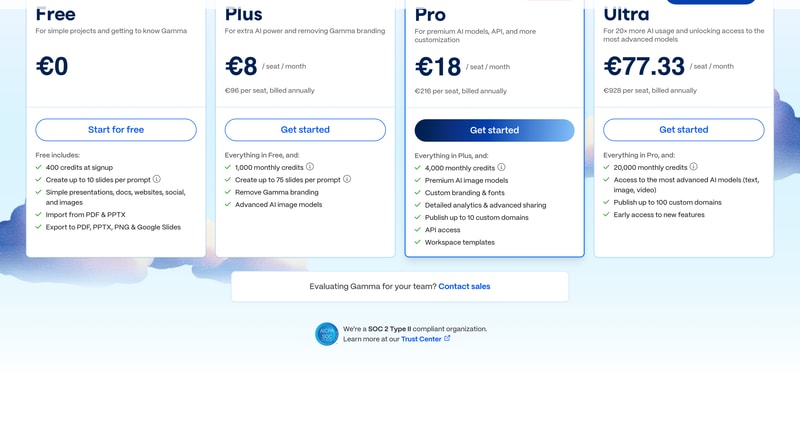
Gamma’s free plan gives you “400 credits at signup”. Every paid plan gives you “monthly credits”. That one word is the whole difference. Free is a one-time allocation — spend it and it does not come back. Plus, at €8 a seat, gives 1,000 credits every month. The wording is accurate on both cards, but they sit side by side and only one of them says “monthly”, so it is easy to read Free as a recurring allowance it is not.
- What it is: An AI tool that turns a prompt into presentations, documents, websites and social posts.
- Best for: Anyone who makes decks regularly and would rather describe one than build it.
- Pricing: Free, or €8 to €77.33 per seat a month. Verified August 2026.
- The honest catch: The free tier’s credits never refresh.
What Is Gamma?
Gamma generates finished documents from a prompt. Where a traditional tool gives you a blank slide and a template, Gamma gives you a complete deck — layout, images and copy — that you then edit.
It is not limited to slides. The same engine produces presentations, documents, websites, social posts and images, with import from PDF and PPTX and export to PDF, PPTX, PNG and Google Slides on every tier including free — so it slots into an existing PowerPoint workflow rather than replacing it.
The variable that governs everything is AI credits. Generating consumes them, and the plans are essentially credit tiers with a few capabilities attached. A second limit sits alongside: slides per prompt, capped at 10 on Free and 75 on every paid plan.
Above that, the tiers add production polish — removing Gamma branding, then custom branding and fonts, detailed analytics, custom domains, API access and workspace templates, and finally the most advanced text, image and video models.
Gamma states it is SOC 2 Type II compliant.
How Gamma Works
- Credits are the meter; plans are credit tiers.
- Free’s credits are a one-off, not a monthly allowance.
- Slides per prompt is a second cap — 10 free, 75 paid.
- Export to PPTX and Google Slides on every tier.
- Annual billing saves 10% to 25%, depending on plan.
- Removing Gamma branding starts at the first paid tier.
Gamma Pricing
Per seat, per month. Prices shown in EUR as served to a European visitor.
| Free | Plus | Pro (most popular) | Ultra | |
|---|---|---|---|---|
| Annual | €0 | €8 | €18 | €77.33 |
| Monthly | €0 | €10 | €24 | €86 |
| Billed annually | — | €96 | €216 | €928 |
| Annual saving | — | 20.0% | 25.0% | 10.1% |
| Credits | 400 at signup | 1,000/month | 4,000/month | 20,000/month |
| Slides per prompt | 10 | 75 | 75 | 75 |
| Remove Gamma branding | ✗ | ✓ | ✓ | ✓ |
| Custom branding & fonts | ✗ | ✗ | ✓ | ✓ |
| Analytics & advanced sharing | ✗ | ✗ | ✓ | ✓ |
| Custom domains | ✗ | ✗ | 10 | 100 |
| API access | ✗ | ✗ | ✓ | ✓ |
| Most advanced models (text, image, video) | ✗ | ✗ | ✗ | ✓ |
What actually decides your cost:
- “400 credits at signup” is not 400 credits a month. The Free card says at signup; Plus, Pro and Ultra all say monthly credits. So the free tier is a fixed budget for evaluating the product, not a sustainable free plan — once those 400 credits are gone, generation stops until you pay. Nothing is misstated, but the four cards are adjacent and only three of them carry the word “monthly”.
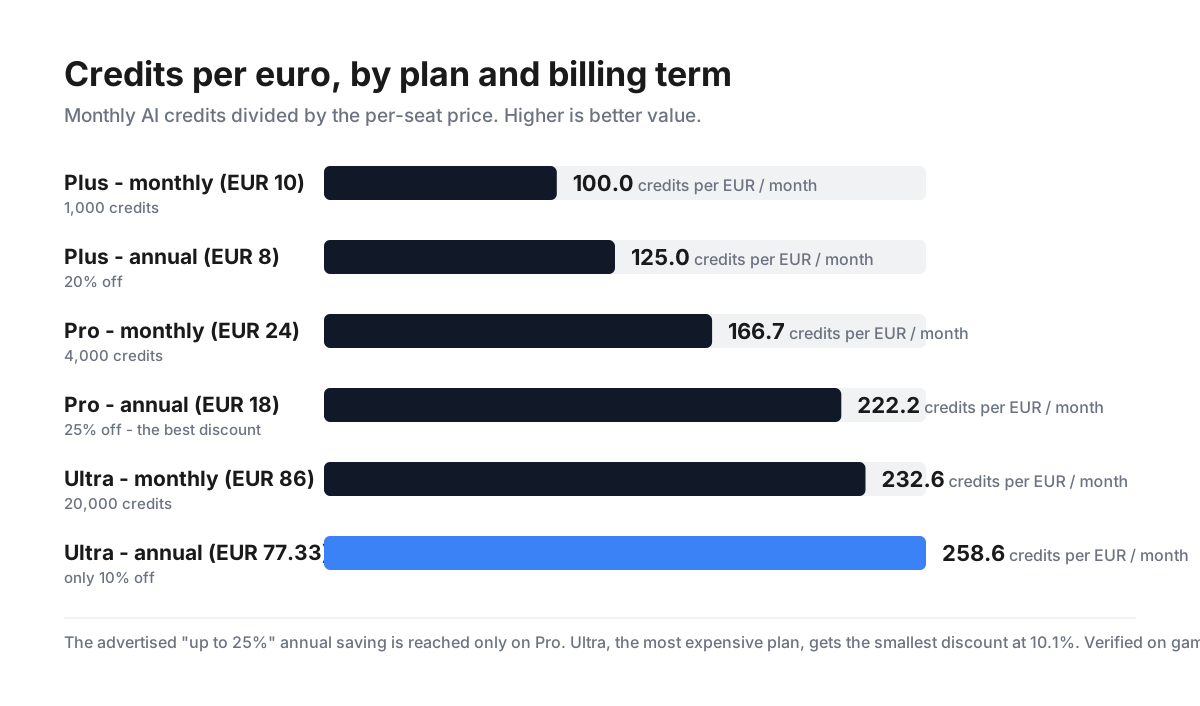
- Credits per euro improves substantially as you climb, which is unusual. On annual billing, Plus gives 125 credits per euro, Pro 222 and Ultra 259. Pro is 78% better value per credit than Plus for 2.25× the price, because it delivers 4× the credits. Ultra is “20× more AI usage” — exactly 20,000 against 1,000 — for 9.67× the price. In a review series where higher tiers routinely cost more per unit, Gamma’s ladder runs the right way.
- The “up to 25%” annual discount is accurate, correctly hedged, and unevenly distributed. Plus falls from €10 to €8 (20.0%), Pro from €24 to €18 (exactly 25.0%) and Ultra from €86 to €77.33 — just 10.1%. So only Pro reaches the advertised figure, and the most expensive plan receives less than half the discount the mid tier does. If you were planning to commit a year on Ultra specifically, the annual lock-in buys you considerably less than the headline implies.
- Pro is the value tier by a clear margin. It carries the best annual discount (25%), a 78% better credit rate than Plus, and it is where the practical features arrive: custom branding and fonts, detailed analytics and advanced sharing, 10 custom domains, API access and workspace templates. The gap from Plus to Pro is €10 a seat a month; the gap from Pro to Ultra is €59.33, for credits and model access alone.
- Removing Gamma branding costs €8 a seat a month, and that decides most buyers. Plus’s own description is “For extra AI power and removing Gamma branding” — the branding removal is half its stated purpose. Anyone presenting to clients or publishing externally cannot realistically stay on Free, so treat €96 per seat per year as the actual entry price for professional use.
- Slides per prompt is the free tier’s other ceiling. 10 on Free against 75 on every paid plan. For a short internal update that may be enough; for anything substantial you are regenerating in chunks, which consumes more of a credit budget that never refreshes.
- Ultra’s jump is about models, not just volume. At €928 per seat per year — 4.3× Pro — what you additionally get is “access to the most advanced AI models (text, image, video)”, 100 custom domains instead of 10, and early access to new features. Video generation is the genuinely new capability; if you do not need it, the same money buys four Pro seats.
- Export compatibility is on every tier, including free. PDF, PPTX, PNG and Google Slides out; PDF and PPTX in. That materially lowers the risk of trying Gamma — you are not locking a deck into a format you cannot retrieve, and it can sit alongside PowerPoint rather than replacing it.
- A Team view exists that we could not capture. The pricing page carries an Individual/Team toggle; the Team panel did not render plan cards during capture, so no team-specific pricing is reported here. All figures above are the per-seat Individual rates.
-
The affiliate link tracks correctly.
/go/gammareturns 200 and lands ongamma.appwith the PartnerStack parameters intact, setting_ps_partner_key,_ps_xid,_gsxidand_grsmpkwith a 90-day window.
Who Should Use Gamma
- People who present often. Describing a deck rather than building one is a genuine time saving.
- Anyone working from existing material. PDF and PPTX import is on every tier.
- Small teams needing branded output. Custom fonts and branding arrive at Pro.
- Marketers publishing microsites. Websites and custom domains come from the same engine.
It fits poorly for anyone hoping the free plan is a permanent option, since its credits never refresh; for buyers on Ultra wanting the headline annual discount, which is 10.1% there; and for teams needing heavy design control, where a conventional tool still wins.
Honest Pros and Cons
Strengths
- Credits per euro improves 78% from Plus to Pro, and 107% to Ultra.
- Export to PPTX, PDF, PNG and Google Slides on every tier, free included.
- Presentations, documents, websites, social and images from one engine.
- A genuine 25% annual saving on the Pro tier.
- SOC 2 Type II compliance stated.
- 75 slides per prompt on all paid plans.
Limitations
- Free’s 400 credits arrive once, not monthly.
- Ultra’s annual discount is only 10.1% — the smallest on the page.
- Removing Gamma branding requires a paid plan.
- API access, analytics and custom branding all start at Pro.
- Free caps generation at 10 slides per prompt.
- Team pricing did not render during capture and is not reported.
Gamma Alternatives and How It Compares
- Canva covers presentations alongside everything else visual, with a far more generous free tier.
- Beautiful.ai applies design rules automatically and is the closest like-for-like on AI-assisted decks.
- Prezi remains the option for non-linear, motion-led presentations.
- PowerPoint or Google Slides with an AI add-in is the cheapest route if you already pay for the suite.
The Verdict
Gamma is a well-priced product with one piece of wording that deserves more prominence than it gets.
The pricing itself is better structured than most in this series. Credits per euro improves as you move up — 125 on Plus, 222 on Pro, 259 on Ultra at annual rates — so Pro delivers 78% more value per credit than Plus for 2.25× the price. Higher tiers costing less per unit is the right way round and, in this review series, not the norm. Export to PPTX, PDF, PNG and Google Slides is available on every tier including free, which means trying Gamma carries almost no lock-in risk.
The wording to notice is on the free card: “400 credits at signup”. Plus, Pro and Ultra all say “monthly credits”. Free’s allocation is a one-time budget for evaluating the product, not a recurring allowance, and once it is spent generation stops. The card is accurate; it is the adjacency of four cards where only three say “monthly” that makes it easy to misread. Combined with the 10-slides-per-prompt cap on Free against 75 on paid plans, the free tier should be understood as a trial with no clock rather than a permanent option.
On which paid tier, the answer is clearly Pro. It carries the best annual discount at exactly 25%, the biggest jump in credit value, and every practical feature: custom branding and fonts, analytics, 10 custom domains, API access and workspace templates. The step from Plus is €10 a seat a month; the step from Pro to Ultra is €59.33, and what that buys is credits plus “the most advanced AI models (text, image, video)”. Unless you specifically need video generation or 100 custom domains, the same money buys four Pro seats.
One detail worth flagging on the annual decision: Gamma advertises “save up to 25%”, and only Pro reaches it. Plus saves 20.0% and Ultra just 10.1% — less than half. The claim is properly hedged with “up to”, but a buyer committing a year on Ultra should know the discount there is the weakest on the page.
Finally, the practical entry point for professional use is not free. Removing Gamma branding starts at Plus, and Plus’s own description names that as half its purpose. If your decks go to clients, budget €96 per seat per year as the real floor and treat the free credits as your evaluation window.
FAQ
How much does Gamma cost?
Per seat, on annual billing: Plus €8 a month (€96/seat/year), Pro €18 (€216) and Ultra €77.33 (€928). Billed monthly those become €10, €24 and €86. A free plan exists at €0. Prices shown are EUR as served to a European visitor and will vary by currency and region. A Team option exists on the pricing page but did not render during capture.
Is Gamma’s free plan really free forever?
The plan is, but the credits are not recurring. Free includes “400 credits at signup” — a one-time allocation — while every paid tier lists monthly credits (1,000 on Plus, 4,000 on Pro, 20,000 on Ultra). Once the 400 are spent, generation stops until you upgrade. Free also caps output at 10 slides per prompt against 75 on paid plans. Treat it as a trial without a deadline rather than a permanent tier.
Which Gamma plan is the best value?
Pro, on three separate measures. It has the largest annual discount (exactly 25%, against 20% on Plus and 10.1% on Ultra), it delivers 78% more credits per euro than Plus, and it is where the useful features arrive — custom branding and fonts, detailed analytics, 10 custom domains, API access and workspace templates. Ultra costs 4.3× Pro and adds mainly credit volume plus the most advanced text, image and video models.
What are Gamma credits and how many do I need?
Credits are consumed when Gamma generates content. Allowances are 400 once on Free, then 1,000, 4,000 and 20,000 per month on Plus, Pro and Ultra. Gamma does not publish how many credits a typical deck consumes, so the only reliable way to size your plan is to use the free allocation and observe your own rate — which is another reason to treat those 400 credits as measurement rather than production.
Can I get my presentations out of Gamma?
Yes, on every plan including free. Gamma exports to PDF, PPTX, PNG and Google Slides, and imports from PDF and PPTX. That means it can sit alongside PowerPoint rather than replacing it, and it materially reduces the risk of trying the product — your decks are not trapped in a proprietary format.

Compare Gamma with other popular tools in the same category.
Sorry, no reviews are available for this product yet.
Be the first one to review Gamma !