

Unclaimed: Are are working at Xsplit Broadcaster ?
Xsplit Broadcaster Reviews: 3.9/5 — Good for the Price
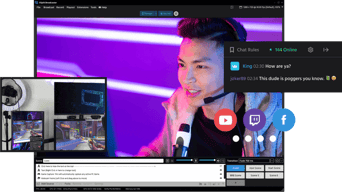
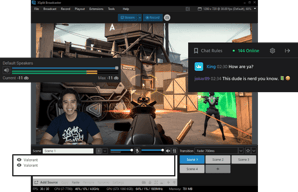
XSplit is a live-streaming application that helps capture live-streaming gameplay, recordings, and more. XSplit ensures users can start sharing gaming skills with the world easily and features extensive ways for users to build a relationship with watchers through live chat, recent event alerts, and stat monitoring. It also supports a projector mode to let you display on multiple screens and simplifies streaming by handling all encoding requirements and gives you control over quality options.

| Segment |
Small Business
Mid Market
Enterprise
|
|---|---|
| Deployment | Cloud / SaaS / Web-Based, Desktop Windows |
| Support | 24/7 (Live rep), Chat, Email/Help Desk, FAQs/Forum, Knowledge Base, Phone Support |
| Training | Documentation |
| Languages | English |
Xsplit Broadcaster Pros and Cons
- Stream and record in 4K with no lag
- Excellent connections to Facebook, Twitch, and YouTube chat
- Custom transitions and branded stream components
- Live illustrations and annotations
- Runs only on Windows
- May require additional plugins for full functionality




Compare Xsplit Broadcaster with other popular tools in the same category.

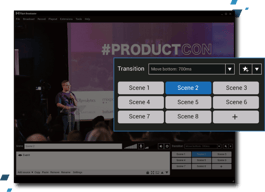
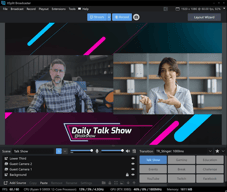
The broadcaster has all these tools, plugins, sources and outputs so you can have a clean, professional, high-performance streaming session. It integrates with Youtube, Twitch, Spotify, Facebook, Elgato, Restream, Livestream, Streamshark and many more. With the scenes, you can prepare layouts and push them live so it gives you time to edit names at the lower-thirds and give transitions to these scenes so you have a complete TV show look and feel. You can use plugins to show your interactions with viewers, show alerts, music playing, show donations, reactions and even integrate Xsplit Broadcaster with other Xsplit products like Vcam and Presenter. With the Vcam installed on your pc and phone on the same network you can use your phone's cameras as other inputs. I can also integrate it with Xsplit presenter that allows you to have a bit more of control of your powerpoints presentations and it won't occupy a whole monitor for this. You can also add and control several audio inputs and edit the equalization so you provide exactly what you want.
The paid version looks too similar to OBS which is free. In the last months, I've seen some changes and upgrades towards distancing themselves from OBS but they are still not that far away.
I needed to get up fast and running in less than a day and I got it with Xsplit Broadcaster. I can have several cameras as inputs and I give my clients a TV show experience that I'm selling quite fine.
I enjoy the customizability and ease of use that XSplit offers. I have found it extremely easy to begin streaming without too much setup. XSplit is easy to use right "out of the box."
I have yet to encounter a feature or design that I didn't condone or enjoy. Thus far, I haven't found anything to sully my experience with XSplit. It's a serviceable and affordable alternative to OBS, even if they don't share all of the same functionality.
XSplit makes it easy to display different customer windows across platforms while streaming. It makes for a more immersive, seamless, and professional streaming experience.
I like how affordable it is and simple to use. It has all the features that are great for streaming and perfecting your overall webcam look. I love the different background settings and all the adjustments you can make on your webcam. I also really love that you can use your phone as a webcam instead. Not many software's offer this feature.
The only thing I don't care for is if you don't want to pay for it, then you get the watermark. That goes for most of these types of software, unfortunately, but overall it's still beneficial if you're not paying.
The feature that allows you to use your phone as a webcam, that solves a big problem if you don't want to spend extra money on a decent webcam. The backgrounds are also great and make for a professional-looking environment.

I love that i'm able to stream to all platforms simultaneously & implement features like custom backgrounds, weblinks, and a really fan-centric style stream
It was a little expensive to purchase but overall I'd say its more than worth it. There is also an issue with its webcam software Vcam that causes it to automatically turn the saturation levels up to the max which is pretty iritating
Streaming to multiple platforms at the same time
Easy to use and GREAT techinical support
It doesn't integrate with Touch Portal as easily as OBS and you have to sign in each time you use it.
Live streaming at my church was much harder before I switched to XSplit. Multiple cameras and video sources are really simple to set up.

it's easy to use, selecting the source, setup scene, switching scene
didn't really run into things I don't like
we were running a Blackmagic Design Switcher, trying to capture with a USB 3.0 capture card, then broadcast through OBS but just could never get the setting right, had to give xsplit a try, and later fully switched to xsplit for all live broadcasting

It has a lot of pre-loaded window styles and borders. Gives you a lot of control over both audio and video quality and effects. Also has a voice changer option that is a very fun feature.
Linking your youtube account is very tiresome and takes all the functionalities of youtube studio away from you. I had a lot of trouble signing in to my youtube account when I first installed it.
I frequently play and stream Valorant using Xsplit. I am pretty satisfied with the out[ut I am getting on my youtube live stream as far as video and audio quality goes.

I can add in personal screens, I can add in video, I can add in various screens for multiple acts in making a single video
Unfortunately sometimes it needs to do an update just before I launch the product so I am not aware of that
In sharing the screen especially if it is one of my longer videos. Plus I can start larger and end small
It is very simple to setup with a minimal design. It allows multistream to different social networks like YouTube and Facebook at the same time. Easy integration with YouTube and Facebook by means of simple logins. No need to copy stream keys.
The login needs to be performed each time the software loads. And that may become cumbersome
I can stream to various platforms and also record and share my screen with minimal efforts.

XSplit Broadcaster easy of use and reliability are, in my opinion, the best aces in this new software. I have been using for the past few months in conjunction with XSplit Video that gives me the possibility to change background transforming my office in an outstanding cityscape or to show behind me my business logo.
Being using it just for a few months, I do not have dislikes so far. Even if I try to find one ... I could not but, based on my experience, I know that something will transpire in the future. The only thing that I can say is that I will keep you posted.
The problem that a broadcaster can find is the setting of resolutions, the editing of the videos including sound. All minor problems when to come to XSplit Broadcast. Its easy layout makes it possible to have all the controls on hand and in this way avoid the back and forth that sometimes makes editing and broadcasting a difficult job.

