
Unclaimed: Are you working at Zoho Analytics?
Zoho Analytics Reviews: 4.2/5 — Solid Choice
Zoho Analytics is a business intelligence tool that allows users to transform raw data into meaningful insights and visually appealing reports. It stands out from the competition with its intuitive interface, flexible data modeling capabilities, and seamless integration with other Zoho apps. With features like data blending, advanced calculations, and customizable dashboards, Zoho Analytics makes data analysis accessible and actionable for businesses of all sizes.
| Company | Zoho Corporation |
|---|---|
| Year founded | 2000 |
| Company size | 10,001+ employees |
| Headquarters | Chennai, Tamil Nadu |
| Social Media |
| Capabilities |
AI
API
|
|---|---|
| Segment |
Small Business
Mid Market
Enterprise
|
| Deployment | Cloud / SaaS / Web-Based, Desktop Windows, Mobile Android, Mobile iPad, Mobile iPhone, On-Premise Linux |
| Training | Documentation |
| Languages | English |
Compare Zoho Analytics with other popular tools in the same category.
Zoho Analytics is a very reliable tool for analysing data with a user friendly interface. Another interesting feature is its ability to integrate and synch with other solutions, get data from other solutions and analysing them, thus making my job seamless. Also, the customer support experience is pleasant. You get response that addresses your concerns adequately.
It requires some level of expertise, a novice will struggle with it like I struggled at first.
At Bludive Technologies Limited, I use zoho analytics to analyse our customers data on manage engine when sending reports to clients from top financial institutions within Nigeria.
Zoho anaytics is best for report and drag and drop table report.
Nothing bad all features and functionality are awesome and cheap in cost.
Helps in drag and drop reports and easy to write sql query. Easy to sync data with another zoho app that we have. Easy to creat pivot view by just drag and drop and easy to create custom filters.
I like to use Zoho Analytics in getting timely reporting of the number of tickets open/closed that need to be resolved.
I can't think of the least helpful since Zoho Analytics is very useful in my daily tasks. If there is, make the Happiness Rate easy to read/track.
It helps me track down tickets and easy to know where I need to resolve the issue of the customer/member.
I am using zoho for 3.5 years with ginger webs, as I am working as a BDO I have to manage the daily task, by using Zoho I can easily manage the upcoming demo and follow-up calls. also its quite easy to use and yes dashboards of Zoho CRM is very interesting and useful.
although I am satisfied with the software but yes as there is always a chance for improvement so I would like to suggest you to work on the mobile app as sometime call records do not sync. rest of the things are good
yes Zoho crm is a very useful product to manage the leads as earlier we have to maintain the data in Excel format now I can show my efforts with a single click.
The Zoho Analytices is best Tool in market who provide best data Managment and Provide best result, this application is very easy to use and the tool which are use in this app in fully upto dated. you can connect so many data sources in one platfrome.
The Price is littel bit higher then other tool's in market.
Provide best result and the costomer support team is very good.
Easy to use a user-friendly drag and drop functionality. Connection with various data sources like databases, cloud storage services, drives, local drive, etc. Advanced analytics capabilities like data blending, statistical analysis, forecasting, and trending/pattern identification. Customizable charts, reports, pivots, tables, summaries, and dashboards. Integration with other Zoho applications like Zoho CRM, zoho projects, etc., Affordable price
Limited data visualization options like pivots, bar charts, pie charts, combination chart only. Can not use created query more then 4 as depandent table or other words limited use on query. Less responsive support.
Zoho analytics solves manual data extraction as we scheduled the data importing from databases. Made data visualization easy and understandable to everyone. With a one without login link, I can share reports, dashboards with everyone in the organization
Zoho Analytics provides a user-friendly interface that allows users to easily import data from various sources and create visually appealing reports and dashboards. Its drag-and-drop interface makes it accessible to users with limited technical skills. Zoho Analytics supports seamless integration with many data sources, including popular cloud applications like Zoho CRM, Google Analytics, Salesforce, and more. This allows you to consolidate data from different systems and gain comprehensive insights.
While Zoho Analytics provides a user-friendly interface, users new to data analytics or business intelligence tools might find learning and navigating the platform challenging. Getting acquainted with the various features and functionalities may take some time. While Zoho Analytics offers basic data transformation capabilities, such as filtering and aggregating data, some users might find the options for complex data transformations and data cleaning limited compared to more specialized tools.
Zoho Analytics allows retail companies to integrate data from different sources, such as point-of-sale (POS) systems, e-commerce platforms, and inventory management software. The company gains a unified view of sales data, customer information, and inventory levels by consolidating data into a single analytics platform.
-Also supported on a mobile app (with shortened feature set). -Provides free trial with 10 users set. -Perfect solution for small and medium businesses to keep all organisational tools at one place. -Affordable enterprise plan as compared to other counterparts.
-Lack of documentation and tutorials over the web, Zoho demos and in-app walkthroughs are your only support. -UI can be a bit overwhelming considering the immense number of tools jammed up.
All solutions provided by Zoho One are linked thereby making our business and data flow connected. We didn't have to spend a single dime on anything else, everything is easily customizable as well.
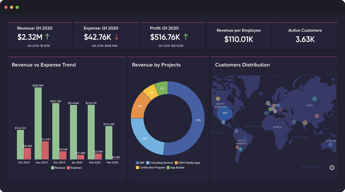
Zoho Analytics is a robust reporting platform that provides multiple options for visually appealing reports and dashboards. Using data in Zoho CRM, you can make geolocation maps, bar graphs, pie charts, etc.
Sometimes the geolocation data is hard to figure out and does not appear as expected. It takes some investigating to figure out how to create the maps reports show the correct informaiton.
Visualizing sales data from multiple years and product lines. It is faster than downloading reports and creating charts in Excel. The option to view sales on a map is also very helpful when analyzing sales patterns and markets.
Anyone can create Visualization and reports no prior experience is Required. It has an inbuilt querying interface so you will extract the data and create the visualization hassle-free.
It does not have statistical visualization like Boxplot, or Treemap and also doesn't have connectivity with Python. It also has the limitation to create a single level of subquery which sometimes does not solve a specific use case.
It helps me in my day ting day tasks like management reporting, Logistics KPI Tracker scheduling some tasks for a particular team's work, and most importantly creating a business funnel which helps in deciding the growth of my organization.
Great information on these reports, dashboards are very visual which is great!
I wish they were a bit more userfriendly
Helps us set and monitor KPIs for our Sales Teams performance. Very customizable reports to pull the details you need
User friendly More data connectors such as google ads,Facebook ads google analytics and many more Also advanced analytics such as Machine learning Zoho keeps data secure Best customer support they offer
Expensive Some time integration issue but very rare ..........
Advanced analytics and insights, for better and enhanced forecasting and optimize processes identify growth opportunities and mitigate risks Better collaboration and sharing It solves several problems 1/ Data consolidation and analysis.. Data visualization and reporting
It gives automatic insights and a dashboard of the different landscapes, which makes it very easy to use and a good customer and user experience, and allows us more time
Of few times, it takes more time to load and provide the detailed report if the file size is too large and a few times, it processes the dashboard late and takes more time to load
its solves the problem of getting the collaborative reports and and access to the different dashboards for the use of various parameters and for getting the quick insights of the overall sales report
Zoho analytics has been an amazing tool for CRMs for my companies I have worked with.
I have encountered issues in the process past with difficulties downloading and cleaning up reports from Zoho
Zoho has been amazing to combine our sales CRM with our CS CRM
-I think the best thing about Zoho analytics is that it is user-friendly anyone beginner can easily be used it. -Zoho Analytics gives the user a wide range of data connector options like Facebook ads, google ads, linkedin, google Analytics and many more. -Excellent Data Visualisation In The Form of tables, charts, maps -The best of Zoho analytics is that my data is safe and secure. -Zoho analytics customer support is awesome
-Zoho Analytics is a little bit more expensive than others. -Zoho Analytics is slower when working with large datasheets. -Facing Integration Problems during the data integration. Sometimes, integration does not work properly
-With the help of Zoho analytics, I can solve complex data into structures and pure forms, which can help me make the perfect decision for my organization. -Without any more technical knowledge, quickly understand the data.
I can customize my dashboards easily once the connection has been established
NOt all connects may be established, and can often prove difficult to QA long term when reviewing trends. Some manual checks are required periodically to make sure connection is secure
Sales analytics, marketing analytics, and operations analytics. We track numbers from shipment to refunds all together in our dashboards, as well as cashflow among other metrics
I have the ability to create many deep dive reports and dashboards to analyze my business. I am not limited with pre-built templates and can even create my own tables and data columns.
I wish that it synced my data with Zoho CRM at a higher frequency.
It allows us for dive deep in all the areas we track within our business as it relates to our day to day operations. The interface is easy to use and even allows me to share views outside of our organization easily.
Effortlessly create and customize dashboards and reports with the help of Zoho Analytics
Occasionally, I encountered data sync issues, but they were promptly resolved with the assistance of the support team.
Zoho simplifies lead dashboard and management, making it easy to keep track of and handle leads effectively.
Easy to use tool to see updates and analytics on what's happening across a company. Generates easy to read and accurate reports.
It can be a bit finicky when importing data. The integrations will take time to learn how to move your data properly.
Quick analytics tool to quickly visualize data.
Connecting multiple data sources into one dashboard and visualizing the overall data in one place is a big hit for Zoho analytics. This tool is not just for analytics but also giving real-time insights using AI.
At first, if you don't have technical knowledge, you might feel lost while setting these analytics, but with some patience, you can complete it. A lot of features might be turned off for light users.
It helps to collect data in one place. You can connect all your data sources in Zoho analytics, combine the data, and extract reports from it. It will help you to generate insights about your data using AI and also allows you to visualize how data is flowing in your overall digital system.
The product is really helpful. It helps me create multiple views of the data. I have been using it to quickly analyse data, as well as to create management reports.
The interface is complicated and there is a long learning curve. Most of the time I have to download the data and work on it separately, as it gets very complicated on the platform.
Zoho has been helping us with data analytics of our consumer from sales to demographics. Since it is directly connected to the Zoho CRM, it becomes very easy to work on the data.
We built Zoho from the ground floor to work best with our sales funnel and manage accounts and overall ROI for each Customer by creating, monitoring and running streamlined reports for all of our Sales and Management Team. We connected outside apps/programs that we used to this system. The Team loved Zoho's integration with our data, reporting, bookkeeping and sales leads. We believe in this Company and what it has to offer. Enormous scale if you ask me! It was why we successfully managed time, money and direct mail marketing campaigns for our Customers. Once you were trained, the program was so easy to use!
We used Zoho for everything! The only downfall for our Marketing company was the overall cost of building this platform from the bottom. We previously used QuickBooks and Office Excel to run the Company. This was a costly investment at first. Eventually, all investments paid off.
Quick and efficient mobile access to our dashboards, data and reports 24/7. Helps drive success and offers excellent tools to plan campaigns and future budgets.
User-friendly interface, lot of explaining about SQL queries, Too much connection source
We need more examples ofcomparing data graphs. It is hard to create when trying to compare graphs
It helps me with specific queries, Like customers aged between 20-30 and salaries between 20k-60k etc. It is not possible create on zoho crm but with analytics and queries it is easy to create tables like that.
I have found it very useful with Zoho CRM and Zoho Creator. I have first used it on 2013 for a client is USA.
I have not found anything to dislike. You can use Zoho flow to integrate with other applications.
I first used it with Zoho Creator and deluge scripting. My client has input data in Zoho Creator Forms. I have integrated them and generated reports on their pathological data.
Ease of integration, not only with Zoho tools, but also great integration with a variety of data origins, a lot of other services, data bases, and repositories, multiple workspaces,
probably just the color palette for graphics could be better, also the ability to have a single data origin linked to multiple workspaces or multiple connections to a single data origins
We used other analytics tools that were way more expensive; Zoho analytics solved our issue of showing KPIs across al companies and from multiple data origins; our CEO could have all the company info in a single dashboard at just a couple of clicks
Zoho Analytics it's easy to create dashboards and reports with built in filters. It's simple to analyze large datasets using this application. It's able to connect with many datasources and its fairly affordable.
Zoho Analytics has been working very well in our company. It's has been reliable tool in analyzing our data. No dislike at the moment.
Zoho Analytics compared to other applications is fairly affordable. Excellent customer support especially via chat. It's aslo able to analyze huge data within a short period.
Zoho Analytics is powerful and stable analytics tool. It's design and functionality are easy to learn. It's easy to import data from CcSV files and Excel and get a real time report in a moment. It's aslo easy to create very powerful dashboards using this application. Zoho Analytics is aslo easily customizable.
It's the best tool I have used for Analytics so far. I have no problem using this application. It's the best in the market right now.
Zoho Analytics was affordable compared to other applications in the market yet it has many features. Their customer support is more than willing to support in case we have an issue. I like aslo how it's able to connect to multiple data sources.
Ease of use. The design and functionality is truly easy to learn
Not much to be honest. Like any other system it takes a little bit of time to learn how to build more tricky views and charts, but the basics remain very easy and powerful
Sales performance and decision making. Presenting sales related analytics to a sales director with Zoho Analytics makes a big difference for good decision making
Zoho Analytics is one of the best apps for data analysis. It is possible to demonstrate everything using tables, graphs, videos, dashboards, and KPIs. One of the things I like the most is the strong security policies and customer support, which is helpful for a beginner.
I don't have a lot to complain about with Zoho Analytics, but sometimes I have some difficulty creating some creative graphics
With Zoho Analytics my organization can easily integrate Google Charts with other Google products and it has seen an increase in production
A great tool to track team inputs parameters, using comparators to maximize efficiency at a broader spectrum throughout the organization.
None so far, actually. However, the implementation of it to create specific report dashboards is a little challenging to navigate through. Practice makes one perfect.
Analytics has helped us drive team numbers based on real-time data, and hoax reports generated sometimes by third-party applications for employees are being distinguished with ease. The plan of action has considerably improved due to these changes