

Unclaimed: Are are working at Accelo ?
Accelo Reviews & Product Details
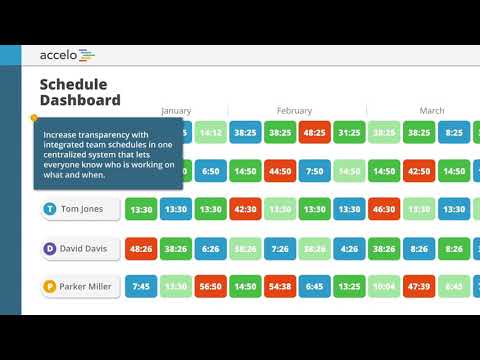
Accelo is a professional services automation software featuring an end-to-end cloud-based platform that manages all aspects of client work delivery, from prospect to payment, including sales, projects, tickets, retainers, timesheets, resourcing, and more, regardless of where you are.

| Capabilities |
|
|---|---|
| Segment |
|
| Deployment | Cloud / SaaS / Web-Based, Mobile Android, Mobile iPad, Mobile iPhone |
| Support | 24/7 (Live rep), Chat, Email/Help Desk, FAQs/Forum, Knowledge Base, Phone Support |
| Training | Documentation |
| Languages | English |

Compare Accelo with other popular tools in the same category.
I love how it lets you simplistically create checklists.
I wouldn't say I like how it can be a long process to create the templates to upload campaigns
We are streamlining the process of getting campaigns live through all of our internal team being able to login and see exactly where a project is at or where it is stuck and why.
They respond quickly and keep you updated on the process of your request.
Sometimes if you have a request for new functionality, take a lot of time for them to upgrade.
keeping the staff timesheet up to date and managing client and internal communications
All the information I need is in one place
The user interface is sometimes quirky and difficult.
Storing all parametric data, creating and managing invoices, handling scheduling
Task triggers. I live in account management, and being able to set criteria that determine if a customer is due for follow-up is a game-changer. It allows me to keep my calendar open for meetings, while also keeping me on track and accountable. It also has stopped me from forgetting about follow-ups. It just doesn't allow for that to happen, because of how we've programmed the triggers. Simple stuff like 'if no inbound or outbound communication has been receive for 4 days, set a task' has really changed the game for how I handle account management and how I prioritise my own memory. Additionally, triggers have made a lot of the repetitive notifications to business partners become completely automated. I'm using automation logic to notify business partners about status changes to shared opportunities with near zero-touch, which they love.
I'd love to be able to split single tasks with other staff members. We have a lot of cross-department work that needs to be done at the same time, and currently we need to set the same task multiple times inside of one project or milestone to ensure that everyone is working on it together, but then each task contains on its own set of activities. I also wish the tablet browser experience was a bit smoother. I'd love to be able to use Accelo on an iPad without needing an external mouse. This would make travelling for work a lot lighter.
It enables me to appear really proactive to my clients, ensures we're hitting all the appropriate touchpoints, but removes the need for me to tediously micromanage my own schedule.
Organization Communication via linked email account how it links to gmail easy of use when discussing projects with coworkers easy to share project task links organization of projects project description and project checklist reporting for different departments integrations with other apps helpful trouble shooting and support links great shortcuts to save time calendar feature email alerts tagging of projects user experience experience of the weekly timer screen
The search feature can be more organized and is great in the move your timer feature. The quick search feature of using the tab key helps and would be great to have more shortcuts like this in accelo. The accelo load time sometimes lags but this can be do to internet connection. There could be more features under the task description to allow Project Managers to identify ket features of a project. Sometimes the gmail linking email functionality does not work and times out. There could be a better way to organize email templates for a department to utilize and share. A page for all of the shortcuts you can use in accelo in a youtube video. A calendar feature to help organize projects similar to google calendar.
Time management communication with clients project management group task management communication with a team task progress reporting meetings are easier and organized when using accelo to share projects overall, communication is easier across the company with accelo integration with gmail email templates project management skills are improved calendar features alerts email alerts about project moving tasks if the time was saved wrong weekly time sheet is organized and easy to manage
The tool is so versatile and covers so much of what we needed. We were able to ease ourselves into the tool and adopt features as we needed them. Accelo also integrates with a lot of other external tools like Quickbooks, Hubspot, and Office 365. I have even used the Power BI integration to build my own custom reports. The support for the product has also been top-notch from the implementation team to support the product.
Accelo does take time and effort to learn. However, any tool that is this robust and has this much functionality will take time and effort to learn. Some of the functionality is not super intuitive, but once you learn more about the tool, you understand why everything works the way it does. I wish that the Power BI integration allowed you to use the client version of Power BI versus just the web application. You cannot do a lot of things in the web application version of Power BI, like linking data tables together.
We are using Accelo all the way from a CRM to sales to project management and timecards, to communicate with clients, invoicing, and reporting. I would say we are using Accelo to solve 80% of the problems we had before implementation. If we had not implemented Accelo when we did, the switch would have been challenging and possibly impossible. Being able to condense numerous tools into one has been a lifesaver.
Accelo offers an all-in-one solution for my creative agency. The ability to include different divisions and have different classifications of clients in one system saves us time, energy, and money when it comes to project management and billing. The Quickbooks Online and Gmail sync are both huge pluses to the system's ability to work in line with our existing infrastructure.
There are some simple user experience issues that I have brought up a few times that never seem to get fixed. The Gmail and QBO syncs can be a little buggy at times. The newest search function isn't as intuitive as the old version. The CRM is too simplistic, so we just don't use it anymore.
Ticket and retainer task management and billing for multiple divisions with one login. Syncing billing to QBO for seamless accounts receivable process. These were the two objectives we wanted to meet when choosing Accelo and is what keeps us very happy to stay.
Honestly, from the moment we implemented accelo I can already see my efficiency improve. My favourite part is being able to see what I actually spent time doing during the day, as most days just pass with a blur and it seemed impossible to know what was actually achieved. Now I can know exactly where my time was spent, if it was productive time or not, and often have a reason as to why it was not productive.
Sometimes there is a bit of cross-over timing, doubling up essentially.
We are able to know exactly how long staff spend on tasks, and if the issue is the task or the staff member. Often the task is too drawn out and we could shorten the process. This is where projects helped as we could list all the tasks we wanted to go into a job.

We like best the integration with our billing/accounting functions, the CRM capabilities, and the project management aspects of it with everything tied into one place.
Nothing at this point. It has been a great experience for us.
One place for various functions and processes in our sales, project mgmt, accounting and billing functions.
The ability to automate and create triggers, as well as their project management capabilities. I also like the customizable ticket filters.
Integration with Ninja could be better than it currently is, although this is likely a limitation on Ninja's side. Ninja cannot push a ticket into Accelo via the API, it has to be done via email, and attached screenshots are not included.
We manage our contracts with clients, we use it to track hours, plan and manage projects, and track time against tickets and retainers.