

Unclaimed: Are you working at Atom?
Atom Reviews: 4.4/5 — Solid Choice
Atom is an open-source text editor used by software developers. The platform is free and features tools that allow cross-platform editing, code autocomplete and Git integration. With Atom, developers can streamline workflows while ensuring better collaboration with team members with the goal of creating high-quality software.

| Capabilities |
API
CLI
OSS
|
|---|---|
| Segment |
Small Business
Mid Market
Enterprise
|
| Deployment | Cloud / SaaS / Web-Based, Desktop Linux, Desktop Mac, Desktop Windows |
| Training | Documentation |
| Languages | English |

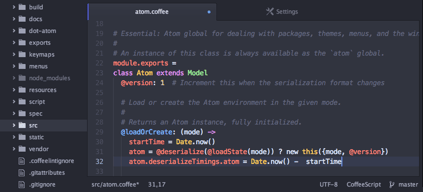

It has a growing community with a lot of themes and packages for everything you can imagine. It's more customisable than Sublime Text since it's a web based editor and the API is more open to integrations, you'll find modules that can use left/right/bottom panes to add consoles, documentation, linters, etc. The new Git and Github integration is incredibly useful and helps you accelerate your development by avoiding you to reach a console from time to time to commit your changes.
The speed is still not comparable to Sublime Text or other editors and probably never will. Some modules are still missing like a proper SFTP integration. Also, Git integration is good but there's still room to grow, like for example tagging commits.
A free and full featured alternative to Sublime Text. Since it's web based and my company mostly does web development, it becomes easier to shape the editor to our specific needs.
What I like about Atom is widely centered around the fact that it's an electron app, which means its entirely built on front-end languages, making it one of the most versatile Text editors available today.
The Pro for Atom is alos its Con; The fact that the build runs webkit, means its subject to the same flaws that Chrome has had for some time. The flaws I'm referring to is mostly memory usage. Atom can, at times, be a very inconvenient memory hog, and will crash every now and then. That doesnt make it unstable, more than resource intensive. You'll notice this issue more so on smaller, less powerful machines.
Atom is fairly easy to use, especially if you're even a little bit familiar with text editors. This means that as a first time user, you can take advantage of Atom's keybindings, and perhaps even make your own. Doing so will allow you to work as quickly and efficiently as possible.
Atom is a great text editor, almost on par with Sublime. It has great plugins and is very customizable
It is very slow compared to sublime. I'm sure with future releases performance will improve.
Coding for work and for my personal use. Plugins are great for increasing productivity.
It's clean and intuitive. The fact that it's Open Source (Free) is arguably its strongest point. Very hackable, in a good way. The community continues to build quality extensions which make it more and more powerful.
Historically it has suffered from input lag. Those micro delays can be very distracting. However I can't attest to the current quality as I haven't used it as a primary editor for a little over a year.
Recently I had to do some editing on a new machine. I immediately went to Atom as I trusted it would be a fast installation that would get me writing faster than having to dig up and fuss with my Sublime Text 3 key.
I really like ATOM because of its sleek Graphical User Interface which provides various color schemes and has in-built themes for providing best customization for syntax and GUI. It provides me the capability to choose my own fonts & their size along with different colors as syntax highlighter. It comes with lots of plugins to provide extended support for the editor and the product is designed by GitHub which itself has a very good market value, so I trust it pretty well. Moreover, it is free to use and is best suited for all major programming languages.
It has a major drawback when it comes to performance with large files and completion of code. It freezes when large files are opened in the editor and sometimes crashes as well. The windows remains unresponsive that time and I have to wait for it to load the complete file.
The most useful benefit I realized was the cross platform support from ATOM. In my organization, I used to work on Windows machine whereas our Client uses Linux as their Operating System. So, ATOM provided the support for both of us and synchronization is now great between client and organization. Now I use it for creating JavaScript files and auto completion of various syntax.
I like this editor because its simple and very extensible also customizable.
I didn't like the startup time is slow. and also lack in big files.
Save me time when I write/edit code source.

The amazing open-source community, and how that transfers to the various plugins available.
It is very slow when compared to Sublime Text, specially the multi-text selection. There are also some known bugs.
I'm mainly a programmer and this is the perfect tool. One huge benefit are the language-specific plugins.
This new editor is really focused on the needs of a web developer. Although it works extremely well with general programing languages where different technologies come out to shine. (Git, some js frameworks and HTML5 APIs). It has a beautiful UI developed with the new technologies of the current market (Electron, Vanilla JS and NodeJS) make this code editor the best suited for fast prototyping and general coding. Thousand of plugins and several customization options give you the ability to adapt Atom so it fits your needs, you'll be able to reduce your production times and cost, Atom is open source, therefor it's free. It has a very sleek GUI, it brings some color schemes and different syntax highlighting colors, you can change everything, fonts, font sizes, anything can be change so you can archieve your desired development enviroment.
Atom being a new thing, since its very first version, has been sort of slow compared to another competitors, in some cases it seems like all these new technologies implemented in the software aren't yet optimized for these kind of implementations and can get bugged up pretty easily. It has been coded from scratch, so it still lacks of some compatibilities with the market's OS and frameworks.
Front-End development in general alongside git (Github) repositories usage, which is awesome.

From the graphic text editors I have used in the past years (TextMate, Sublime), this is definitely the best one. It is very customizable and it is definitely a different approach in building software. If they get the speed part better I might try it again in the future.
Performance, I find it slower then vim which is what I have used for the past years, but of course that is understandable.
Developing software, it is a very good multi-platform open source editor.

1. Built on web technologies like html5, js,css - so gets all the tooling benefit that comes with it, like chrome debugger, testing , linting, auto-formating frameworks 2. Plugins can be written easily as they are written in javascript. So, the tap-able plugin author base is much larger and we can already see that effect - it has lots of plugins, probably as much as the old king Sublime Text (which is still my main editor, actually) 3. It has a rapid development cycle and has all the special editing functionality that only Sublime Text used to have. So, earlier Sublime used to be the king, but its development pace has been stalled for the last few years. Even though I swear by Sublime, I am confident Atom will catch upto it and then become much better due to its active devs. All of this is open-source, for the icing.
1. Performance is sluggish and doesnt feel as responsive as native editors like Sublime Text. It used to be horribly slow, but in the last year the situation has improved drastically and now its more than usable. But it is nothing near the fast startup of Sublime or the native responsiveness. Again, those thing might get resolved in the future, but it will still never be as impressive as Sublime Text (ST). 2. API for plugins are still not as mature and easy to use like others, a lot of boilerplate is needed to start making one.
Problem - Using it for writing javascript modules and editing some stylesheets. Benefits - The process was very streamlined due to some plugins which: 1. Refreshed the browser page on editing and saving the css 2. Automatically checked for syntax error and code smells as I typed and showed hints 3. Autocomplete for variable, function names alongwith type information

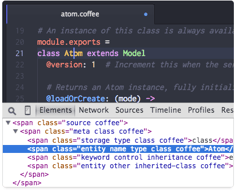
I have to admit that there are some things that I like about ATOM like the fact it is free and also open source on all platforms, it has a good integration with Git and GitHub. You can rely on a well-documented open API for plugin developers, a good selection of themes and plugins with a built-in package manager and sublime text and vim-compatible shortcuts. Also it is immediately usable with less reliance on configuration files, and has an attractive interface. Atom is reasonably easy to install on Mac and has a built-in updater. I have to mention in here also that it is really easy to use, if you're coming from Sublime Text, it has the Command Palette, also Developer Tools (a big plus from my side). It has an easy to customise UI and maybe one of the most important things a lot of support from Github crew (You can see these guys pushing to Atom repo's all day long)
Windows and Linux install versions are a little behind with the latter requiring source build instructions. It is slow (Sublime Text 3 is insanely fast), it cannot handle files bigger than a couple of MB's
Day to day work, and sometimes side projects for myself.
Liked the cutomization part of it with add-ons required for a particular use. While coding, the variety of extensions make it really handful- like Linter, File Icons etc
Its performance, which is kinda sluggish, while opening & working with large codebases.
To write code for Web Applications
Almost all language support which are needed
Need to work on auto suggestion part and gui
Script writing without utilisation of IDE concorrent licence
I liked how it takes care of the minute details and make a smooth flow of user experience.
I didn't like the way it manages plugin. I would want it to be more robust.
Day to day Ide

## UI This is a well understood but underrated aspect. One Dark is an amazingly useful and beautifully crafted syntax theme. It's a relief to find it even on VS Code! I am a huge fan of the three column layout. I've tried unsuccessfully to recreate this in other text editors. The three columns are Files, Code Editor and Git. Piling up files on the Git tab and checking them often to introspect changes is a very effective workflow. Now this is very possible in VS Code as well, but at the expense of your file explorer. For an Atom aficionado the only sane way to use VS Code is to move the side bar to the right side. Keep it in Git + Gitlens view most of the time and come to peace with the fact that you can't see your file explorer with zero effort :( ## Hackable This clearly still is the selling point for Atom. Why else would atom.io still say "A hackable text editor for the 21st century". Most people really don't wanna be hacking around their text editor though. Installing extensions to make it work is enough "hacking around" for most. I have really enjoyed this though. I really liked my entire text editor, including the extensions and file explorer using "Dank Mono". But it is possible because Atom is hackable enough to make it tremor every time you type a letter. Or have it play a musical note on key press! (Both these extensions exist!) I really like how much Atom becomes the user's once its installed on their computer. Most other text editors, including VS Code, still ocks you out from extensively customising it. ## Integrations - GitHub This was another selling point for Atom. Right next to the Git tab is the GItHub tab. You can directly raise a Pull Request from there. Find issues -> Create branches and much more. I am of the opinion that Atom is a better GitHub client than the GitHub desktop app! Another thing I used to use is how when you're working on a branch with a PR raised for review, all your lines with comments are highlighted with the comment.
## Extensions and Themes This is a where Atom has fallen behind. Extensions and themes are nowhere close to what we have on VS Code. Besides, the complete hackable nature is a double edged sword. When you have the power to mess up your editor to the point where it's not usable anymore. Even an extension can have inefficient code that slows down not just the editor, but your entire computer! ## Outdated? Not really. Most packages are somehow still updated! But some newer packages never make their way into Atom. And how GitHub and Facebook gave up on Nuclide the project to make Atom as good as an IDE was a shame. It is still very much possible to use Atom as your only text editor in 2021. But you'll be unfortunately missing out on some cool extensions!
Atom will forever be remembered for the revolution it brought about. Rendering an HTML page inside a native app wrapper was nothing to be proud of. Then came Atom, a cross platform app built on web technologies that really rivalled prominent players of that time that included the giants like Sublime and Brackets. For a long while, every tech influencer used this marvellous piece of engineering excellence from GitHub. Every tutorial on the internet from that time period started with an `atom .`! I remember back in 2016 when Atom was the best thing out there! I vehemently used Sublime Text back then. I complained how buggy and slow Atom worked on my Ubuntu. In two years time, I switched to VS Code. It worked like magic on both my Ubuntu and Windows 10. Around 2018, I switched to a Mac finally, and on a better screen, I started to realise how beautiful a UX GitHub had crafted in the form of this text editor!
Atom is highly customizeable and modular. It can be used for just about any language if there's a plugin for it. It also allows great keybindings, including using Windows/Super key combinations which was one of my main reasons for using the IDE. There is a Vim mode plugin as well so my hands don't have to leave my keyboard.
The IDE takes up more memory than expected. It also occasionally has problems in Windows, not sure why but my config files get deleted or moved and it breaks the editor. It has terrible boot times and gets slower with each plugin you add to it.
Atom is an IDE and with the right plugins, could be used for just about any project. I personally used it for C++ projects and had a nice keybinding setup that let me never leave my keyboard. It also has auto-completion plugins and a color picker pop-up. It was too heavy for my system, so I just went to vi.
I like how there is a Github tab from which I can perform literally all the operations I would perform in my GitHub account in the browser. I can create a new branch from within atom and even open pull requests. The process of fetching new changes from the team's common repository is also simplified. By the way, all of these can be done through the mere click of a button rather than writing commands in a terminal. As a matter of fact this is quite helpful because sometimes I always end up forgetting the right command for what I want to do but with atom, the process is simplified.
Atom is notorious for its high computer memory usage. Compared to other text editors, atom stands out as a very unresourceful software to have installed on your computer. Because of its liberal usage of RAM, atom takes a longer time to startup and sometimes stays with a blank screen until it is restarted. And now when you add plugins to the editor, it slows down to an even higher rate making it a very unsuitable software to work with. This means that if you intend to extend Atom's functionality, you will have sacrifice responsiveness.
I use Atom for lightweight development work that do not require over-reliance on libraries or which I know will not end up having a large number of files after completion
Where atom stands out is its focus on file version control by giving not just git (which is a common feature in most text editors and IDEs) but also github a lot of significance. The internal integration with github is almost flawless and as long as you're logged into your account it becomes fairly easy to do a lot of things from right within atom as you would do on the github website. Atom also makes it easy to access your packages because the packages' tab is in an openposition meaning
Atom is seriously heavy, actually I have come to realize that it used more resources than a fully packed IDE such as Phpstorm. Your computer is going to be left hanging and half the time you'll be resolving computer freeze issues rather than writing code. WHat's more annoying is that atom does not posses as many features for it to be that heavy.
I use atom for developing our website and applications because despite its huge shortfalls, it excels when it comes to web development.
The atom development team (which comprises part of the Githyb team) have made it a personal mission that controlling file versions using git is a key part of the software development cycle by ensuring that the Git and Github panels are merely a click a way. In addition, unlike other text editors and IDEs which integrate Git but in terminal, Atom ensures that there are two panels each specifically dedicated for Git and Github which means even remote repositories can be accessed from within the editor.
For an editor that has established and experienced professionals in its core development team, you would hope that Atom does better at computer resources' usage. Unfortunately, Atom tends to lag even when it is running very light work and a lot of times it takes longer to start up than its competitors such as sublime text.
We have an unwritten policy that we use lighter editors for work that does not require integration with a lot of third party tools, frameworks and libraries. This is where atom comes in handy. I use it whenever I'm working on projects that mostly involve the vanilla versions of a language and sometimes light usage of a framework
The thing that I like most about this app is that it's friendly to platforms like MAC because I've been looking for the software that suits the Mac. It's also a excellent customization app, and it's also simple to add packages. It also guarantees that consumers get what they need from the software and what they expect
As I stated, it offers packages, but finding the ones you need is not very simple, and if you fortunately discover one, it turns out that someone else is already taking it. So, finding the packages you need is a challenge. In addition, if you have any problems, finding the platform to assist and fix the problem is difficult.
It once improves the user's productivity after becoming accustomed to it, so learning this software is worth it. The most helpful thing about it is the range of packages and ftps to link to. It can also be remotely used. This benefit helps make the coding run smoothly between the software and the autofill function, which is really a good thing about it.
Instalar nuevas características, temas y paquetes es súper fácil: es agradable ver una colaboración basada en la comunidad en ese frente. Puede usar el paquete de acuerdo con sus requerimientos en el desarrollo, es completamente gratuito, por lo que no debe preocuparse por los precios
Por no mencionar, si encuentra uno bueno, está desarrollado por otra persona y si tiene problemas, a veces es difícil encontrar el foro adecuado para encontrar una solución. La configuración puede demorar unos minutos. Lo único que no me gusta este software es que requiere una alta memoria RAM y no es adecuado para grandes proyectos.
Durante mucho tiempo trabajando con diferentes IDE siempre tuvimos problemas de estabilidad porque son aplicaciones muy pesadas y complicadas que siempre dan algún problema, gracias a Atom podemos hacer el mismo trabajo en un entorno simple y estable. Estoy resolviendo el problema de la programación más sencilla. Flujo de trabajo con colores más oscuros y un diseño fácil de usar. Atom es rápido y fácil de configurar con nuestros paquetes internos para facilitar el desarrollo de los nuevos miembros del equipo.
The look and feel of the Atom Editor is the best I've seen. That alone tempts me to use it all the time. The simplicity of editing any text document is great. Plus the Git integration is fantastic.
The editor only possesses language introspective features (autocomplete, package inspection, typechecking) through plugins, and support is waning. Getting all the plugins to play nicely is a large time investment upon starting a project. Debugging is very challenging to accomplish in Atom, and it's totally different for each language technology. Overall the inconsistency makes the investment seem less than worth it.
It a lightweight & fast editor that can be used no matter the language used for a software project.
It's the first IDE I used and it was very easy, great for start and not very complicated to use.
Again, because it is more simple, there aren't too many things it is capable of it seems. But not a big deal to me.
We use Atom every once in a while for small code changes in Typescript - our other preferred IDE does not support it.
Atom is a great open source text editor. It works extremely well for every language I have come across(Java, python, javascript, etc...). It also has a great array of plugins to fill almost every aspect of a full IDE without being too bloated.
It can be slow at times. It also feels like it is not as well developed as Visual Studio Code. It lacks all the features and speed of the competitors but it is on the right track.
I use this for the Javascript development and notetaking.
It supports multiple file format. It has different theme. You can customize the style. Good handy keyboard shortcuts.
Its integration with packages. I would like to have default packages from atom.
Mostly as a text editor.
Code suggestions make it easy to get work done fast. All the plugins mean if I need to have code suggestions or linters for php, CMS framework or any other instance, I can add that functionality easily.
Adding/Removing and enabling/disabling plugins is a little bit obscured at first, but after doing it a few times you get the hang of it.
Writing javascript, php, CSS
Atom has a large community of plugins, add-ons, and themes. It's also free and open-source.
At the time of this writing, the performance of Atom is really bad. Its underlying technology is slow and uses a lot of memory. On my Macbook Pro, the performance was so bad that I decided to stop using it in favor of a more performant editor.
A free code editor, with good syntax highlighting and support for EditorConfig and various code linting add-ons.
It is easy to use. Very simple application
Not suitable for beginners. But good for experts
Write applications. Coding writing scripts.
Ele tem plugins fantásticos como Hemmet e o Pigments (destaco o Pigments, que facilita a vida de UI designer), é altamente personalizável, bonito e integra bem com qualquer processo de produção.
It has one big problem: it uses a lot of memory and processing the machine. I have an i5 with 8GB of RAM and SSD, but I can not use the Atom - hangs, takes to open files and leaves the development process time consuming.
With Atom I have been able to solve the excessive resource problem used by IDEs such as Visual Studio or Eclipse, speeding up the worker process by isolating the UI development layer in another part of the workflow. He has been an ally for years on a myriad of projects.
Easy setup. Lots of plug-ins. Easy to create and manage projects in a lightweight manner and use as just an editor (vs something like Eclipse).
Still a bit buggy, especially when you have a lot of plug-ins installed.
Needed a good lightweight source editor for Linux. This is one of the better ones. Powerful plug-ins allow faster development.