
Unclaimed: Are you working at Atom?
Atom Reviews: 4.4/5 — Solid Choice
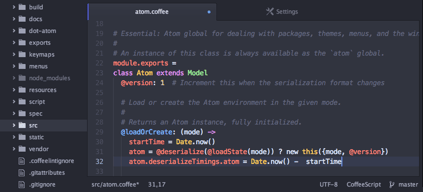
Atom is an open-source text editor used by software developers. The platform is free and features tools that allow cross-platform editing, code autocomplete and Git integration. With Atom, developers can streamline workflows while ensuring better collaboration with team members with the goal of creating high-quality software.

| Capabilities |
API
CLI
OSS
|
|---|---|
| Segment |
Small Business
Mid Market
Enterprise
|
| Deployment | Cloud / SaaS / Web-Based, Desktop Linux, Desktop Mac, Desktop Windows |
| Training | Documentation |
| Languages | English |
Atom was easy to use and beginner friendly. One for the better text editors
Did not have many features as compared to other editors
Writing javascript programs with embedded git control
i like the user interface of atom along with ui it also offers git integrated with it which helps us to push the text at remote.you can customise it according to you. its good in terms of performance. its quite fast. you can use various themes also. its open source and freely available on the internet.its cross plateform you can use it on mac, windows or linux.if you are a developer it will help you a lot as it helped me to create and modify the whole ui and i customised it as per my ease. it has good comunity support and it helps when we get stuck or face some issue. i faced a issue few days back it was crashing constanly i googled it and i resolved with the help of solution posted by the community.
continouse updates and bug fixes makes it little bit distruptive. you will see that git is integrated partially not all features are available.its resource intensive its not like other light weight text editor tools in terms of occupying resources you may suffer little bit slowness while using atom.
i use it to make the notes while attending teams calls and meetings. it helps me to memorise a lot of things i have noted down throughout my work experience. before any presentation i make notes using atom because of its simple and useful tools and user interface . from gathering requirement to developing the system a lot things come in between and i use atom to make notes of it.
i like the way we can customise the theme in atom. its integrated with git so pushing changes on some remote place is an advantage. you will get the suggestions for autocomplete that's quite impressive. you can search , replace, navigate to diff words through ui. in my opinion its best tool i use it for my personal note making tool while attending the meetings.
it takes a lot of time while starting and performance is bit slow.it uses high memory while running on the system. there is a lots of competitors of atom which are doing quite better than atom.
i prepare notes through atom while attending the meetings.
It is open-source, free to use, and has many good plugins and extensions. Also, it has excellent developers' support and an active community to learn and work with. It has a collaboration feature to work with teammates and is easy to understand and use.
It is easy to use only after one understands and learns how to use it, it has not had sufficient features, and its support is good, but updates to the software are not regular. Otherwise a good editor for anyone who uses it.
It helps make code in a customizable environment and has provided community support which helps in learning. It is perfect for growth, offers many extensions and plugins to use in principles, and is free and open source, so secure and does not need to pay.
It has remote collaboration , customisation and source code integration .
Ease of use and documentation is little poor
It has GitHub integration which is the best part and very helpful for developers
Atom has been useful for me in the past years for multiple reasons, its fast, easy to customize and you can open big projects without a hassle. I work a lot with databases myself and get send a lot of CSV files, its not uncommon for me to have to edit those, which can also be quickly done trough Atom. We also use it for our regular code of course, it was so lovely to find you can edit your syntax with different colors and themes. In the years of use we also added a lot of plugins that significantly improved our use of Atom.
Honestly i myself dont dislike anything about Atom. The only thing for me was the start of using Atom, it was a bit complicated at first because you have so many options you can trigger to make it your own. No complaints! :)
Atom has helped solve a lot of problems, the easy editing of text files, working fast and efficiently with the integrated Git plugin. And because its so simple to use all our new coworkers got used to it really quick!
Atom is the best text editor that has supported multiple programming languages. It's user-interface makes it more easy to use and collaborate with colleagues. The navigation through multiple files and folders makes it more dynamic.
I don't dislike anything about Atom. It has provided every feature that a single text-editor can provide to a programmer at college level.
Atom is the best text editor that I have used for implementing static HTML based websites. I have used it throughout my graduation for academic purposes. It has helped me a lot in terms of productivity.
Atom has a very simple GUI developed by GitHub, so it has a built-in git feature. It provides a decent amount of extensions and plugins to add more features for your convenience.
Atom does provide a very limited number of extensions, whereas VScode offers a vast number of extensions and customization. Atom is slower than some other text editors, and when you add more extensions and plugins, it worsens.
It is a good text editor for someone who dislikes too many extensions, customization and adding on features. It has built-in git feature, which is very helpful while working on more significant projects.
Atom provides remote collaboration so by two people can code on the same panel. The integration of source code is awesome. highly customizable platform. the open source extension and support are greater. it supports markup languages too.
It required a lot of time to start. managing plugin becomes cumbersome. find difficulty in the documentation. create an issue in GIT support. UI increases the level of difficulty, need to improve UI. Packages should be more advanced.
As a system developer, I use atoms to do code for my applications. I mainly use aton to collaborate on the code with my other team members. provide a variety of extensions to make my work easy. mainly I prefer atom for community coding . Markup language support helps me to work with CSS code.
It is really easy to work on it and write codes. I am learning html and css coding thanks to ATOM. I added my pages there and was able to edit them all.
The menu that we had at start, it was very confusing. I couldnot understand how to start a new project by using the instructions. But later, after trying all the tabs 1 by 1, I succeeded to understand which one was the correct one.
It helps me write html codes and css codes.
Atom simplifies coding, and its amount of modifications and themes is unparalleled. It is excellent that you can alter every aspect of your workstation and complete tasks efficiently.
The portable version does not support automatic updates, so you must manually check the performance.
Atom is my preferred editor since I can update files directly from such a platform when I modify or correct errors in GitHub-hosted corporate projects. Additionally, it features a variety of attractive themes and plugins that make coding simple.
The vast array of plugins and extra features make programming in any language easier. It is such a versatile IDE that you can program in several different computer programming languages.
The first load up tends to be RAM heavy and CPU heavy, so it tends to give a false "program not responding message." I would love it if it was streamlined a little and maybe made so it loads certain functions to make it more responsive in the beginning.
I use Atom to perform all of my programming needs. It helps me program quickly and concisely because the linter plugins and the beautify plugins make my code nicely organized and readable. I am currently using it write javascript and creating a crawler.
The best thing I like about atom is how beginner-friendly it is, with a very simple interface and no new keyboard shortcuts to learn for a simple use case. What I loved is that I could find many extensions nearly for every use case that I had, be it syntax highlighting for languages, dynamic linting, debuggers and even music controls. Even I can make my customized theme in Atom if one is good with CSS.
I feel that Atom starts showing response issues when working on large text-based projects. When I try to use the search feature it is a bit slow. I found sublime text to be more efficient when working with text-based projects.
I have used Atom for a lot of projects, be it HTML, CSS, JavaScript, Java or Python. I feel that language support extensions make it easier to work with anything within Atom. Atom has built-in integrated support for git and GitHub which is an added advantage.
It is free, flexible, and can be customized. I very much like its interface.
It does not have autocorrect features and sometimes startup is slow. But overall I like it very much.
It solved many problems. I had a project that required me to have a number of lines in the document exactly the same as the base documents. It was a serious problem. I tried many editors but his one solved this perfectly.
The users do not need to speed a single penny for using this software. It has a lot of customizable potentials which can be used to mold the software according to your requirements. It is a lightweight software that takes almost no time to boot up.
It is not my first choice for working on large projects as it lags and sometimes crashes when doing so. It does not have a large collection of plugins for you to add. It does not have self-correction feature which other IDEs do have.
I am using Atom as an IDE for Python only to work on small projects or to make some changes on already completed projects. It provides you with a lot of shortcuts, thereby increasing your efficiency.
Atom IDE is a free and open-source text editor that is based on the Electron programming language, It currently supports JavaScript, TypeScript, C#, PHP, and Flow, and will add support for additional languages in the near future. It is also capable of deep syntactical analysis, which allows it to offer comprehensive coding assistance.
The thing I don't like about this program the most is its slow speed. It can run large amounts of code but it is slower than other IDEs like Sublime text and Vs code. Therefore, it would be better if the IDE is smaller so it can run faster.
Among the many features of Atom IDE, the most useful is the support for multiple programming languages. The IDE is open source, which means that the community can help improve it and make it even better. It also has a GitHub integration, which makes it easy for you to manage your projects and stay on top of your latest code changes. It also allows you to install packages that are essential for your development. These packages are free to download and install, which is another major advantage of Atom.
After the experience of using atom for one year, I can assure you that atom is one of the best code editors, the UI of the atom is really awesome and gives a very cool coding experience. Especially for languages like python this is the best.
There is nothing to dislike from the atom. It is so perfect that there are not many changes to be suggested and no dislikes which can be provided. Extensions can be a bit be improvised.
The auto-filling feature which it has makes it more unique than many other IDE, the color differentiation of the code is so good which also follows indentation, which is the most significant benefit. The color differentiation helps us know whether the code written by us is right or wrong.
It has many packages and themes. It is easy to use, remarkably creative design, which makes us very productive and gives us relief while writing a code. The GitHub package is already available on the Atom website. The one feature I like is that we can open single, whole, or multiple projects simultaneously. It is free, not like other paid software, and provides premium service.
It takes time to launch. Files get lost when the system crashes. Sometimes the plugin doesn't work or stops working. But if we restart the application, then it works.
The benefits are too many as I can write code very quickly and mean full. The UI is exellent, which provides a suitable environment for the user. Many projects are uploaded on the website by the best creators.
Atom makes my coding easy. the build-in terminal access is liked most because i am coding in laravel project it wants terminal access more and so atom provides build-in terminal so that i can access the terminal in the editor don't want to switch between normal terminal in windows. its just one example a lot more remote functions are also available in atom so that we can easily host our edited files to server on one click
Takes a bit of time to start the editor. Other wise no problem
creating custom applications in laravel frame work and accessing terminal with in the edior
The features that i liked the most are: - it is a completely free editor which does not effect one's pocket. -It is able to handle large data without slowing down and it is highly customizable also. -Atom provides good syntax highlighting. Also, it supports multiple language. These features make this editor one of the best in the market.
The drawbacks which i will point down are 1) it's documentation and plugin can be more discoverable. 2) it sometimes feels that it is not working with notebook 3) The performance which I get does not match as expected. 4) it is difficult for a beginner to use with ease. These drawbacks makes this a little disappointing.
I can solve many problems with atom text editor like ~ as it has autocompletion feature which completes syntax errors. ~ i am impressed with its GIT integration as it can control all my files and data easily. ~ atom can work effectively with different encoding files which other's cannot perform with equal ease. ~ it helped to reduce my workload by 20%. These are some features by which i rate atom text editor higher than its competitors.
I like Atom because it has a built in package manager and an extensive list of packages. It can run on Mac, Windows and Linux and this multi platform support is the best features of Atom. It is free, open source and written in C++,and CoffeeScript. It has embedded Git control that is very good feature of it.
Main disadvantage ot it is that Atom is very slow to startup. It has a relatively high memory usage, especially when compared to some other text editors not based on Electron. It tends to crash or hang with large text files and it is worst thing of Atom. It slows down exponentially with plugins and it is also a main disadvantage of it and I didn't liked it.
I mainly use it for programming and coding by integrating with Python. The open source nature of the project and accessible source makes it easy to either modify plugins that we have installed. And it made me very productive.
Atom is one of the best free text editors. It supports almost all programming languages. It is available at no cost to the developers; hence, it benefits them financially. Its auto-complete feature is one of the best among all the text editors I have used.
It takes a little longer than other text editors to boot. When working on large projects, it feels a bit laggy to use. It does not have a lot of plugins available.
I primarily use Atom as a text editor for Python language. As it is a free IDE, it benefits financially. Also, due to its excellent auto-completion feature, it has increased by efficiency very much.
If you're used to Sublime Text, this is a breeze to use. The Command Palette is available in Atom. The Github team has been quite helpful (you can see these individuals pushing to Atom repo's all day)
Bit Slow (Sublime Text 3 is insanely fast) To write the packages, you'll need to utilize CoffeeScript. (I'm not sure if this is a pro or a con because I'm a Python programmer.)
For quickly opening files, use a fuzzy finder. Use a fuzzy finder to quickly open files. Its user interface is far too simple to utilise. Atom creates a clutter-free environment where the focus is on the code rather than the distractions.
The user experience is quite good,the autocomplete feature helps you to write effective and efficient code
There is a room for improvement as the application crashes when running for a longer period of time.
I have been writing python codes with atom for 2 years
Supports large number of programming languages. Add pakages to add new functionality. Lots of customizations.
Startup time is high. Closes randomly. Preview functionality missing. Formatting linting capabilities missing.
I use it as text editor. Sometime as IDE. I work on multiple languages. Its solve my problem not to use multiple IDE and text editor.
I like the atom packages as they make it even more powerful and easier to write code in a minimum amount of time.
There is nothing about Atom I think I don't like; I have been doing web programming for a very long time, and I found atom super valuable for my day-to-day coding work. My most recent project was a personal back office application which was completed within 1 day, Thanks to Atom for features likes Github integration and packages libraries.
Version Control, Github integration has been super time saving for us. We can easily pull repositories of the project we are working on from github and edit anything we want.
I use Atom to perform multiple tasks when designing learning modules for Canvas LMS and WordPress, as well as batch processing for other files accessible in plain text. Atom is a straightforward interface that tucks the bells and whistles away in the menu bar, allowing for my focus to remain on the workspace. When making redundant changes to documents to meet formatting or accessibility issues, I am able to fly through multiple pages in a very short amount of time. The interface also has a shortcut link to GitHub for ease of communication.
The only caveat I have with the Atom program is the multiple windows that open upon starting the application without calling to a file first. There is a need to close ~3 windows of information prior to obtaining a fresh workspace.
When other online providers change their link format, I can very quickly make the alterations across all of my pages and update them very quickly. I am also able to preview publishing layouts in Atom to be sure my pages are ready to go before loading them.
Atom is a good editor for many coding fields, it crosses platforms and it's 100% free and open source. One of Atom's key selling points is its flexibility and readiness for customization.
There's nothing I dislike about using the Atom software.
Atom is helping use some coding to customize my website and some applications.
Atom is a simple and intuitive text editor with a lot of customisation options available. The sheer number of packages available for Atom is so high and you will find really useful packages like linter, hyperlink and git blame. The text editor also has git inbuilt and hence you don't need a separate version control application installed in your mac if you are using git via Atom.
It feels rather slow the longer you keep it open. Figuring out what packages you need and don't sometimes isn't straightforward as it has so many options so its a pain to find the right one.
Almost 80% of my work and personal projects have been done with Atom. With the package manager being installed by default it makes the whole process of finding what suits your style much easier.
Atom has a simple UI that makes users use it without any issues. It has support for github and has a lot of plugins. Along with this, a user can write its own plugin. Support code formating for different languages and its minimap feature also helps sometimes.
Sometimes it becomes slow when working on multiple files. Syntax highlighting for some languages is missing. And some plugins crash randomly.
Using Atom for writing and debugging Python/Django and frontend technologies. Its Github support is excellent. Atom's auto-complete feature helps us to write code instead of searching on google.