

Unclaimed: Are you working at Bitbucket?
Bitbucket Reviews: 4.4/5 — Solid Choice
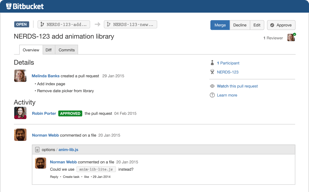
Bitbucket is a cloud-based version control platform for developers who want to collaborate on code as well as manage software projects. The software supports tools that focus on team collaboration through review tools, issue tracking, and continuous integration.

| Capabilities |
API
CLI
|
|---|---|
| Segment |
Small Business
Mid Market
Enterprise
|
| Deployment | Cloud / SaaS / Web-Based, Desktop Mac, Desktop Windows, On-Premise Linux, On-Premise Windows |
| Training | Documentation |
| Languages | English |

Compare Bitbucket with other popular tools in the same category.
- Very affordable version control hosting solution. Also has a free option for up to 5 users, with unlimited private repositories. - Has great integration with JIRA. - Easy to create and merge pull requests straight from BitBucket. - Easy to create and see active branches.
- The UI can be a little confusing compared to GitHub's. - The size of the community is considerably smaller than GitHub's.
We host most of our projects on Bitbucket. It's very easy to use and has many useful tools like pull requests, git blame, file history, etc.
I like the way of distributed release monitor system that makes it simple for us to cooperate with our working team. Always have unbroken access to the data center. The freedom to use our productivity quicker and from anywhere in the world. Wonderful tools to learn about.
Very good opportunity to manage all working steps which are really very easy and doesn't bring any bad issues. I don't have any ideas what you can to change on this software as I know that this program completely suits me.
Definitely, we completely enjoy with our working tool. We guess that we found the key to valid work which will help us to operate for results. Also, we have the opportunity to work with the big amount of our documents and we can store all of them in a very large memory place which is really very helpful for all of the team.
I really love its flawless integration with Jira, confluence and hipchat. It has better user interface that GitHub in my opinion
It is a bit pricey.I would love if the price was reduced for small teams.Though, I use it for Nnocytomics inspite of being paid
Revision control is really great with BitBucket
Not only is this solution to version control cheap, but it is excellent. This system can be based off of git or mercurial which is a huge plus to developers who are used to either of those systems. The price is either cheap or free depending on how you use the system which is a huge selling point to businesses like ours. It also has features such as an API that you can integrate into your projects.
The only dislike is that the GUI client that is available for download is a bit confusing. If you aren't familiar with git based systems and using CLI then this can be quite confusing.
We are using Bitbucket as a means of version control. We have realized that Bitbucket has much better features compared to other free systems such as Subversion.
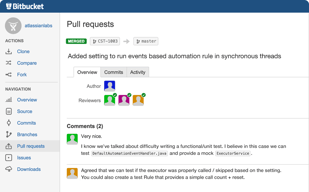
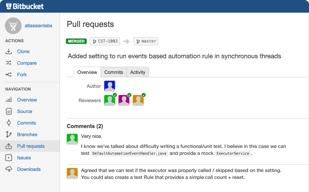
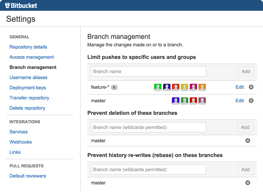
Bitbucket is source code management tool where organizations can create projects and repositories where developers can store their code. Bitbucket is based on Git. It has default branch master and for parallel development users can create n number of branches and through Bitbucket branches can be managed easily. Pull request can be done on the UI and can be set reviewer for code review before merging to master branch and these pull request can be rejected or approved based on the code quality checks. Bitbucket can be integrated with Jenkins through webhooks where jobs can be triggered once code is pushed to Bitbucket Bitbucket server can be installed on cloud with cloud formation templates with less effort of using amazon services. Bitbucket data center supports Bitbucket mirroring through which user in different geo graphical location can access Bitbucket without latency. And projects can be mirrored to the different regions based on the project teams. Role based access through LDAP , groups can be synchronized through Active Directory and these groups can be given restricted access to required projects based on project management. User and groups cab be given Read, Write or Admin access. Admin can add or delete the repositories to project where as write can read and add filed to Bitbucket. Read access is only to read the repository Bitbucket also allows to access to HTTPS and SSH protocol. Every user can be able to add SSH keys to user profile and access without password One can easily protect their branches from direct commits /pushes through Bitbucket branch permissions. Easily restrict set reviewers for every branch. And Bitbucket notifies users for every pull request , for every push to the repository so that every user will get to know the things happening to its own repository One an fork their repository and will be able to get changes automatically through this feature.
Browsing back to other projects is not possible directly from Bitbucket UI. One has to go back to main Projects and then navigate to required project
It easy for developers, testers and architects to see the code changes and who made the changes It is easy to get the history of the changes One can easily blame the changes done on one file Pull request made easy way of merging branches Reviewers can do code review before merging on UI Architects can Merge the branch or reject if code doesn't meet the quality

We have been using BitBucket for several years and we love that we can manage our source code on the cloud and develop as a team effectively. BitBucket supports Git and we feel that Git is the best Source Code control platform available today. As a Cloud platform, the cost is reasonable and clear. The user interface is clean and understandable. The integrations work well with PM tools and messaging like Slack. The user permissions and management is nice as well. If you allow each user to Fork and create their own repository, you can lock down who has the ability to commit to the main repository while giving them all the access they need to effectively develop. The keeps the main repository clean and enforces code review. I love the audit trail, the ability to compare commits and older file versions to other file version to track down specific changes. Last year, they added the ability to group related repositories into "Projects" which is very useful to quickly identify related repositories.
Recently BitBucket redesigned their web site. Some of the key functionality is a little more hidden that it was before. Honestly, there isn't too much to dislike. There are some issues with very large file support that have been slow to be resolved, but we haven't experienced this issue.
BitBucket is a key component in our CI/CD infrastructure. It is easy to connect to build and deploy tools and services. Our development process is so much cleaner, more maintainable, and more predictable. BitBucket allows developers, designers, and PMs better exposure to the state of the code base and progress as tasks are completed towards releases.
Bitbucket allows me to monitor any Pull requests that might be stuck in review to ensure that they're being pushed along.
I am happy with bitbucket. there is nothing I don't like.
Bitbucket helps my Scrum team be more cross-functional. we lack a designated QA tester so Bitbucket allows us to easily find and review another's pull requests. By using Bitbucket my team is able to run more efficiently.

Ease of managing all project repositories
Nothing in particular, The product from Atlassian has been evolving continuously.
All out code repositories are in one place.
History view, branching diagrams, comments on commits (on top of the normal git comment). Integration with Jira. Source view is also good for looking at the codebase. Pull request tool is nice as well.
Searching is not intuitive sometimes. And sometimes I doubt it has searched how I expected it to.
It's where we host our codebase and we handle code reviews through it. It's very quick to push and pull from Bitbucket and it rarely ever seems down.
It is the best UI for git and features like fork ,pull request , LDAP access , Group access control , plugin support for JENKINS and others. It is very easy to use this tool for source code management . It allows to create projects and repositories underneath. It is easy to provide group access and individual access to users for repositories and projects. User can fork their own repositories and work , any changes to their fork will be fetched automatically. It is easy to create branches for parallel development. It is effective in sending notification for every change through email configuration. It is easy to set reviewers for every pull request and all the changes can be viewed on user interface .Easy to install on AWS through cloud formation templates.User can have private and public repositories and can be given access to other users through Group permissions. Bitbucket Mirror capabilities reduces the latency to clone the code for different data centers located in in different geo graphical locations. Through Bitbucket mirror user can push and pull the code without having latency issues. Branches can be protected through branch permissions. User can be restricted to push changes to stable branches and can restrict to do code review before pushing the code to Bitbucket. Bitbucket can be accessed via HTTPS or SSH.Easily integrated with CI tools like Jenkins
It is difficulty to navigate between the projects If user have access to multiple projects . Navigating to older is not there on UI.User has to select the Project page then navigate to respective projects.
Bitbucket can be hosted on premise data center , it helps in securing the data Easily integrated with Jenkins for Continuous Integration Easily integrated with Ansible and Puppet for Configuration Management tool RBAC is easy with Bitbucket Multi site support through Mirroring
Free account that allows up to 5 users to collaborate on a private repository. Diff and change logs are easy to read and use. Tracking of history good and syncing or rolling back can be done easily.
Not too much. Everything is pretty good. Can be somewhat slow at times but that is understandable.
Can collaborate and review code with team, share notes, and do so using a simple workflow.
I like how fast I can push and pull . Also Pull requests are best feature of BitBucket
Not much wide community like Github. local UI Source tree is full of bugs.
We are storing source code of Cash Management application

Super fast and very good work. Big helper to make your team work perfect. All of the process easy to control. I like that we can work better with a good cooperation our work is much better now. I like to use a lot of good tools.
Actually very easy to easy and good to understand. Tools are very useful and very good to work with them. Any problems which are coming to you, you will easily solve them with support service.
Great software to have at the company. We like to do work on our results. The Bitbucket is much better for it. We are working good so we are having a lot of folders but we are not afraid as we know that there is a lot of place in storage.
I mostly enjoy the way it integrates seamlessly with Jira and Confluence.
Proprietary/Commercial product so there's a limit of what one can do or modify for private corporate use.
We are using the full Atlassian suite that includes bitbucket,
Fast, effective and promotes proper software governance
Integration points can be made better. Have native support for precommit processes
Governance of our software product
The best part is it is free for upto 5 members.It makes a private repository.Very easy to use and documentation is excellant
After a limit of 2 gb the repository becomes readonly.This part i dislike
With bitbucket we want to centralize code from all developers into one branch .We also use it for version control
Access to the SourceTree tool, and simple integration with JIRA cloud
Jira Cloud lacks some of the UI features that make Jira on-premise great.
Backups of source code, and basic change attribution
Version control since salesforce does not have its own version control yet.
Nothing to dislike. Has worked well so far.
version control
Ease of use and ability to see feature trees in source for CICD streams
The UI is bit clunky and cumbersone to see all metrics
Salesforce sales dev
Bitbucket easily integrates (obviously) with the full Atlassian suite. Since we use the full suite at our company, this is key. Using it with Sourcetree is amazingly easy, and makes it perfect for integrations with our entire team. It's easy to branch, merge, and for other to do code reviews.
The UI sometimes leaves a little to be desired. Some areas are not as user friendly as they let on. There are a couple of areas where you click a button, expect a result, and something entirely different happens, or just plain errors out.
Source control. The full integration is essential when using Jira/Confluence/Bamboo. Code reviews, branching/merging, code integrity.
Bitbucket is completely free for its basic plan, which contains enough features and functionality to serve most teams. Additionally, the repositories are private which a lot of other cloud version control systems don't offer. Atlassian is constantly improving the software with user interface improvements. It integrates seamlessly with SourceTree (desktop Git client). The cloud-hosted web application makes it easy to get started with version control systems - no previous experience required nor does it need any complicated setup on a server. It support connections over HTTPS as well as SSL. I like the ability to edit code directly through the Bitbucket web application if I have something minor to correct.
Somewhat difficult to put an existing project into a repository on Bitbucket. You have to clone a new repository into an empty directory first, then move your project into that directory. The SourceTree app that goes along with this can be slow at times and crashes occasionally. However Atlassian releases regular updates to BitBucket and SourceTree.
Working on team projects with others in my organization. Easy to share code with clients for review or modifications. Paired with the desktop Git client SourceTree it is very easy to use, especially for people new to working in a team environment with version control systems.

The code review design is easy to look and navigate through
New branches do not appear in the Pull Request autocomplete drop down for about a minute so after pushing my branch I have to wait a minute to create a pull request.
Collaborating with a team of developers from the git command line is not as efficient as using bitbucket.
I have to admit that the main reason I use bitbucket is the ability to host my private git repos for free. Even though the limitation of maximum 5 users per private repo, it is very attractive if you work alone or in small teams. The integration with Sourcetree is also very nice.
Not really big complains about the service.
Git repositories storage and serving in the cloud. The main benefit is the ability to have private repos without paying, as is the case in github.
All Bitbucket features are fantastic, speed, stability, delivery guarantee and user-friendly interface. There is nothing that can be pointed out as demerit, mainly because the platform receives constant updates. In the last 10 months I've migrated to other Git versioning services, but after an experience on those beaches I used Bitbucket again to do some testing - what was the surprise of seeing that the platform is better and many of the things I missed are there now. The best? The price remains fair and scalable according to the size of your team or company.
The only thing that needs improvement, but not a serious problem, is the mapping of projects through issues, simulate to other platforms. However, it has an integration with Jira and Trello that already solves this problem - just adapt your worflow and "voi a lá", solved the "problem".
Five years ago I needed to use a cloud service to store my repositories. Bitbucket was ideal for the malleable features of my projects and became my only repository for the teams I worked for. For a growing company, it was a smart way out, because it allowed me to scale between teams without major problems.
Unlimited private repositories are one of the best features on Bitbucket.
Interface can use some work still. They're working on it, but it's not there yet.
We host 100% of our private repositories on Bitbucket for version control hosting and continuous delivery.
Free git repositories Good UI Good analitics
Not so famous like Github To much promos of other Atlasian solutions
Create git repositories of startup projects
The ability to have free private repositories is a cool feature of bitbucket
I think there is no option to sign commits with a gpg key
the use of private repositories for projects that have a certain delicate business logic of the company

Simplicity, new interface design, freemium model.
Not much to dislike. Paid version is as good as it gets.
Software development with a remote team—building a comprehensive design and production process from local development environments to CI / CD.
We love to have option so that we could choose to have public or private repositories.
Currently we have nothing to dislike for this service.
We mostly using this service for version control of projects which are developed my employees living in multiple locations.

Bit bucket allows us to maintain version control on all of our repos. It integrates pretty well with all of our services ( CI tools, slack, build systems, et cetra)
The UI is not the most intuitive. Most people use the free version of Github which is a very different UI and the pull request system is a bit different.
We are using it to do version control on everything we build. We do also use it for version control on documentation.