

Unclaimed: Are you working at Bitbucket?
Bitbucket Reviews: 4.4/5 — Solid Choice
Bitbucket is a cloud-based version control platform for developers who want to collaborate on code as well as manage software projects. The software supports tools that focus on team collaboration through review tools, issue tracking, and continuous integration.

| Capabilities |
API
CLI
|
|---|---|
| Segment |
Small Business
Mid Market
Enterprise
|
| Deployment | Cloud / SaaS / Web-Based, Desktop Mac, Desktop Windows, On-Premise Linux, On-Premise Windows |
| Training | Documentation |
| Languages | English |

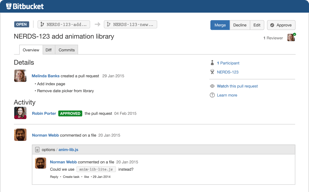
Compare Bitbucket with other popular tools in the same category.
Good interface, documentation and best practice. Good integration with Atlassian products and others products. I think It's the must have software if you wanna use GIT
Nothing, but I have a request for Atlassian: do not change the core functions. Are very very easy.
Have a GIT repository where store my code.
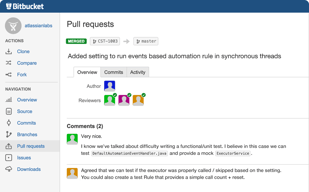
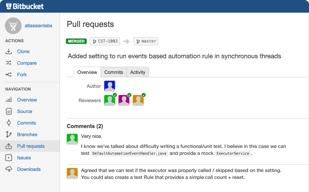
How easily you can see the difference between your branch and the master branch. Maintains code-base very easily. Can check who edited what and when in a particular branch. Also, how it easily links to Jira, by just mentioning the bug number. It is really useful as it first opens up the bug in a small window and then if wanted you can open it in a new tab. Very useful for reviewing as you can get a first hand understanding of the issue and then understand the approach of solving the problem.
Sometimes, to find any pull-requests that I have already approved is a task. It is very over-whelming for a newbie, requires a lot of practice and trial and error to reach the desired target. When trying to add a unit-test code in the pull-request, the data is a big blob (Yes you can add the ''' marks around the unit test, but no where it is mentioned for ease of use). The navigation is definitely confusing, and can be improved by adding some sort of tutorial which can be accessed anytime.
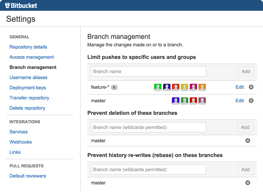
Mainly for our networking product. Benefits is that I don't break anything by directly committing to the main branch. So, its so much better when I can always branch off of the main and work, try as many things as possible without worrying about any functionality broken for any other developer.
Very good "Get started" tuttorial, easy to follow. Understandable, self explanatory user interface Online file edit Free pipeline minutes
Hard to tell, so far I am still in discovery mode, I like what I see so far.
Continuous Integration, Continuous delivery
I love this repository web, it allow us management our code without cost
Some features of the repository only are for customers that pay
We put some project in this repository, because we have some co-worker out of the office and this allow us worked with them
Pipelines - integrated CI on every commit. They're adding features every month, and asking for feedback along the way. Other tools are out there, but the UI is simple, intuitive and gives us the feedback we need. Looking forward to new features...
Missing some key features, like test tracking, but hopefully those are coming soon.
Easy to manage our git repositories and get feedback on our code changes as they happen across the team. Integrates well with Jira...

Unlimited free private repositories. This really helps for young startups and private users get going and eventually, as needs progress, start using more of the premium features at a very reasonable price.
There isn't much to dislike really apart from one UX issue that bothers me. I am unable to view the code from a certain point in history. It is possible through an unofficial way - there is no proper way embedded in the UI/UX. Apart from this, it is all spot on.
Bitbucket allows me, as a professional developer, to version control and store all my code in repositories hosted online that I can work on from anywhere in the world. I am still a "free" user and this is totally because Bitbucket offers so much to free users.
Amazing tools for managing code review and branch management. In addition, although this is more company-based than product, the Atlassian dev blog is a fantastic resource for learning about proper git flow and project management. In addition, Bitbucket has unlimited private repos, which are necessary as my team works on closed-source code.
Minor gripes I have: - new UI; I prefer horizontal menu bars, but this is really just personal preference. - All commits made on the web client itself do not follow the git best practice of using present imperative tense + mood. - Going to a new repository always takes you to the source code first rather than an overview, which doesn't have the URI for cloning. An extra, unnecessary step that can be easily avoided.
Bitbucket provides a central remote repository to host code versioned using git. In addition, Bitbucket provides a suite of tools for code review and management via branches and Pull Requests.
Free account for small teams/startups with almost all benefits of standard version. You can start small and expand as you grow. Very attractive pricing plan and intuitive UI. Build in wiki and issue tracker, excellent user management and you can log in using your google account. You can chose between on premises (Bitbucket Server) and cloud version.
I actually can't find important to dislike about this product. It's just what i was looking for. Like with all version control software conflicts resolution could be improved.
Version control, issue tracking and knowledge base for big commercial project in huge company and small startup ideas shared between friends.
I love the newly added feature of automatic testing (pipelines). Cuts down time wasting significantly.
Pull requests could be a bit faster/easier to access/create.
Mostly issues with wasting a lot of time on testing, with pipelines we can run tests automatically.
As a small web development firm with many small, independent projects the pricing (FREE) simply can't be beat when comparing to other alternatives that charge per user or per repository.
The UI isn't as intuitive as some other providers, though Atlassian has made big improvements in the product interface and workflow recently.
We use BitBucket as a central repository for all website themes that we develop. It keeps us organized, makes collaboration among multiple developers easy, and helps restore important data when disaster strikes.
Works well with git and Jira, links commit from git/Sourcetree based on comments (where branch name is included). Code repository management with good UI, creating branches is easy
It a well worked tool, nothing to dislike
Develop software for electronic assembly machine in team
Bitbucket is a great tool for having a place that collects assets, docs, images etc for my design career. The person accessing the repo can easily stay up to date with collections and overall it acts like a source of truth
I dislike the interface a bit, could use some enhancements. Sometimes it gets confusing, could use a breadcrumb navigation.
All of our projects have a reposition and we keep assets and files organized!
Being part of the Atlassian product family, Bitbucket has access to and works seamlessly well with their other developer focused tools, such as JIRA, and Bamboo. This means, an organization or team can sign up with the Atlassian stack and have an end to end tool chain, and developer experience, without having to look else where, and do patch work to make different parts of their workflow work together. For example, you can use JIRA for issue tracking, check in codes into Bitbucket with references to JIRA issues, so you can easily see what commits are related to which issue, and then build/deploy with Bamboo, with your build/deploy plans referencing Bitbucket commits, JIRA issues and releases. And for bonus point, you can federate all your user identities with their Crowd offering. This complete tool chain and end to end experience is what gives Bitbucket the edge over other competing products. Of course, Bitbucket itself is a solid product, with support for both Cloud and on-prem deployment options. Again, this is where the rest of the Atlassian stack comes in, as those applications also support Cloud and on-prem (with exception to Bamboo, which is being replaced by Bitbucket pipeline). Bitbucket also has very friendly licensing terms for "casual developers" that are just looking for affordable code repository services, as you can use Bitbucket for free, and have private repos, something competing offerings do not have.
As a code repository, there really isn't a lot of downsides to use Bitbucket, especially if you are already using Atlassian products for your development. However, there are a few things to keep in mind: * there are some differences between the Cloud and on-prem offerings, especially when it comes to 3rd party add-ons, so do your homework when choosing which route to take. * GitHub is still the #1 place for hosting public (open source) projects, and many developers tend to be more familiar with it and its tool chain, so if you want to start an open source project, you may need to take that into consideration. * It's tool chain with JIRA (issues), Confluence (wiki), etc, is more advanced and powerful, but also more involved, unlike its main competitor GitHub, which is more simplistic but also easier to use. So it really comes down to your use case, e.g. if it is for personal or enterprise, what you already have as part of your tool chain.
Mainly using it as a Git code repository for all of our projects, integrated with Atlassian JIRA, Confluence, and Bamboo to have an end to end automated develop/build/release/deploy process.
The UI for Bitbucket is great, and is exceptionally easy to use. Alllied with the ability to create Pull Requests for Peer Reviews, and branch your code, along with new features like Pipelines and now the ability to Search your code repository, this just getting better each year
Haven't found anything that I dislike at the minute
Using Bitbucket as a code repository and performing code reviews. We also use Bitbucket with our Continuous Integration tools also
BitBucket's new pipelines allows us to run out CI directly from bitbucket
Integration with the app Source Tree is flakey
Hosted git repositories

It's cheap, very cheap that's the best advantage of bitbucket, and it does what It's needed, they have been working hard on the new things and I believe they are improving.
It's not as good as github the way to handle comments on PR, tags and other integrations are really needed, that's one of the biggest disadvantages of bitbucket
For me it has been a very great tool based on the cost and the way to manage teams, it is a good product but with a lot of missing features that the competence has.
Easy to use and great features. Very good integrations with Jira. Interaction with my teams also are easy.
It's something has problems with the servers and impossible to reach. But did not happen as much lately.
Code review, deploying my apps and working with jira and bitbucket saves a lot of time.
The best part of Bitbucket is their free, or basic, tier. It allows for private repositories at a smaller scale, whereas Github charges you for any private repository. It's just as easy to use as Github is, albeit with less of a following. Additionally, if you have other Atlassian products, they can all live under one login.
Sometimes it's a little hard to navigate to where you want to go. However, they totally redid their interface recently and it could alleviate such problems. I use Gitbox to interface with my repos, so it's been awhile since I logged in.
I use Bitbucket for all my personal or client projects under my business name. Since I'm mostly the primary developer on all these projects, I can host all of them for free.
Very easy to use, great way of creating several repositories/branches to collaborate across team members
Nothing specific on bitbucket, sometimes git in general can be a bit arcane
Version control, product management

The graphical interpretation of branches.
Some of the explanations can become confusing.
Mostly solving processes and multiple users. also version control.
When I evaluated options, BitBucket provided the best solution for private projects and was more economical than Github.
Community and 3rd party integrations are not as strong as Github, if that happens to be important to you.
Modern version control for private code repositories.

It is free and fits all my needs for small teams up to 5 developers, not like Github which doesn't have private repos for small teams free.
Its UI isn't very interesting like Github or Gitlab
Building mobile and web apps. Hosting all our repos for free on bitbucket.

Bitbucket has a great service, they offer private repositories for free, the posibilities to create teams, clone repositories, git or svn technologie and more. Just signin and you have al benefits. You can use your Gmail account to login and go ahead. There is no limitations on the service this time. I hostesd around 6 or 7 private projects without restrictions and have code backups, versioning, documentation and all its beneffits. Thats all.
Unique useless is the windows client, ok they have source tree, but is too difficult to use to create a repository with a folder on my computer. First need to create a project on web, later clone with windows client, then add the initial content and commit it. Otherwise it doesn´t upload local repository to cloud.
I can work in teams in our small projects with 0 cost. We can work in different seccions of the project and syncronize with repository, not need to have local servers or svn/git implementations. There is no limitations to the service at this time. I hostesd around 6 or 7 private projects without use restrictions.
Free Private Repos are awesome and the collaboration tools make working in teams a breeze.
The public pages for repos could use some UI changes.
Hosting git repos. Good alternative to GitHub for smaller teams.
I like the easily readable user interface, and how you can analyse your code and the people working on it every step of the way. integrates with JIRA nicely you can embed links to JIRA tickets when doing commits, which also notifies you of changes via email.
Sometimes differentiating between bitbucket, JIRA, and Confluence and what context I'm in when navigating is a bit unclear to me.
Software versioning helps multiple teams efficiently collaborate on projects.

Bitbucket is the way to go for private hosting of git repos. For most scenarios, It's more affordable than Github. The features tend to be more focused on project work other open source development and it meets the needs of our client projects in every way. Additional features like Pipelines make it even more indispensible.
They do seem to have disruptions to parts of the service once every month or two. Occasionally access is slow.
Moving all our git repos to Bitbucket was the next logical step for code management after leaving SVN behind. Bitbucket has met all our needs.
A find very useful the fact that BitBucket provides unlimited private repositories, five team members, issues tracking and organization of repositories in projects all for free. It also integrates with other Atlassian's software as Jira, what allows to make a complete control and tracking of user stories, bug, tasks and other types of issues.
Although BitBucket is a great tool, it would very nice if you it social functionalities had more attention. Besides that a found very difficult to say something a dislike.
We have been using BitBucket in ours projects and it has been a helpful tool for a startup environment, allowing us to use free access as a small team with top functionalities available like private repositories e Jira integration.
I think appreciate that Bitbucket is a cloud based git repo. It has all of the standard git features.
I don't see or understand the differentiating factor from GitLab, or GitHub.
We are in an Agile software development lifecycle. We must keep track of all revisions for a geographically distributed team.
Bitbucket is inexpensive and provides an easy to use interface for viewing and tracking code changes between team members on the web.
Sometimes it's difficult to view specific files within a branch when navigating from commit history. It can also be challenging to assign roles and permissions to team members within organizations.
We're able to create repositories for using version control online at a very low price.

BitBucket is super flexbile and informative regarding its intake and presentation of the code involved in a repository. Often I have found BitBucket's interface to be the best path for researching various meta data about code commits, developer comments, and other tidbits of information that I needed at a particular time. Everything about BitBucket works swimmingly well.
I haven't found anything about BitBucket to dislike! I often do use it in coordination with SourceTree and other Atlassian products, and I have really liked each product I have used recently.
BitBuckets works well for a hosted repository that has to be private (i.e. not in the public view, since we are working on private, commerical code) and shared among a dev team. We have used it for several projects and it has really delivered. It makes our workflow smooth.