

Unclaimed: Are you working at Bitbucket?
Bitbucket Reviews: 4.4/5 — Solid Choice
Bitbucket is a cloud-based version control platform for developers who want to collaborate on code as well as manage software projects. The software supports tools that focus on team collaboration through review tools, issue tracking, and continuous integration.

| Capabilities |
API
CLI
|
|---|---|
| Segment |
Small Business
Mid Market
Enterprise
|
| Deployment | Cloud / SaaS / Web-Based, Desktop Mac, Desktop Windows, On-Premise Linux, On-Premise Windows |
| Training | Documentation |
| Languages | English |

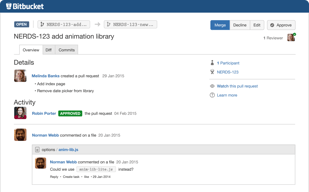
Compare Bitbucket with other popular tools in the same category.

clear and understandable interface.reliable code management software. bitbucket can run any servers, integration with jira, high security for source codes.
difficult work with repositories and branches .cost is higher. difficult to understand architecture of bitbucket
source code conflict problem is solved with this software
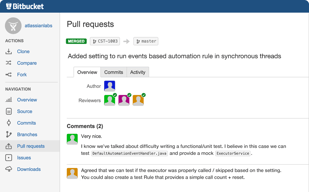
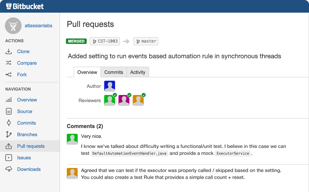
Easily traceable all changes with very smart way of GUI and can submit for reviews in form of pull requests before checking in to any branch
There is nothing dislike actually. Only thing I do not know much is difference between Github and Bitbucket
Better code reviews, Easily creation of branches, tag creation for prod version
Usage of BitBucket won't be a troublesome endeavor .in the unlikely event that we seek after the documentations and course, we can without a doubt realize the stage
Sometimes it's difficult to create the new team members that used to work with other tools
easy to clone repository for another pc
Bitbucket is a very usefull for maintain many git projects, control permission of each user in the repositories, show all changes with a timeline to follow all histoy of changes.
Very limited integrations for git clients.
A project in java language where we followed up with Bitbucket.
Enterprise version can be hosted internally in the company. Github does not offer that Similar to github in sense of available features, very easy switch form git to bitbucket
To access to certain features like, snippets, a separate plugins need to be added
Bitbucket is a great solution for source code management that can be hosted internally, which allows the company to have more control of the data.
Branching is a great feature of BitBucket. It enables easy development and version control of multiple Sprints if you use Agile methodology. It is better than other Version control systems in the market.
When file versions have conflict, Merging files in command prompt (or) Sourcetree - is a nightmare. IntelliJ smart merge option is a saver for this problem.
Source code Repository and Version Control system for the code base.
- Much simpler to navigate then gitlab - Integrates extremely well with out other existing atlassian products (bamboo, jira, confluence)
Although I can't think of that many negatives it would have been nice to have more vendored support for puppetization rather than having to rely on 3rd party modules.
Migrating existing svn projects over to git.
1. Mobile version of bitbucket is nice. Easy to navigate. 2. Difference between two branches is much better than github.
Side by side difference between branches is slow to scroll/navigate.
We use bitbucket to host our code. And, it has all our repositories and it boosts our code reviewing.
Bitbucket is very easy to use software service. The best part is that it allows having a private repo with up to 5 people inside. This is a very good feature for startups and small teams to have code under the private repository. With bitbucket the code review process is very easy, you can write comments make changes right inside the pull request or commit. It also has all integrations with other Atlassian's software which can save a lot of time. Once your project up and running with more people (more than 5) the price is very affordable.
I have been using bitbucket for 3-5 years and so far there are no points which I dislike. The only thing is that the service becomes down for a few minutes and this is really frustrating as no code or commands can be deployed. And another point is that the repo has 2gb size limit but I don't think this is a case as it supposed to store only code and note media files.
Nowadays when the project consists of many people there is no way to work on the code by one. The whole team work on the project and bitbucket gives the ability to control the code flow and the software versioning. It has all the tools which make the development process very easy and smooth. BitBucket allows us to have private repos with very easy to use interface. And in case you are working on a small project with a team up to 5 people you don't need to pay anything.
The UI is the best feature. Love that it is easy to navigate and create pull and push requests. The files are organized and can be easily viewed
Would be better if there is a command line interfacing as well. This will help to just enter git commands in the UI and push/pull requests.
Code review and code commit
Bitbucket provides you with both public and private repositories for free. You can create a remote git repo on bitbucket and then pull and push code using git to it. Its integrations are available for all leading cloudplatforms. Its branching model makes the source code management an easy task. Its access control method are also very effective in order to control the access to your code. You can invite other developers to collaborate with you.
Personally, i do not like its user interface, it is not very intuitive, and appeals to the user.
we manage our source code using Bitbucket.
Bitbucket is the next step on version control systems and much better than solutions like CVS o SVN. Bitbucket web interface is outstanding. It allows user to easily review the different repositories, look each repository branches status, relationships and differences. The network view on the repositories is really useful to see the history of changes, merges and branches of a repository. The option to launch and review pull requests from the web UI improves team code review, allowing developers to adopt good programming practices in a shortest time period. The connection of Bitbucket with JIRA really boosts software development having both the product backlog and the version control repository connected in a seamlessly and straightforward way.
Based on my experience with Bitbucket so far, there are no disadvantages on using it.
Bitbucket increases productivity and improves quality on software projects with developments teams with more than 3 people.
The main advantage of this platform is the possibility to create an unlimited number of private repositories without any cost (up to 5 collaborators for each repository). In Github, the most used GIT platform you can only create public repositories in the free plan (although there's no limit of collaborators). Moreover, it is intuitive, has a lot of additional services and supports both GIT and Mercurial. I also like the Trello boards integration.
The only meaningful limitation is the number of collaborators per repository, but I think that is fair. If you work with a bigger team you can buy one of the paid plans.
I use this platform to store several work and personal projects, and I think it's a safe and useful platform. A good alternative to GitHub.
I like it's ease of use and security features to allow/disallow people or groups from viewing or creating repositories. Jira integration is also useful.
No integration with heroku and zendesk.
Source control and code backup/reuse.
The integration with JIRA has been amazing for us. Being able to provide full a audit trail for our commits and PR's to tickets has helped us stay on top of where we're up to in our sprints. The PR system is super intuitive and allows for us to have in depth discussions on single lines of code or the whole commit.
Bitbucket has been known to have stability issues. I'd say on average at least once every few months we lose the ability to push code to bitbucket.
The ability for us to provide seamless links between JIRA issues and Bitbucket commits has been a huge help for us.
The interface is simple and easy to navigate. It can be implemented with other software, like Slack to help with communication.
BitBucket is not used with every git resource, such that it can be difficult to use off the web.
We use BitBucket to host our code and collaborate on projects. It is easy to use and can be implemented similar to GitHub.
Not provided
Not provided
Not provided
The tool is also based on Git protocol and you'll feel just at home if you are experienced with Github or similar VCS systems. The GUI tool provided by Atlassian Sourcetree is a quality product and is quite similar in functionality to Github Desktop client.
The 5 user limit could be increased to a 10 thought that can't be considered a downside when compared to the features provided by Bitbucket.
Startups or non-profit software firms in need of a private DVCS system can benefit highly from this tool.
I like the handiness of this tool. It is pretty much free or cheap depends on business need and usage. It is integrated with GIT that is one of the best thing on this GUI tool.
sometimes, I personally feel that the UI of this tool is not much faster. If we do operations from GIT bash , it is pretty much fast. managing whole repository from UI is sometimes timetaking and messy.
We integrated our source code control versioning on this. acting like repository.
Bitbucket is easy to use with git, has a great dashboard to show you activity in your repositories and is more friendly to private repositories than other competitor offerings.
As it is not as ubiquitous as certain competitor offerings, it can be more time consuming to find resources for specific problems. Realistically, this isn't a big issue as the documentation still exists. I would also say that some of the plugins for IDE's don't feel as polished, but I think these are partially community contributions so not something to fault Bitbucket for.
Small project source control for teams that are not devoted to development activities generally and we do not want to license for TFS.
I like its seamless integration with Git and svn. The UI is pretty neat with easy to navigate and learn for first time users
It could have better integrations with other software. Also the pricing is high when using it for teams
Software repository hosting for all the development that we do in the company. It has good integrations with other atlassian products

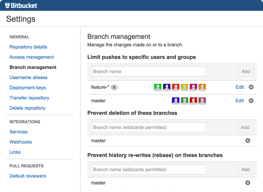
I like that you have a web app that can be used for code reviews, it helps to improve the quality of our code. I also like the way to manage permissions and set different groups.
I would like to have a mobile app to manage pull requests and to create new repos on the way.
Code versioning and code quality.
The better way to provide granular access monitoring for our team, ensuring the right user can make the correct changes to our code. Also, I like that I can save time combing via application results with a semantic search that ranks determination first.
I can't say that this program is not strong enough. During the working time, I never have a problem with this. To manage all of the stuff is easy and does not have any bad issues.
This program gives us the assurance to develop. We can decrease our mistakes and keep the team lean working on critic tasks. Also, we have the ability to store and control our create configurations in a single file.

Excellent integration with Git. It is possible to use Git Large File Storage if you have large assets or data bases. Good opportunities for monitoring rights and administration. There is the possibility of integration with many services to facilitate the development process, for example we use integration with Trello. Excellent documentation, if we had problems we easily found the solution in it.
No small price if you have a large development team, but if you are a beginner startup there is a free version of up to five people. Sometimes there are problems in the operation of servers.
In our company there are remote offices. Bitbucket helps us to work with them. Exchange code has become simple.
Free, unlimited private git repository for company.
Bitbucket could improve for people to share their code like github.
We use bitbucket to save our analytic platform code.
Bitbucket works simply, has a clear interface and many functions that we use every day. In addition, a lot of integration with different services, branched out the structure of files, which, compared to others, greatly simplifies and speeds up the work. Has a free trial, which is ideal for a start-up or small business.
I'm glad that I don't see any bad issues about that platform. Maybe time to time process can be slow but it is not a big deal as all product wor well. By the way all of the help from support service you can get online which is save your time.
Bitbucket is a tool that provides us with an excellent online repository for visualizing and sharing information with my team. This gives us the key to effective work that will help us work for our results. We are happy, and we are sure that Bitbucket is created for this.
It is intuitive, has a nice looking interface.
Some icons are not very self explanatory.
Code review management and version control.
Ease of use. Code development with multiple developers is easy
Occupies more space as it creates copies of the repository
Using it as source code repository. Can verify what is in qa, production and development
Ease of use. Ability to share code remotely with developers and partners.
Nothing, bitbucket works well as our version control system.
Bitbucket acts as our distributed source code version control system.
I like the fact that i can create private repositories for free and it also supports mercurial
Most of the tools are not coupled together, I have to authorize my account before I can use the jira board for example.
I use it for code collaboration, mostly private repositories. I also use it for continuous integration and since it has jira board, I use it for agile methodology.