

Unclaimed: Are you working at Box?
Box Reviews: 4.2/5 — Solid Choice
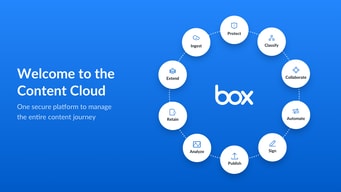
Box is a file-sharing and content management platform that runs on the cloud. The platform lets users store, share, and collaborate on files, regardless of where they are, through the use of workflow automation, security controls, and various integrations with business applications. Using Box, businesses can help their teams streamline internal processes and boost team productivity.


| Capabilities |
AI
API
|
|---|---|
| Segment |
Small Business
Mid Market
Enterprise
|
| Deployment | Cloud / SaaS / Web-Based, Desktop Mac, Desktop Windows, Mobile Android, Mobile iPad, Mobile iPhone |
| Training | Documentation |
| Languages | English |

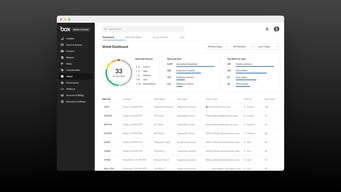
Compare Box with other popular tools in the same category.
i went through the whole demo and talked to the rep. it is easy to use.
so far i am concern the removal of files.
sharing files easilty
simple interface. Easy to use for some things, easy to share with external clients. Their new Edit docs feature is pretty good.
Clunky folder structures, clunky integration with SFDC, clunky user and permission management
Document storage and collaboration.
Easy to add documents & edit them. Cloud makes it available anywhere any time.
As a test we tried using this for a week-long class in which employees had to develop group projects. Most seemed confused and some documents "disappeared". We decided to look elsewhere - at least for now.
Not provided
I am using business account, it is easy to manage file sharing.
Boxsync sometimes has trouble. Sometimes unexpected file deletion is occurred. Personal account there is not encryption for connection. Enterprise license is very expensive for me.
Not provided

It's functional as an occasional-use FTP site for clients or colleagues who use it.
Uncommon use and not as robust or feature-rich as Dropbox or OneDrive.
Using Box helps me meet the occasional needs of clients or colleagues.
BOX allows us to store files on a cloud server, with easy, instant access worldwide, including support on mobile devices and desktop access. Our business account has infinite storage, so there is no worry about running out or upgrading space. The interface is easy to understand, and most users adapt very quickly.
Box has waterfall permissions for files, which you should be sure that you understand before signing up. You cannot restrict files within a folder that someone can access at a higher level. Waterfall permissions can make file organization a bit tricky. Also, ad-ons to BOX are very pricey. BOX advertises all this awesome stuff you can do, but you don't realize that a lot of it is costly add-on until later. Once you activate the ad-on, there is no trial period. You are stuck paying for it for a year, even if the ad-on doesn't work for you. Finally, I feel like BOX caters to huge organizations more than small businesses.
We used to have an FTP server which you could only upload and download things, not manipulate files. It was a time-sucker. Once we expanded clients, it wasn't too usable. All the rest of the company files were stored on a local server, and remote desktop access could only be used by one person at a time and would always go down. It was a mess! BOX changed everything, with instant access 24/7 to all the files, no matter who needs it. I can also access everything on the go, which is crucial, I'm not tied to a home desktop system. BOX can also update you when someone comments or uploads things, so you get a lot of oversight about what is happening with your files (if you can keep up with it!) BOX is pretty versatile, and with the function, I don't have any complaints. I just wish we knew more about how it worked before going "all in." ONce you are "all in," getting out is a big leap.
Box is a great way to share large files between our company and the client.
Once my email was associated with one client, I could not log into the box account another client created for us. I have reached out to various IT departments, but the issue does not seem to be easily resolved.
We work with a lot of larger files that cannot easily be sent via email. Box enables us to easily send larger files to our clients.
It allows me to share files with others as needed
The UI feels clunky and unintuitive, generally
Sharing files between various colleagues
Easy to share the link. No issues with outside parties
Not an agile system. Might need some updates in User interface and functionality
Share large files
I like that everything was cloud based and usually could be accessed.
There were regular issues with document’s appearing where they should be. Frequently error codes with trying to access items.
A space to share info with a large group
This provides 10 gb of free online individual storage
This won't allow free users to upload bigger files like video.
Access anywhere for documents which is smaller in size. therefore it is recommended that you only store files which is important to you.
I used to like the fact I had plenty of cloud storage with file versioning.
It all went very well until I had a hard drive failure and needed to replace my hard drive, only to discover that after a hard drive replacement I would need to re-download dozens of Gb because the app was unable to simply ACCEPT the content was already in my new drive. The staff wasn't helpful at all and blamed ME for now knowing how to use the app - I'm more tech-savvy than them though, so that didn't quite work. Box became now only a second backup - in case Dropbox or Onedrive fail to do their jobs, which I doubt.
I had plenty of cloud storage with file versioning, which was helpful when working with large image and video files. It also integrates well with a variety of other digital tools.
That it’s easy to upload share and download. There are apps for both operating devices making it easy to use and install on phones and laptops
It’s hard to set up and grant access to different sites. Passwords don’t usually Work and the app has problems loading database
That you need to use google chrome instead of safari, Firefox works , however apple operating systems give troubles
Searchability, extensive archiving power
Slow and occasionally glitchy with large uploads
Easy to password protect files and pass them along to others
What I like the most is the ability to control who has access to different files.
Unless you set up your personal computer with Box Sync (which has to be done separately on every computer you work with, even if it's under the same log in), you have to log in to Box each time to access the stored files. I've found it almost impossible to work in Excel Online to edit my documents (which are primarily spreadsheets) and have to export them out to Excel proper in order to work in them; this option isn't available on every computer in our department, so I'm limited in where I can do the work. I've also found that spreadsheets that are linked (i.e., changes in one spreadsheet affect the data in another) do not have the same settings when those files are stored in Box. In that case, it requires making the same changes in multiple spreadsheets in order to make sure the data matches across file locations.
I haven't seen any benefits from storing our files in Box. It was a required move by my employer as they wanted to get rid of the shared drive used by my department.

Box provides the basic features needed for enterprises in terms of storage and file sharing. Simple for simple tasks and does an adequate job for those tasks.
Box is advertised as a enterprise solution for the growing need of cloud storage in many companies. However from my experience the promise falls short especially in comparison to rivals such as dropbox and google drive. Aside from basic cloud storage Box under delivers on its other features. File sharing and collaboration features make the user question if the technology is still in the beta phases. There have been multiple occasions where I have used box desktop to save files to the cloud and then these files would simply disappear.
I have been trying to use Box over the past 3 years for many consulting projects. More specifically as a repository to store files and a place for to edit documents/presentations. Box was able to fulfill the first aspect of my needs in terms of storage. However my experience has been poor in coordinating team edits on stored. files.
Control is pretty good. You can assign who can view and edit files.
Not all versions of eXcell are compatible. this created very dilapitated views of the control .
file sharing and multiple users at one time.
Adequate space, real-time collaborative editing, nice security, clear interface
Derivative of Dropbox without clear uniqueness of approach or branding.
Excel editing options across users. Benefits of low errors and crashes.
Online file and document sharing, easy access for multiple users
Error prone when downloading files (excel, in my experience). Not always reliable
finance documents, SOX testing, sharing with external auditors
I like that you can connect people with the information they need. We use box to share and collaborate on documents that we need to do our day to day operations.
I do not like the identification process I have to go through every time. I have the box saved in my bookmarks bar, and every time I have to confirm the group I am with and log in.
Easy collaboration is a must in today's world. However, I personally do not think that box fits a niche that is not already taken by other, better software
Box is like a higher security DropBox, so it has similar functionality. You can replace files, edit in your browser, etc.
It takes a lot of security hoops to get in, and your access expires after 90 days. It's not super flexible.
I used Box to collaborate with a client whose security settings wouldn't let us use Dropbox or Google drive.
I like the fact that you can log on on multiple computers and see your items
I think it is more difficult to use than OneDrive or Google Drive
Sharing documents with a large team
I like that you are able to upload revisions to the same already-shared link and have the link update without having to resend it. It is very helpful to have a reliable system where I can share large files both within my company and externally.
I dislike that links expire without warning or email notification and you cannot organize your folder in any understandable way! I wish that the user experience were better, and I wish that we could change certain settings. I also wish that you would receive several alerts either via email, text, or some other form of communication about how long you have until your file gets deleted. I understand why Box deletes folders and files after a certain amount of time, but I wish that it would be more transparent about the timeline and reasoning each time you upload a file. I also think that it would be beneficial if there were a setting that allowed you to prohibit Box from deleting certain files. There are certain links that I would like to revisit but they have expired, which is frustrating considering that the app is meant to save you space on your computer, but it essentially requires me to download each file that someone sends me so that I don't lose it eventually.
Box allows me to send large powerpoint files that I otherwise wouldn't be able to send. It is really helpful in terms of sharing these files that I need to share, and even with files that are shareable by email, Box loads them much more quickly than my Microsoft Outlook would load them.
Customized for our organization and great files sharing tool
could be faster and more streamlined, speed is an issue
file sharing and data management
The web design is good as well as it is easy to find all that it offers on its page.
It should 've been free for what you get. Poor cuatomer service and limited storage. I don't even own a business and I cannot store everything I need and it is relatively not alot.
For the sharing of much needed information and files.
I liked the option to be able to encrypt a file upon sending, and the recipient could decrypt it before using. It felt like a safe, good option for file sharing.
I could never actually figure out how to work the encryption! It was such a headache. My coworker and I tried multiple methods, looked on Box's faq's for answers, and failed every time. Eventually after several failed attempts and frustration, we gave up and used a better system.
While encryption didn't work for me and my workplace, I think it is a great feature for those who are perhaps more tech savvy than me. Just for the record- I actually think I'm moderately tech savvy though, so I don't know.
Easy to drag and drop files. No storage limits
Trying to store files that contain macros can give you trouble
Storage solutions and collaborations
I like the option for collaboration and storing documents
On the downside it doesn’t let team members make real time updates like google docs allows so this is a major downside
Allowing people collaborate without large email threads and holds documents in one place
easy to use and pretty straightforward - user friendly
not easy to connect to other systems and nothing too special that i cant find in other software
document sharing, convenience
Ease of use- you can upload and download files easily.
Every user must have an account. This makes it very difficult and not user friendly. Google drive lets you get around that. With box- you cannot share files unless the other user also has an account.
Sharing documents. Unfortunately, it is not possible to share documents with outside users unless they have an account.