

Unclaimed: Are you working at BugHerd?
BugHerd Reviews: 4.8/5 — Highly Rated
BugHerd is a visual feedback tool for websites. Pin stakeholder feedback & track bugs directly on web pages. Loved by thousands of great teams worldwide to manage website projects.

| Capabilities |
API
|
|---|---|
| Segment |
Small Business
Mid Market
Enterprise
|
| Deployment | Cloud / SaaS / Web-Based, Mobile iPad, Mobile iPhone |
| Support | 24/7 (Live rep), Chat, Email/Help Desk, FAQs/Forum, Knowledge Base, Phone Support |
| Training | Documentation |
| Languages | English |


BugHerd’s “2 MONTHS FREE” badge is exactly true — $50 a month becomes $500 a year, $80 becomes $800, $150 becomes $1,500, and even the seat add-on obeys it. Every plan saves precisely two months, which almost no vendor manages. The thing to check instead is the feature table. Jira, Asana, Linear, ClickUp, Monday.com and Teamwork all require Premium at $1,500 a year — three times the entry price — as does almost everything BugHerd does with clients.
- What it is: A visual feedback and bug tracking tool — pin comments directly onto live websites, Figma files, PDFs and images.
- Best for: Agencies collecting client feedback, once they are on Premium.
- Pricing: $42–$125 a month billed yearly, for 5–25 members. Verified July 2026.
- The honest catch: No SSO or uptime SLA on any published plan, Premium included.
What Is BugHerd?
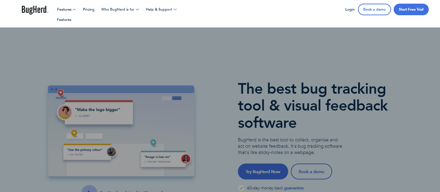
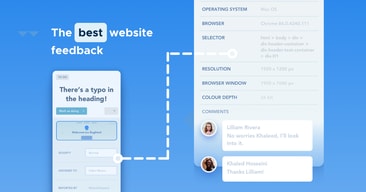
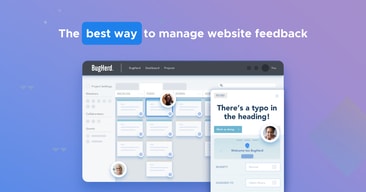
BugHerd is a visual feedback tool. A one-line JavaScript tag (or a browser extension) lets clients and colleagues pin comments directly onto a live web page; BugHerd captures a screenshot plus browser, OS and selector metadata, and files it as a task on a kanban board. Feedback also works on Figma designs, PDFs and images, with video feedback and suggested text edits.
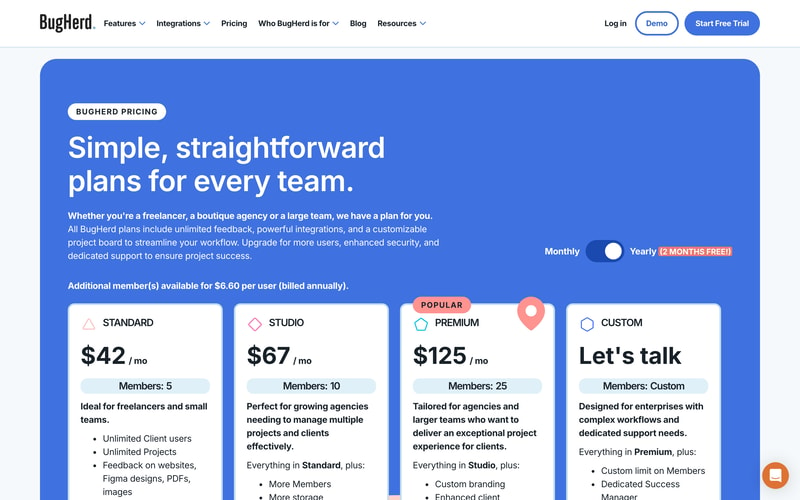
Client users are unlimited on every plan — you pay only for internal members.
How BugHerd Works
- Priced by member, in bands of 5, 10 and 25.
- Unlimited clients and projects on every tier.
- Extra members cost $80 a year each.
- Integrations split sharply at Premium.
- Two months free on yearly, exactly.
- 60-day money-back guarantee.
BugHerd Pricing
Captured from BugHerd’s pricing page in July 2026 in US dollars, reading both billing toggles and the full comparison table.
| Plan | Monthly | Billed yearly | Yearly total | Members | Storage |
|---|---|---|---|---|---|
| Standard | $50 | $42 | $500 | 5 | 10 GB |
| Studio | $80 | $67 | $800 | 10 | 25 GB |
| Premium | $150 | $125 | $1,500 | 25 | 50 GB |
| Custom | — | Quoted | — | Custom | Unlimited |
| Extra member | $8 | $6.60 | $80 | — | — |
| Derived | Standard | Studio | Premium |
|---|---|---|---|
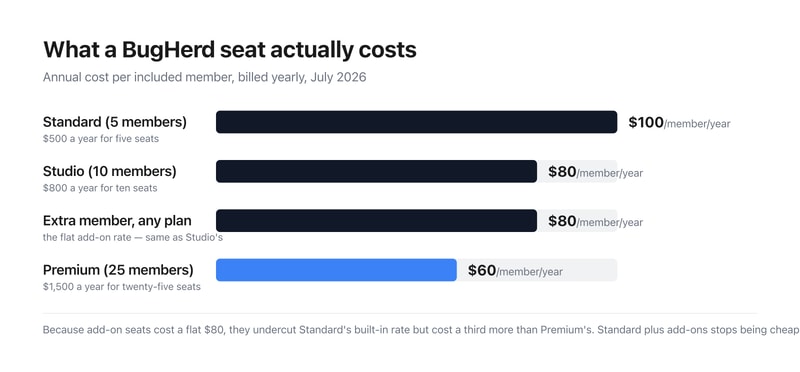
| Cost per member per year | $100 | $80 | $60 |
| Yearly saving vs monthly | $100 | $160 | $300 |
| As months free | 2.0 | 2.0 | 2.0 |
| Jira / Asana / Linear / ClickUp | ❌ | ❌ | ✅ |
| Client-facing features (of 6) | 1 | 1 | 6 |
What actually decides your cost:
- The “2 MONTHS FREE” claim is exact on every line, which is genuinely uncommon. Standard is $50 monthly and $500 yearly — twelve months at $50 is $600, so the saving is $100, precisely two months. Studio saves $160 on $80 a month; Premium saves $300 on $150; and the seat add-on saves $16 on $8. All four are exactly 2.0 months. Across this review series, “save 2 months” claims usually resolve to 1.7 or 1.8. BugHerd’s resolves to 2.0 four times out of four.
- Jira, Asana, Linear, ClickUp, Monday.com and Teamwork are Premium-only. Standard and Studio get thirteen integrations — Slack, Teams, Zapier, Make, GitHub, Trello, FullStory, LogRocket, Harvest and others — but the six gated ones are precisely the project trackers most engineering and agency teams already run. For a bug-tracking tool, not syncing to Jira until $1,500 a year is the single most consequential line on the page. Check your stack against that list before pricing anything else.
- Almost every client-facing feature also requires Premium. BugHerd’s whole pitch is client collaboration, and “Unlimited Client users” appears on every plan — but of the six features in the page’s own “Client experience” section, Standard and Studio have exactly one: pausing new feedback. Clients seeing each other’s feedback, clients seeing member feedback, member-only commenting, a client task board and scheduling a feedback deadline are all Premium and above. An agency buying Standard “for freelancers and small teams” gets the annotation tool but not the client workflow around it.
- Extra seats are a flat $80 a year, which is good value on Standard and poor on Premium. Included seats work out at $100 a year on Standard, $80 on Studio and $60 on Premium. Because the add-on rate is fixed at $80, it undercuts Standard’s own rate by 20% and exceeds Premium’s by a third. The crossovers are clean: Standard plus add-ons costs less than Studio up to 8 members and more from 9; Studio plus add-ons beats Premium to 18 members and loses from 19. Feature needs will usually force Premium well before 19, but if seats alone are driving the decision, those are the two numbers.
- No published plan includes SSO or an uptime SLA — not even Premium. Single sign-on, a 99.9% uptime SLA, a dedicated success manager and onboarding support are all marked available only on Custom, the quoted enterprise tier. So a team paying $1,500 a year still has to make a sales call to get SSO, which is worth knowing if your security review requires it.
- The seat add-on is quoted at two slightly different prices. The header says ”$6.60 per user (billed annually)” while the calculator lower down says ”$80/year for each additional user”. Twelve months at $6.60 is $79.20, not $80. The gap is 80 cents a year and clearly a rounding artefact rather than anything sharp — but if you are modelling fifty extra seats, use $80.
- Everything about feedback capture is on the cheapest plan. All eight feedback features — screenshot capture with technical metadata, annotation, Figma, PDF and image feedback, suggested text edits, video feedback and the public widget — are ticked on all four tiers, as are unlimited projects and unlimited client users. The gating is entirely about who else can see the feedback and where it goes, not about collecting it.
Who Should Use BugHerd
- Agencies running client review cycles. The clearest case — but budget for Premium, where the client features live.
- Teams whose tracker is Trello, GitHub or Slack. Fully supported from Standard at $42 a month.
- Freelancers wanting unlimited client seats. Five members and unlimited clients for $500 a year.
- Non-technical stakeholders. Pinning feedback on a live page needs no training.
It fits poorly for teams on Jira, Asana, Linear or ClickUp who cannot justify Premium; for organisations that mandate SSO, which requires a quote; and for solo users, since the smallest plan is five seats.
Honest Pros and Cons
Strengths
- “2 months free” is exactly two months, on all four prices.
- Unlimited client users and projects on every plan.
- All feedback features on the cheapest tier.
- 60-day money-back guarantee — double the usual.
- Extra seats at a flat $80 a year.
- Data export via CSV, XML, JSON and API on all plans.
Limitations
- Jira, Asana, Linear, ClickUp and Monday.com need Premium.
- Five of six client features need Premium.
- No SSO or SLA on any published plan.
- Custom branding is Premium-only.
- Add-on seats cost a third more than Premium’s built-in rate.
- Two different figures for the same add-on seat.
BugHerd Alternatives and How It Compares
- monday.com covers task tracking broadly, without the visual annotation layer.
- Jira is the engineering-side tracker BugHerd integrates with — on Premium.
- Trello is supported from BugHerd’s cheapest plan and is far lighter.
- Marker.io is the closest direct rival on visual feedback with tracker sync.
- Usersnap and Pastel compete on client review and website annotation.
For a wider survey, browse our bug tracking software directory.
The Verdict
BugHerd does the hard part well and prices it honestly. Every feedback feature sits on the cheapest plan — screenshot capture with browser and selector metadata, annotation, feedback on Figma files, PDFs and images, suggested text edits, video feedback and the public widget — alongside unlimited projects and unlimited client users. Nothing about actually collecting feedback is held back for an upgrade, which is the right way round. And the “2 MONTHS FREE” badge survives arithmetic that most do not: $50 monthly against $500 yearly, $80 against $800, $150 against $1,500, $8 against $80. All four are exactly two months. After checking a great many of these claims, that is worth stating plainly.
What is gated is the other half of the product. Jira, Asana, Linear, ClickUp, Monday.com and Teamwork all require Premium at $1,500 a year, while Standard and Studio get Trello, GitHub, Slack, Teams and nine more. For a bug-tracking tool, whether it syncs to the tracker you already run is not a nice-to-have, and BugHerd puts the six most likely answers behind its third tier. Run your stack against that list first: if your team lives in Jira, BugHerd’s real entry price is $125 a month, not $42.
The same cliff applies to clients, which is odder given the positioning. “Unlimited Client users” is advertised on every plan, yet of the six items in BugHerd’s own “Client experience” table, Standard and Studio have one. Clients seeing each other’s comments, clients seeing member feedback, a client task board, member-only commenting and feedback deadlines are all Premium. So the plan described as “ideal for freelancers and small teams” gives you unlimited clients and almost nothing to do with them. Agencies should read that section of the comparison table before anything else.
On seats the maths is simple and mildly in your favour at the bottom. Included members cost $100, $80 and $60 a year on the three tiers, and extra members are a flat $80 — so add-ons beat Standard’s built-in rate and cost a third more than Premium’s. Standard plus add-ons stops being cheaper at nine members; Studio stops at nineteen. One last item for security reviews: no published plan includes single sign-on or an uptime SLA, Premium included — both require the quoted Custom tier. Given the 60-day money-back guarantee, the sensible approach is to trial on the plan your integrations actually force, not the one the pricing page leads with.
FAQ
How much does BugHerd cost?
In US dollars, captured July 2026: Standard is $50 a month or $42 billed yearly ($500/year, 5 members); Studio is $80 or $67 ($800/year, 10 members); Premium is $150 or $125 ($1,500/year, 25 members). A Custom tier is quoted. Extra members are $8 a month or $80 a year each. All plans include unlimited client users and unlimited projects.
Does BugHerd really give two months free on yearly billing?
Yes, exactly. Standard costs $600 over twelve monthly payments against $500 billed yearly — a $100 saving, precisely two months. Studio saves $160 on an $80 monthly rate, Premium $300 on $150, and the extra-member add-on $16 on $8. All four work out at exactly 2.0 months, which is unusually precise for a claim of this kind.
Does BugHerd integrate with Jira?
Yes, but only on Premium at $1,500 a year. Asana, Linear, ClickUp, Monday.com and Teamwork are gated the same way. Standard and Studio include thirteen integrations — Slack, MS Teams, Zapier, Make, GitHub, Trello, FullStory, LogRocket, Harvest, Time Doctor, Firmao, LambdaTest and Productive. If your team runs Jira, price BugHerd from Premium.
Which BugHerd plan do agencies need?
Premium, in most cases. Five of the six features in BugHerd’s own “Client experience” comparison — clients seeing each other’s feedback, clients seeing member feedback, member-only commenting, a client task board and scheduling a feedback deadline — begin at Premium, as do custom branding and the major tracker integrations. Standard and Studio offer unlimited client users but only one of those six client workflows.
Does BugHerd offer single sign-on?
Not on any published plan. SSO, a 99.9% uptime SLA, a dedicated success manager and onboarding support are all listed only under Custom, the quoted enterprise tier — so even Premium at $1,500 a year requires a sales conversation to add SSO. Plan for that if your security review treats single sign-on as mandatory.

BugHerd does all of the expected things like having sortable columns of tasks with severity levels and assigning them to users. But I like most is the BugHerd Chrome extension that allows us to take screenshots and link directly to the problem. As a developer, this means that I can better solve problems because I am given more information than "There's an issue with an image on the homepage". This has become invaluable during our client testing phase, as they can give precise feedback via an easy to use interface.
One of the biggest downfalls is that our team isn't using BugHerd to it's full potential, such as using due dates or finding a meaningful way to use tags. Even whilst writing this, I have just discovered the "Additional Info" dropdown that details the exact browser information used to take the screenshot - mind blown! I would suggest some better training on our behalf! I think the only other thing that could be improved is the acknowledgement of comments when viewing the main taskboard. Currently there is no way of knowing if a task has comments, and this can be frustrating!
Our internal testing consisted of a spreadsheet to track issues, which lacks information and detail. This also resulted in a messy tagging system. BugHerd allows for a screenshots to be provided to highlight exactly where the issue is on the page, and allows us place these into columns for easy sorting.
Ability to log, track, assign, validate bugs with precision anywhere on a site.
Not able to direct which project a bug goes to when adding it.
Easily communicate QA between teams
Bugherd is easy to use, and all the tools that you need to work through bugs are right there - I've never had an issue or bug through bugherd. It's easy, clients get it, and your bugfixin' developers will use it all day!
If you need a client and internal board, it can be tough to delineate them.
An easy to use board for developers and clients alike, which allows us to communicate and keep the work in one place!
BugHerd is a really helpful internal tool for our subsidiaries to report any issues or corrections on our website. With our website being available in 9 languages, our subsidiary marketers use BugHerd to notify us of any translations or images which need to be corrected. Our tech support team has access to BugHerd to report any incorrect links or changes to our product support team. We further link BufHerd to Monday.com using Zapier so any reported bugs get fed directly to our Monday boards.
The pins sometimes don't show so I need to take a few extra steps to see what the reported issue is.
BugHerd is assisting when we have incorrect translations or broken links across the 9 languages we manage. The corrections get annotated by our subsidiary marketers and I get notified to fix the correction.
It's super easy to use and stream lines our testing process by removing the need for tons of testing documents that are difficult to keep organized or track progress in. Bugherd makes website testing so simple and saves us precious time.
No downside so far! There are a couple features that would be nice (default "severity" for all bugs logged, ability to attach bugs to dialog boxes/pop ups, etc.) but nothing major!
Bugherd offers a solution for stream lining website testing. By cutting down on unnecessary documents and integrating the logging of bugs with notifications, many hours are saved when testing entire websites.
BugHerd allows clients to seamlessly provide visual feedback in an easy to manage way.
Sometimes the Chrome extension will affect other parts of the site in an unintended way.
Bugherd allows for a direct link between visual feedback from the client and our teams.
Simple implementation and very easy to add clients too. The ability to tag specfic components for visual feedback makes the process very seamless. It fully integrates with the native kanban board to track bugs and improvements.
Sometimes when using javascript heavy websites, the Chrome extension can cause some odd behaviour and console errors. This is not too wide spread but has limited us in some areas.
BugHerd removes the need for large documents of feedback and provides a large depth of feedback that we'd expect from an in person feedback session. It also allows for anyone to feedback at any time and capture it all in the standardised way.
Collaboration between multiple people/teams and easy assignment and understanding of who is doing what task are two main benefits. It also allows us to easily capture client feedback in real-time.
I wish I had more control over the notifications I received. The platform works great and I use it on a daily basis with multiple team members at my company who work in different departments.
Task responsibility is a big issue this platform solves. We no longer are asking "who did this?" It makes it easy to de-bug new websites by being able to see the other person's view with the screenshot.

Tasks tracking and status updating and shareable links.
There's not one I can think of. The tool is great
Communication and status update on progress of tasks
BugHerd streamlines feedback gathering by allowing multiple people access to review and add comments. Tasks can easily be moved into the Kanban for the developer and reviewed and archived as completed. Huge efficiency for clients and developers.
Sometimes there are browser conflicts with clients but that is the only downside.
Streamlines multiple channels of feedback and saves the PM and developers time from reviewing multiple documents/screenshots of feedback. We are definitely more efficient using BugHerd.
Interactive feedback direct with developers, designers and project managers that saves time and gets your website live quickly.
It can be slow to respond when you have multiple tabs of the same website open.
Managing remote communication and feedback from multiple parties directly with the developer.
Très utile pour recueillir le feedback des différentes personnes impliquées dans la production de contenu.
Not being able to joint an image to my comments (to show an example for instance).
Le QA est grandement simplifié et évite une multitudes de courriels entre tous ceux qui doivent approuver les contenus avant la mise en ligne.
we love letting our clients use it as a way of posting issues and bugs and we can triage them and assign to developers or designers on our team.
It's another tool with another login and there is some training needed but clients love it.
clients can post issues in a ticketing system and we have a lot of information on what browser they are using, screen size, etc without needing to ask them.
Bugherd is a quick, easy way to mark required changes, noticed typos and other feedback on live websites. The mark-ups go straight to our developer, who is alerted immediately. Changes can be made quickly and you get a notification when they are. Bugherd was invaluable when we released a complete rebrand of our website and has continued to be a great tool for everyday tweaks.
I personally do not see any downside to Bugherd.
Eliminates off-line emails or tickets in review systems, especially for nonmaterial changes.
It automates so much of what makes quality assurance a pain. Annotated screenshots that automatically get logged to a kanban-like board make life easy.
Literally only the cost, which can be absorbed if used within a larger organization.
It automates and makes easy the logging of quality issues, streamlining a lot of the QA process. We are far more productive as a result.
The interface is intuitive and easy to use. Clients/stakeholders and team members alike can collaborate together for resolution.
I can't think of one at this moment! As with any process, I'm sure there are things that could improve, but most are working well!
We used to track bugs in a spreadsheet that was used for the entire team - what a nightmare! We now use BugHerd exclusively.
Simple to add a task for the company and client. The screenshot item is way too helpful, and we love the video one too in some cases. Adding a type of task is fun, and easy to add a new one.
The big thing we would love is - We would love to choose in which column a client task goes (not always in feedback) - Choose which column has the "done" status (more than one and not just de last one)
The most significant challenge was accepting the client's feedback gracefully. The constant barrage of emails and calls was overwhelming and unclear. However, the process has since become more manageable, as the client can now easily add tasks during QA, and the screenshot system has proven to be an invaluable asset that I never want to lose.
Collaboration with the team and the ability to have a screenshot of what is being seen on the viewer's end for the best possible diagnostic support. The ability to have the google extension is also very nice for clients to easily use the product
Sometimes things can get buried or lost if the client is not well organized or likes to post multiple requests about the same section. Perhaps to mitigate this you could have the option to group requests via subpage as well?
As a website design and reform agency Bugherd helps to not only root out any site issues during the building process but also allows for efficient design feedback too. Allowing us to better work with our design team to get the whole picture of what a client is looking for!
The most helpful feature in BugHerd is auto screenshot generation. The new screen capture feature supporting video is also very nice for tracking animated bugs.
I don't like that sometimes when I edit a bug, the editing jumps to another sentence in the bug randomly. This only started happening in the last few months, but I would love for it to be fixed. It's minor.
Bugherd is solving the ease of tracking visual and function bugs across multiple client platforms. This makes quality assurance a breeze and communication much more accessible.
Super easy to use. Intuitive for users with different skill sets.
I truly can't think of a single thing that I dislike about this product! We have had great success in using it.
BugHerd has saved us time and frustration and greatly reduced miscommunication about bugs/feedback on our projects. It also serves as a wonderful repository of valuable information for future updates. It truly has been a game-changer for us. Because it is so easy to offer feedback, we are creating much stronger projects that reflect everyone's input and observations.
Easily pinpoint items, in place, and provided detailed instructions/notes to your team. Easily add comments to communciate back and forth, track tasks by page, open/closed, etc.
I want to receive email notifications for all comments/updates to my tasks. I probably just dont know how to turn this on.
WOrking with an external firm half wasy around the world bugherd has made communication and collaboration a breeze. Eliminates back and forth and me trying to describe/screenshot what I mean etc.
Bugherd is a browser plugin that lets you redline your website. Suggest edits, comments and user feedback and have information like the users Browser, URL visited, a screenshot and contact information of who reported the bug. INVALUABLE for development and marketing departments technical and non technical stakeholders as a time saver. Streamlines communication. Directors to copywriters at my place of business love it.
Bugherd is an amazing tool. I wish that it had a better method to integrate into third party project management systems. Bugherd has an API - and you can achieve lots of customization and integration, but honestly it feels like bugherd should be an add on for every project management tool that could be used to run web development. The Zapier Zaps are good enough for many scenarios, but don't always fit the bill with every other project management system.
Multi stakeholder QA on multiple web products. It assists with our product launch and marketing initiatives as well making them "more perfect".
Easy to tag people concerning the review comment, and be able to take a screenshot of the element reviewer is speaking about. It is great to have a link to reach to the LMS page where it was added.
It would help if the concerned person would be notified once an issue is resolved and also if the comments would appear according to the hierarchy of their importance.
1. Easy to review the LMS. 2. Easy to tag the concerned person who can fix/ implement the change required. 3. Easy to keep track of the comments and link the page to a particular issue in the LMS page.
It's very easy to use and to explain to internal staff as well as clients. It allows really important feedback and dialog between everyone for the best product.
I wish they included more licenses than 5 with the initial package. 10 would be more appropriate.
Making bug & change tracking easier and better to manage and understand. When I show it to people who have never used it the typical response is "where has this been all my life!"
We have used Bugherd for every single web project we have ever built and just changes the game allowing us to triage internal, development and client feedback, saving time and money. It's great for projects big and small.
Maybe 1/20 clients either just doesn't 'get it' or just refuses to use it.
Allows us to pull feedback from multiple parties before the launch of web development projects, bug tracking after launch and forward planning post-launch for new features and updates.
I like how easy it is to collaborate with people who may not be as sophisticated with web tools, installing extensions etc. The UI is simple and effective. Performance is always fast and consis
I can't think of much to dislike, other than the masthead at the bottom corner is a little intrusive at times. I'm nitpicking here.
Bugherd is solving the complex quality assurance process with web development in the agency world. It is easier to have feedback submitted within a staging environment than screen shots and multiple emails.
I love that Bugherd provides an interface for our clients that makes logging bugs and issues super simple and user-friendly. Clients can log bugs directly from their site, taking the guesswork out of capturing details like screenshots, browser and device specs, and page information.
The only complaint I have is that there are no in-app notifications, so I end up relying on email notifications to monitor activity within the app. If there are a large number of bugs or a lot of activity on the site, this gets a little cumbersome and it becomes easy to miss things.
Bugherd helps us streamline the QA and pre-launch review process with websites. It helps ensure that we get good quality feedback and eliminates a lot of back and forth that we'd otherwise have to deal with.

Makes it super simple for clients to report feedback, us to understand and lets us have conversations around each item. Sure beats working from a Google sheet of doom :)
Would be kind of cool if it didn't need to be a browser plugin, but I get why it has to be that way.
Streamlines the process of gathering feedback and implementing it.
The ability to pin comments to specific points on a site is invaluable. The behavior is exactly the same as our design review process using Adobe XD so it makes the transition from design to site review seamless for the clients.
We often have to remove people to make room for new seats. This can be a little impractical.
It has made the review process much more efficient. We would previously use spreadsheets to review sites and a lot of time was wasted trying to figure out what clients were referring to. Having BugHerd has been very beneficial.
So easy to work with it. Simple and interactive.
Sometimes it doesn't work as it supposed to be. It needs some enhancements (I guess it's the plugin/extension problem - I use Chrome).
Actioning QA tickets on spot.