

Unclaimed: Are you working at BugHerd?
BugHerd Reviews: 4.8/5 — Highly Rated
BugHerd is a visual feedback tool for websites. Pin stakeholder feedback & track bugs directly on web pages. Loved by thousands of great teams worldwide to manage website projects.

| Capabilities |
API
|
|---|---|
| Segment |
Small Business
Mid Market
Enterprise
|
| Deployment | Cloud / SaaS / Web-Based, Mobile iPad, Mobile iPhone |
| Support | 24/7 (Live rep), Chat, Email/Help Desk, FAQs/Forum, Knowledge Base, Phone Support |
| Training | Documentation |
| Languages | English |




BugHerd’s “2 MONTHS FREE” badge is exactly true — $50 a month becomes $500 a year, $80 becomes $800, $150 becomes $1,500, and even the seat add-on obeys it. Every plan saves precisely two months, which almost no vendor manages. The thing to check instead is the feature table. Jira, Asana, Linear, ClickUp, Monday.com and Teamwork all require Premium at $1,500 a year — three times the entry price — as does almost everything BugHerd does with clients.
- What it is: A visual feedback and bug tracking tool — pin comments directly onto live websites, Figma files, PDFs and images.
- Best for: Agencies collecting client feedback, once they are on Premium.
- Pricing: $42–$125 a month billed yearly, for 5–25 members. Verified July 2026.
- The honest catch: No SSO or uptime SLA on any published plan, Premium included.
What Is BugHerd?
BugHerd is a visual feedback tool. A one-line JavaScript tag (or a browser extension) lets clients and colleagues pin comments directly onto a live web page; BugHerd captures a screenshot plus browser, OS and selector metadata, and files it as a task on a kanban board. Feedback also works on Figma designs, PDFs and images, with video feedback and suggested text edits.
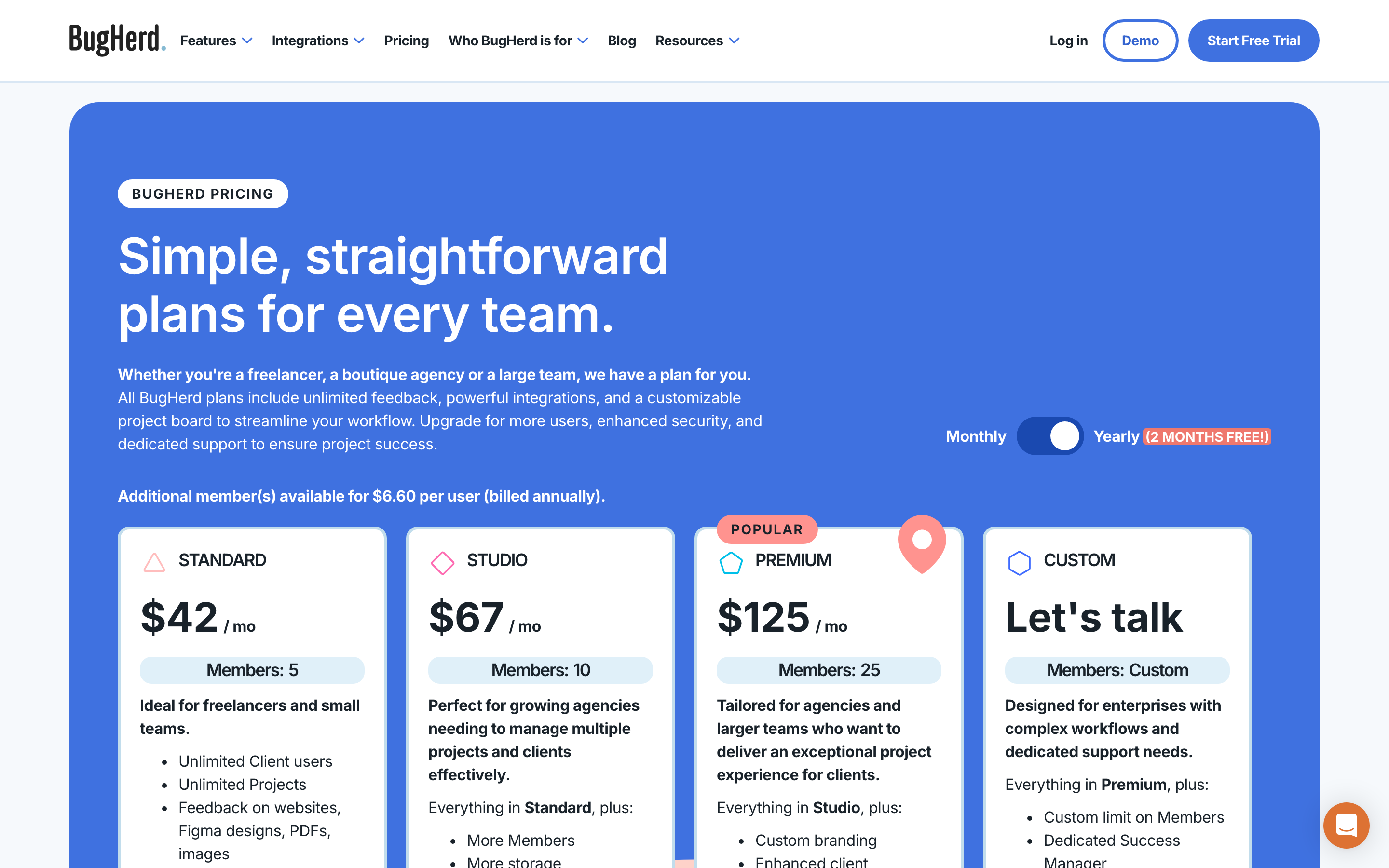
Client users are unlimited on every plan — you pay only for internal members.
How BugHerd Works
- Priced by member, in bands of 5, 10 and 25.
- Unlimited clients and projects on every tier.
- Extra members cost $80 a year each.
- Integrations split sharply at Premium.
- Two months free on yearly, exactly.
- 60-day money-back guarantee.
BugHerd Pricing
Captured from BugHerd’s pricing page in July 2026 in US dollars, reading both billing toggles and the full comparison table.
| Plan | Monthly | Billed yearly | Yearly total | Members | Storage |
|---|---|---|---|---|---|
| Standard | $50 | $42 | $500 | 5 | 10 GB |
| Studio | $80 | $67 | $800 | 10 | 25 GB |
| Premium | $150 | $125 | $1,500 | 25 | 50 GB |
| Custom | — | Quoted | — | Custom | Unlimited |
| Extra member | $8 | $6.60 | $80 | — | — |
| Derived | Standard | Studio | Premium |
|---|---|---|---|
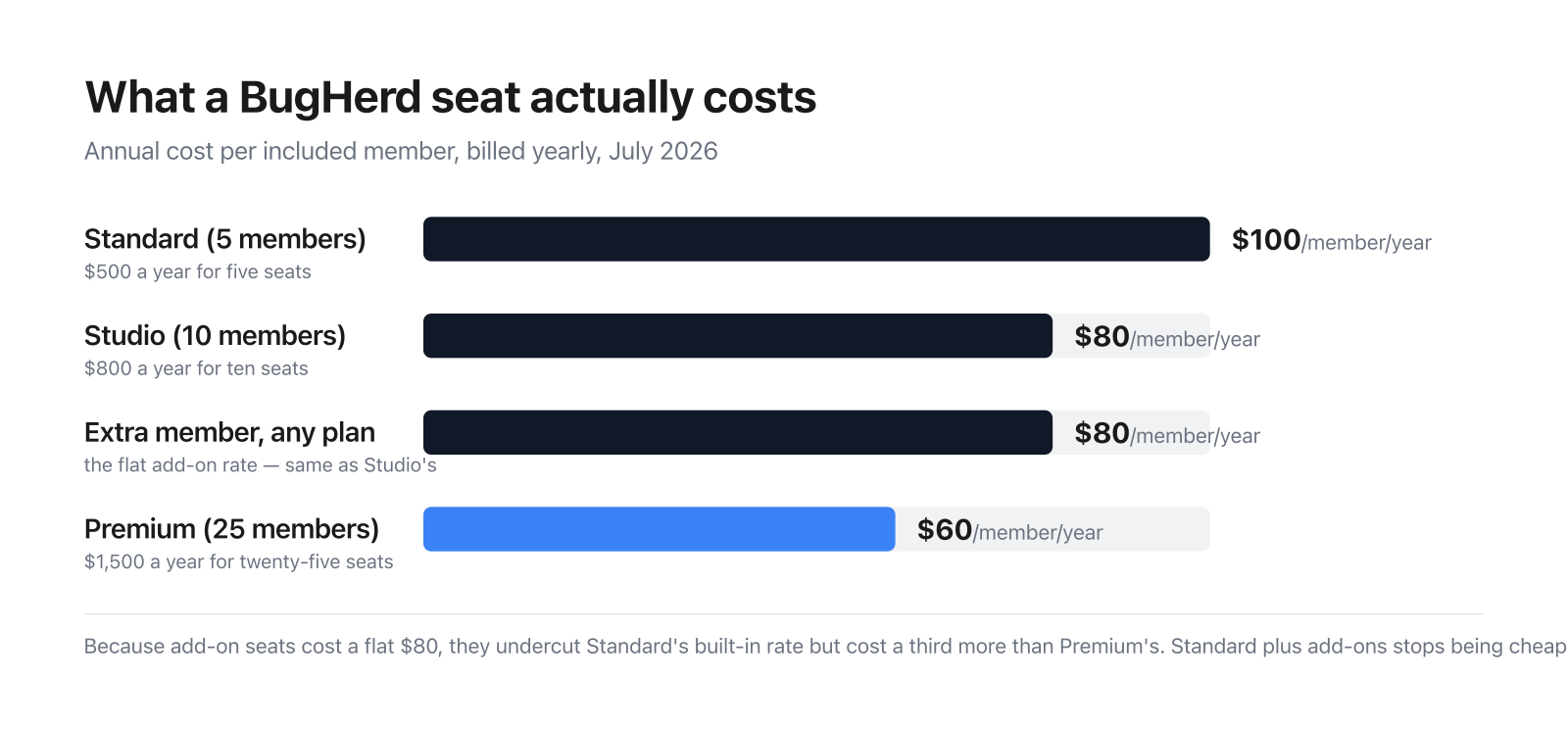
| Cost per member per year | $100 | $80 | $60 |
| Yearly saving vs monthly | $100 | $160 | $300 |
| As months free | 2.0 | 2.0 | 2.0 |
| Jira / Asana / Linear / ClickUp | ❌ | ❌ | ✅ |
| Client-facing features (of 6) | 1 | 1 | 6 |
What actually decides your cost:
- The “2 MONTHS FREE” claim is exact on every line, which is genuinely uncommon. Standard is $50 monthly and $500 yearly — twelve months at $50 is $600, so the saving is $100, precisely two months. Studio saves $160 on $80 a month; Premium saves $300 on $150; and the seat add-on saves $16 on $8. All four are exactly 2.0 months. Across this review series, “save 2 months” claims usually resolve to 1.7 or 1.8. BugHerd’s resolves to 2.0 four times out of four.
- Jira, Asana, Linear, ClickUp, Monday.com and Teamwork are Premium-only. Standard and Studio get thirteen integrations — Slack, Teams, Zapier, Make, GitHub, Trello, FullStory, LogRocket, Harvest and others — but the six gated ones are precisely the project trackers most engineering and agency teams already run. For a bug-tracking tool, not syncing to Jira until $1,500 a year is the single most consequential line on the page. Check your stack against that list before pricing anything else.
- Almost every client-facing feature also requires Premium. BugHerd’s whole pitch is client collaboration, and “Unlimited Client users” appears on every plan — but of the six features in the page’s own “Client experience” section, Standard and Studio have exactly one: pausing new feedback. Clients seeing each other’s feedback, clients seeing member feedback, member-only commenting, a client task board and scheduling a feedback deadline are all Premium and above. An agency buying Standard “for freelancers and small teams” gets the annotation tool but not the client workflow around it.
- Extra seats are a flat $80 a year, which is good value on Standard and poor on Premium. Included seats work out at $100 a year on Standard, $80 on Studio and $60 on Premium. Because the add-on rate is fixed at $80, it undercuts Standard’s own rate by 20% and exceeds Premium’s by a third. The crossovers are clean: Standard plus add-ons costs less than Studio up to 8 members and more from 9; Studio plus add-ons beats Premium to 18 members and loses from 19. Feature needs will usually force Premium well before 19, but if seats alone are driving the decision, those are the two numbers.
- No published plan includes SSO or an uptime SLA — not even Premium. Single sign-on, a 99.9% uptime SLA, a dedicated success manager and onboarding support are all marked available only on Custom, the quoted enterprise tier. So a team paying $1,500 a year still has to make a sales call to get SSO, which is worth knowing if your security review requires it.
- The seat add-on is quoted at two slightly different prices. The header says ”$6.60 per user (billed annually)” while the calculator lower down says ”$80/year for each additional user”. Twelve months at $6.60 is $79.20, not $80. The gap is 80 cents a year and clearly a rounding artefact rather than anything sharp — but if you are modelling fifty extra seats, use $80.
- Everything about feedback capture is on the cheapest plan. All eight feedback features — screenshot capture with technical metadata, annotation, Figma, PDF and image feedback, suggested text edits, video feedback and the public widget — are ticked on all four tiers, as are unlimited projects and unlimited client users. The gating is entirely about who else can see the feedback and where it goes, not about collecting it.
Who Should Use BugHerd
- Agencies running client review cycles. The clearest case — but budget for Premium, where the client features live.
- Teams whose tracker is Trello, GitHub or Slack. Fully supported from Standard at $42 a month.
- Freelancers wanting unlimited client seats. Five members and unlimited clients for $500 a year.
- Non-technical stakeholders. Pinning feedback on a live page needs no training.
It fits poorly for teams on Jira, Asana, Linear or ClickUp who cannot justify Premium; for organisations that mandate SSO, which requires a quote; and for solo users, since the smallest plan is five seats.
Honest Pros and Cons
Strengths
- “2 months free” is exactly two months, on all four prices.
- Unlimited client users and projects on every plan.
- All feedback features on the cheapest tier.
- 60-day money-back guarantee — double the usual.
- Extra seats at a flat $80 a year.
- Data export via CSV, XML, JSON and API on all plans.
Limitations
- Jira, Asana, Linear, ClickUp and Monday.com need Premium.
- Five of six client features need Premium.
- No SSO or SLA on any published plan.
- Custom branding is Premium-only.
- Add-on seats cost a third more than Premium’s built-in rate.
- Two different figures for the same add-on seat.
BugHerd Alternatives and How It Compares
- monday.com covers task tracking broadly, without the visual annotation layer.
- Jira is the engineering-side tracker BugHerd integrates with — on Premium.
- Trello is supported from BugHerd’s cheapest plan and is far lighter.
- Marker.io is the closest direct rival on visual feedback with tracker sync.
- Usersnap and Pastel compete on client review and website annotation.
For a wider survey, browse our bug tracking software directory.
The Verdict
BugHerd does the hard part well and prices it honestly. Every feedback feature sits on the cheapest plan — screenshot capture with browser and selector metadata, annotation, feedback on Figma files, PDFs and images, suggested text edits, video feedback and the public widget — alongside unlimited projects and unlimited client users. Nothing about actually collecting feedback is held back for an upgrade, which is the right way round. And the “2 MONTHS FREE” badge survives arithmetic that most do not: $50 monthly against $500 yearly, $80 against $800, $150 against $1,500, $8 against $80. All four are exactly two months. After checking a great many of these claims, that is worth stating plainly.
What is gated is the other half of the product. Jira, Asana, Linear, ClickUp, Monday.com and Teamwork all require Premium at $1,500 a year, while Standard and Studio get Trello, GitHub, Slack, Teams and nine more. For a bug-tracking tool, whether it syncs to the tracker you already run is not a nice-to-have, and BugHerd puts the six most likely answers behind its third tier. Run your stack against that list first: if your team lives in Jira, BugHerd’s real entry price is $125 a month, not $42.
The same cliff applies to clients, which is odder given the positioning. “Unlimited Client users” is advertised on every plan, yet of the six items in BugHerd’s own “Client experience” table, Standard and Studio have one. Clients seeing each other’s comments, clients seeing member feedback, a client task board, member-only commenting and feedback deadlines are all Premium. So the plan described as “ideal for freelancers and small teams” gives you unlimited clients and almost nothing to do with them. Agencies should read that section of the comparison table before anything else.
On seats the maths is simple and mildly in your favour at the bottom. Included members cost $100, $80 and $60 a year on the three tiers, and extra members are a flat $80 — so add-ons beat Standard’s built-in rate and cost a third more than Premium’s. Standard plus add-ons stops being cheaper at nine members; Studio stops at nineteen. One last item for security reviews: no published plan includes single sign-on or an uptime SLA, Premium included — both require the quoted Custom tier. Given the 60-day money-back guarantee, the sensible approach is to trial on the plan your integrations actually force, not the one the pricing page leads with.
FAQ
How much does BugHerd cost?
In US dollars, captured July 2026: Standard is $50 a month or $42 billed yearly ($500/year, 5 members); Studio is $80 or $67 ($800/year, 10 members); Premium is $150 or $125 ($1,500/year, 25 members). A Custom tier is quoted. Extra members are $8 a month or $80 a year each. All plans include unlimited client users and unlimited projects.
Does BugHerd really give two months free on yearly billing?
Yes, exactly. Standard costs $600 over twelve monthly payments against $500 billed yearly — a $100 saving, precisely two months. Studio saves $160 on an $80 monthly rate, Premium $300 on $150, and the extra-member add-on $16 on $8. All four work out at exactly 2.0 months, which is unusually precise for a claim of this kind.
Does BugHerd integrate with Jira?
Yes, but only on Premium at $1,500 a year. Asana, Linear, ClickUp, Monday.com and Teamwork are gated the same way. Standard and Studio include thirteen integrations — Slack, MS Teams, Zapier, Make, GitHub, Trello, FullStory, LogRocket, Harvest, Time Doctor, Firmao, LambdaTest and Productive. If your team runs Jira, price BugHerd from Premium.
Which BugHerd plan do agencies need?
Premium, in most cases. Five of the six features in BugHerd’s own “Client experience” comparison — clients seeing each other’s feedback, clients seeing member feedback, member-only commenting, a client task board and scheduling a feedback deadline — begin at Premium, as do custom branding and the major tracker integrations. Standard and Studio offer unlimited client users but only one of those six client workflows.
Does BugHerd offer single sign-on?
Not on any published plan. SSO, a 99.9% uptime SLA, a dedicated success manager and onboarding support are all listed only under Custom, the quoted enterprise tier — so even Premium at $1,500 a year requires a sales conversation to add SSO. Plan for that if your security review treats single sign-on as mandatory.

Ease of setup, exceptional collaboration built in, the ability to share outside of our org, and the overall simplicity and effectiveness of the tool.
There isn't much I dislike thus far. It would be nice to apply specific themes to different projects to help visually decipher one from another.
It creates a ton of efficiency in our web review process and prevents multiple reviewers from leaving contradictory feedback.
The pin to the exact elements for the task. That is amazing.
Nothing to dislike there, everything is good.
Solved the problem to gather actual client requirements...
Our company did a major brand redesign including developing a new website this year. The company we selected to create the website utilized BugHerd to create a visual of the design and allow me to make comments and edits. Without a doubt, I can say BugHerd made a HUGE difference in my experience designing the site. I am a visual person and it can be difficult for me to picture the design or layout based on a description. I was able to see the site and utilize it as if I were a customer accessing it after completion. When I wanted to make a change, I just created a comment. I was able to attach images and pinpoint what changes needed to be made. It makes communication very easy and enjoyable. It was very fun seeing my comments implemented and seeing the website take shape. We have a second website being created now as well and they do not use BugHerd and it has shown me just how convenient BugHerd makes the entire process. If you are considering getting BugHerd, just do it. You will not regret it!
I don't have any major things that were inconvenient with BugHerd. I did truly like the system.
As a customer of a company that designs websites, BugHerd helped streamline the communication process and take a lot of the guesswork out. For example, instead of sending a list of things to fix and finding creative ways to reference the spot I was talking about, I could create a pinpoint exactly where I wanted changes to be made. Communication is key during these kinds of projects, and BugHerd makes communication very natural and easy during the creative process.
Being able to share feedback opportunities with clients
unreliable mobile functionality. Sometimes bugherd does not work for mobile checks
Solving the issue with being able to leave feedback on mobile inspector


It's a great tool and is extremely easy to use
Nothing. We've been using the tool for years and it meets all our needs
We used to manually screenshot user interfaces to explore solutions. Now we capture this using Bugherd and discuss immediately
Allows to drop pins in specific locations and make comments. Coming from a previous agency that used screenshots and Word, Bugherd streamlines the process.
It can be a little buggy at times as pins can move about but nothing I can't work with.
We know exactly where the problem areas are. This allows us to solve the clients concerns quicker.
Intuitive application which allows clients and designers to annotate dislikes like a pdf.
Doesn't prevent duplicate annotations i.e. multiple clients can comment without realising that they dislike the same thing.
Allows better bug tracking and visual testing whilst allowing clients to confirm likes/dislikes whilst using the site.