
Unclaimed: Are you working at Campaign Monitor?
Campaign Monitor Reviews: 4.1/5 — Solid Choice
Campaign Monitor is a marketing platform for businesses to create and send targeted email campaigns. The software offers tools designed to boost email marketing efforts, improve ROI, and improve engagement rates such as drag-and-drop email builder, automation workflows, and A/B testing and performance analytics.

| Capabilities |
API
|
|---|---|
| Segment |
Small Business
Mid Market
Enterprise
|
| Ease of use |
Intermediate
|
| Deployment | Cloud / SaaS / Web-Based, Mobile Android, Mobile iPhone |
| Support | Email/Help Desk |
| Training | Documentation |
| Languages | English |




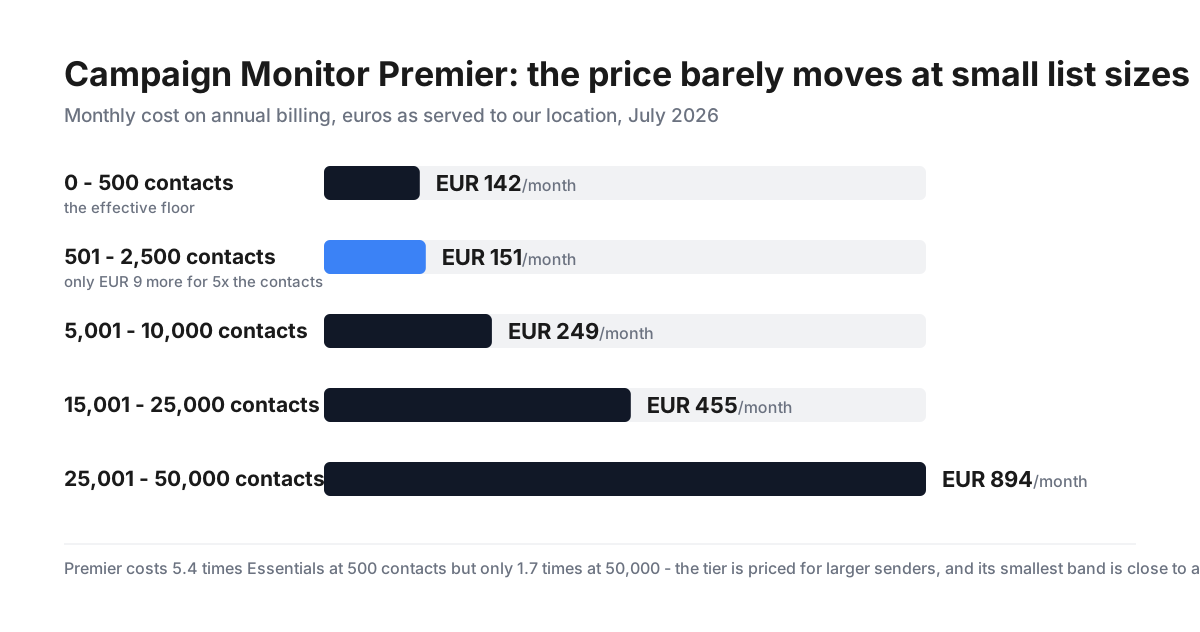
Campaign Monitor’s Premier plan costs €142.20 a month for up to 500 contacts and €151.20 for up to 2,500 — nine euros more for five times the list. That is because Premier has an effective floor price that has almost nothing to do with list size at the bottom of the range. At 500 contacts it costs 5.4 times Essentials; at 50,000 contacts, only 1.7 times. The tier is built for large senders, and small ones pay a minimum rather than a rate.
- What it is: Email marketing — templates, automation, segmentation and transactional email.
- Best for: Established senders on Essentials; Premier only makes sense at scale.
- Pricing: From €10.80 a month, by contact count. Verified July 2026.
- The honest catch: Lite caps sends at 5× your subscriber count each month.
What Is Campaign Monitor?
Campaign Monitor is an email marketing platform covering template building, marketing automation, segmentation, personalisation, signup forms and transactional email, with newer additions including an AI Writer, AI Email Booster, Segment Mapper and a drag-and-drop website builder. Pricing is set by contact count across eight bands from 0–500 up to 50,001+, with four tiers plus a free plan.
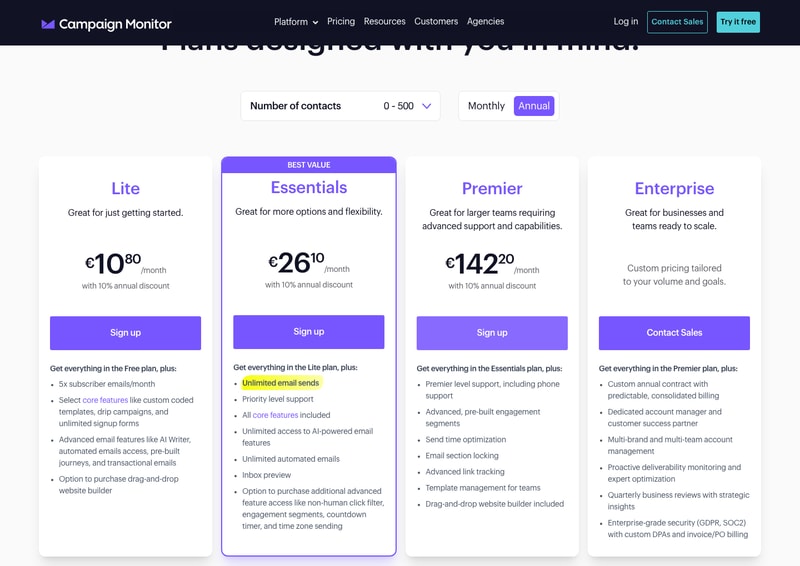
Choose your contact band and all four cards reprice.
How Campaign Monitor Works
- Priced by contacts, eight bands.
- Annual saves exactly 10%.
- Lite meters your sends.
- Essentials is unlimited.
- Premier has a floor price.
- Enterprise by quote.
Campaign Monitor Pricing
Captured from Campaign Monitor’s pricing page in July 2026, stepping the contact selector and both billing toggles. The page served euros from our location; prices shown include the annual discount.
| Contacts | Lite | Essentials | Premier | Premier ÷ Essentials |
|---|---|---|---|---|
| 0–500 | €10.80 | €26.10 | €142.20 | 5.45× |
| 501–2,500 | €39.60 | €62.10 | €151.20 | 2.43× |
| 5,001–10,000 | €98.10 | €151.20 | €249.30 | 1.65× |
| 15,001–25,000 | €200.70 | €357.30 | €455.40 | 1.27× |
| 25,001–50,000 | €330.30 | €536.40 | €893.70 | 1.67× |
| Monthly vs annual, at 0–500 contacts | Monthly | Annual | Saving |
|---|---|---|---|
| Lite | €12.00 | €10.80 | 10.0% |
| Essentials | €29.00 | €26.10 | 10.0% |
| Premier | €158.00 | €142.20 | 10.0% |
| What each tier adds | |
|---|---|
| Lite | 5× subscriber emails/month, custom templates, drip campaigns, unlimited signup forms, AI Writer, transactional email |
| Essentials (best value) | Unlimited email sends, priority support, all core features, unlimited AI and automated emails, inbox preview |
| Premier | Phone support, pre-built engagement segments, send time optimisation, advanced link tracking, website builder included |
| Enterprise | Custom contract, dedicated account manager, multi-brand management, GDPR and SOC2 with custom DPAs |
What actually decides your cost:
- Premier’s price is nearly flat across the two smallest bands. €142.20 for up to 500 contacts and €151.20 for up to 2,500 — a €9.00 difference for five times the list. Everything below that in the range behaves normally: Lite rises from €10.80 to €39.60 across the same jump, and Essentials from €26.10 to €62.10. Premier alone has a floor, which tells you plainly that the tier is not designed for small lists. If you want Premier’s features on 500 contacts, you are paying a minimum, not a rate.
- The Premier premium collapses as your list grows. Against Essentials, Premier costs 5.45× at 0–500, 2.43× at 501–2,500, 1.65× at 5,001–10,000 and 1.27× at 15,001–25,000. At those larger sizes the extra buys phone support, pre-built engagement segments, send time optimisation, advanced link tracking, template management for teams and the website builder included rather than as a purchase. For a 20,000-contact sender, a 27% premium for that set is a reasonable question; for a 500-contact sender, a 445% premium is not.
- Lite meters your sending, and the multiplier is easy to miss. Lite allows “5x subscriber emails/month” — so a 500-contact list can send 2,500 emails a month, and a 10,000-contact list 50,000. That sounds generous until you count campaigns: five sends a month to your whole list exhausts it. Essentials removes the cap entirely with “unlimited email sends”, which is the single clearest reason to move up. Anyone emailing weekly will hit Lite’s ceiling.
- “With 10% annual discount” is exactly 10%. Monthly rates of €12.00, €29.00 and €158.00 become €10.80, €26.10 and €142.20 — precisely a tenth off on all three plans. It is a modest discount by industry standards, and it is stated accurately rather than inflated, which several products in this review series do not manage.
- The website builder is a purchase on Lite and Essentials, and included on Premier. Both lower tiers list an “option to purchase drag-and-drop website builder”; Premier states “drag-and-drop website builder included”. Campaign Monitor does not publish what that add-on costs on the pricing page, so anyone weighing Essentials plus the builder against Premier cannot complete the comparison without asking.
- Essentials also gates a second paid add-on layer. Its card notes an “option to purchase additional advanced feature access like non-human click filter, engagement segments, countdown timer, and time zone sending” — features that arrive included on Premier. So the real Essentials cost for a team that wants engagement segments is the plan price plus an unpublished add-on price, which again is only resolvable by asking.
- Contact bands mean you pay for headroom, not usage. The eight bands run 0–500, 501–2,500, 2,501–5,000, 5,001–10,000, 10,001–15,000, 15,001–25,000, 25,001–50,000 and 50,001+. A list of 2,600 contacts costs the same as one of 5,000, so pruning inactive subscribers below a band boundary is worth real money — particularly at the larger bands where the steps are hundreds of euros.
- A free plan exists but is only referenced obliquely. Every paid card begins “Get everything in the Free plan, plus”, yet the free plan itself has no card on the pricing page and its limits are not stated there. Given the pattern elsewhere in this series, it is worth finding those limits before assuming the free tier does what you need.
-
The affiliate link works despite returning 404 to automated checks. Fetching
/go/campaign-monitorfrom the command line gives 404 frompartners.campaignmonitor.com; in a browser it resolves normally. Note also that this listing is filed under Product Reviews Software, which does not describe an email marketing platform, and that category page returns a 404.
Who Should Use Campaign Monitor
- Regular senders on Essentials. The clearest case — unlimited sends from €26.10 at small list sizes.
- Larger lists wanting advanced segmentation. Premier’s premium falls to 1.27× at 15,001–25,000 contacts.
- Teams needing phone support. It starts at Premier regardless of list size.
- Businesses needing SOC2 and custom DPAs. Those are Enterprise features.
It fits poorly for small lists wanting Premier features, where the floor price dominates; for infrequent budget senders, since Lite’s 5× cap binds quickly; and for anyone needing to compare Essentials-plus-add-ons against Premier, since add-on prices are unpublished.
Honest Pros and Cons
Strengths
- “10% annual discount” is exactly 10% on every plan.
- Unlimited email sends from the Essentials tier.
- Transactional email and AI Writer included on Lite.
- Contact bands and prices are fully published.
- Website builder included on Premier.
- A free plan exists beneath the paid tiers.
Limitations
- Premier costs 5.45× Essentials at 500 contacts.
- Lite caps sends at 5× your subscriber count.
- Website builder price is unpublished on lower tiers.
- Advanced feature add-ons are also unpriced.
- The free plan has no card and no stated limits.
- Filed under Product Reviews Software, a category that 404s.
Campaign Monitor Alternatives and How It Compares
- Mailchimp is the broader incumbent with a stronger free tier.
- MailerLite competes hard on price at small list sizes.
- beehiiv targets newsletters with monetisation built in.
- Postmark handles transactional email specifically, and better.
- Constant Contact targets small businesses with heavy onboarding support.
The Verdict
Campaign Monitor’s pricing is clear about the numbers and less clear about the add-ons. The contact bands are all published, the four tiers reprice visibly as you change bands, and the “with 10% annual discount” claim is exactly 10% on every plan — €12.00, €29.00 and €158.00 becoming €10.80, €26.10 and €142.20. Modest, and honestly stated.
The tier to understand is Premier, because its price behaves differently from the others. At 0–500 contacts it costs €142.20 and at 501–2,500 it costs €151.20 — nine euros for five times the list. Lite and Essentials both roughly triple across that same jump. What that means is Premier has a floor: below a few thousand contacts you are paying a minimum for the tier rather than a price for your list. Measured against Essentials, Premier is 5.45× at 500 contacts and only 1.27× at 15,001–25,000. It is a plan for larger senders, and small ones should read that ratio before being drawn in by the feature list.
For most buyers the real decision is Lite versus Essentials, and it turns on one line. Lite allows “5x subscriber emails/month” — five sends to your full list, then you stop. Essentials removes the cap with unlimited sends. Anyone emailing weekly will exhaust Lite inside a month, so the €10.80 headline is realistically a plan for occasional senders. At €26.10 for the same 500 contacts, Essentials is where regular campaigns actually live.
The gap in the page is what the extras cost. Lite and Essentials both offer an “option to purchase” the drag-and-drop website builder, and Essentials separately offers paid access to non-human click filtering, engagement segments, countdown timers and time zone sending — all included on Premier. None of those add-on prices is published, so the natural comparison, Essentials plus the features you want against Premier outright, cannot be completed from the pricing page. Given Premier’s floor price at small list sizes, that comparison is exactly the one a small sender needs, and it requires a conversation with sales to resolve.
FAQ
How much does Campaign Monitor cost?
Pricing is set by contact count across eight bands, in euros as served to our location in July 2026. At 0–500 contacts with annual billing: Lite €10.80, Essentials €26.10, Premier €142.20 a month. At 25,001–50,000 contacts: €330.30, €536.40 and €893.70. Monthly billing costs about 11% more — at the smallest band, €12.00, €29.00 and €158.00. Enterprise is quoted.
Why is Campaign Monitor Premier so expensive on small lists?
Because it has a floor price. Premier costs €142.20 for up to 500 contacts and €151.20 for up to 2,500 — only €9 more for five times the list — whereas Lite and Essentials roughly triple across the same jump. Measured against Essentials, Premier is 5.45× at 500 contacts but only 1.27× at 15,001–25,000. The tier is priced for larger senders.
What is the difference between Campaign Monitor Lite and Essentials?
Sending limits, mainly. Lite allows “5x subscriber emails/month” — so a 500-contact list can send 2,500 emails, which is five full-list campaigns. Essentials gives unlimited email sends, plus priority support, all core features, unlimited AI and automated emails and inbox preview. Anyone emailing weekly will hit Lite’s ceiling, making Essentials the practical entry tier.
Is Campaign Monitor’s 10% annual discount accurate?
Yes, exactly. Monthly rates of €12.00, €29.00 and €158.00 become €10.80, €26.10 and €142.20 on annual billing — precisely 10% off on all three plans, with no rounding in Campaign Monitor’s favour. It is a smaller discount than many competitors advertise, but it is stated accurately.
Are there extra costs beyond Campaign Monitor’s plan price?
Potentially two. Both Lite and Essentials list an “option to purchase” the drag-and-drop website builder, which is included on Premier. Essentials separately offers paid access to advanced features including a non-human click filter, engagement segments, countdown timers and time zone sending — also included on Premier. Neither add-on price is published on the pricing page.


My favourite things about Campaign Monitor are the ease of use, the robust, uncluttered UX and I really like the in-content segmenting features. Also the client sub-accounts are super useful in a large organisation like where I work.
The setting default to unsubscribe from all lists if unsubbed from one list. Also it would be useful to default to the unsubscribe confirmation (2 step) process because this helps with large organisation firewall settings (which will unsub an entire internal list if you're not careful).
I have consolidated a myriad of organisational EDMs into one account for Communications and Marketing department oversight and support.
I have found campaign monitor to be a great tool. As a non IT expert I have found it easy to set up and use. The online support and team have been helpful to guide me through everything and Campaign Monitor continues to provide information and tips on an ongoing basis. Being based in New Zealand I did wonder what the support would be like in my timezone, but have found this to be no problem.
Very happy with Campaign Monitor. I would like to learn more about creating and inserting GIF's. There are probably instructions for this - I just havent looked at them yet!
Campaign monitor has been a cost effective solution for promoting our tips to our customers via email. As we are not a retailer, our objectives might be different to other companies looking for direct sales. Emails to our customers keep our customers engaged with our brand and provide opportunities for us to extend usage occations. The design is professional and our open rates remain very high. Our customers comment that they love our newsletters, in fact they call it a magazine! Based on our success of external emails we have recently now started an internal company newsletter.This has ensured that everyone has a good knowledge of what is happening in our business.
The email drag and drop builder is clean and simple to use. There are plenty of templates to give you a fast kick-start and simple ways to add personalisation. The flexible and easy segmentation also makes customisation to different tastes within a subscriber base very easy. Their 'Worldview' Live delivery report is a bit of fun to see when your campaign first launches but actually is also useful for cross-regional campaigns. The bulk upload of subscriber data is checked and deduplicates as well as traps typos .
Exporting puts the Full Name into one column - it would be easier if that was split into First + Last columns. Having a way to change the column number and layout options when you have added content to a row would make it faster and easier when creating newsletters - especially for clients that keep chaning their minds following the previews they get.
We use Campaign Monitor to keep both our clients and prospects engaged with us as well as offering it as a white-labeled solution to our clients.
Their format options and the ease of use.
Sometimes I have issues about spacing - quite a minor problem
The biggest benefit has been our ability to reach out to our subscribers and other customers on a regular basis. We get an excellent response and we have been able to build our brand awareness through our mailings. This has been especially important during the pandemic where we have been offering free tasters to our customers and friends and we are able to communicate with them efficiently and creatively.
It's the best, most easy to uso mailing app for agencies! You can withe label the app and manage any client account directly from your dashboard... Great to offer "in-house" software and look more professional to clients.
There are pther cheaper platforms woth the same functionality... It's only valuable to me for the white labeling option
None at the moment

Me gusta mucho porque es muy fácil de usar, muy intuitiva y la versión profesional tiene funciones de lógica, comportamientos y filtrados muy avanzados. Es ideal para agencias ya que permite controlar varias cuentas con sus propios créditos y también para empresas que desean tener su propia cuenta. También cuenta con robustas integraciones con CRM u otras plataformas para campañas y generación de leads, como por ejemplo Unbounce. El precio puede ser por envío o por volumen de contactos, tu decides qué plan te acomoda mejor, obvio entre mayor volumen es igual a menor costo por envío.
Lo que no me podría llegar a gustar es obviamente el costo, se puede entender que a mayor volumen de envíos se podría entender que la empresa es más grande y recibe más contactos que es igual a más posibles clientes, pero aun así para mercados latinoamericanos como México siguen siendo un tanto caro.
En su momento lo usé para varias empresas que carecían de un CRM y el usar Campaign Monitor me sirvió mucho para echar mano a funciones avanzadas de mailings, desde el diseño optimizado para móviles, así como el tracking y pruebas A/B. De igual forma la administración de la base de datos que se va generando es muy fácil e intuitiva.

Campaign Monitor allows our team and clients the opportunity to leverage our brand and messaging framework to new levels customized to meet our respective audiences. And, the ease of using the platform at whatever your experience level is in email marketing is a huge bonus!
We have 20 plus accounts across the university and I wish there was a way to do summary reporting vs. by account.
Traffic monitoring; aligned brand creative and messaging; oversite of everything being send across the university; templates reflective of the brand; analytics to inform strategy.
very economical fast downloads can send more than 200 emails at one go
nothing a very effective tool in internet marketing campaign
reaching out to customers across globe efficiently and effectively at tip of mouse and cursor
How user friendly the software is making it easy to navigate and create mailers. It also offers professional design templates and lots of insights into who has engaged with the content.
It can be hard to tidy up lists and delete people from one list but keep them on another.
It is an efficient and professional way to communicate with our supporters, allowing us to design creative mailers that fit with our brand.
Campaign Monitor is oldest email platform to generate business leads. It is very fast and secure for business. We can use Campaign Monitor easily and design email template by using drag and drop option with out development knowledge we can work for our email campaigns. It is automate email software, we can set time to send bulk emails for different countries.
Overall Campaign Monitor is good product to using in email marketing services but some features are limited to customize email template. We should increase more options to design template in better view.
It is secure marketing software to build strong business between clients. We can easily change our email plan as per requirement. It offers monthly email plan if you want to convert in higher plan, you can go directly with the help of customer support. Campaign Monitor is a good solution to for marketing services. In our construction business Campaign Monitor was very help full to grow business sales.

Campaign Monitor was the first email software I was introduced to and I found it incredibly intuitive to quickly integrate my custom HTML designs into their system. Something I find very helpful is the ability to send test emails to your own personal email that basically show what you're going to be sending to your main audience. Another feature that's brilliant is how they provide templates (not only online editable templates but also downloadable HTML templates for you to edit) for the email designer to pull apart and make their own. It means you don't have to start from scratch every single time you send an email, even if you're a designer wanting a very custom result.
With any new system, you have to get your head around where things live within its website. Also, for a while the UX design was outdated however they seem to have updated that recently. Also, from time to time, the sending of emails isn't 'instant' and takes a little while to run.
Basically you need to email a mass of people but have a decent amount of correspondence with the data: who opened it and who didn't. You can run trials with this software like AB split testing (which is where you email a test case to 2 groups of people and the leading response get's emailed to the larger group). It also has a cute little map where it shows you realtime results people opening the emails which is fun.
From campaign monitor I can say that it contains the greatest positive qualities for carrying out work focused on offering a product for commercial purposes. Where obviously you can see the clear and complete management offered by this system, seeking to increase the values of your company in terms of sales and finance, creating an acceptable corporate standard that promotes the advancement of the company in this area of great importance, providing also, dynamic content, campaign management, creation of commercial analysis, these being great mechanisms for obtaining the best possible results.
Clearly you can notice that in campaign monitor there is an error in its programming, which does not identify correctly the content according to its importance, reason and relevance, which makes it difficult to know which is the one that has to be reviewed in the first instance, which can cause damage in terms of its system to obtain favorable results for the company, because if the content that enters the platform is not managed in the best way, it can cause complaints and dissatisfaction by users because their content has not been reviewed in the corresponding time.
Personally I must say that the use I provide to campaign monitor is thanks to its incredible high capacity software which manages to encourage and stimulate the constant advancement of my advertising marketing operations focused on obtaining the best results for your company, where you can easily offer your products and services in the various means of data distribution and social networks, hand in hand with its main manager of receiving, monitoring and responding to user needs that is your email, a key piece for the development of your company, through this system.

We have been using this software for like months in our industry and it has proved great in marketing department. For better connections with prospects, it provides standard tips. Formation of representative body of email was a bit complex work, but now with using campaign monitor it has become a quick and simplified one. On regular basis, the professionally designed emails are sent and received. Various means are used for such purposes. Any device can be used for doing this work and works equally great. Any tests can be conducted on campaigns by taking two variable products. This procedure is called A/B testing and is a part of it. The adaptive content is also constructed and it redesigns on the basis of users interest. Significant offers are conveyed through landing pages on the client browsers. New set of subscribers are managed accordingly and categorically placed.
When we looked through its significant attributes, some difficulties arised in terms of building an email. Not enough tools were able to customize the whole thing. The integration with different applications should be included in its system to increase exposure. For checking the overall status, the feedback forms were not available and customers can't record their complaints freely.
The productivity rate of this app is significantly higher. Certain amendments can rise this app to the next stage. Promotions are now managed easily without any hustle. The adaptive content is also constructed and it redesigns on the basis of users interest. Significant offers are conveyed through landing pages on the client browsers. New set of subscribers are managed accordingly and categorically placed.
The tools and methods can be seen that what is good is within the campaign monitor, thanks to its countless methods of management and positioning of brands and product models through advertising campaigns that frame and add all the value and standard possible to a product made by the employer company, managing correctly the evolution of their business operations, boosting their sales and productivity rates, enhancing their capabilities and demonstrating their skills to obtain the best desired results.
From campaign monitor we must emphasize the constant dissatisfaction of the users when seeing that this error greatly affects its correct use, where this failure consists of the appearance of an excessive amount of advertising that only maximizes the difficulty in the handling of the platform, which provides users with a quite negative experience, which would cause negative opinions and not so encouraging comments that the program is not suitable, because clearly this will affect its reputation and existence in the market, since many users may even have the desire to remove it from the main software download portals.
I can honestly say that my experience with campaign monitor has been extremely important to be able to materialize all the goals that users want to achieve, by having a complete and trained system to correctly execute all the development processes that are highly necessary and effective, offered by this program, which increases all the values of the company to high and stable levels, thanks to its advertising and marketing methods that manage to generate the best results within the data distribution systems, in this case using email as the main method.

Now it has been easier to monitor email marketing campaigns with this tool. It is fulfilling our all requirements. The automation of this tool is an important part of this tool. We can customize this tool accordingly to our needs. It is fully featured and multi functional product. We can easily make a better relationship with our customers. Many new promotions can be run easily. It is well organized platform playing important part in my professional career.
Sometimes I have to face some delays while running a campaign but I am sure this problem will be resolved sooner because I am discussing it with its customer support they are very helpful and responsive as well. I appreciate the performance of this product.
The functionalities of this tool are unforgettable because I have never seen such automation functions. It has created an ease for handling daily workload. It has made easy to have a strong connection with our audience. It has straightforward functions for authentic services.
I like how simplified the email marketing campaigns are when using Campaign Monitor. I tried to initially use MailChimp but i found this difficult to use as somebody only just starting out on a email marketing platform.
I would like more ability for customisation across the board, the templates can be very simplistic.
We have greatly improved our ability to reach out to our employees with consistent content.

automation of my email marketing campaigns
spam emails % rate you need take practices to reduce that %
email delivery service

The templates help us shorten the creation time of our email newsletters. The templates are fully customizable, so mold them according to our needs is not hard to do. Simply drag and drop to add new elements. Another thing I like about Campaign Monitor is the photo editor that saves us even more time by preventing us from first passing our photos through Photoshop, since within Campaign Monitor we can crop and add filters to our images.
I had no problems using Campaign Monitor.
Creating visually appealing email newsletters is a challenge. Campaign Monitor makes things easier for us. It helps us personalize our newsletters and other emails to connect with our audience and position our brand.
Through Campaign Monitor, I like automation features. In general, the emails sent to users should be enabled based on the actions they take through our shopping program. It's cool.
In order to facilitate visualization, analysis I don't like being able to group our data and reports together. When editing emails it can be a bit slow.
It's very quick to use a campaign app. The software is sufficiently intuitive to know what to do to accomplish a certain goal. You can configure and run it for months with excellent automation functions. It can sometimes be a bit slow, but it is a great product other than that.

I absolutely love that I'm able to create and send emails to my prospective clients. The platform that helps me design my emails is amazing, no need to learn HTML! This helps me advertise my business and untimely drives profile views which lead to sales. Customer support on email is the quickest around!
For the Premier version of Campaign Monitor I think $149 a month is kind of steep, however with the middle package still having unlimited email campaigns and auto emails at a much more reasonable price it’s much more do able. I wish phone support was included with the other packages, but its only on the expensive package.
I'm able to send out email campaigns for my business with ease, which untimely drives more sales. I have seen a huge spike in sales, and I believe Campaign Monitor is the reason why. With the time zone sending and automation process We can send email at the target time customers statistically check their emails, over all different time zones.
Campaign Monitor is a great and easy way for our partners to provide emails to their customers easily and inexpensively
Limit on emails, certain issues with macro naming
Campaign Monitor has helped us save time in the email marketing sector
Campaign Monitor is by far the best email marketing platform currently on the market. Lists are easily sortable and accessible, and they can be segmented by various fields like location, the date the contact joined the list, and more. I also appreciate not being billed by the list, since our organization has a wide range of audiences and different lists that need to be kept separate. Creating, scheduling, and sending emails is a breeze. Although the template builder has some limitations, it's fairly easy to create professional-looking emails that get results from our targeted audiences.
While Campaign Monitor is a great platform, the email template builder has limitations. Many of our templates are built in external programs and then uploaded to Campaign Monitor in order to achieve the level of customization we need. Some features are also locked into incredibly expensive plans (we pay over $600 per month for our plan and still can't access features like time zone based sends and in-email countdown timers.
Campaign Monitor allows us to market to and communicate with our various audiences effectively on a regular basis. The automation and transactional features have enabled us to create and execute complex marketing drip campaigns to different audiences with a set-it-and-forget-it approach.
It is the best email marketing things for us
There is nothing to dislike. Its really likable product
Many problems. Mainly I solved the email marketing side.
This Monitoring system was fabulous good.
I loved This software to use and easy to maintain
Yes I used this software and it's solved my all problems and I get used to with this.

It took almost short time and helped me to organize things instead of hiring experts for joining heads and making some out come and result.
What i do dislike is, what i don't know. However some times they did not get my idea or the programmimg running in my mind.
Almost for marketing purpose and attaining ideas.
Because of the modern design of this website, it's very easy to use and understand. This is enhanced by arrange of templates that clients chooses from.
In my own opinion can't see any dislike at the moment. Since customer care services has greatly been improved and now feedbacks are instantly given.
Our business has found success using this website both internally and externally, especially analytic feature of the tool that helps our marketing team use data to plan directed communication to our customers and employees

Using campaign monitor has been a key success to my ability to be a recruiter. I'm able to create templets for amazing emails and develop them as I go. I'm able to sell the Army easily and make the emails stick out. Compared to other recruiting centers we do a lot better and I give direct credit to campaign monitor.
I think what would improve it would be to provide deferent ways to send campaigns, for example if you want to send a mass snail mail campaign, email etc. there are benefits for both. first some people do not have internet access so a mail campaign would reach those people.
Some times when my computer is bogged down this application doesn't seem like it wants to work properly, additionally, the import function for emails and profile have to be set up a certain way. so I have to edit the import document for campaign monitor to fully accept it properly.
Camping Monitor is the software that enables you to create very attractive individual emails or newsletters with initial models, noting that it won't be a issue to handle mass emails. It has a full and responsive functionality that facilitates email automation. Its free use enables the ability of the initiates to be developed and the software to be adapted
You could only review the data and reports separately, there is no alternative for grouping and generating statistics. This limits data assessment a little, because sometimes we need the grouped data of several campaigns and several product organizations to see how everything functioned together and how each product has to be reviewed separately. I hate you're not able to customize HTML for autoresponders unless you're building the full HTML email design.
This is a excellent instrument that enables me to build Campaign in very less time, very quickly and simple to use. And I also find the pre-build template very helpful. I also handle the email list very readily

I've tried a lot of different email marketing platforms over my 15 years in marketing and Campaign Monitor is hands-down the best option out there. I would waste hours of my time fiddling around on other platforms to get things to display properly. In other platforms, everything would look great until I send out the email and then the HTML would be all jumbled and things wouldn't display properly. This is not the case with Campaign Monitor. When I send emails they look exactly the same as they do in the preview. Finally, I can get hours of my life back!
Honestly, I haven't found anything I dislike about Campaign Monitor. The platform is very easy to use from creating an email to managing contacts and lists. It is very user friendly and has a full suite of options to choose from to customize the tool to your own marketing needs.
Campaign monitor allows us to easily reach our customers with regular email marketing campaigns. It also allows us to maintain our customer lists and captures data for us such as unsubscribers and subscribers so we don't have to manage that information and tracking.

Campaign monitor is so far the easiest to use in its field. Creating beautiful emails and managing campaigns cannot be easier, even if you have never done it before.
The pricing is quite high and you need to think before using it but it’s worth.
I’m getting in touch with my customers and followers and keep them up to date.