
Unclaimed: Are are working at Carrd ?
Carrd Reviews: 4.5/5 — Highly Rated
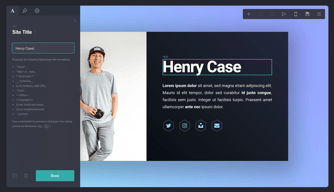
Carrd is a one-page site builder for professional, personal, and marketing purposes. Carrd users can choose from dozens of simple yet eye-catching templates or they can opt to start with a blank canvas for a personalized design. One-pager sites built on the platform are fully responsive to give visitors an optimal browsing experience on desktops, tablets, and mobile phones. The free version allows users to create three websites and create a web page using Carrd’s core features while a competitively priced pro account can accommodate more websites plus access to the platform’s premium features such as custom domains, forms that integrate to common email marketing systems, Google Analytics tracking, and the ability to embed widgets.

| Segment |
Small Business
Mid Market
Enterprise
|
|---|---|
| Deployment | Cloud / SaaS / Web-Based |
| Support | 24/7 (Live rep), Chat, Email/Help Desk, FAQs/Forum, Knowledge Base, Phone Support |
| Training | Documentation |
| Languages | English |
Carrd Pros and Cons
- Affordable pricing plans with a generous free plan
- Mobile editing support
- The simplest website builder you can find
- Simple, stylish, and easy to navigate
- Sign up only when you publish
- Unable to add a blog to your website
- No eCommerce options
- You can only create one-page websites
- No scalability whatsoever
- Still requires HTML formatting for text
Compare Carrd with other popular tools in the same category.
I use Carrd for my personal website, business website, as well as for Slack group sign ups for groups I administer (3000+ person Slack community). Carrd is affordable, easy to use, and makes great looking web pages. I've used it since it first launched on product hunt and it is constantly improving and adding new functions, plug ins, etc.
I wouldn't build a full e-commerce site or anything on the platform. It's simple to use and creates simple pages, but with the improvements the developer keeps making maybe it will get there one day. It is definitely suited for easily customized and edited, static pages at a great price but nothing more than that.
Quickly making a website that doesn't look terrible and feels professional, plus is responsive, easy to update, and not very expensive. Carrd ticks all of these boxes for me to the point where I have built 4 sites using it (all on the same inexpensive license!).
The pricing for the number of websites you get is incredible. One of the cheapest ways to build and host websites to empower to create websites!
I wish there was a large template marketplace. If I could access hundreds of templates that others have made, I would love Carrd even more.
I use it for simple websites to test if my ideas are a validated concpet. Speed and the number of websites I can publish are the apparent benefits.
Carrd's pricing is incredibly reasonable. For only a little bit of money, you can host a number of sites using Carrd.
Carrd takes some getting used to and you have to understand page structures a bit, but once you play around for a bit, it becomes very easy to create nice pages.
Carrd allows users to set up single page websites very easily. No more messing around with other page builders, Carrd is simple and quick. There are a bunch of starter pages/templates, and also a few websites listing great Carrd design.
The customizability and versatility and what makes Carrd an outstanding option for anyone that wants to make a quick website. I know a very tiny bit about coding, so I'm able to make changes if absolutely necessary, but it's not a requirement to know how to do those things for your website to look good. The free tier has so many features and is perfect for a link aggregation page, a basic portfolio, a one-off website for a promotion, etc. I also like that you can specify the size of elements with exact numbers and not be limited to the slider bar to change it.
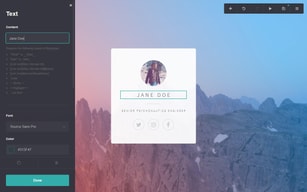
I wish the font list showed a preview of the font in the drop-down menu because there is no way to tell what the font looks like unless you change the text every time. Although I suppose all of these fonts come from Google Fonts, so that is an alternative for previewing.
We needed a page where we could list all of the relevant links our organization had, along with a short description for visitors. We tried linktr.ee, but we weren't able to add icons or a longer description without upgrading. I also like that the custom URL puts our name first (example.carrd.co) unlike of linktr.ee (linktr.ee/example).
Carrd has been my go to builder for it's ease of use, easy to learn tools, excellent responsive design and affordability.
There's not much to dislike, they're more than they advertise. If I could request new tools it would be just a bit more control functions with the background and menu layout options for multiple page designs.
Carrd has proved to be an excellent resource not just for hosting and designing my own and several client websites, but also to stage and mock up designs that can be built elsewhere for client approval. If you're going to use an lander/page builder to quickly create design-forward, highly functional webpages with SSLs standard and incredibly-cheap-in-comparison hosting, there's no other choice out there.
Carrd is so easy to use and their pricing is very good. I use it for my business for clients to email me questions, see my prices, and fill out the order form.
You can't change your website name without deleting the whole page. Not that I've found anyway. That makes it a little troublesome if you typo, but it isn't a deal breaker.
Carrd has allowed me to put all of my information in one place and allow clients to fill out a form rather than having me ask them a million questions to get them a proper quote.
Using Carrd allows you to create websites on the fly that a super sleek, responsive, and have decent SEO value. It takes about 5 minutes to build a website thanks to the templates that are provided and about 15-20 minutes if you want to connect it to your own domain (which is also comparatively easier than other platforms).
Sometimes while adding a new element it will automatically go to the bottom of the page which then forces you to drag it to the top each time. It doesn't really change the experience but it is definitely an annoyance that adds up over time.
Due to the ease of use, anyone can log into Carrd and make adjustments on the fly. This has allowed for me to priortize other areas of the website.
It's a low-cost, easy-to-use platform with which you can create solid landing pages for your business. Registration is very fast and simple and allows you to publish immediately after registration. Additionally you have a variety of customization templates available for each element and plans with very attractive domain for only $19 / year.
The only negative aspect is that it does not provide the option to export the site created to obtain the html and the support files so that one can host it in his own domain. On the other hand Carrd in its free use version, is limited to 3 sites, 100 elements, images and standard videos and a subdomain carrd.co. Upgrading to at least the Pro Standard plan offers you up to 10 sites, images and videos of great quality and big size, unlimited elements, simple forms and widgets. If you want advanced forms, redirects and more websites, you will need to use Pro Plus or Pro Max.
Carrd is now my access tool for anything related to web building. I made a website for a friend and even won a few dollars. Additionally in depodcast.com the place where I work for being an online store we only opened an institutional mail, me to provide greater reliability when making deliveries or send mail, and even in my business card I have a footer inviting them to visit my web site.
Drag-and-drop builder, affordable pricing for pro plans
Ability to add subpages could've been useful.
WordPress is a complicated for building single page websites. Carrd provided an excellent drag and drop builder with all the necessary features.
I like how well designed it is. It's easy to add your links in and have a link page that is beautiful without having to do any design work. It is still customizable though, choosing your own colors for the links and can add a bio and your own photo.
Nothing specific. Some features you have to pay for but the free version still provides everything you need. I think the ability to add a second line of text to a link would be helpful though.
It provides a landing page for links. It's perfect for a "link in bio" landing page for Instagram to feature your offers, blog, podcast episode, and referral links.